Security in modern SQL Server goes beyond authentication and permissions to include multiple layers of encryption and hardening. Administrators can encrypt network traffic, backups, entire databases (via Transparent Data Encryption), and even specific columns, while also reducing attack surface with features like Extended Protection and hiding instances. The dbatools PowerShell module streamlines these tasks at scale and helps align environments with common security benchmarks by automating discovery, configuration, validation, and ongoing monitoring across an estate.
For data in transit, SQL Server supports TLS-based encryption using PKI certificates. In practice, you obtain or request a certificate, bind it to the instance, and then enable—ideally force—encrypted connections. dbatools simplifies the end-to-end process with commands to generate certificates or CSRs, enumerate eligible certificates, set the network certificate while fixing key permissions, and remotely enable or audit the ForceEncryption setting. Further hardening is available with Extended Protection for Authentication (configurable Off, Allowed, or Required), and dbatools provides commands to set it and to test, set, and troubleshoot SPNs for reliable Kerberos operation. Many policies also require disabling SQL Server Browser and hiding instances; dbatools makes that change easy, with the reminder that clients must then connect via the correct port for named instances.
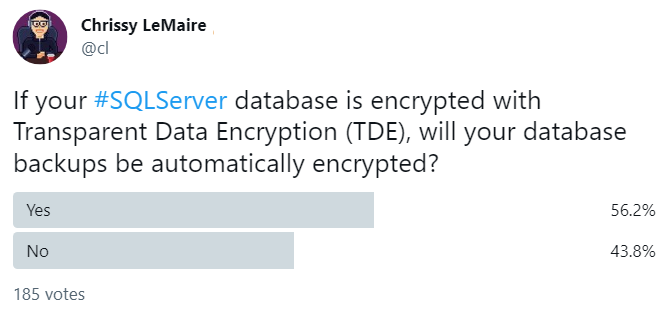
For data at rest, TDE encrypts database files and automatically encrypts their backups, adding a valuable defense-in-depth layer. dbatools can encrypt selected or all user databases in one step while creating and backing up required master keys and certificates, and it supports pausing, resuming, and fully reversing encryption when needed. Administrators should plan for a modest performance impact, increased tempdb load, disabled instant file initialization, and constraints on full backups during active encryption or decryption. Beyond TDE, backups can be encrypted explicitly with a certificate and chosen algorithm; prerequisites include creating and securely backing up the master key and certificate, and migrating those when restoring to other servers. dbatools also offers commands to verify whether a backup is encrypted and how, helping ensure restores will succeed only on authorized systems.
Figure 24.1. Setting a Certificate in SQL Server Configuration Manager
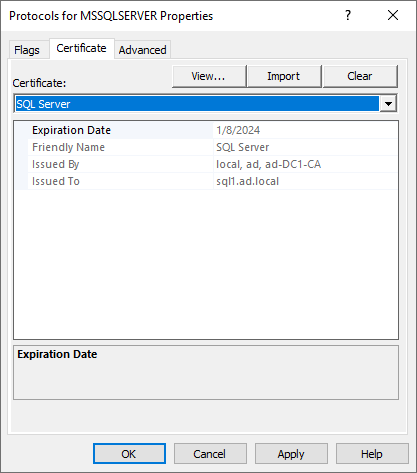
Figure 24.2. Check protocols Properties in SQL Server Configuration Manager
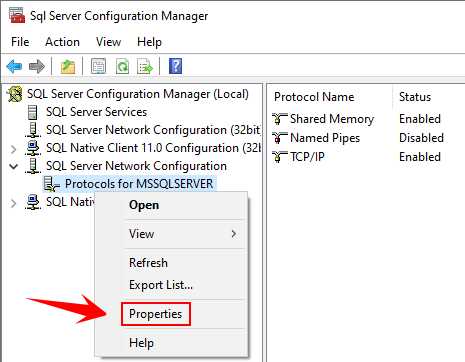
Figure 24.3. Force Encryption setting
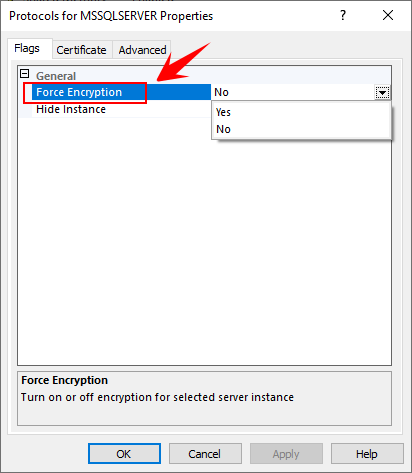
Figure 24.4. Extended Protection setting
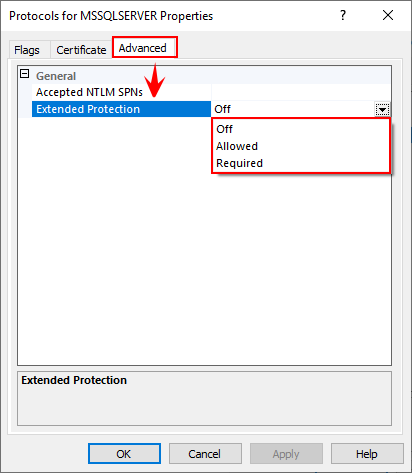
Figure 24.5. Managing database encryption in SSMS
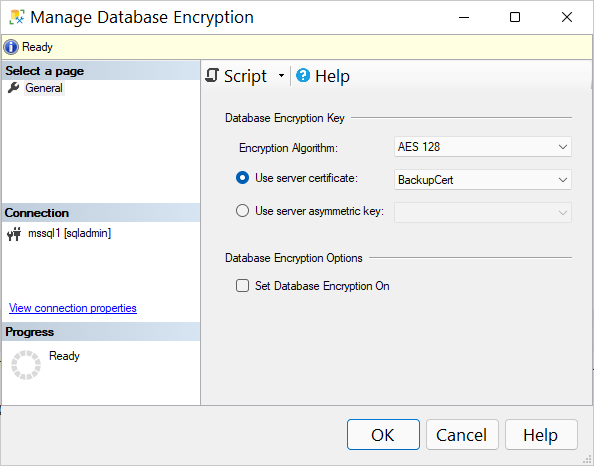
Figure 24.6. Non-scientific poll
Hands-on Lab
Try the following tasks
- Hide your SQL Server instance
- Verify if you have any database that are using TDE
- Check if one of your backups is encrypted
FAQ
How do I encrypt SQL Server network connections?
Use TLS with a server certificate, bind it to the instance, then force encryption.
- Obtain/install a TLS certificate in LocalMachine\My.
- Bind it:
Set-DbaNetworkCertificate -SqlInstance myserver -Thumbprint <thumbprint>. - Force it:
Enable-DbaForceNetworkEncryption -SqlInstance myserver. - Restart SQL Server and verify clients trust the issuing CA.
What kind of certificate do I need and how do I get one with dbatools?
You need a TLS server cert whose subject/SAN matches the server name(s). In AD environments use New-DbaComputerCertificate -ComputerName myserver -Dns myserver.domain,myserver. If you can’t enroll directly, create a CSR with New-DbaComputerCertificateSigningRequest, have PKI approve it, then import to LocalMachine\My. Verify candidates with Get-DbaComputerCertificate and note the Thumbprint.
SQL failed to start after setting a certificate—what did I miss?
The SQL Server service account must be able to read the certificate’s private key. Set-DbaNetworkCertificate automatically grants the required permissions; using GUI tools often does not. Re-run Set-DbaNetworkCertificate or manually grant private key read access, then restart the service.
How can I check and enforce the Force Encryption setting remotely?
Use the dbatools trio:
- Check:
Get-DbaForceNetworkEncryption -SqlInstance myserver - Enable:
Enable-DbaForceNetworkEncryption -SqlInstance myserver - Disable:
Disable-DbaForceNetworkEncryption -SqlInstance myserver
After enabling, restart the instance. Clients must trust your cert; otherwise you’ll see trust/target principal errors.
What is Extended Protection for Authentication and how do I configure it?
Extended Protection helps defend against credential relay attacks in AD environments. Set its level with Set-DbaExtendedProtection -SqlInstance myserver -Value Off|Allowed|Required. Use Required for the strongest posture (only protected apps on protected OSes can connect); Allowed is a middle ground for mixed estates.
How do I diagnose and fix SPN issues for secure/Kerberos connections?
Use the SPN helpers:
- Inspect:
Get-DbaSpn -ComputerName myserver - Test:
Test-DbaSpn -ComputerName myserver - Fix:
Test-DbaSpn -ComputerName myserver | Where-Object IsSet -eq $false | Set-DbaSpn
Correct SPNs are essential for Kerberos and some Extended Protection scenarios.
Should I hide SQL Server instances and disable the Browser service?
Many standards require it to reduce the attack surface. Hide an instance with Enable-DbaHideInstance -SqlInstance myserver and consider disabling SQL Browser. Impact: named instances not on 1433 must be reached with an explicit port, e.g. Connect-DbaInstance -SqlInstance "server,14333" or server:14333. Default instances on 1433 are largely unaffected.
How do I enable Transparent Data Encryption (TDE) with dbatools, and what are the caveats?
Use Start-DbaDbEncryption to handle the full workflow, including backing up required keys/certificates. Example: supply secure passwords, a backup path, and select databases (or all user DBs). Expect a small overall overhead (often ~3–5%), extra load on tempdb, disabled instant file initialization, slower compressed backups, and no FULL backups while encryption is in progress.
How do I pause, resume, or remove TDE?
Control the process with:
- Pause:
Suspend-DbaDbEncryption -SqlInstance myserver -Database MyDb - Resume:
Resume-DbaDbEncryption -SqlInstance myserver -Database MyDb - Decrypt per DB:
Disable-DbaDbEncryption -SqlInstance myserver -Database MyDb - Decrypt all and clean up keys:
Stop-DbaDbEncryption -SqlInstance myserver(waits for decryption to finish)
How do I encrypt backups (with or without TDE) and restore them elsewhere?
TDE-encrypted databases produce encrypted backups automatically. Without TDE, first create a master key and certificate in master (New-DbaDbMasterKey, New-DbaDbCertificate), then back them up. Run Backup-DbaDatabase with -EncryptionAlgorithm AES128|AES192|AES256|TRIPLEDES and -EncryptionCertificate. Verify with Test-DbaBackupEncrypted. To restore on another server, create a master key there and restore the source certificate backups before the database restore.

 Learn dbatools in a Month of Lunches ebook for free
