DBAs trace SQL Server activity both reactively and proactively to diagnose long-running requests, deadlocks, and other issues. While SQL Server Profiler and traditional Traces were the trusted tools for years, Extended Events introduced in SQL Server 2012 SP1 are lighter, richer, and cover all Trace events, making them the recommended approach. Adoption hesitancy largely came from early SSMS usability, but leaning on T-SQL and automation—especially with dbatools—makes creating, running, and managing Extended Events straightforward across many instances, even as the chapter still acknowledges scenarios where Profiler may be required.
Although Traces/Profiler are deprecated, they remain available, and dbatools helps manage them at scale. You can discover active traces across servers, start, stop, and remove them, and read existing trace files using PowerShell. A pivotal capability is converting existing Traces to Extended Events with ConvertTo-DbaXESession (a wrapper over the SQLskills conversion procedure), letting you preserve familiar trace templates while moving to a supported and more efficient mechanism. Combined with server registration and interactive selection, it becomes practical to audit, mass-start, or clean up traces throughout an estate.
Extended Events provide deeper coverage (including features like AlwaysOn, Columnstore, and In-Memory OLTP), and SSMS now includes a GUI and XEvent Profiler for immediate, real-time access. dbatools adds about 30 commands to manage Extended Events comprehensively: list sessions across your environment, filter and inspect details, and adopt a template-first approach using both built-in and community templates or custom XML. You can start and stop sessions (even schedule a stop with a specific time), watch live output with Watch-DbaXESession, read postmortem XEL files with Read-DbaXEFile, replicate sessions quickly to multiple instances with Copy-DbaXESession, and remove sessions when they’re no longer needed. Together, SSMS and dbatools make Extended Events the preferred, scalable way to trace SQL Server activity.
Figure 23.1. Extended Events templates
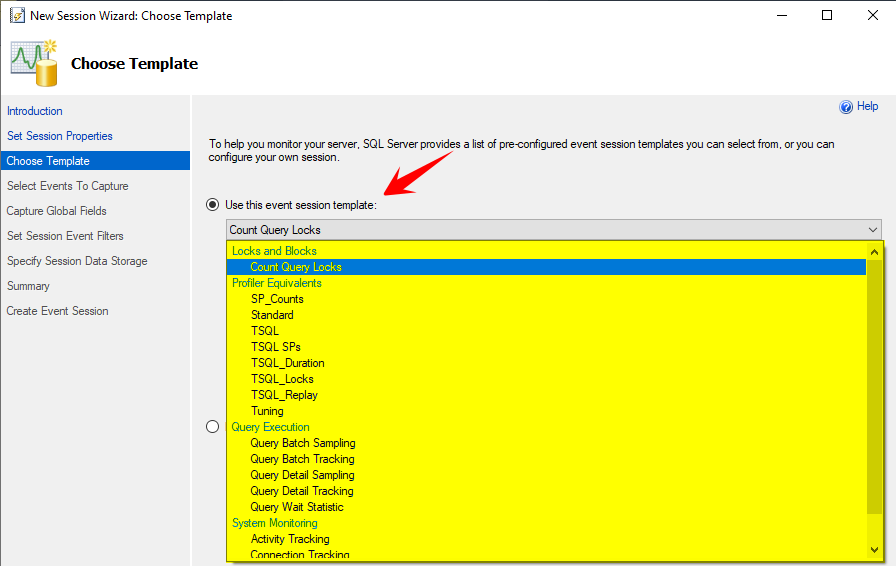
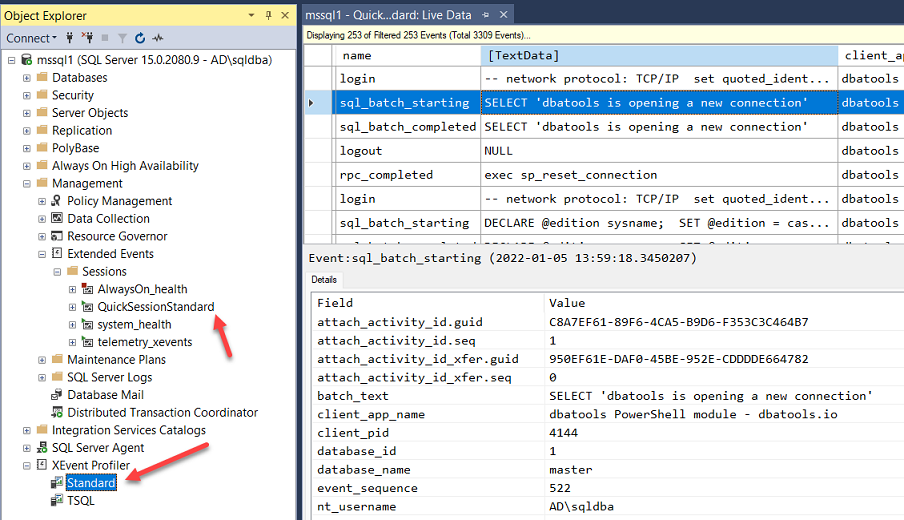
Figure 23.2. XEvent Profiler
Hands-on Lab
Try the following tasks
- Find sessions in a stopped status
- Create a session from a template and run it just for 5 minutes
- Find the file location of the
system_healthsession
FAQ
What’s the difference between SQL Server Trace/Profiler and Extended Events?
Extended Events (XE) are the modern, lightweight, and more detailed tracing framework. Since SQL Server 2012 SP1, XE covers all Trace events and adds many more (including for features like AlwaysOn, Columnstore, and In-Memory OLTP). Profiler/Trace are deprecated and can impose higher overhead because events are synchronously processed by the Profiler UI. XE is Microsoft’s recommended path going forward.How can I see which Traces are running on my servers with dbatools?
You can query one or many instances in a single call. For a few servers:Get-DbaTrace -SqlInstance sql01, sql02, sql03For your registered estate:
Get-DbaRegisteredServer | Get-DbaTrace
# or (depending on your environment)
Get-DbaRegServer | Get-DbaTrace
How do I start, stop, or remove Traces in bulk?
Pipe Trace objects to the desired action:# Start selected traces Get-DbaRegisteredServer | Get-DbaTrace | Out-GridView -PassThru | Start-DbaTrace # Stop or remove Get-DbaRegisteredServer | Get-DbaTrace | Stop-DbaTrace Get-DbaRegisteredServer | Get-DbaTrace | Remove-DbaTraceOut-GridView lets you interactively pick which traces to act on.
Can I convert an existing Trace (like the default trace) to an Extended Events session?
Yes. Use ConvertTo-DbaXESession and then start the new XE session:Get-DbaTrace -SqlInstance mssql1 | Where-Object Id -eq 1 | ConvertTo-DbaXESession -Name 'Converted Default Trace' | Start-DbaXESessionThis preserves your trace’s intent while moving to the supported, efficient XE engine.
How do I list and inspect Extended Events sessions across my estate?
Use Get-DbaXESession, optionally fed by your registered servers:# All sessions on all registered servers Get-DbaRegServer | Get-DbaXESession # A specific session on one instance Get-DbaXESession -SqlInstance mssql1 -Session telemetry_xeventsPipe to Out-GridView for easy filtering if the output is large.
What’s the easiest way to create XE sessions using templates?
Leverage built-in and community templates shipped with dbatools:# Discover templates Get-DbaXESessionTemplate # Import a template and start it Get-DbaXESessionTemplate -Template 'Deprecated Feature Usage' | Import-DbaXESessionTemplate -SqlInstance mssql1 | Start-DbaXESessionHave your own XML? Import it directly:
Get-ChildItem 'C:\Temp\Login Tracker.xml' |
  Import-DbaXESessionTemplate -SqlInstance mssql1
Tip: The session name defaults to the XML file name unless you specify -Name.
How do I start and stop XE sessions, and can I stop them automatically at a specific time?
Start/stop is straightforward:Start-DbaXESession -SqlInstance mssql1 -Session 'Query Timeouts' Stop-DbaXESession -SqlInstance mssql1 -Session 'Query Timeouts'To auto-stop at a timestamp, use -StopAt (dbatools creates a SQL Agent job to stop it):
Start-DbaXESession -SqlInstance mssql1 -Session 'Query Timeouts' `
  -StopAt (Get-Date).AddMinutes(30)
How can I watch live XE data and filter it with PowerShell?
Use Watch-DbaXESession and pipe to Where-Object:Watch-DbaXESession -SqlInstance mssql1 -Session QuickSessionStandard | Where-Object client_app_name -match 'dbatools'Press CTRL+C to stop watching, or stop the XE session.
How do I read XE files (XEL) for post-mortem analysis?
If your session writes to an event_file target, read it later with:Read-DbaXEFile -Path 'C:\Logs\deadlocks.xel'You can pipe to Where-Object / Select-Object for ad-hoc filtering and projection.
What’s the best way to replicate an XE session to multiple instances (and how do I clean up)?
Copy an existing session directly (fast, T-SQL based, great for high-latency links):Copy-DbaXESession -Source mssql1 -Destination mssql2,mssql3 -XeSession 'Login Tracker'To remove sessions you no longer need:
Remove-DbaXESession -SqlInstance mssql1 -Session 'Login Tracker'

 Learn dbatools in a Month of Lunches ebook for free
