This chapter positions dbatools and PowerShell as practical enablers of a DevOps way of working for SQL Server teams. Framing DevOps as the union of people, process, and technology focused on continually delivering value, it stresses that practices vary by organization but share goals such as shortening lead time and making change traceable, accountable, and reversible. By shifting from ad‑hoc GUI changes to Infrastructure as Code, dbatools provides repeatable, non‑interactive automation that fits naturally across development, continuous integration, continuous delivery, and operational tasks.
A central focus is declarative database delivery with DACPACs, which encapsulate a database’s schema for consistent deployments through environments; BACPACs extend this by including data for scenarios like production‑like testing. The chapter walks through a typical workflow—exporting a DACPAC, defining deployment options, creating a publish profile, and publishing—highlighting how dbatools commands streamline each step. It shows how to tailor deployments per environment (for example, excluding users, logins, or permissions), store publish profiles in source control, and repeatedly recreate known‑good schemas for debugging, testing, and release automation.
Finally, the chapter demonstrates how to run dbatools within common CI/CD systems by authoring parameterized PowerShell tasks, ensuring build agents have the module installed, and passing environment‑specific values at runtime. Reusable scripts can restore databases, apply masking, deploy DACPAC changes, and set up security, enabling consistent, auditable pipelines across test, staging, and production. The result is portable, maintainable automation that leverages the same PowerShell patterns regardless of the chosen CI/CD platform.
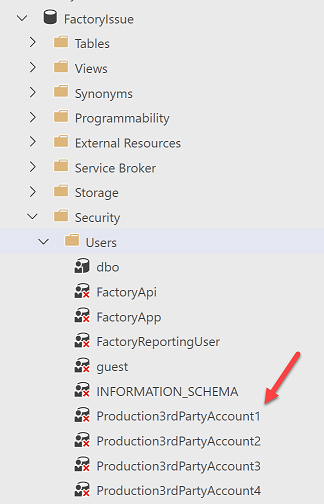
Figure 22.1. The developers database has the production users in it
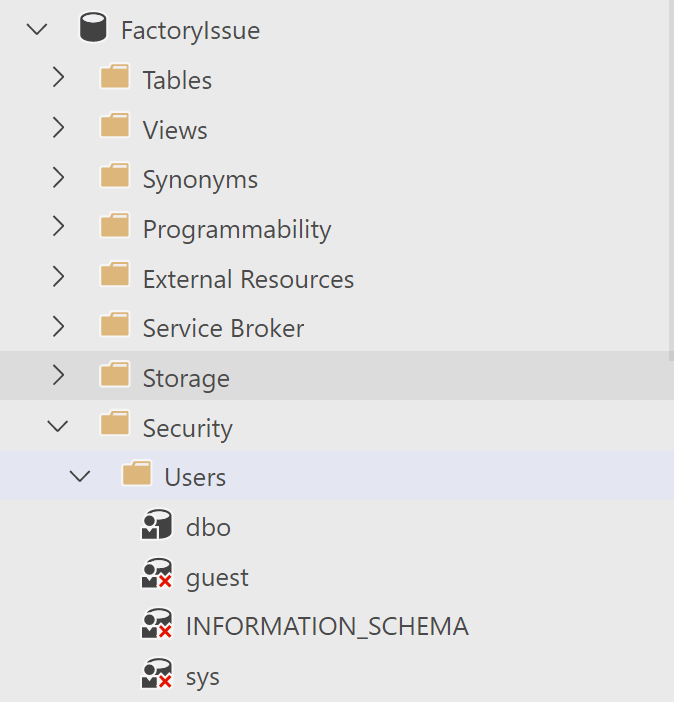
Figure 22.2. The developers database has no production users in it
Hands-on Lab
Try the following tasks
Explore New-DbaDacOption with different -Type and -Action parameters using Get-Member
Use your experience with looping or pipes to export more than one profile
FAQ
What does DevOps mean in the context of dbatools and SQL Server?DevOps is the union of people, processes, and technology that continually delivers value to customers. dbatools is the technology piece you can use to automate, standardize, and make database changes traceable, repeatable, and revertible within your processes.When should I use dbatools in a DevOps process?dbatools fits across the lifecycle:
- Development: create or modify database objects consistently
- Continuous Integration: build from scripts, format SQL, run unit tests (e.g., tSQLt)
- Continuous Delivery: package, publish, deploy, and sync databases; generate reports
- Operations: monitor server performance and automate routine tasksWhat are DACPACs and BACPACs, and when should I use each?
- DACPAC: an artifact that defines the database schema (no data). Use for schema-only deployments and repeatable builds across environments.
- BACPAC: like a DACPAC but includes data. Use when you need a portable database including data (e.g., test with representative data).
Both can be created and applied with dbatools and related tooling.How do I export a DACPAC from an existing database with dbatools?Use Export-DbaDacPackage with parameters for SqlInstance, Database, and FilePath. The command connects to the target database, extracts the schema, and writes a .dacpac you can share or use in pipelines.How do I publish a DACPAC to create or update a database?Use Publish-DbaDacPackage. It will:
- Create the database if it does not exist
- Incrementally update an existing database so its schema matches the DACPAC
You can run it repeatedly to return a database to a known schema state (useful locally and in CI/CD).How can I exclude production users, logins, and permissions when publishing to dev/test?Create deployment options with New-DbaDacOption and pass them to Publish-DbaDacPackage. Common settings:
- ExcludeObjectTypes: Users, RoleMembership, Logins
- IgnoreUserLoginMappings: true
- IgnorePermissions: true
- ExcludeUsers/ExcludeLogins/IgnoreUserSettingsObjects: true
This keeps dev/test deployments clean of prod-only principals.What is a publish profile and how do I create one with dbatools?A publish profile is an XML file that stores deployment options. Create it with New-DbaDacProfile (target instance, database, path, and PublishOptions). Check the generated file path and commit it to source control. Use the profile with Publish-DbaDacPackage for consistent, environment-specific deployments.Which CI/CD systems can run dbatools, and what do I need on the agents?Popular systems include GitHub Actions, Azure DevOps, Jenkins, Octopus Deploy, Bamboo, TeamCity, GitLab, and CircleCI. Requirements:
- A PowerShell-capable agent/runner
- The dbatools module installed and accessible to the agent’s user account
- Appropriate network/database permissions for the agent identityHow do I pass parameters and secrets into dbatools PowerShell scripts in pipelines?
- Write scripts with a Param() block (e.g., Param($SqlInstance, $BackupFile))
- In the pipeline task, pass arguments that map to these parameters
- Store sensitive values in the CI/CD system’s secure variables/secret store and reference them according to the platform’s syntax (e.g., Azure DevOps variable/secret docs)Can you give a simple example task to reuse across environments?Restore environment-specific backups using one script:
- Script: a small PowerShell file that runs Restore-DbaDatabase with parameters (instance, backup path)
- Pipeline: create one PowerShell task per environment (Test/Staging/Prod), each passing different parameter values
This keeps logic in a single script and varies only the inputs per environment.
pro $24.99 per month
access to all Manning books, MEAPs, liveVideos, liveProjects, and audiobooks!

 Learn dbatools in a Month of Lunches ebook for free
