High availability and disaster recovery for SQL Server are presented as essential yet complex responsibilities, and the chapter shows how dbatools streamlines the setup, monitoring, and day-to-day management of common HADR patterns. It focuses on three core options—Log Shipping, Windows Server Failover Cluster Services, and Availability Groups—and emphasizes that while each has prerequisites and moving parts, dbatools wraps the intricate, error-prone steps into repeatable PowerShell commands with sensible defaults. The result is faster provisioning, clearer diagnostics, and safer operations across Windows, Linux, and even containerized labs.
The Log Shipping section explains the concept—backing up and shipping transaction logs from a primary to one or more secondary databases—and demonstrates how a single command can configure it with just a few required parameters. It highlights prerequisites such as SQL Agent service account access to shared paths, default 15-minute job schedules when timings aren’t specified, and the practical challenges of using traditional tooling. For troubleshooting, a dedicated command aggregates errors and points to root causes like access issues, while a recovery command performs a controlled cutover to bring secondaries online; the chapter also notes that dbatools does not automatically take the original primary offline, which can be handled separately if needed.
For Windows Server Failover Cluster Services, the chapter shows how dbatools queries cluster nodes, roles, and resources without additional modules or GUIs, making discovery and auditing straightforward. Availability Groups receive a deep dive: enabling the feature on instances, then creating an AG with a single command that checks prerequisites, configures replicas, handles seeding via backup/restore or automatic methods, manages permissions, and optionally adds a listener. The authors also provide a container-based lab option for quick hands-on practice. Once AGs are running, dbatools offers comprehensive visibility into groups, replicas, listeners, and databases, as well as operational controls to perform safe or forced failovers and to suspend or resume data movement during maintenance—along with the caution that suspensions can cause primary transaction log growth until replication resumes.
Figure 17.1. Database is in recovery on destination instance
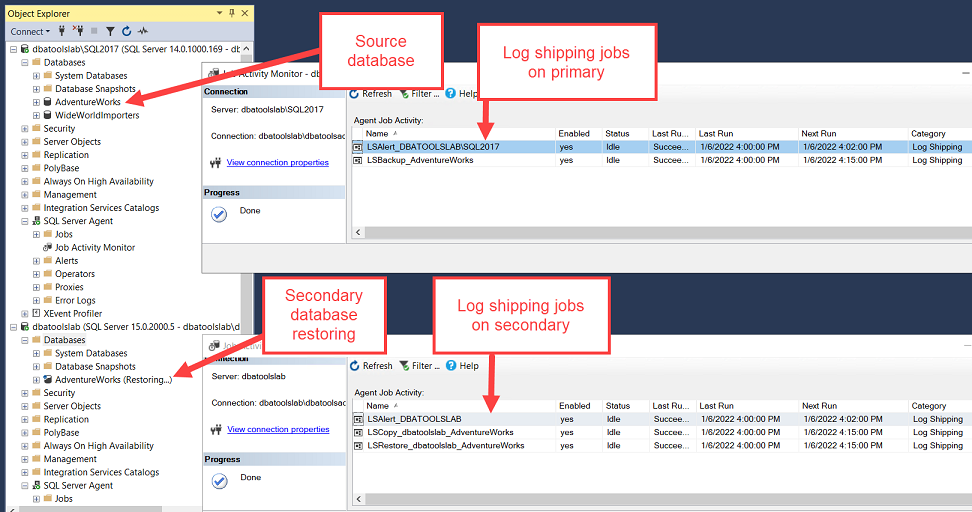
Figure 17.2. Enable AlwaysOn Availability Groups in the SQL Configuration Manager GUI
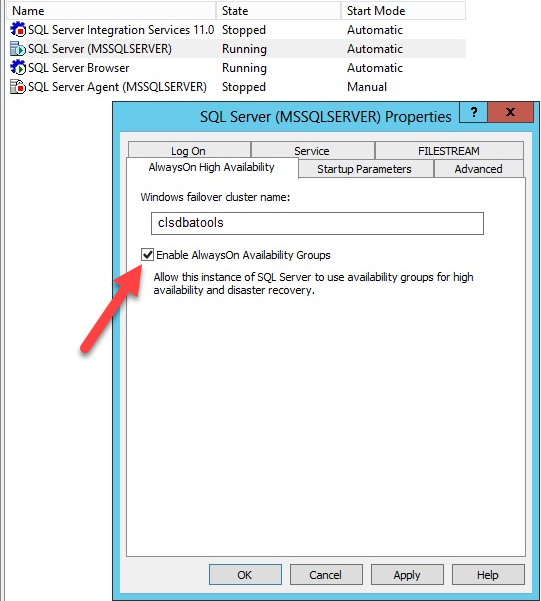
Figure 17.3. Availability Group running on containers in our lab
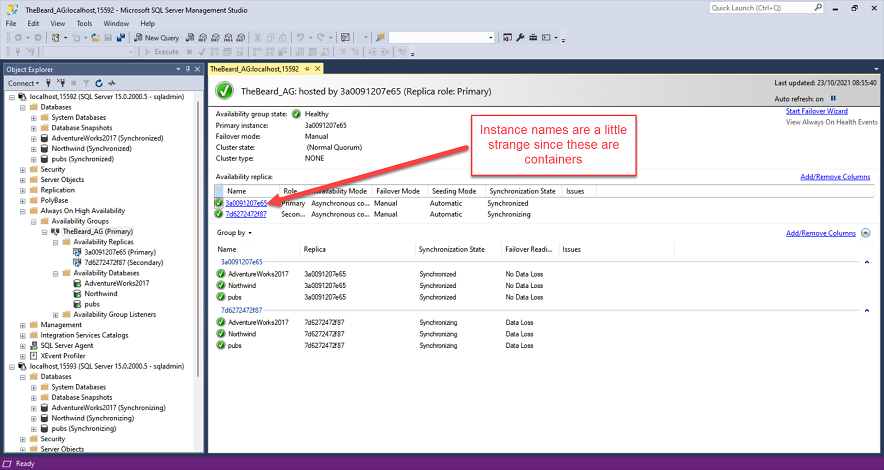
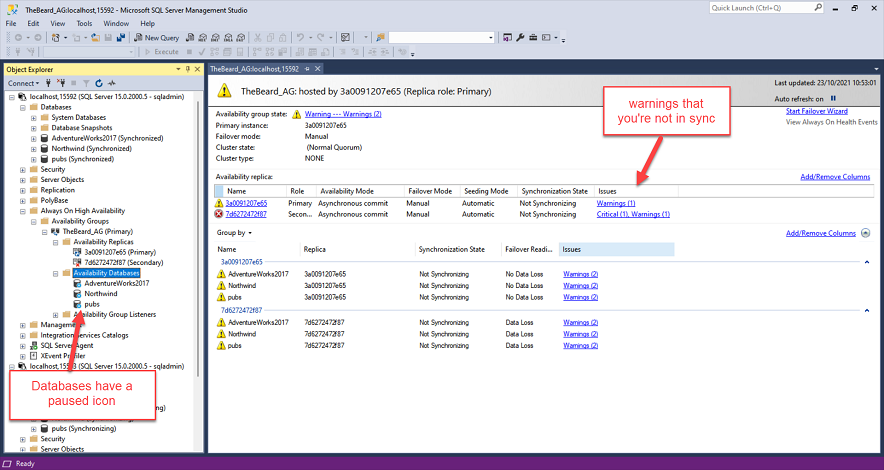
Figure 17.4. Data movement suspended for all the databases in our AG.
Hands-on Lab
- If you have a WSFC handy run the
New-DbaAvailabilityGroupcommand to set up an Availability Group.
- If not run through the notebooks to get an Availability Group set up running on containers.
- Once your AG is setup explore with
Get-DbaAgReplicaandGet-DbaAgDatabase
- Cause a failover with
Invoke-DbaAgFailover
- Suspend data movement and then resume it with
Suspend-DbaAgDbDataMovementandResume-DbaAgDbDataMovement
FAQ
What High Availability (HA) and Disaster Recovery (DR) options does SQL Server provide, and where does dbatools help?
SQL Server provides multiple HA/DR solutions: Log Shipping, Windows Server Failover Cluster Services (WSFC), and Availability Groups (AGs). dbatools streamlines setup, monitoring, and day-to-day operations for each, reducing manual steps and making complex tasks repeatable and reliable.What is Log Shipping, and why use dbatools to configure it?
Log Shipping periodically backs up a primary database’s transaction log and copies/restores it to one or more secondary databases to keep them in sync. SSMS-based deployments can be brittle; dbatools provides robust, scriptable commands (for example,Invoke-DbaDbLogShipping) that simplify configuration and improve reliability.What are the prerequisites and minimum parameters to set up Log Shipping with dbatools?
- Minimum parameters forInvoke-DbaDbLogShipping: -SourceSqlInstance, -DestinationSqlInstance, -Database, -SharedPath.- Prerequisites: SQL Agent service accounts on both primary and secondary need read/write access to the shared backup/copy path. Ensure those file permissions exist before scheduling/log-shipping jobs can run successfully.
What does dbatools configure for Log Shipping by default?
If you don’t specify schedules, dbatools creates SQL Agent jobs that back up, copy, and restore logs on a 15-minute cadence by default. It will initialize a secondary (prompting to take a full backup) if the database doesn’t exist on the destination.How do I troubleshoot Log Shipping failures with dbatools?
UseGet-DbaDbLogShipError against your involved instances to collect relevant errors quickly. Common issues include missing permissions to the shared path, inaccessible folders, or insufficient disk space. Example: Get-DbaDbLogShipError -SqlInstance Primary,Secondary.How do I cut over to a Log Shipping secondary during a failover or migration?
UseInvoke-DbaDbLogShipRecovery on the secondary to bring it online. The command validates and applies the last shipped log to minimize data loss. Note: dbatools does not take the original primary offline automatically. For migrations, consider setting the old primary offline with Set-DbaDbState once you’ve verified the cutover.What is Windows Server Failover Cluster Services (WSFC), and which dbatools commands help me inspect it?
WSFC underpins Failover Cluster Instances and many Windows-based AG deployments. Useful dbatools commands include:-
Get-DbaWsfcNode to list cluster nodes-
Get-DbaWsfcRole to view roles (including AG roles)-
Get-DbaWsfcResource for detailed resource info (e.g., AG, IPs, witness)Note: WSFC commands are Windows-only.
How do I enable the “Always On Availability Groups” feature with dbatools?
RunEnable-DbaAgHadr -SqlInstance Inst1,Inst2 on each instance that will host AG replicas. Changing this setting requires a restart of the SQL Server Engine service on those instances.How do I create an Availability Group with dbatools, and what does the tool automate?
UseNew-DbaAvailabilityGroup with parameters such as -Primary, -Secondary, -Name, -Database, -ClusterType (e.g., Wsfc or None), and (for manual seeding) -SharedPath. The command can:- Check prerequisites and create the AG
- Grant cluster and endpoint permissions
- Add replicas and databases
- Perform backup/restore for manual seeding or handle automatic seeding (requires Full recovery and at least one backup)
- Create a listener if specified and permitted.
How do I explore and manage existing Availability Groups with dbatools?
- Explore:Get-DbaAvailabilityGroup for AG overview; Get-DbaAgReplica for roles/commit modes/failover modes; Get-DbaAgDatabase for database details; Get-DbaAgListener for listener info.- Manage:
Invoke-DbaAgFailover for planned failovers (use -Force for non-synchronous or DR scenarios); Suspend-DbaAgDbDataMovement and Resume-DbaAgDbDataMovement for maintenance. Note: while data movement is suspended, the primary’s transaction log will grow until movement resumes.
 Learn dbatools in a Month of Lunches ebook for free
