dbatools popularized simplified SQL Server migrations, showing that even instance-to-instance moves can be automated with concise PowerShell. The flagship Start-DbaMigration wraps numerous Copy-Dba* commands to move databases plus surrounding instance objects such as logins (with passwords), linked servers, credentials, SQL Agent jobs, schedules, and operators. But real-world migrations are rarely one-liners: large databases extend downtime, legacy instances accumulate unused objects you may not want to carry forward, and environmental constraints introduce complexity. The chapter aims to equip you to plan, test, and script repeatable, reliable migrations, first focusing on database movement via backup/restore, detach/attach, and a staged approach for large databases, with a strong emphasis on thorough preproduction testing.
For small databases and moderate downtime, Copy-DbaDatabase with the BackupRestore method is straightforward: specify source, destination, and a shared path accessible to both SQL Server service accounts (verify with Get-DbaService), with striped backups across three files by default and options to target one, many, or all user databases. You can split the process into Backup-DbaDatabase and Restore-DbaDatabase when a shared path isn’t feasible, and use SetSourceOffline to prevent post-migration connections to the old database. Detach/Attach is similarly simple to invoke by switching to -DetachAttach, but it copies raw MDF/NDF/LDF files over admin shares, increases downtime, and is Windows-only; safeguards reattach the source on failure, and -Reattach helps during iterative testing. The command surface is extensive, so exploring built-in help reveals many tunables that affect speed, safety, and fidelity of the move.
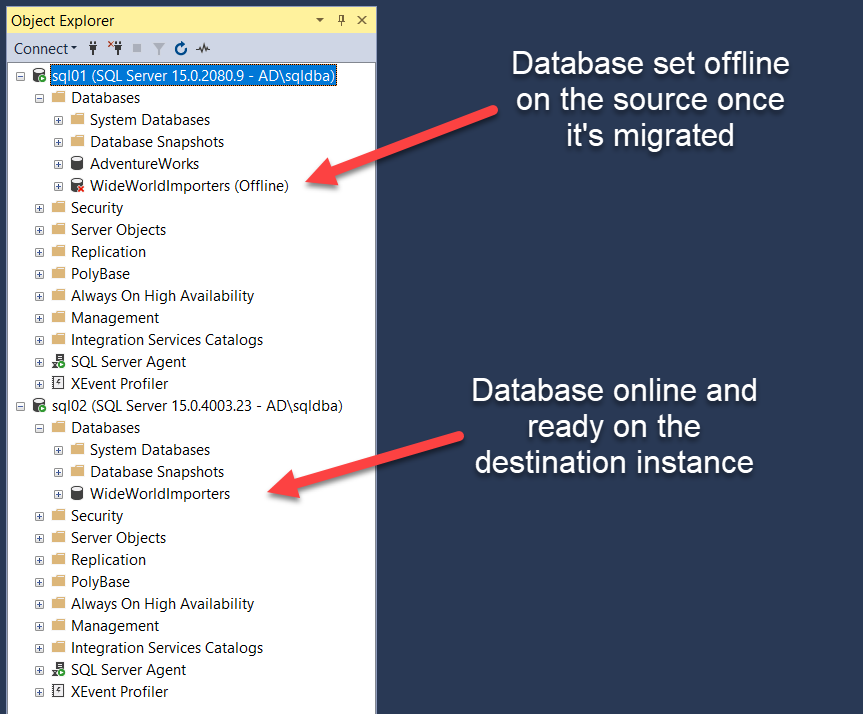
When downtime is tight, stage large databases: seed a full backup to the destination and leave it in recovery (NoRecovery) so only changes need to move at cutover. If you need to apply differentials or logs afterward, restart the backup chain by disabling copy-only (NoCopyOnly), noting this can affect your regular recovery plan. During the window, take and restore a differential (or log backups), bring the destination online, and optionally leave the source offline for clean cutover and quick rollback if required. Beyond these basics, near-zero-downtime options such as log shipping or availability features can further compress the outage. Choosing among methods means balancing edition constraints, complexity, and downtime tolerance; pruning unneeded objects, scripting everything, and practicing end-to-end in a lab are key to predictable, repeatable production migrations.
Figure 15.1. Database is in recovery on destination instance.
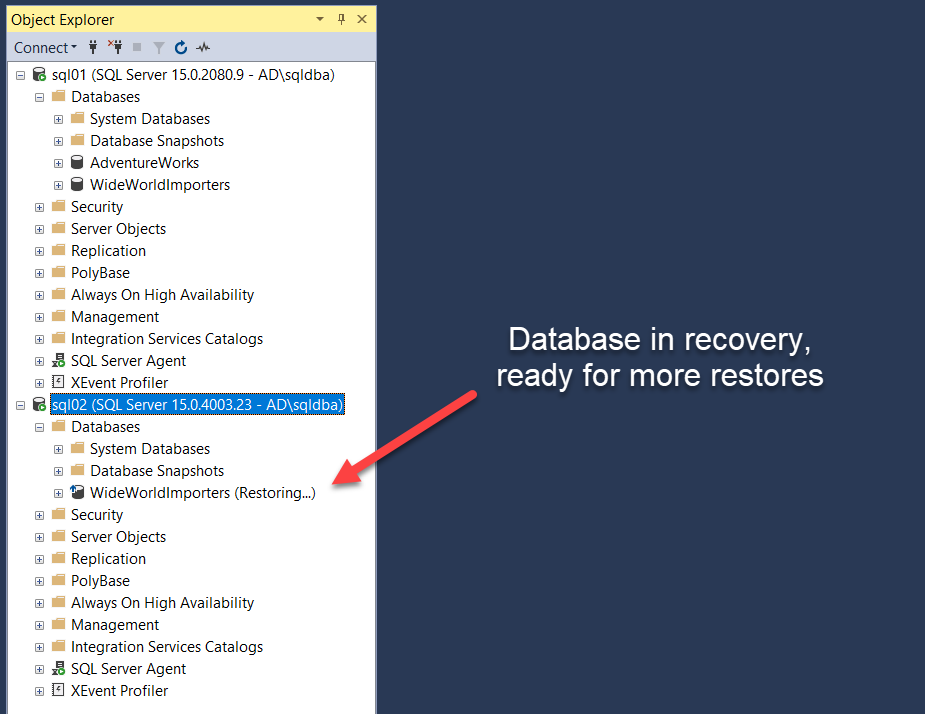
Figure 15.2. Database is now online on the destination SQL Server instance and offline on the source
Hands-on Lab
-
Migrate the databases from one server to another
- Migrate a database with a straightforward method, either backup\restore or detach\attach
- Migrate a database by staging a full backup, create a new table, then cutover and make sure you can see the new table
- Migrate a database with a straightforward method, either backup\restore or detach\attach
FAQ
What does Start-DbaMigration do and when should I use it?
It’s a one-command, instance-to-instance migrator that orchestrates many Copy-Dba* commands for you. It can move logins (with passwords), linked servers, credentials, SQL Agent jobs, schedules, operators, and more. Use it when you want to lift-and-shift an entire SQL Server instance quickly, then refine or customize as needed.How do I migrate a database using Backup/Restore with dbatools?
Use Copy-DbaDatabase with the BackupRestore switch and a shared path accessible by both source and destination SQL Server service accounts, for example: Source=sql01, Destination=sql02, SharedPath=\\\\nas\\sql\\migration, BackupRestore=$true. This approach is straightforward and suits small to medium databases within your downtime window.What permissions do I need on the shared path and how do I find the service accounts?
The SQL Server engine service accounts for both instances must read/write the SharedPath. You can discover the service accounts with Get-DbaService (Windows only, uses SQL WMI). Domain accounts simplify granting share and NTFS permissions; local virtual accounts like “NT Service\\MSSQLSERVER” complicate network access.How can I migrate multiple or all user databases at once?
- Specify multiple names with -Database to select a subset, or- Use -AllDatabases to migrate every user database on the source.
You can also tune performance by changing the number of backup stripes with -NumberFiles (default is 3).
What properties does Copy-DbaDatabase preserve beyond a plain Backup/Restore?
Compared to a manual backup/restore, Copy-DbaDatabase helps retain additional database settings such as ownership chaining, TRUSTWORTHY, Service Broker enabled, and read-only status, reducing post-restore cleanup.How do I keep users from connecting to the old database after cutover?
Use -SetSourceOffline with Copy-DbaDatabase so the source database is taken offline when the migration finishes. This prevents accidental connections and updates on the old instance while you redirect clients (for example via DNS, client aliases, or connection string updates).When should I use Detach/Attach and what are the caveats?
Detach/Attach is simple and works well for smaller databases or generous downtime windows, but it moves uncompressed data/log files, increasing downtime. It uses UNC admin shares (for example \\\\server\\d$\\path) and is supported on Windows only. You can add -Reattach to automatically reattach the source for iterative testing; if the operation fails, dbatools will reattach the source for you.How do I stage large databases to minimize downtime?
Stage a full backup ahead of time: use Copy-DbaDatabase with BackupRestore plus -NoRecovery (leave the destination in restoring) and -NoCopyOnly (start a new backup chain). At cutover, back up just the changes (differential or transaction logs), restore them, then bring the destination online. Note: taking a full without COPY_ONLY affects your existing backup chain—plan recovery accordingly.What are the cutover steps after staging with a full backup?
- Take a Differential (or Log) backup on the source to capture changes since the staged full.- Optionally set the source database offline to prevent new writes.
- Restore the Differential/Logs on the destination with recovery (for example Restore-DbaDatabase -Continue) to bring it online.
Are there options for near-zero downtime migrations?
Yes. For very large or critical databases consider:- Log Shipping: Invoke-DbaDbLogShipping to configure, then Invoke-DbaDbLogShipRecovery to cut over.
- Availability Groups or (older) Mirroring where appropriate.
These approaches can reduce downtime at the expense of added setup and requirements.

 Learn dbatools in a Month of Lunches ebook for free
