Major outages can stem from natural events, accidents, or malicious acts, so disaster recovery planning aims to prepare before failure, assuming an entire SQL Server instance may need to be rebuilt from scratch. A practical recovery workflow covers four essentials: export and back up what you need, move those artifacts off-site, regularly test restores on a secondary server, and be ready to import and restore when a real incident occurs. The chapter shows how dbatools streamlines this process and helps reduce recovery time by automating the export and validation of the many components that make up a working instance.
The core tool is Export-DbaInstance, which produces T-SQL scripts to re-create or restore critical instance-level items—such as database restore scripts, logins, credentials, agent jobs and schedules, linked servers, server configuration, audits, Extended Events, availability groups, and more. It creates restore scripts rather than database backups, so you still maintain your normal backup strategy, then store the generated scripts securely off-site in source control for versioning and ransomware resilience. The chapter emphasizes secrets handling (linked server and credential passwords can appear in clear text), recommending exclusions where policy requires, and highlights customization via New-DbaScriptingOption (for example, adding “IF NOT EXISTS,” targeting specific SQL versions) as well as selectively excluding objects (such as Resource Governor) to match differences on recovery hardware.
For granular needs, Export-DbaScript lets you script specific SMO-based objects (jobs, stored procedures, audits) to files, the console, or the clipboard, while specialized commands handle cases needing extra logic: Export-DbaLogin, Export-DbaCredential, Export-DbaLinkedServer, Export-DbaRepServerSetting, Export-DbaSysDbUserObject, and Export-DbaSpConfigure. Server-level configuration is captured and reapplied with Export-DbaSpConfigure and Import-DbaSpConfigure (some settings require a restart). By combining whole-instance exports, targeted scripting, secure off-site storage, and routine restore testing, you can rebuild an unavailable instance quickly and predictably when disaster strikes.
Figure 14.1. sp_configure.sql in Azure Data Studio
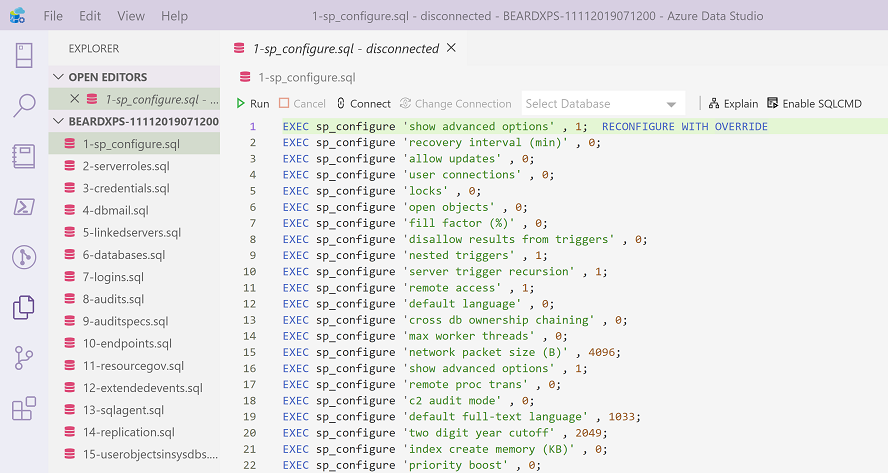
Figure 14.2. Scripting Options in SSMS
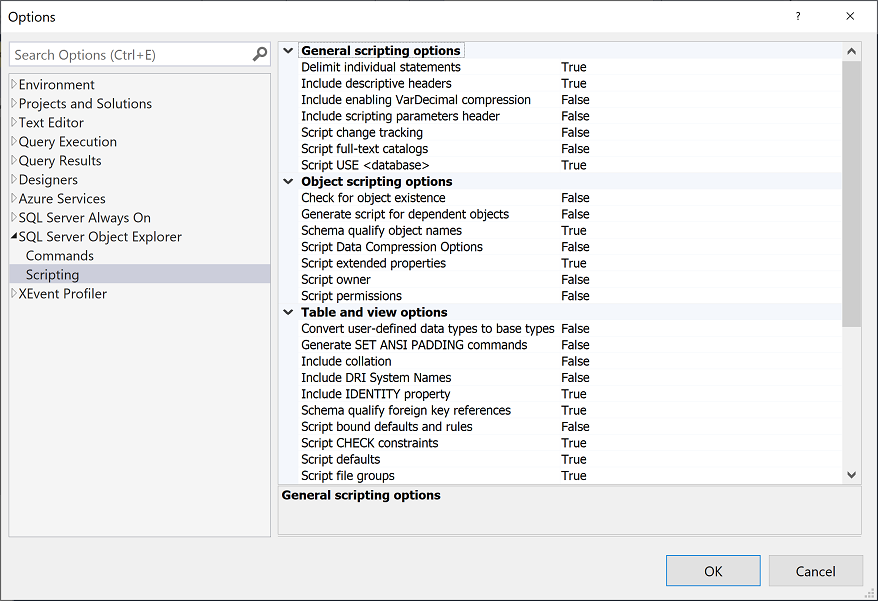
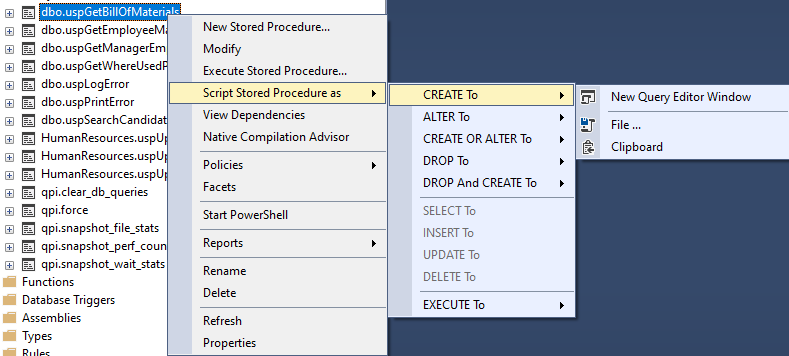
Figure 14.3. script stored procedure in SSMS
Hands-on Lab
Let’s practice what you just read about in this chapter.
See if you can complete the following tasks:
- Export the configuration settings for an instance
- Export all of the configuration settings except for Policy Based Management and Resource Governor for an instance
- Create T-SQL scripts for Extended Event objects
- Create T-SQL scripts for the Agent Jobs on an instance
Unsure of the answers? You can check your work at dbatools.io/answers.
FAQ
What’s the difference between High Availability (HA) and Disaster Recovery (DR)?
HA addresses short, usually automated failovers for minor outages. DR addresses major outages (natural or man‑made) and relies on manual, documented procedures to rebuild and restore. DR typically has a longer recovery time objective (RTO) than HA.What are the four core parts of a SQL Server Disaster Recovery plan?
- Export and back up all required items to disk- Move export files and backups off‑site
- Test imports and restores on a secondary server
- In a disaster, import and restore everything from disk
Which SQL Server objects should I include in my DR exports?
Key items include: database restore scripts, logins (with permissions), linked servers, credentials, Database Mail, Agent jobs/schedules/operators, proxies, alerts, replication settings, server configuration (sp_configure), custom errors, server roles, Central Management Server, backup devices, audits and specifications, endpoints, Policy‑Based Management, Resource Governor, Extended Events, user objects in system databases, and Availability Groups.How do I export an entire instance with dbatools, and what prerequisites apply?
Use Export-DbaInstance to generate T‑SQL scripts for key instance objects:Export-DbaInstance -SqlInstance sql01 -Path C:\Exports. The source instance must be online. When targeting localhost, run PowerShell as Administrator for WMI‑based commands.Does Export-DbaInstance also back up my databases?
No. It creates database restore scripts (for your latest full/diff/log backups) but does not perform backups. Maintain a proper backup strategy alongside your exports.Where should I store exported scripts, and how often should I test them?
Store off‑site in version control (e.g., Azure DevOps Repos, GitHub, GitLab) so they’re accessible during a disaster and changes are auditable. Many teams export nightly and automate weekly test restores on a secondary instance.How should I handle passwords and secrets in exported files?
Linked server and credential passwords are written in clear text; login exports include sensitive data. If policy prohibits this, exclude them:-Exclude LinkedServers,Credentials (and possibly Logins). Secure stored files with strict permissions and consider a separate secrets management solution.Can I tailor the generated T‑SQL (e.g., add IF NOT EXISTS or target a SQL version)?
Yes. Create options withNew-DbaScriptingOption (e.g., $opt.IncludeIfNotExists = $true, set target server version, compression, etc.) and pass them to Export-DbaInstance -ScriptingOptions $opt or Export-DbaScript -ScriptingOptionsObject $opt.Can I exclude object types or export only certain settings?
Yes. Use-Exclude on Export-DbaInstance (e.g., -Exclude ResourceGovernor,LinkedServers). For targeted scripting, pipe SMO objects to Export-DbaScript (e.g., Get-DbaAgentJob | Export-DbaScript). Some objects have dedicated exporters: Export-DbaLogin, Export-DbaLinkedServer, Export-DbaCredential, Export-DbaSpConfigure, etc.How do I capture and restore sp_configure settings as part of DR?
Export withExport-DbaSpConfigure -SqlInstance sql01 -FilePath C:\Exports\sp_configure.sql and import to the new instance with Import-DbaSpConfigure. Some settings require a SQL Server restart. You can also copy settings live using -Source and -Destination.
 Learn dbatools in a Month of Lunches ebook for free
