Database snapshots offer a fast, point-in-time safety net for when changes go wrong—think running an UPDATE without a WHERE clause or deploying an upgrade script that misfires. They are read-only copies captured at a specific moment and are ideal for rapid rollback or time-specific reporting, but they do not replace a solid backup strategy. Because snapshots aren’t first-class citizens in SSMS, they’re underused; nonetheless, they can be invaluable for quick recovery and auditing scenarios.
Under the hood, snapshots start small and grow as original data pages change, storing prior versions in sparse files. This makes disk capacity planning critical: if a snapshot runs out of space, it becomes unusable and must be dropped. Consider the scope of change before using them—small, targeted updates (such as typical application upgrades) are a great fit, while large-scale churn or truncations may be better served by full backups. There is some write overhead to maintain snapshots, so clean-up matters once they’re no longer needed.
dbatools simplifies the full lifecycle: creating snapshots (New-DbaDbSnapshot), rolling back entirely when you need a consistent database state (Restore-DbaDbSnapshot, after disconnecting sessions), or selectively recovering objects and rows by querying the snapshot directly or copying data back (for example, with Copy-DbaDbTableData). Be aware that reverting to a snapshot breaks the LSN chain, so plan to take a new full backup afterward, and remember you can have multiple snapshots but must manage them before a full-database revert. Beyond recovery, snapshots shine for reporting—capture daily, timestamped snapshots to compare data across days—then remove stale ones (Get-DbaDbSnapshot | Remove-DbaDbSnapshot) to reclaim space and reduce overhead.
Figure 12.1. The only option (aside from using dbatools) to create a snapshot is to use T-SQL and specify all data files.
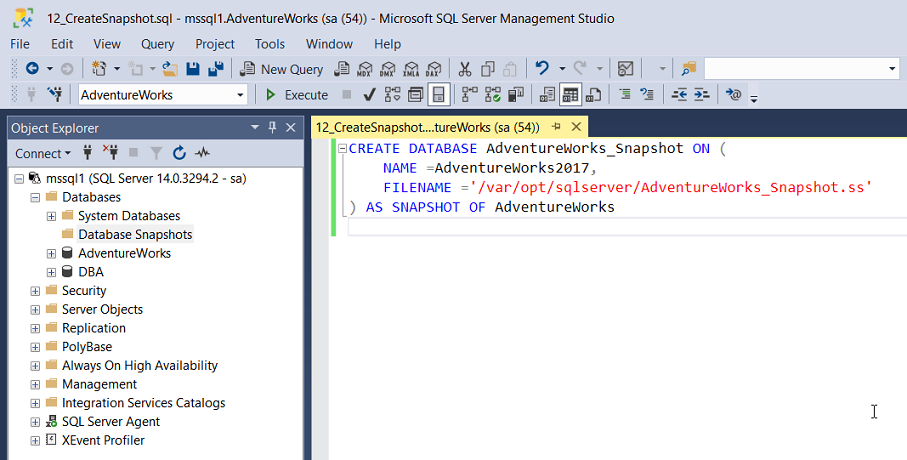
Figure 12.2. Running the application upgrade code to update a stored procedure.
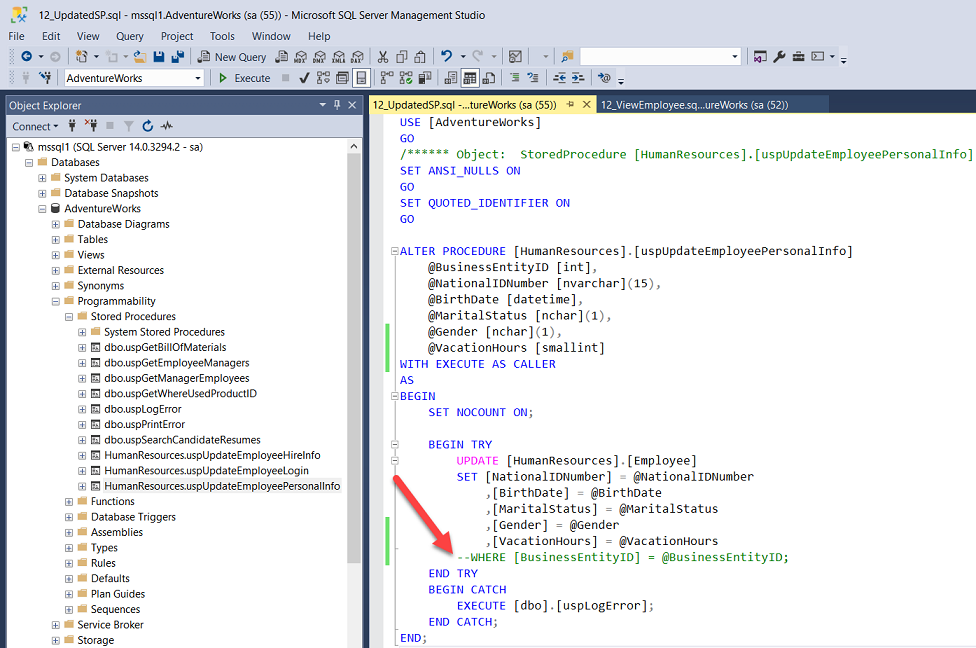
Figure 12.3. All of the employees have the same values for NationalIDNumber, birthdate and VacationHours.
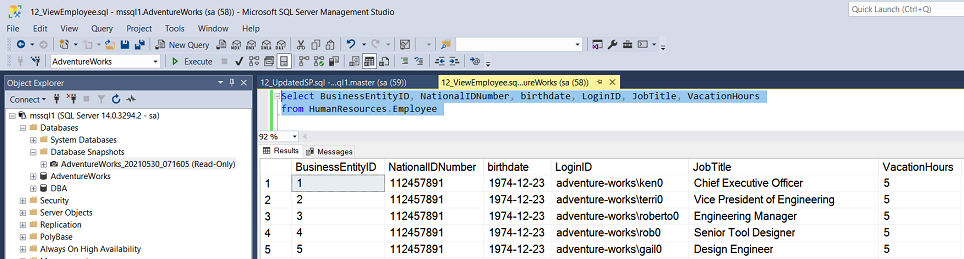
Figure 12.4. Browse the snapshot using SSMS, or query with T-SQL.
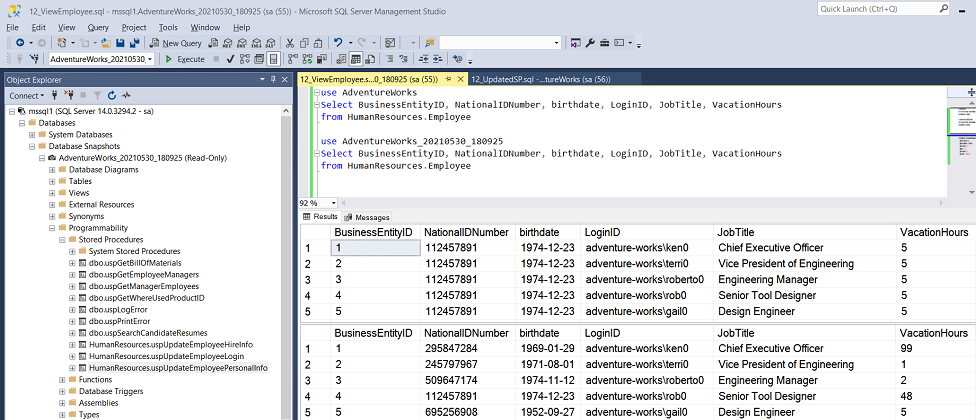
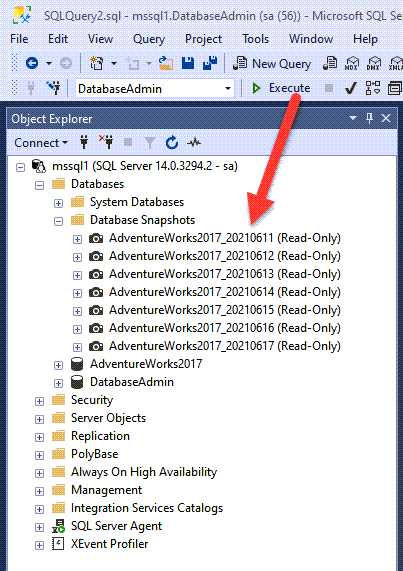
Figure 12.5. Multiple snapshots taken each day and labeled with a date stamp.
Hands-on Lab
- Create snapshots for multiple databases at once by using the
-NameSuffixparameter
- Create a snapshot on a different drive than your database data files by using the
-Pathparameter
- Alter some data and then roll it back by using your snapshot
- Clean up all the snapshots you created to prepare for the next chapter
FAQ
What is a SQL Server database snapshot and how does it work?
A database snapshot is a read-only, point-in-time view of a database. It starts small because it stores only original data pages that change after the snapshot is created, using a sparse file. As more data changes in the source database, the snapshot grows to keep those original pages.Do snapshots replace a backup strategy?
No. Snapshots are great for rapid rollbacks and point-in-time reporting, but they do not replace backups. Maintain regular backups and restores; use snapshots as a complementary tool for fast recovery.How much disk space should I plan for a snapshot, and what if it runs out?
Plan for up to the size of the source database at the time you take the snapshot. If the snapshot’s sparse file runs out of space, the snapshot becomes suspect and must be dropped—meaning you can’t use it to recover.When are snapshots a good fit—and when are they not?
Good fit: scenarios with relatively small data changes, like application upgrades, where you may need a quick rollback. Not a good fit: operations that change or rebuild large portions of data (e.g., truncations/rebuilds), where snapshot growth and extra I/O may outweigh the benefits.How do I create a snapshot with dbatools?
Quick start:New-DbaDbSnapshot -SqlInstance mssql1 -Database AdventureWorksBy default, the snapshot is named with the database and a timestamp, and files go to the same folder as the source data files. Control naming and location with:
New-DbaDbSnapshot -SqlInstance mssql1 -Database AdventureWorks -Name AW_Snap -Path E:\Snapshots\
How do I roll back the entire database to a snapshot with dbatools?
1) Disconnect active sessions:Get-DbaProcess -SqlInstance mssql1 -Database AdventureWorks | Stop-DbaProcess2) Restore from the snapshot:
Restore-DbaDbSnapshot -SqlInstance mssql1 -Snapshot AdventureWorks_YYYYMMDD_HHMMSSNotes: Reverting breaks the LSN chain—take a new full backup afterward. You can have multiple snapshots, but only one can be used to revert the whole database; drop extras first if needed.
Can I restore only specific objects or rows from a snapshot?
Yes. Snapshots are queryable read-only databases. You can browse/query them in SSMS and copy back what you need. For data, consider:Copy-DbaDbTableData -SqlInstance mssql1 -Database AdventureWorks_SnapshotName ` -Table schema.Table -DestinationDatabase AdventureWorksThis is useful when only a subset of rows needs to be restored and new data is still being written.
How do I clean up snapshots, and why should I?
Snapshots consume space as changes occur and add slight write overhead to the source database. Remove unneeded snapshots to free space and reduce overhead:Get-DbaDbSnapshot -SqlInstance mssql1 -Database AdventureWorks | Remove-DbaDbSnapshotTip: Use a quick picker:
Get-DbaDbSnapshot -SqlInstance mssql1 | Out-GridView -Passthru | Remove-DbaDbSnapshot
Why aren’t snapshots common in SSMS, and how would I create one without dbatools?
SSMS has no built-in UI for snapshots. Without dbatools, you must write T-SQL and explicitly list every data file for the database—tedious for multi-file databases. dbatools automates this.Can snapshots help with reporting or point-in-time analysis?
Yes. Because snapshots are read-only, static views, they’re ideal for point-in-time reporting and comparisons. For daily snapshots:New-DbaDbSnapshot -SqlInstance mssql1 -Database Sales -Name Sales_Snap_$(Get-Date -Format yyyyMMdd)Maintain multiple snapshots (e.g., per day) to compare data across dates.

 Learn dbatools in a Month of Lunches ebook for free
