Restores are treated as first-class operations on par with backups, and the chapter shows how PowerShell and dbatools make them fast, repeatable, and scalable for migrations, disaster recovery, CI/CD, and validation testing. The centerpiece is Restore-DbaDatabase, a flexible command that mirrors what you can do in SSMS or T‑SQL, enabling everything from one-off database recoveries to restoring an entire instance with a single command. Because dbatools builds on native SQL Server capabilities, there are practical boundaries: you can’t restore backups from a newer SQL version onto an older one, encrypted databases require the proper keys, and restoring master isn’t automated for safety. System database support varies (for example, msdb and model are supported with build compatibility), and as with T‑SQL, backup paths are relative to the SQL instance and the service account needs file access.
The chapter walks through common restore patterns and quality-of-life features. You can restore from a single file or pipe files directly from PowerShell, and you can target a directory of backups; the command inspects backup headers, builds the correct full/diff/log chain, and restores the latest viable set. Overwrites are opt-in via WithReplace, and you’re encouraged to filter large file sets before piping to improve performance. For auditing or DR runbooks, add OutputScriptOnly to generate the exact T‑SQL without executing, and send it to the clipboard or a file. When database files need to live outside default locations, you can specify custom data and log directories, and there’s helper functionality to map file names and paths from existing databases.
Advanced scenarios are covered in depth. NoRecovery keeps a database in a restoring state for multi-step chains or cutover strategies, and Continue finalizes recovery. You can rename a database during restore and optionally update physical file names with ReplaceDbNameInFile. Time-targeted recovery is simplified via RestoreTime, and marked transactions enable precise rollbacks without guessing timestamps by stopping before or after a named transaction. For corruption, the chapter shows how to find suspect pages and perform page-level restores, including backing up the tail of the log to a specified folder. Cloud-native workflows are first-class: restores from Azure work with either Shared Access Signatures or Access Keys, including striped backups. Altogether, the guidance equips you to rehearse and execute restores confidently, from routine test refreshes to high-pressure disaster events.
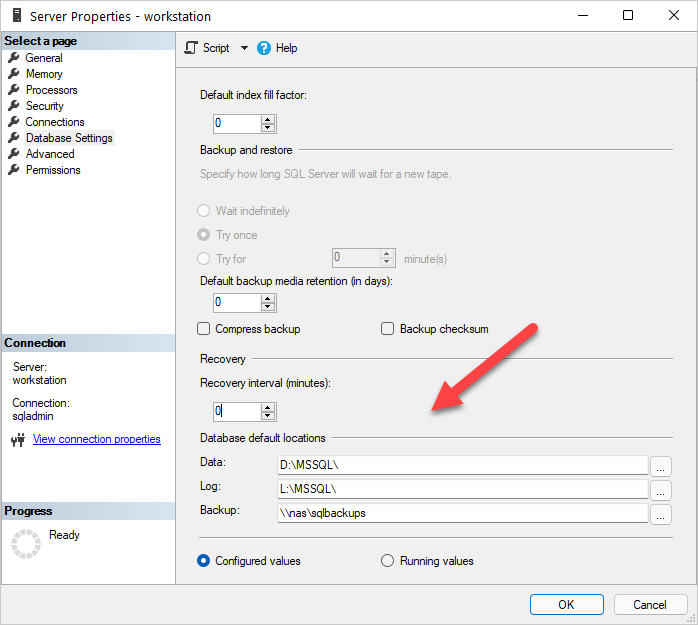
Figure 11.1. SQL Server’s default directories
Hands-on Lab
- Backup all user databases in your test SQL Server instance. Perform one full backup, one differential backup, and three log backups then restore the entire folder back to your test instance, ensuring you use
-WithReplace.
- Restore a single database, and move the data and log files to a new location
- Restore a single database to a new name
FAQ
What are the main limitations of Restore-DbaDatabase?
It mirrors SQL Server’s native restore capabilities. It cannot restore a backup taken on a newer SQL Server version to an older version, and it cannot decrypt encrypted databases without the required key. dbatools does not automate restoring the master database due to safety and reliability concerns.Can dbatools restore system databases?
Support varies by system database: master = no; msdb = yes (best to restore to the same server; builds must match if restoring elsewhere); tempdb = no (it’s recreated at startup); model = yes (builds must match between source and destination).Why does my restore fail when I can see the file locally?
The backup path is relative to the SQL instance, not your workstation. Ensure the SQL Server service account has permissions to the backup location (local, UNC, or cloud) so the engine can read the files.How do I restore from a single file or the pipeline?
You can specify a single file via-Path (for example, S:\backups\mydb.bak) or pipe files from Get-ChildItem into Restore-DbaDatabase. By default existing databases aren’t overwritten; add -WithReplace to overwrite and to auto-close active connections.How do I restore everything from a directory of backups?
Pipe a directory listing intoRestore-DbaDatabase. It reads backup headers, builds the correct restore chains (full, diff, logs), and restores the latest valid chain per database. If you have thousands of files, pre-filter with Get-ChildItem/Where-Object to reduce header reads.Can I generate the T-SQL restore script without executing it?
Yes. Use-OutputScriptOnly to output the T-SQL instead of running it. You can pipe the output to the clipboard (| clip) or to a file (| Out-File) for DR documentation or source control.How do I restore to custom data and log directories?
Use-DestinationDataDirectory and -DestinationLogDirectory to target non-default locations. For easier file mapping, Get-DbaDbFileMapping can help build the hashtable needed for customized layouts.How do I handle multi-step restores (full, diff, logs)?
Restore intermediate steps with-NoRecovery to keep the database in a restoring state, then use -Continue on the final restore to recover the database. This is useful for HA, log shipping, or minimizing migration cutover time.How do I rename a database during restore (including physical files)?
Set-DatabaseName to change the database name and add -ReplaceDbNameInFile to also update the physical file names. Note: logical file names aren’t renamed by this process.How do I restore to a specific moment (time or a marked transaction)?
- Point-in-time: supply-RestoreTime (PowerShell datetime) and a path that includes the full and subsequent log backups. - Marked transaction: use -StopMark with the transaction name; add -StopBefore to stop just before it (or set it to false to stop after).How can I repair corruption by restoring only bad pages?
Find suspect pages withGet-DbaSuspectPage, then pass the results to Restore-DbaDatabase via -PageRestore. You must also provide -PageRestoreTailFolder for the tail-log backup that SQL Server takes during the process.How do I restore backups stored in Azure (SAS or Access Keys)?
For SAS, if the credential is already created, just use the Azure URL in-Path. For Access Keys, pass the credential name with -AzureCredential. Striped backups are supported by passing all stripe URLs (works for local and Azure backups).
 Learn dbatools in a Month of Lunches ebook for free
