8 Configuring applications with ConfigMaps and Secrets
This chapter shows how to configure containerized applications in Kubernetes without rebuilding images and while keeping manifests portable across environments. It explains how to override a container’s default command and arguments and how to set per-container environment variables from literals, other vars, or external sources. It also clarifies variable interpolation rules, when shell expansion is useful, and why pods don’t have “global” env that containers inherit. Beyond inlined settings, the chapter motivates decoupling configuration from pods through dedicated API objects and introduces a way to surface runtime metadata to applications.
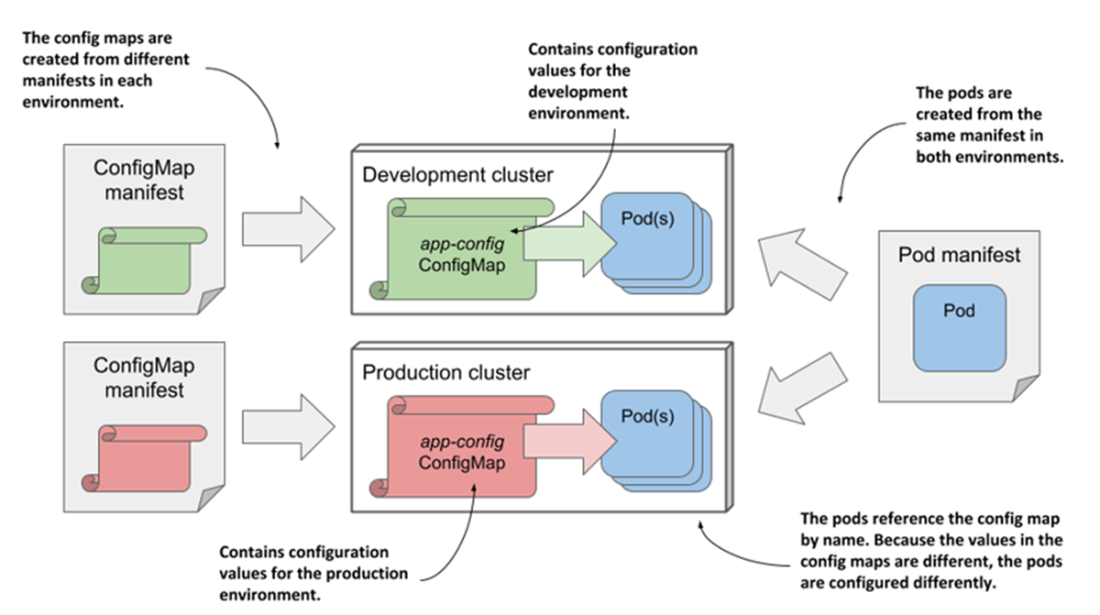
ConfigMaps provide key–value configuration that pods can consume as environment variables or files. You can create them from literals, files, or env-style files and use them to inject single entries or entire maps (with optional prefixes), combine multiple sources, and mark references as optional. The chapter discusses day‑2 operations—listing, editing, updating, and deleting—and highlights important semantics: updating a ConfigMap does not change environment variables in already running containers, which can lead to drift if some pods restart. To preserve consistency and improve cluster performance, ConfigMaps can be marked immutable; otherwise, you typically introduce a new ConfigMap and roll out pods to adopt it.
Secrets mirror much of ConfigMaps’ behavior but add security‑oriented handling (e.g., kept in-memory on nodes), support typed variants (generic/opaque, TLS, registry credentials), and allow both Base64 data and plain-text stringData on write. The chapter cautions that Secret values in manifests are encoded, not encrypted; at-rest encryption in etcd must be enabled; RBAC must be scoped carefully; and environment-variable injection can leak through logs or child processes—projecting Secrets as files is safer. Finally, the Downward API lets you inject pod and container metadata (such as pod and node names/IPs, labels/annotations, and resource requests/limits) via environment variables or files using fieldRef and resourceFieldRef, enabling apps to adapt to their runtime context without duplicating configuration.
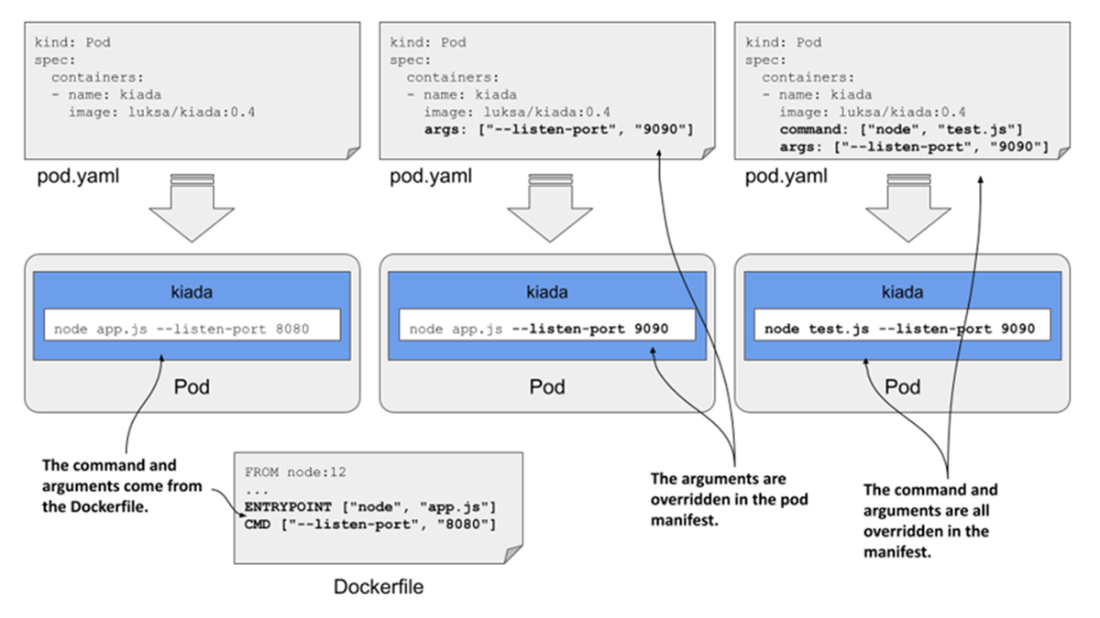
Overriding the command and arguments in the pod manifest
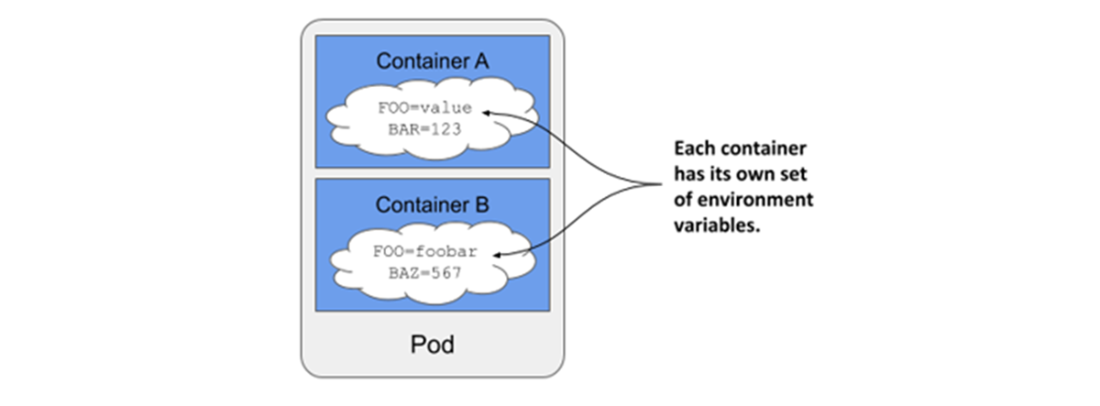
Environment variables are set per container.
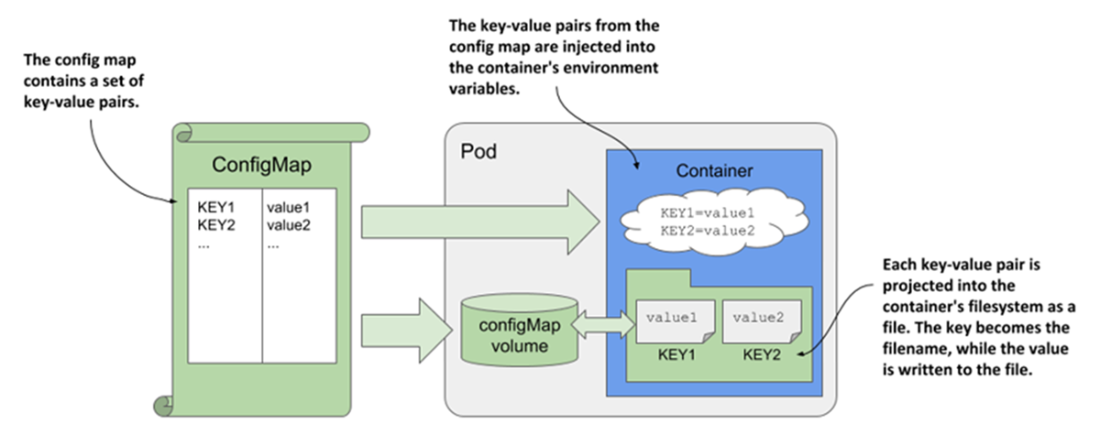
Pods use ConfigMaps through environment variables and configMap volumes.
Deploying the same pod manifest and different ConfigMap manifests in different environments
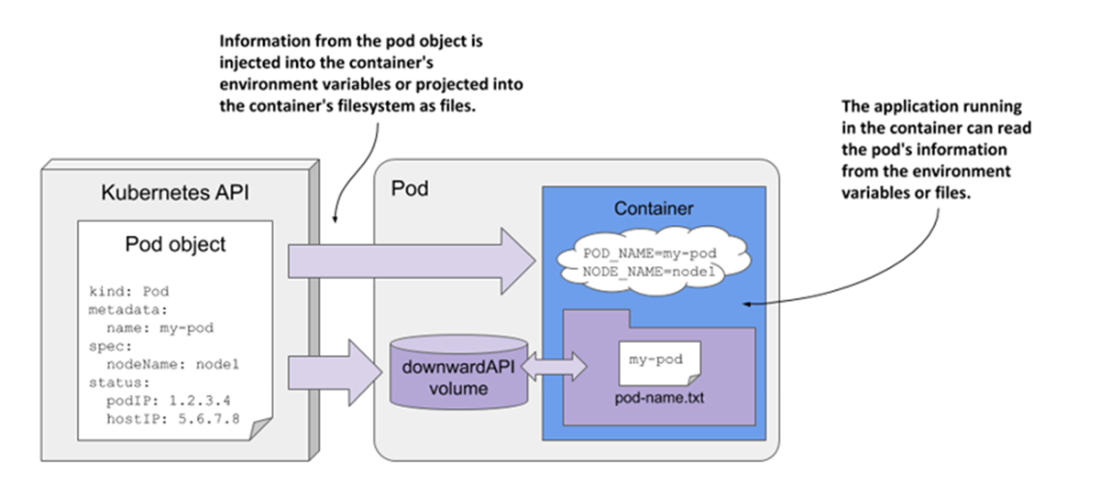
The Downward API exposes pod metadata through environment variables or files.
Summary
- The default command and arguments specified in the container image can be overridden in the pod manifest.
- Environment variables for each container can be defined in the pod manifest. Their values can be hardcoded or sourced from other Kubernetes API objects.
- ConfigMaps are Kubernetes API objects used to store configuration data as key–value pairs.
- Secrets, like ConfigMaps, are Kubernetes API objects, but they are used to store sensitive data such as credentials, certificates, and authentication keys.
- Entries from both ConfigMaps and Secrets can be injected into a container as environment variables or mounted as files.
- ConfigMaps and other API objects can be edited in place using the kubectl edit command.
- A pod manifest can specify image pull secrets to allow pulling images from private container registries.
- The Downward API provides a way to expose the pod metadata to the application running within. Like ConfigMaps and Secrets, this data can be injected into environment variables.
FAQ
How do I override a container’s command and arguments in a Pod manifest?
Use the container’s command and args fields. They are array values that mirror Dockerfile’s ENTRYPOINT (command) and CMD (args):
- command replaces the image’s ENTRYPOINT.
- args replaces the image’s CMD.
- The final command line is command + args (concatenated).
- Example: set command: ["node","--cpu-prof","--heap-prof","app.js"] or just override args: ["--listen-port","9090"].
What’s the right way to set environment variables in Pods, and what YAML pitfalls should I avoid?
Define env under each container with name/value pairs. Quote anything YAML might misinterpret (numbers, true/false, yes/no, on/off, null, etc.). You can reference other manifest-defined variables using $(VAR_NAME), but only if the referenced variable appears earlier in the same env list. To keep a literal $(VAR_NAME), write $$(VAR_NAME).
Can I reference environment variables defined in the image (or OS) from command/args?
Yes, but not with $(VAR_NAME). That syntax only resolves variables defined earlier in the manifest. To expand variables from the image or OS (e.g., HOSTNAME), run your command through a shell and use $VAR or ${VAR}, for example command: ["sh","-c","echo Hostname is $HOSTNAME; sleep infinity"].
What is a ConfigMap and how do I create one?
A ConfigMap stores non-sensitive key–value pairs for configuration and can be consumed as environment variables or mounted as files. Create it via:
- kubectl create configmap NAME --from-literal key=value
- --from-file key=file or a whole directory
- --from-env-file file.env (key=value per line)
- From YAML (kind: ConfigMap, data: …, binaryData: …). Non‑UTF‑8 content goes in binaryData (Base64-encoded).
Keys may contain alphanumerics, dashes, underscores, and dots.
How do I inject ConfigMap values into environment variables?
Two ways:
- Single key: env[].valueFrom.configMapKeyRef{name: CM, key: K, optional: true|false}
- All keys: envFrom[].configMapRef{name: CM, optional: …}
Notes:
- envFrom injects every entry; you can set a prefix. Keys must already be valid env var names (no key renaming).
- If the same variable is set multiple times, env (explicit entries) take precedence over envFrom; among multiple envFrom entries, later ones win.
- If optional is false (default) and the CM/key is missing, the container won’t start until it exists.
What happens if I change or delete a ConfigMap used by running Pods?
For values consumed as environment variables, running containers do not update in place. New/restarted containers will pick up the new values. Deleting a referenced ConfigMap leaves running containers unaffected, but any restart will fail to start if the reference isn’t optional. To guarantee consistency and reduce API server load, consider immutable: true on the ConfigMap; create a new CM for changes.
How are Secrets different from ConfigMaps?
Both store key–value pairs, but Secrets are designed for sensitive data:
- Fields: Secrets use data (Base64) and stringData (write-only plain text). ConfigMaps use data (plain text) and binaryData (Base64).
- Secrets can have a type (e.g., Opaque, kubernetes.io/tls, dockerconfigjson, etc.).
- Kubernetes treats Secrets specially: only sent to nodes that need them and kept in memory on nodes.
Create with kubectl create secret (generic, tls, docker-registry) or from a YAML manifest.
Is it safe to inject Secrets into environment variables?
It works, but it’s not ideal. Environment variables can leak via logs, error reports, or child processes. Prefer mounting Secrets as files via a secret volume. Remember: Base64 is encoding, not encryption; enable etcd encryption at rest, restrict access with RBAC, rotate secrets yourself (no automatic rotation), and consider external secret managers (e.g., Vault) for robust control.
How do I inject pod metadata (like pod name, IP, node) using the Downward API?
Use env[].valueFrom.fieldRef.fieldPath with supported fields, for example:
- POD_NAME: metadata.name
- POD_IP: status.podIP (or podIPs)
- NODE_NAME: spec.nodeName
- NODE_IP: status.hostIP (or hostIPs)
The Downward API also supports projecting metadata into files via a downwardAPI volume (covered alongside volumes).
How can I expose a container’s resource limits/requests to the app?
Use env[].valueFrom.resourceFieldRef. Examples:
- limits.cpu → MAX_CPU_CORES
- limits.memory → MAX_MEMORY_KB with divisor: 1k (or 1, 1Ki, 1Mi, etc.)
By default, the enclosing container’s resources are used; set containerName if you need another container’s values.

 Kubernetes in Action, Second Edition ebook for free
