7 Organizing pods and other resources using namespaces and labels
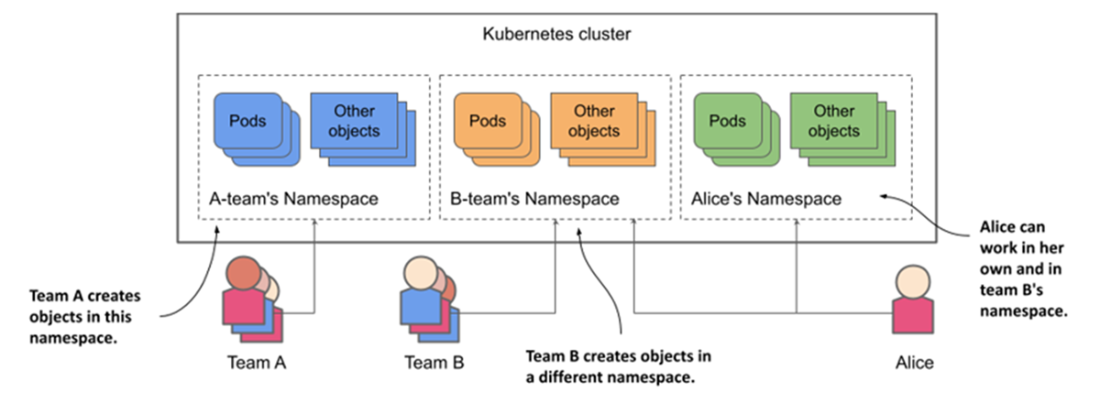
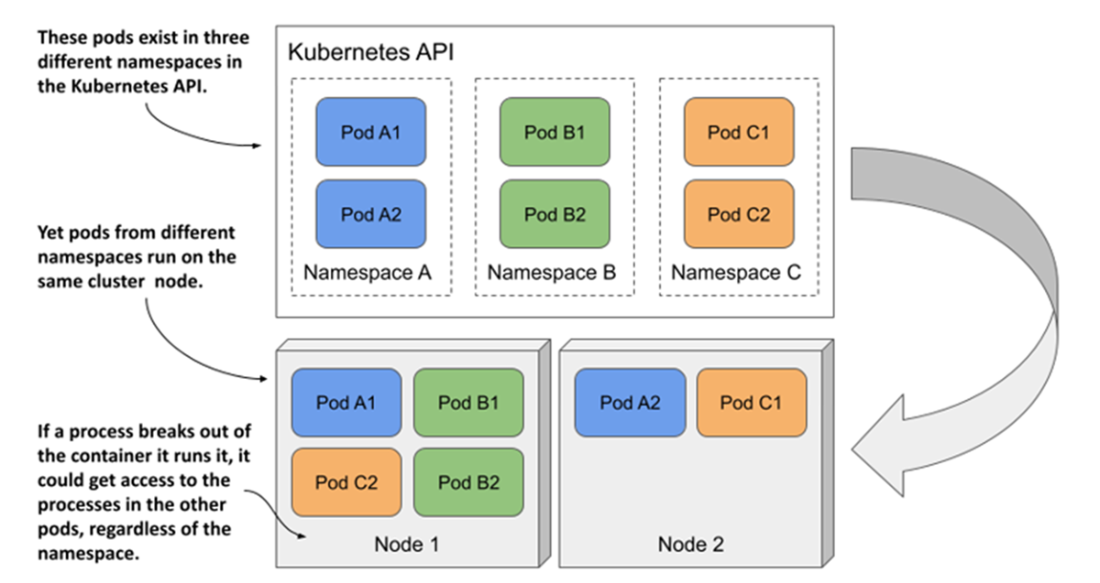
This chapter explains how Kubernetes helps multi-team, multi-service environments stay organized using two complementary mechanisms: namespaces and labels. Namespaces partition a single physical cluster into virtual, name-scoped spaces so different teams can reuse object names and restrict permissions to just their areas, while still sharing the same nodes. You learn how to list and manage objects per namespace or across all namespaces, create namespaces via commands or manifests, and switch your kubectl context to work more efficiently. The chapter also clarifies that namespaces are not hard isolation: workloads from different namespaces can run on the same nodes and communicate by default, unless constrained by NetworkPolicies. It closes the namespace topic with guidance on deletions (and why they sometimes get stuck due to finalizers) and cautions against using namespaces as substitutes for separate prod/stage/dev clusters.
Labels are simple key–value tags that classify objects along multiple dimensions (for example, application and release), making it easy to understand and operate on related resources. The chapter shows how to add, change, and remove labels; display them in kubectl output; and follow syntax rules and naming conventions, including common, community-recommended keys (such as app.kubernetes.io/*). The real power comes from label selectors: equality- and set-based filters that you can combine to list or bulk-operate on subsets of objects (including careful use for mass deletion). Selectors also underpin how Kubernetes ties components together internally, and the chapter encourages consistent, informative labeling so users and tools can manage large systems safely and predictably.
Selectors appear in manifests too, especially for scheduling. You use node labels with nodeSelector (equality-based) and nodeAffinity (set-based) to steer pods onto specific groups of nodes or exclude others, with operators like In, NotIn, Exists, DoesNotExist, Lt, and Gt. Beyond labels, field selectors filter objects by intrinsic fields (for example, finding pods by assigned node or by non-Running phase) and can be used in affinity via matchFields. Finally, annotations complement labels by storing non-identifying, free-form metadata (such as owners, build info, or controller hints) with generous size and character limits. The chapter demonstrates adding, inspecting, updating, and removing annotations, noting that annotation keys follow the same conventions as label keys while values can contain arbitrary text.
Splitting a physical cluster into several virtual clusters by utilizing Kubernetes Namespaces
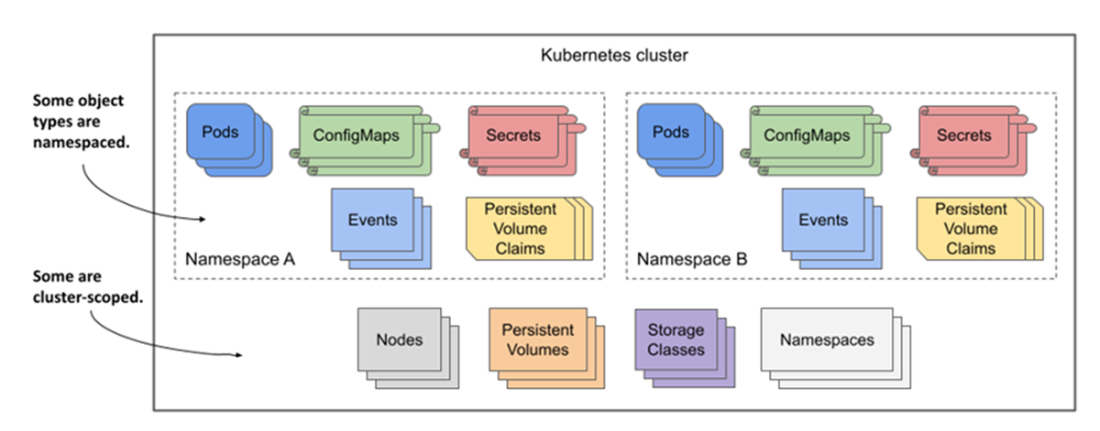
Some Kubernetes API types are namespaced, whereas others are cluster scoped.
Pods from different namespaces may run on the same cluster node.
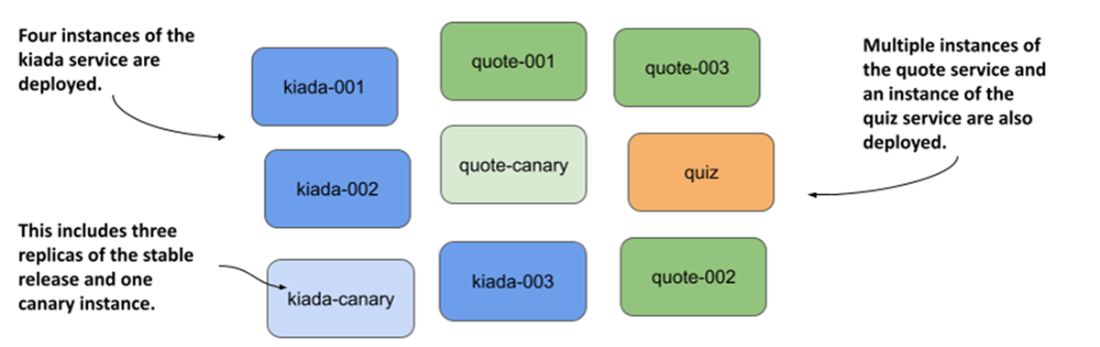
Unorganized pods of the Kiada application suite
Labelling pods with the app and rel label
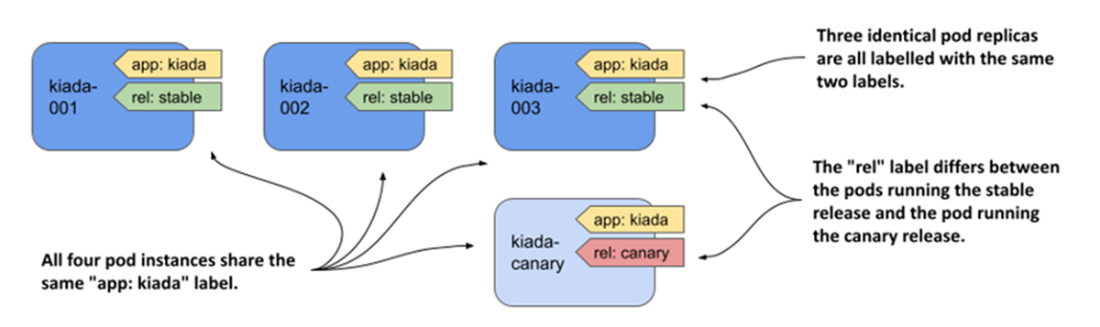
All the pods of the Kiada suite organized by two criteria
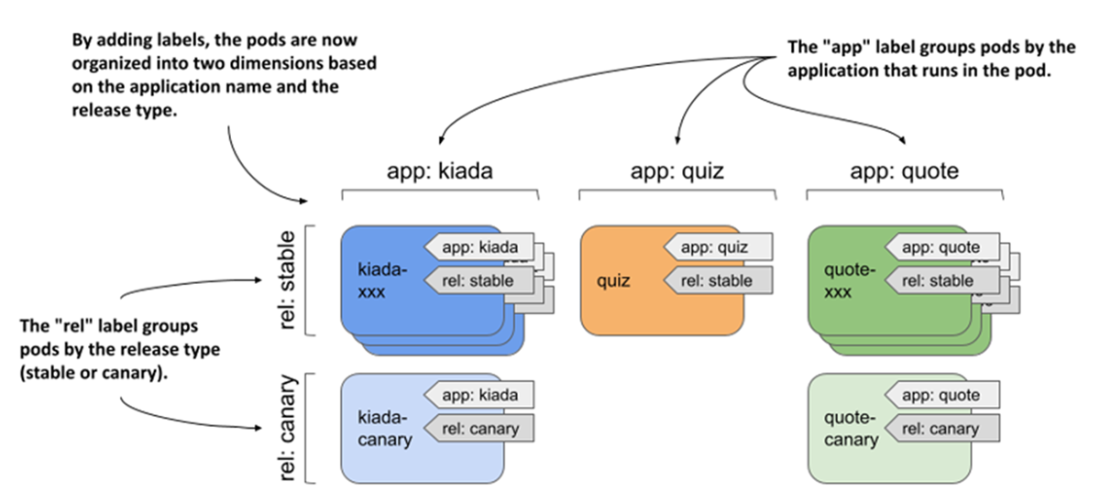
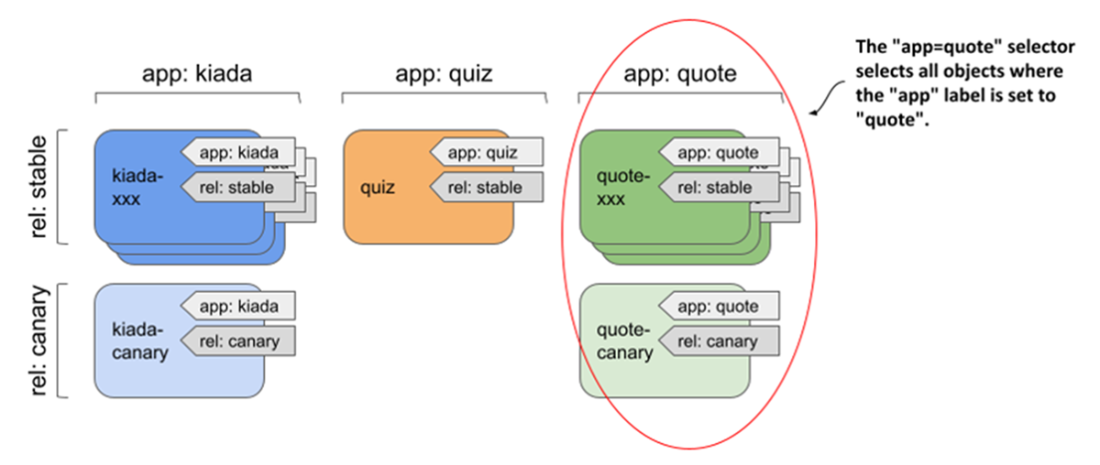
Selecting objects using an equality-based selector
Combining two label selectors
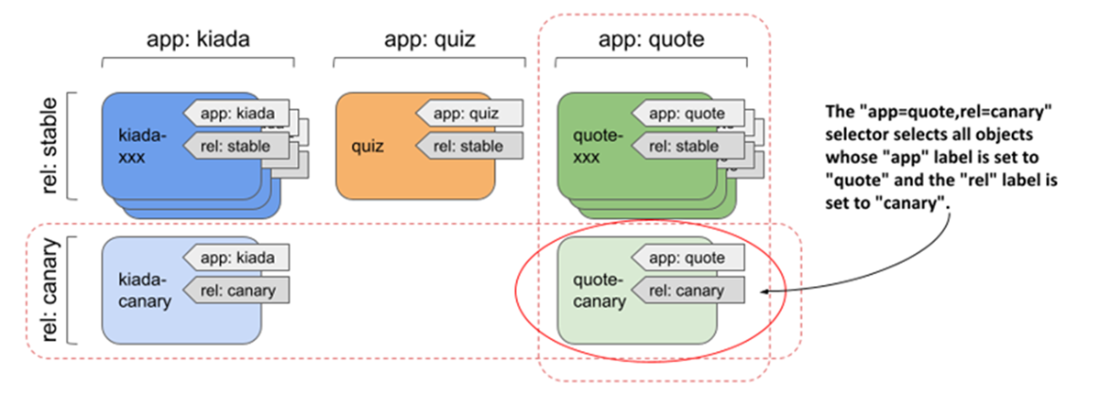
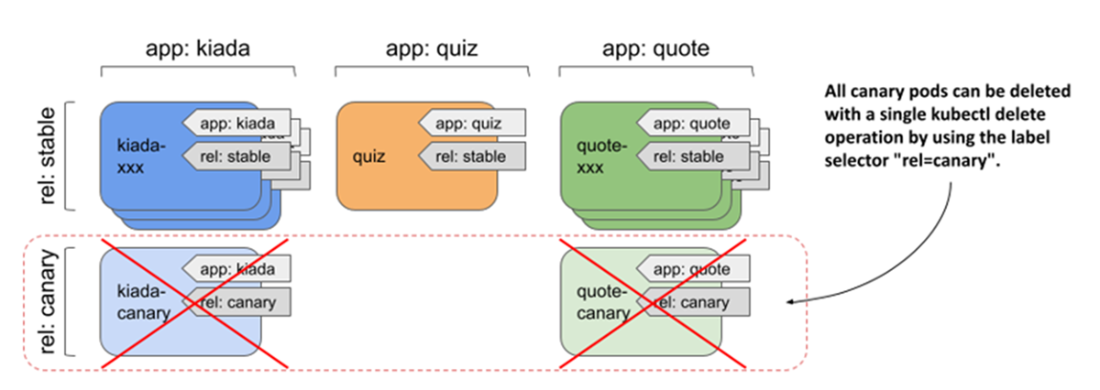
Selecting and deleting all canary pods using the rel=canary label selector
Summary
- Objects in a Kubernetes cluster are typically divided into many namespaces. Within a namespace, object names must be unique, but you can give two objects the same name if you create them in different namespaces.
- Namespaces allow different users and teams to use the same cluster as if they were using separate Kubernetes clusters.
- Each object can have several labels. Labels are key–value pairs that help identify the object. By adding labels to objects, you can effectively organize objects into groups.
- Label selectors allow you to filter objects based on their labels. You can easily filter pods that belong to a specific application, or by any other criteria if you’ve previously added the appropriate labels to those pods.
- Field selectors are like label selectors, but they allow filtering objects based on specific fields in the object manifest. For example, a field selector can be used to list pods that run on a particular node. Unfortunately, you can’t use them to filter on annotations.
- Instead of performing an operation on each pod individually, you can use a label selector to perform the same operation on a set of objects that match the label selector.
- Labels and selectors are also used internally by some object types. You can add labels to node objects and define a node selector in a pod to schedule that pod only to those nodes that meet the specified criteria.
- In addition to labels, you can also add annotations to objects. An annotation can contain a much larger amount of data and can include whitespace and other special characters that aren’t allowed in labels. Annotations are typically used to add additional information used by tools and cluster users. They are also used to defer changes to the Kubernetes API.
FAQ
What are Kubernetes namespaces and why would I use them?
Namespaces partition a single physical cluster into multiple virtual clusters. They:
- Scope object names so different teams can reuse names without collisions.
- Provide a boundary for access control (RBAC) and bulk operations.
- Help multi-tenant and multi-team setups keep resources organized.
Note: Kubernetes namespaces are unrelated to Linux namespaces.
Do namespaces provide strong isolation between workloads?
Not by themselves. Namespaces do not:
- Prevent pods from sharing the same node or kernel; resource abuse or container escapes can still affect others.
- Isolate network traffic by default; cross-namespace communication is allowed unless restricted with NetworkPolicy.
Use separate clusters for strict environment isolation (e.g., prod vs. staging).
How do I list, create, switch, and delete namespaces with kubectl?
- List:
kubectl get ns(use-Aon other commands to span all namespaces). - Create:
kubectl create namespace my-nsor apply a Namespace manifest. - Switch default namespace for your context:
kubectl config set-context --current --namespace my-ns. - Delete:
kubectl delete ns my-ns(use--wait=falseto return immediately).
If deletion is stuck in Terminating, inspect kubectl get ns my-ns -o yaml to find remaining content/finalizers.
Which resource types are namespaced vs. cluster-scoped, and how do I check?
Examples:
- Namespaced: Pods, ConfigMaps, Secrets, PersistentVolumeClaims, Events.
- Cluster-scoped: Nodes, PersistentVolumes, StorageClasses, Namespaces.
Discover with kubectl api-resources and check the NAMESPACED column.
How do I create or manage objects in a specific namespace?
- CLI flag: add
-n my-ns(or--namespace) to commands likekubectl get/apply. - Manifest: set
metadata.namespace: my-nson the object.
If you pass -n and the manifest also sets a namespace, they must match or kubectl errors.
What are labels and how are they different from annotations?
Labels are key–value pairs used to identify and group objects; they power selectors (e.g., Services, Deployments, kubectl filters). Keys/values follow strict syntax rules (length, allowed characters).
Annotations are non-identifying metadata (up to ~256 KB, any characters). They cannot be used in selectors; store descriptions, commit SHAs, owner info, tool hints, etc.
What are the syntax rules and recommended conventions for labels?
- Keys may have an optional DNS-like prefix (
example.com/); reserved prefixes includekubernetes.io/andk8s.io/. - Key name: up to 63 chars; alphanumeric,
-,_,.; must start/end alphanumeric. - Value: empty or up to 63 chars; alphanumeric,
-,_,.; no spaces.
Community labels to consider: app.kubernetes.io/name, instance, component, part-of, version, managed-by.
How do I filter and bulk-operate on objects with label selectors?
- Equality-based:
-l app=quote,-l app!=quote. - Set-based:
-l 'app in (quiz,quote)',-l 'app notin (kiada)', presence-l rel, absence-l '!rel'. - Combine with commas:
-l app=quote,rel=canary. - Bulk delete carefully: e.g.,
kubectl delete pods -l rel=canary(no confirmation).
How can labels influence pod scheduling to specific nodes?
Label nodes (e.g., node-role=front-end) and reference them from pods:
spec.nodeSelector: simple equality selectors (e.g.,node-role: front-end).spec.affinity.nodeAffinity: set-based selectors with operators like In, NotIn, Exists, DoesNotExist, Lt, Gt; can also usematchFieldsto target node fields (e.g., exclude a node by name).
What are field selectors and when should I use them?
Field selectors filter by object fields (not labels) in kubectl and some manifests.
- kubectl examples: pods on a node
--field-selector spec.nodeName=kind-worker; non-running pods--field-selector status.phase!=Running. - In manifests:
nodeAffinitysupportsmatchFields(e.g., avoid a specificmetadata.name).
Use kubectl explain to explore fields; not all fields are selectable.

 Kubernetes in Action, Second Edition ebook for free
