6 Managing the pod lifecycle and container health
This chapter deepens the practical understanding of how a pod and its containers operate over their entire lifetime. It explains how to interpret pod status (phases, conditions, and per-container states) to diagnose behavior, and it shows how these signals change as a pod starts, runs, and terminates. With that foundation, it moves from observation to control: how Kubernetes sustains container health, how to hook into container startup and shutdown, and how the full pod lifecycle—initialization, run, and termination—plays out in real clusters.
The chapter details the mechanisms Kubernetes uses to keep workloads healthy. The Kubelet recreates failed containers and honors a pod-wide restartPolicy (Always, OnFailure, Never), applying exponential backoff that can lead to CrashLoopBackOff when failures repeat. Liveness probes provide active health checks via HTTP, TCP, or command execution, with configurable timing, thresholds, and timeouts; startup probes decouple slow initialization from steady-state monitoring to prevent false restarts. Guidance emphasizes designing probes that are simple, lightweight, and focused on internal health (not external dependencies), avoiding unnecessary restarts and resource contention, and using failureThreshold instead of bespoke retry logic. Throughout, the chapter shows how to read container status, lastState, exit codes, and events to understand what happened and why.
To run logic at key moments, containers can define lifecycle hooks: postStart (runs alongside process startup) and preStop (runs just before termination), each supporting exec or HTTP handlers. The text highlights important caveats—postStart runs immediately and can delay readiness or even trigger restarts if it fails; HTTP hooks must not depend on a server that isn’t ready yet; preStop failures don’t block shutdown, so monitoring events is essential. The lifecycle sections stitch everything together: image pull policies and init containers during initialization (idempotent by design), parallel container operation during the run stage (with ordering nuances around postStart), and graceful termination using preStop, signals, and configurable grace periods (including delete-time overrides and custom stop signals). Practical fixes—like handling SIGTERM in app code—demonstrate how to achieve fast, predictable shutdowns.
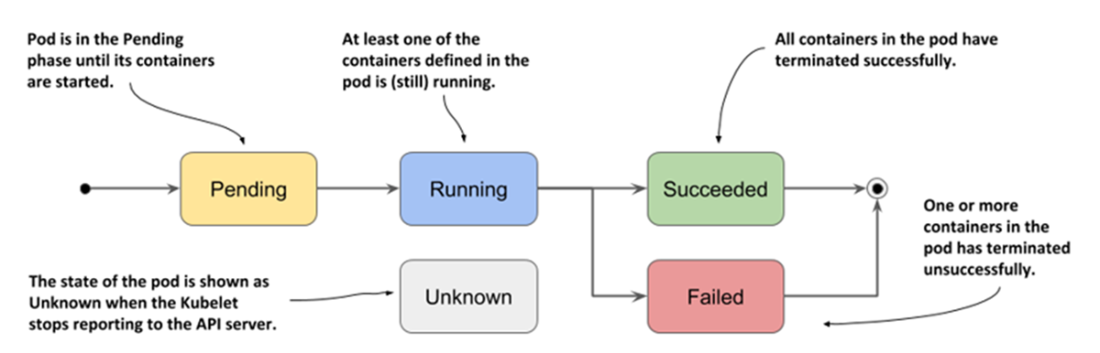
The phases of a Kubernetes Pod
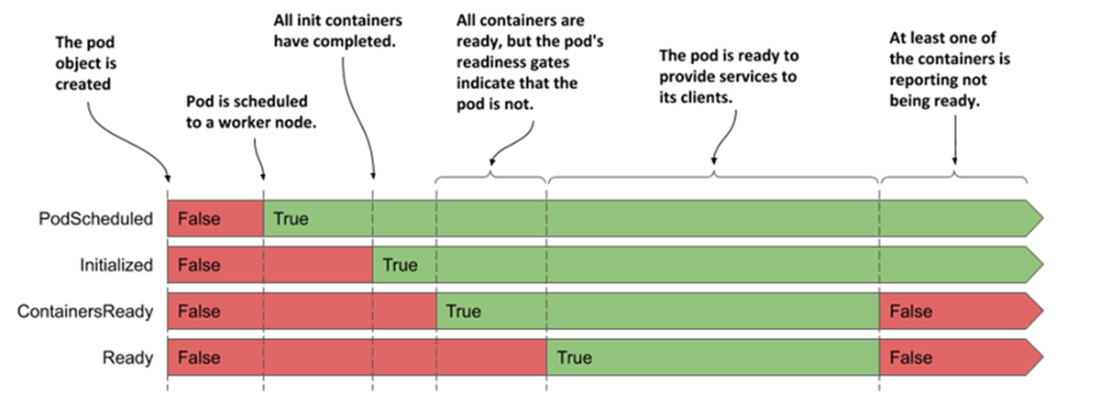
The transitions of the pod’s conditions during its lifecycle
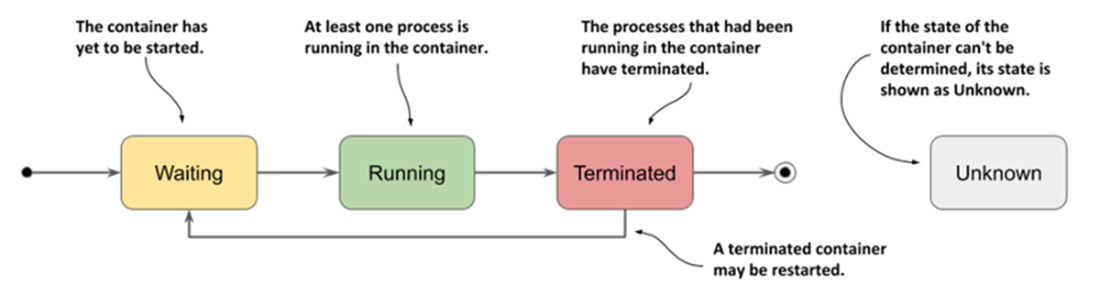
The possible states of a container
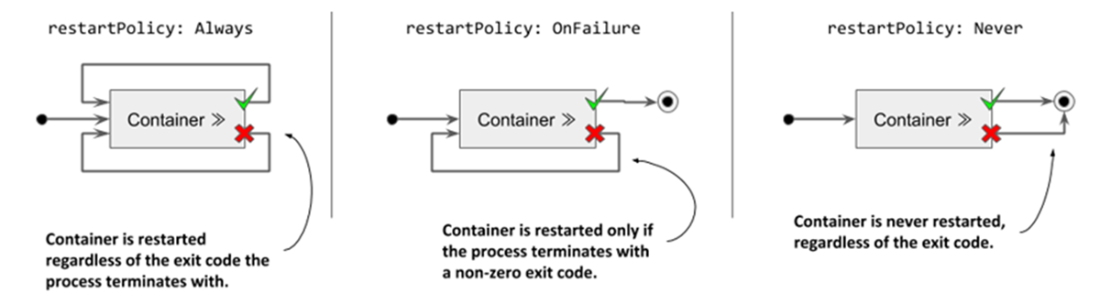
The pod’s restartPolicy determines whether its containers are restarted.
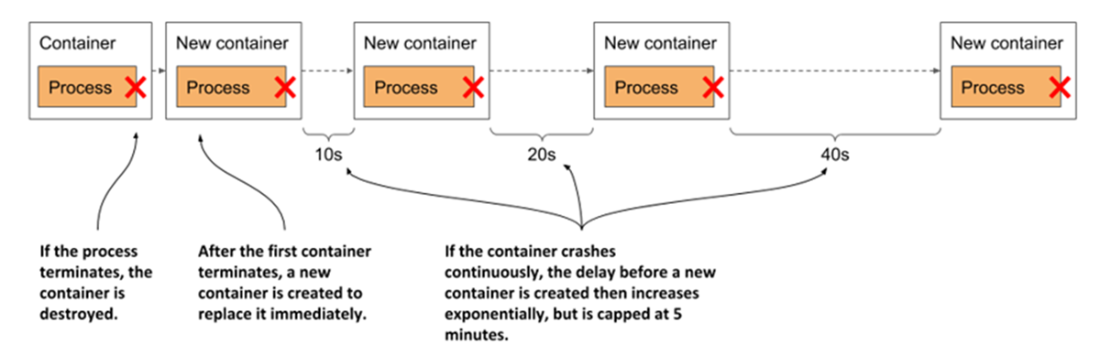
Exponential back-off between container restarts
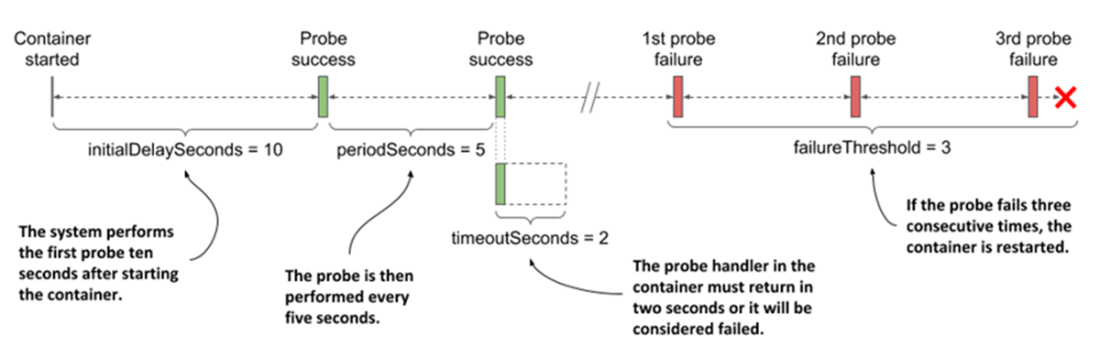
The configuration and operation of a liveness probe
The exec liveness probe runs the command inside the container.

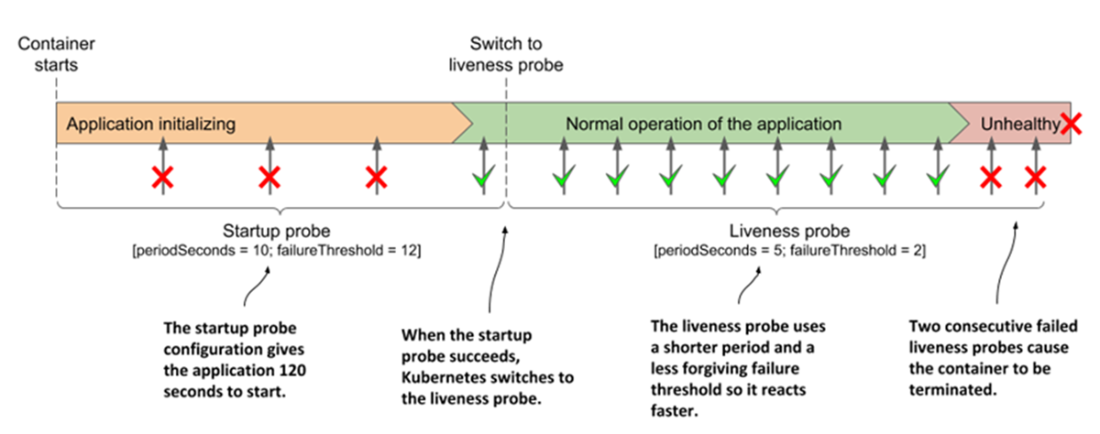
Fast detection of application health problems using a combination of startup and liveness probe
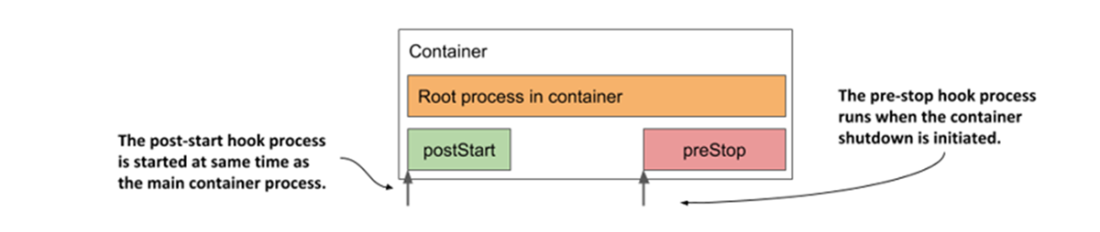
How the post-start and pre-stop hook fit into the container’s life cycle
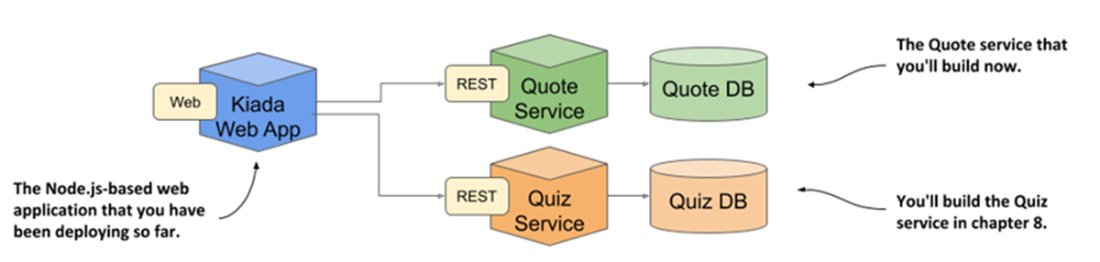
The Kubernetes in Action Demo Application Suite
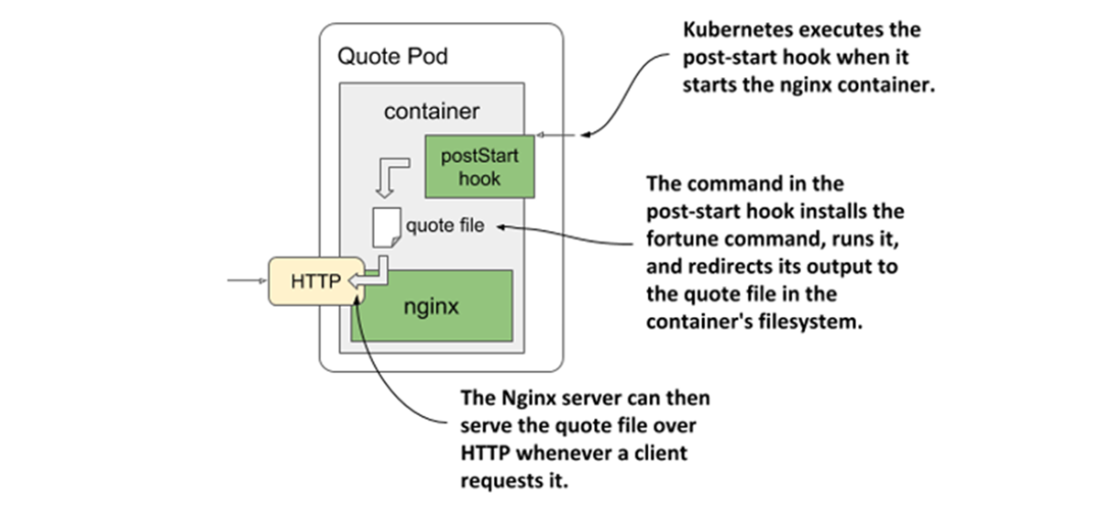
The operation of the quote-poststart Pod
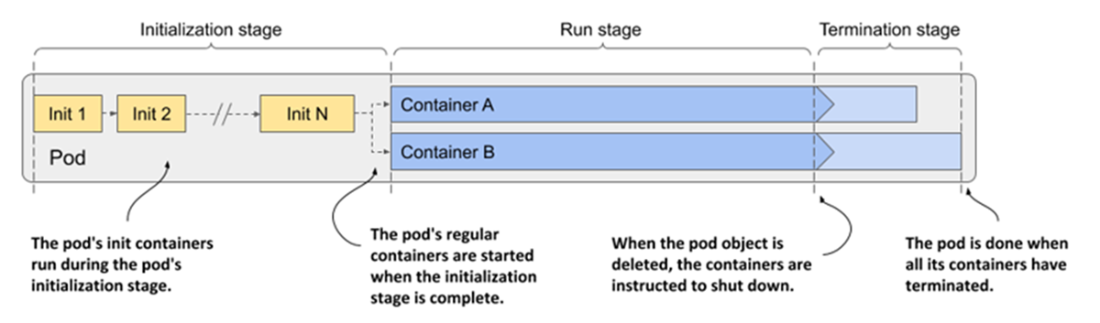
The three stages of the pod’s lifecycle
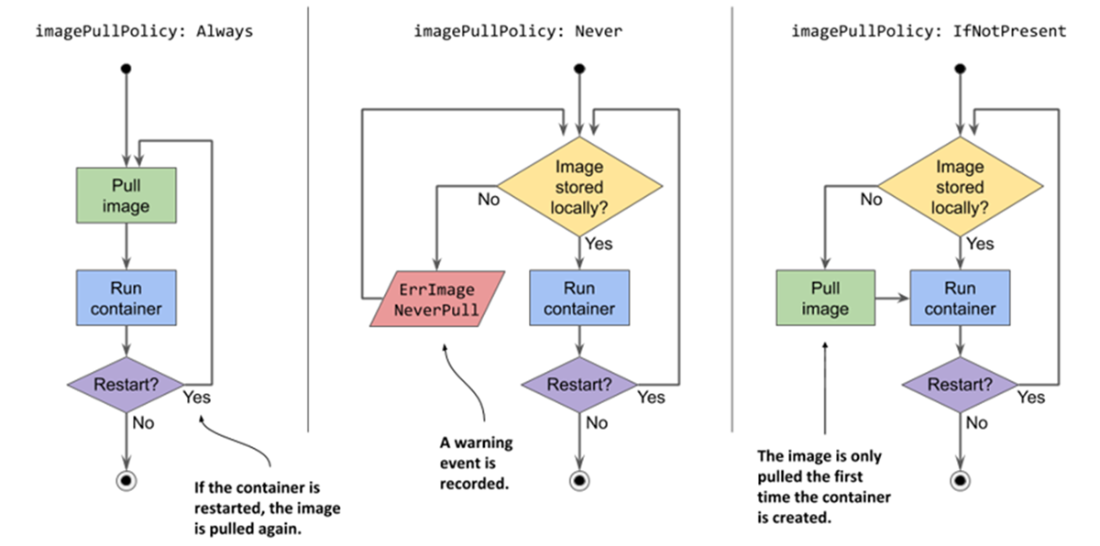
An overview of the three different image-pull policies
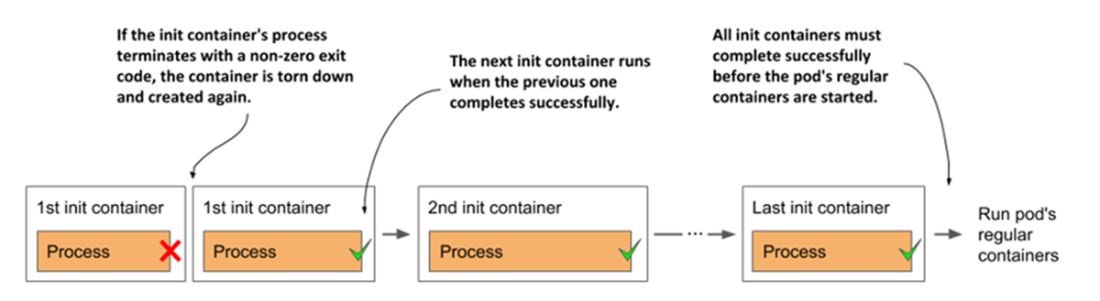
All init containers must run to completion before the regular containers can start.
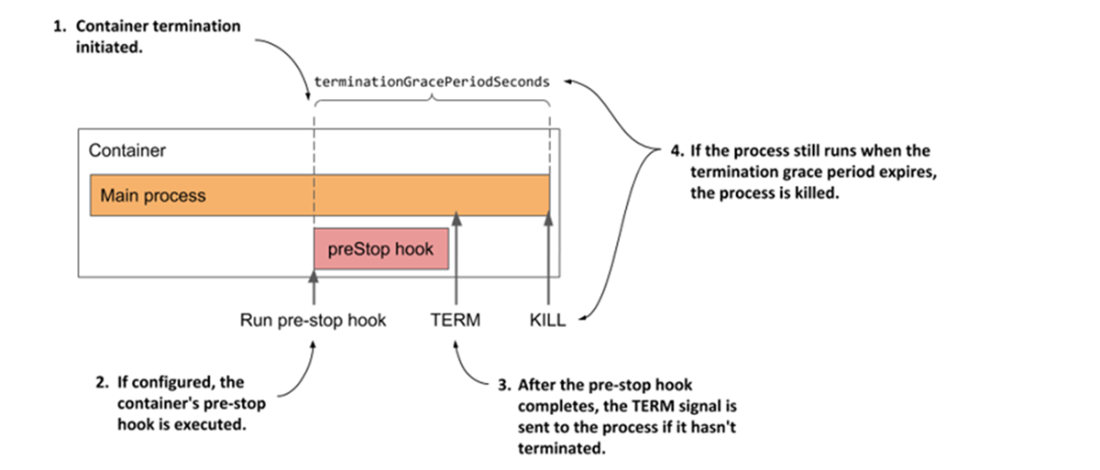
A container’s termination sequence
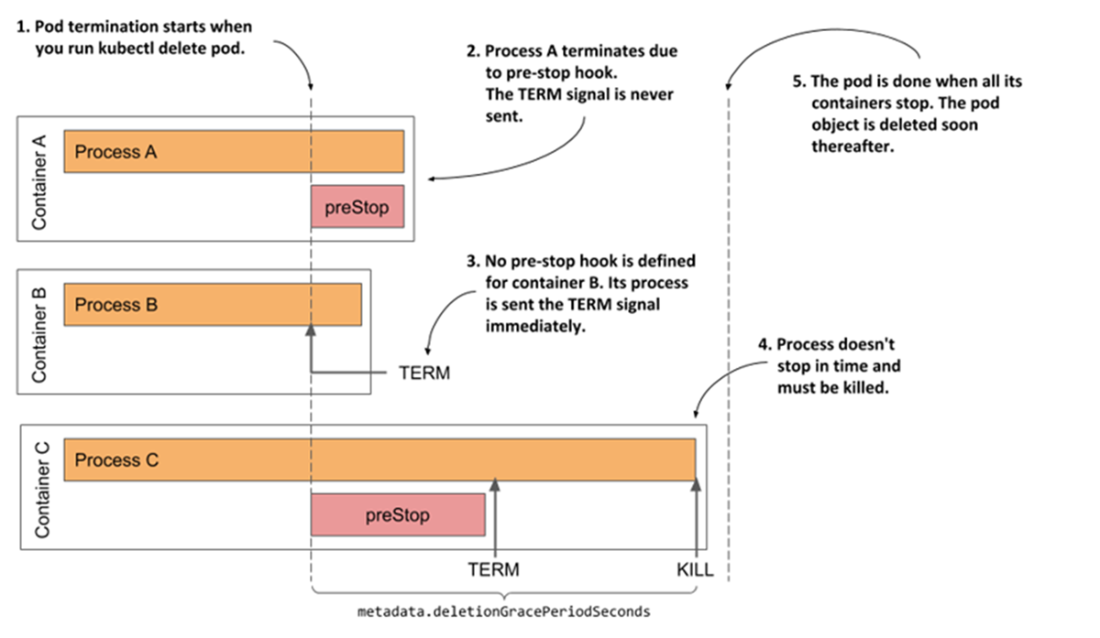
The termination sequence inside a pod
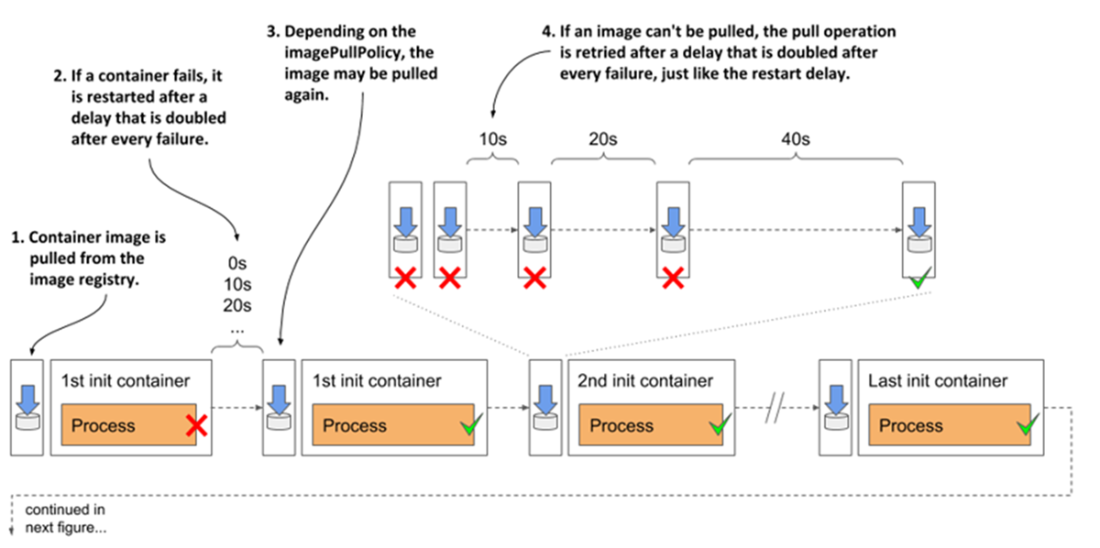
Complete overview of the pod’s initialization stage
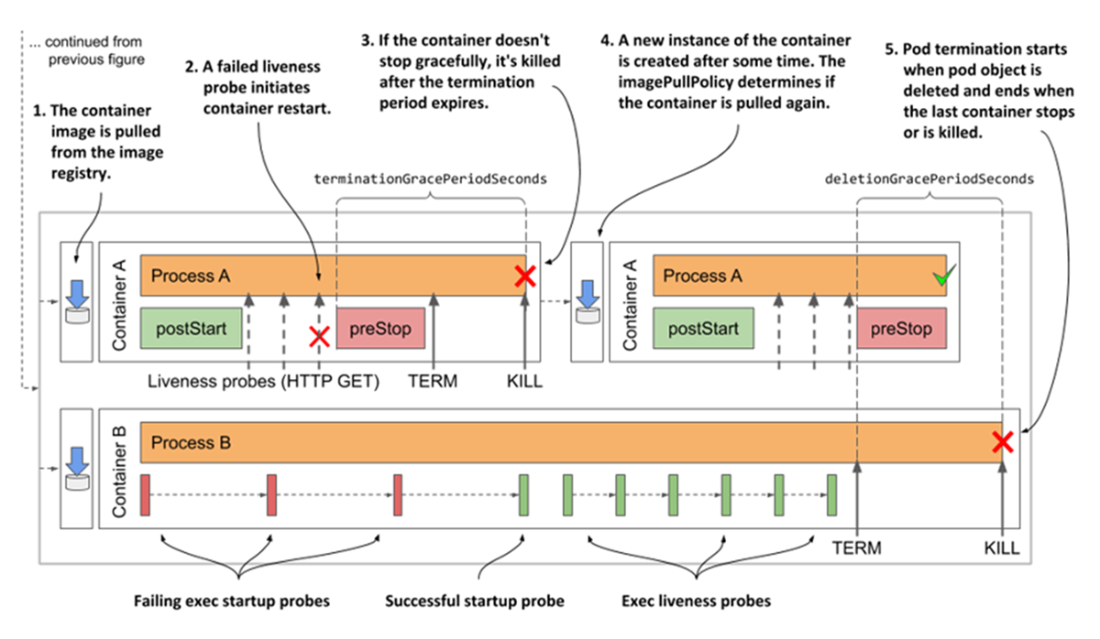
Complete overview of the pod’s normal operation
Summary
- The status of the pod contains information about the phase of the pod, its conditions, and the status of each of its containers. You can view the status by running the kubectl describe command or by retrieving the full pod manifest using the command kubectl get -o yaml.
- Depending on the pod’s restart policy, its containers can be restarted after they are terminated. In reality, a container is never actually restarted. Instead, the old container is destroyed, and a new container is created in its place.
- If a container is repeatedly terminated, an exponentially increasing delay is inserted before each restart. There is no delay for the first restart, then the delay is 10 seconds, and it then doubles before each subsequent restart. The maximum delay is 5 minutes and is reset to zero when the container has been running properly for at least twice this time.
- An exponentially increasing delay is also used after each failed attempt to download a container image.
- Adding a liveness probe to a container ensures that the container is restarted when it stops responding. The liveness probe checks the state of the application via an HTTP GET request, by executing a command in the container, or opening a TCP connection to one of the network ports of the container.
- If the application needs a long time to start, a startup probe can be defined with settings that are more forgiving than those in the liveness probe to prevent premature restarting of the container.
- You can define lifecycle hooks for each of the pod’s main containers. A post-start hook is invoked when the container starts, whereas a pre-stop hook is invoked when the container must shut down. A lifecycle hook is configured to either send an HTTP GET request or execute a command within the container.
- If a pre-stop hook is defined in the container and the container must terminate, the hook is invoked first. The SIGTERM signal is then sent to the main process in the container. If the process doesn’t stop within terminationGracePeriodSeconds after the start of the termination sequence, the process is killed.
- When you delete a Pod object, all its regular containers are terminated in parallel, and any native sidecars are terminated afterward, once all regular containers have stopped. The pod’s deletionGracePeriodSeconds is the time given to the containers to shut down. By default, it’s set to the termination grace period but can be overridden using the kubectl delete command.
- If shutting down a pod takes a long time, it is likely that one of the processes running in it doesn’t handle the SIGTERM signal. Adding a SIGTERM signal handler is a better solution than shortening the termination or deletion grace period.

 Kubernetes in Action, Second Edition ebook for free
