5 Running applications with pods
This chapter explains how Kubernetes runs applications with pods, the atomic unit that groups one or more tightly related containers. It contrasts the single-process-per-container model with the need to co-locate cooperating processes, showing how pods share network, IPC, and UTS namespaces (and optionally PID), while keeping separate filesystems and using volumes for shared data. You learn when to split functionality into separate pods for better placement and independent scaling, and when to combine containers using the sidecar pattern to augment a primary application. The chapter also introduces native sidecars and init containers as lifecycle tools to prepare, extend, and stabilize application runtime behavior.
On the practical side, the chapter walks through defining Pod objects in YAML/JSON and managing them declaratively with kubectl apply. It covers observing pod state via get, describe, and Events, and several ways to reach applications: direct pod IP (inside the cluster), one-off client pods, port-forwarding, and API server proxying. You learn to inspect and stream logs (with timestamps, tailing, and time filters), attach to containers (including interactive stdin), execute commands and full shells for troubleshooting, and move files in and out of containers. For deeper diagnostics in lean images, it shows how to add ephemeral debug containers and, when necessary, share the process namespace to observe cross-container processes.
Multi-container pods are illustrated with real examples, such as adding an Envoy sidecar to terminate TLS and forward traffic to an HTTP-only app, and other complementary sidecars like content fetchers or log processors. The chapter explains init containers for staged initialization, when moving setup out of the main image improves security and reuse, and how native sidecars (initContainers with an Always restart policy) start early, serve both init and main containers, and shut down last. It concludes with cleanup techniques: deleting pods and multi-object manifests, understanding why Deployment-managed pods reappear unless you scale or delete the controller, and bulk deletion options across object types.
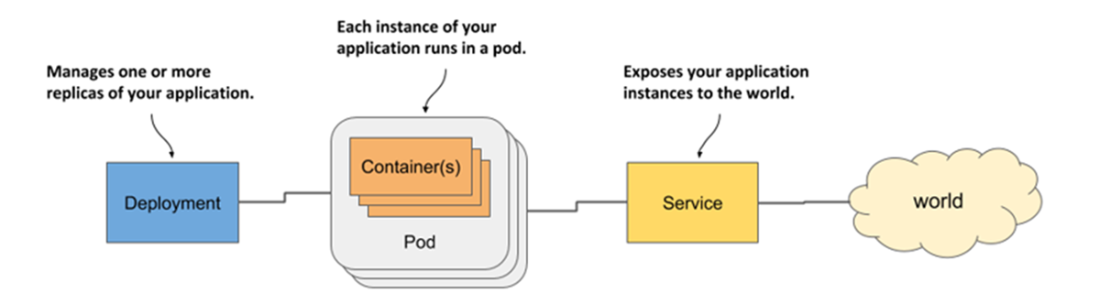
Three basic object types comprising a deployed application
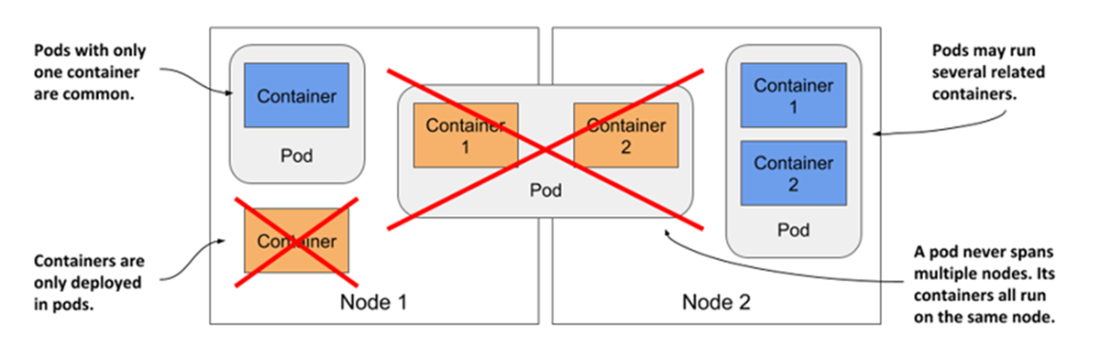
All containers of a pod run on the same node. A pod never spans multiple nodes.
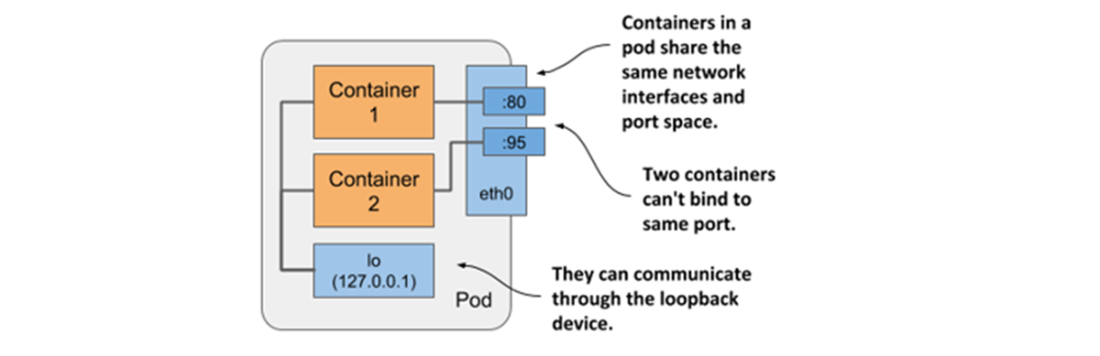
Containers in a pod share the same network interfaces.
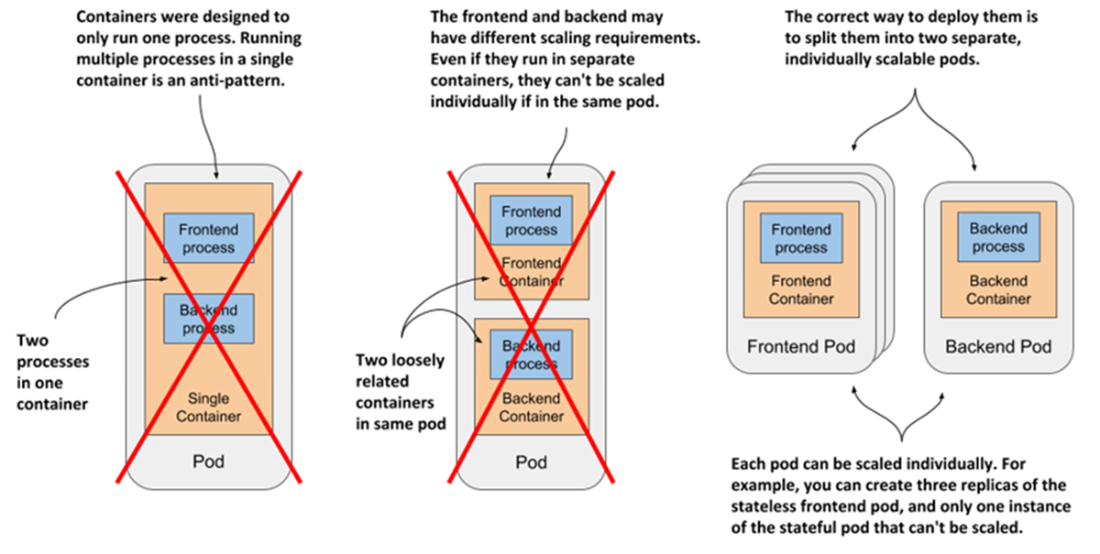
Splitting an application stack into pods
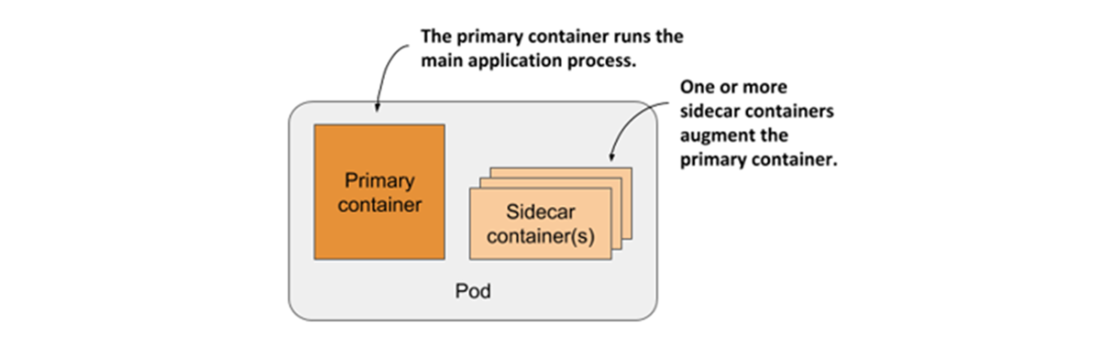
A pod with a primary and sidecar container(s)
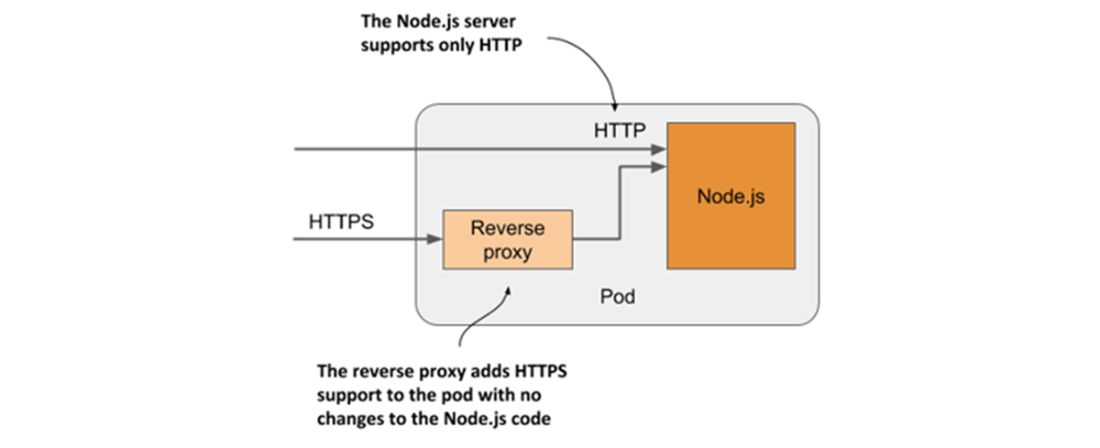
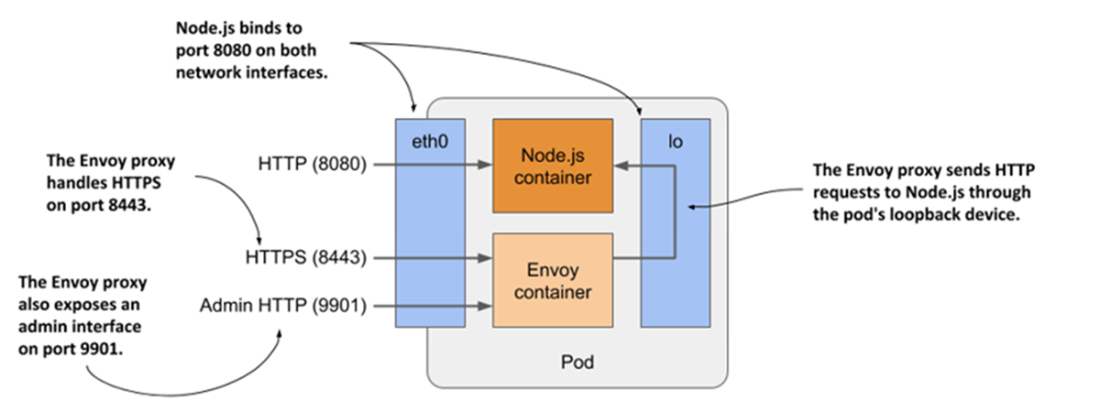
A sidecar container that converts HTTPS traffic to HTTP
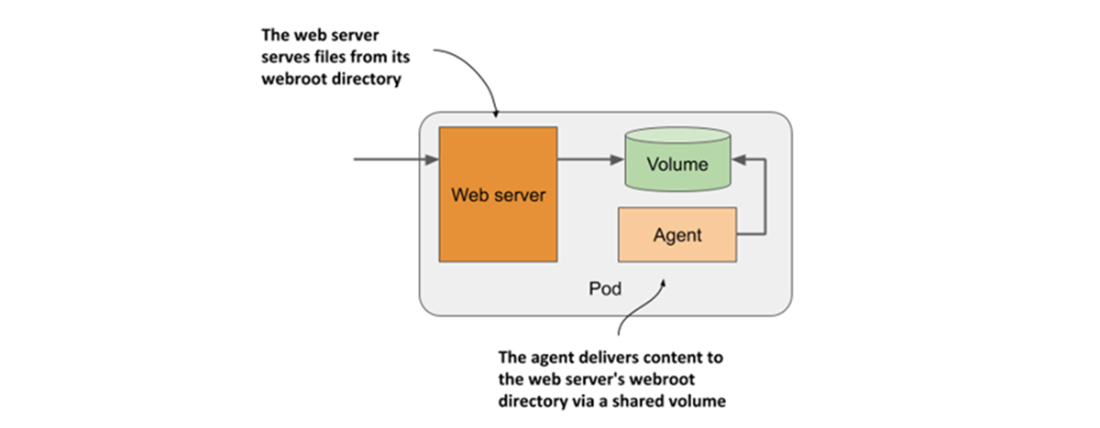
A sidecar container that delivers content to the web server container via a volume
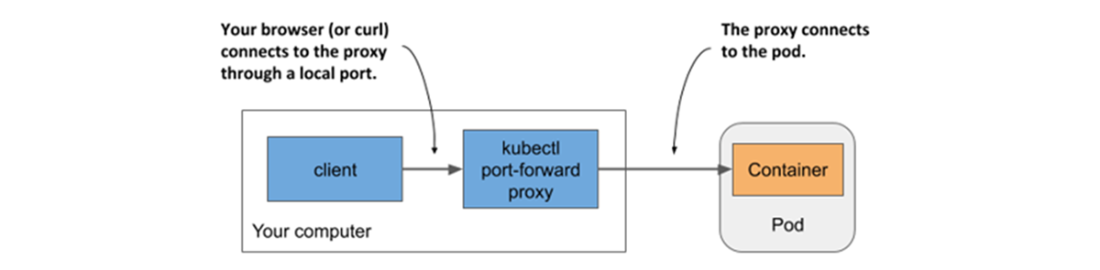
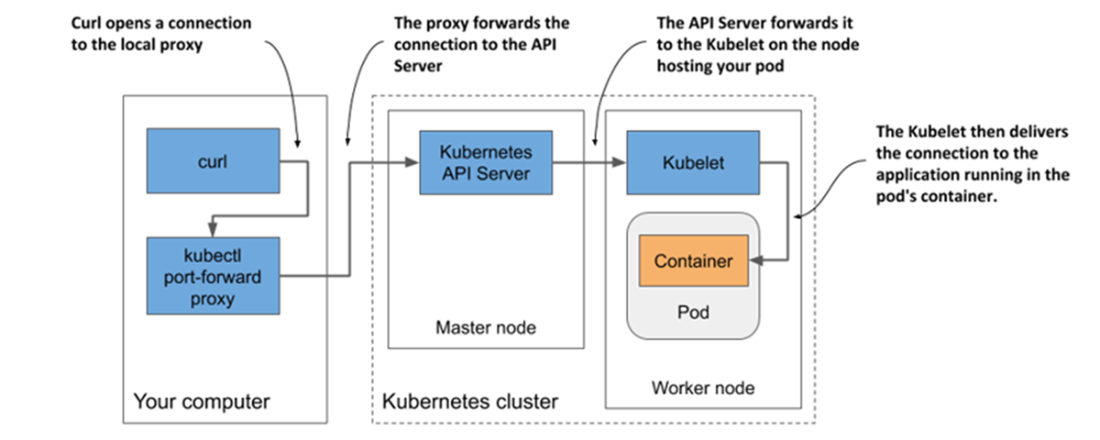
Connecting to a pod through the kubectl port-forward proxy
The long communication path between curl and the container when using port forwarding
Detailed view of the pod’s containers and network interfaces
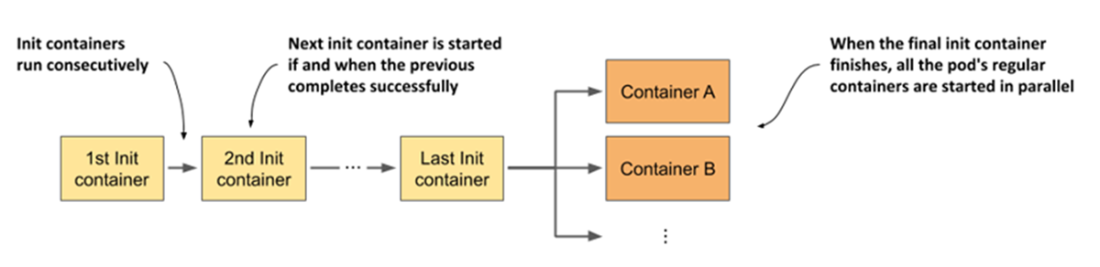
Time sequence showing how a pod’s init and regular containers are started
Summary
- Pods run one or more containers as a co-located group. They are the unit of Deployment and horizontal scaling. A typical container runs only one process. Sidecar containers complement the primary container in the pod.
- Containers should only be part of the same pod if they must run together. A frontend and a backend process should run in separate pods. This allows them to be scaled individually.
- When a pod starts, its init containers run one after the other. When the last init container completes, the pod’s main containers are started. You can use an init container to configure the pod from within, delay startup of its main containers until a precondition is met, or notify an external service that the pod is about to start running.
- The kubectl tool is used to create pods, view their logs, copy files to/from their containers, execute commands in those containers, and enable communication with individual pods during development.
FAQ
What is a Pod and why is it the basic unit in Kubernetes?
A Pod is the smallest deployable unit in Kubernetes. It groups one or more tightly coupled containers that run together on the same node and are managed as a single unit. Pods are used instead of multi-process containers so you can keep each process isolated in its own container while still running them together when they must cooperate closely.What do containers in the same Pod share?
Containers in a Pod share several Linux namespaces and resources: - Network namespace: same IP, interfaces, and port space (no port conflicts inside the Pod). - UTS and IPC namespaces: same hostname and IPC. - Optional shared PID namespace: single process tree if enabled per Pod. - Storage via volumes: each container has its own mount namespace, but volumes can be mounted into multiple containers to share files.When should I put multiple containers in one Pod vs separate Pods?
Use a single Pod when containers must be co-located and managed together (sidecar pattern). Ask yourself: - Must they run on the same host and share networking/storage? - Do you want to manage and scale them as one unit? - Do they form a single, cohesive component? - Can one node meet their combined resource needs? If any answer is no, split them into separate Pods (enables independent placement and scaling).How do I create and update a Pod from a YAML manifest?
- Author a Pod manifest (apiVersion, kind: Pod, metadata.name, spec.containers[…]).- Create or update it with: kubectl apply -f file.yaml.
- Retrieve the full live manifest: kubectl get pod NAME -o yaml.
Notes: - Some Pod fields are immutable; if apply fails, delete and recreate the Pod. - Keep manifests in version control to make deployments reproducible.
What are the common ways to reach an app running in a Pod?
- From a node: SSH/exec into a worker node and curl the Pod IP and port (shortest path for troubleshooting).- From a one-off client Pod: kubectl run … to execute curl from another Pod (tests Pod-to-Pod connectivity and any network policies).
- Port-forward: kubectl port-forward POD localPort:podPort to access it via localhost (app must listen on loopback inside the Pod).
- API server proxy: kubectl get --raw /api/v1/namespaces/NS/pods/POD/proxy/… for quick HTTP access via the API server.
For stable client access, expose the Pod with a Service (covered elsewhere).
How do I view and filter container logs (including multi-container Pods)?
- Basic: kubectl logs POD (streams stdout/stderr captured by the runtime).- Follow: kubectl logs POD -f.
- Timestamps: kubectl logs POD --timestamps.
- Time filters: --since=2m or --since-time=RFC3339.
- Tail lines: --tail=100.
- Previous crash: --previous.
- Multi-container: specify -c CONTAINER or use --all-containers.
Availability notes: - Logs are kept per container on the node and may rotate; following logs stops on container restart or rotation. - Deleting a Pod removes its logs; use centralized logging for retention.
What’s the difference between logs, attach, and exec (and when to use each)?
- kubectl logs: Read-only view of a container’s stdout/stderr; best for passive inspection and filtering.- kubectl attach: Stream stdout/stderr like logs, and optionally send input (use -i); container must have stdin: true (and tty: true for terminal semantics). Useful for apps that read from stdin.
- kubectl exec: Run a command or an interactive shell inside the container (use -it). Great for ad-hoc diagnostics and environment inspection. For multi-container Pods, add -c CONTAINER.
Tip: kubectl cp can move files in/out during debugging (requires tar in the image).
What is a sidecar container and why use it?
A sidecar is an auxiliary container in the same Pod that augments the main container without changing its code. Common uses: - Protocol adaptation and TLS termination (e.g., Envoy to add HTTPS while the app speaks HTTP). - Content fetchers, log shippers/rotators, metrics agents, or data processors. Trade-offs: faster to implement for legacy apps, but increases Pod resource usage.What are init containers and native sidecars? How do they differ?
- Init containers: Run before regular containers, one at a time, and must all complete successfully. Use them to prepare files/config, check dependencies, or perform network setup before the app starts.- Native sidecars: Define an init container with restartPolicy: Always. It starts during the init phase but stays running for the Pod’s lifetime, restarts if it dies, and is terminated after normal containers. Use them when a sidecar must be available to later init containers and must outlive the main app during shutdown (e.g., network proxy, log processor).
How can I debug a running Pod that lacks diagnostic tools?
Use ephemeral containers with kubectl debug to inject a temporary debug container (e.g., nicolaka/netshoot) into the Pod without recreating it. This lets you run tools like tcpdump, dig, or netcat alongside your app. For process-level debugging across containers, you can enable a shared PID namespace (shareProcessNamespace: true) so tools can see other containers’ processes.How do I delete Pods and other objects, and why do some Pods reappear?
- Delete by name: kubectl delete pod NAME (Pod shows Terminating during shutdown).- Delete by manifest: kubectl delete -f file.yaml (or an entire directory, add --recursive for subdirs).
- Delete multiple: list names, or use --all to remove all of a kind (e.g., kubectl delete po --all).
- Everything common in a namespace: kubectl delete all --all (does not include every kind; add specific types as needed).
If Pods keep coming back, they are managed by a higher-level controller (e.g., a Deployment). Scale the Deployment to 0 or delete the Deployment to stop it recreating Pods.

 Kubernetes in Action, Second Edition ebook for free
