4 Navigating the Kubernetes API and object model
This chapter introduces how all cluster management in Kubernetes flows through its HTTP-based, RESTful API and the objects it exposes. It clarifies the subtle but important distinction between resources (the API endpoints) and objects (the entities they represent), noting that a single object can be reachable through multiple resources and versions. Object manifests are exchanged as JSON or YAML and share a common shape: type metadata, object metadata, spec (desired state), and status (observed state). Controllers in the control plane continuously reconcile spec to status—users write the spec, controllers report the status—and some object kinds without dynamic behavior (such as events) omit spec and status entirely.
Using the Node kind as a running example, the chapter walks through inspecting full manifests and individual fields. Node objects, typically registered by the Kubelet, map one-to-one to machines and expose concise spec fields (for example, podCIDR) and rich status details (addresses, capacity, images, nodeInfo). Tools like kubectl get -o yaml, kubectl explain (including recursive views), and even direct API access via kubectl proxy help you explore schema and live data. A spotlight is put on the widely used conditions field: orthogonal condition types such as MemoryPressure, DiskPressure, PIDPressure, and especially Ready report granular health with True/False/Unknown states, transition times, reasons, and messages—crucial signals when troubleshooting.
For day-to-day inspection, kubectl describe presents the same information in a friendlier format and also aggregates related data, such as pods scheduled on a node, resource allocation, and recent events. The chapter then examines Event objects, which controllers emit to record Normal progress and Warning problems during reconciliation. Events are standalone, short-lived API objects you can list with kubectl get events, expand with wide output, and filter using field selectors (for example, type=Warning) to surface issues quickly. Although Event manifests lack spec/status and appear alphabetically ordered (making them less readable), they remain invaluable for understanding what’s happening in the cluster as you create and modify API objects.
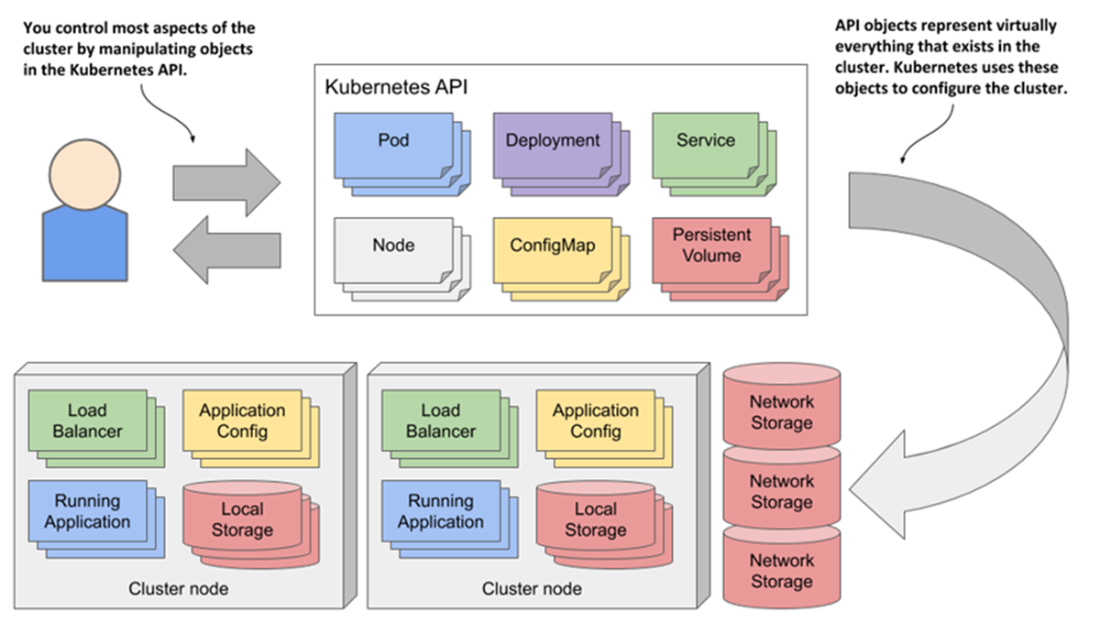
A Kubernetes cluster is configured by manipulating objects in the Kubernetes API.
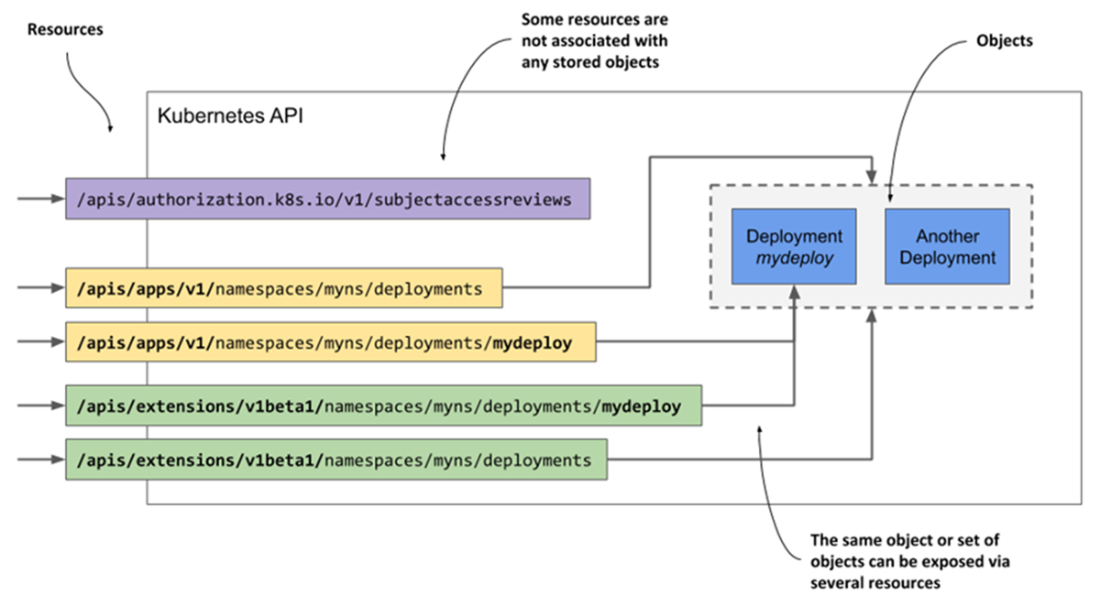
A single object can be exposed by two or more resources.
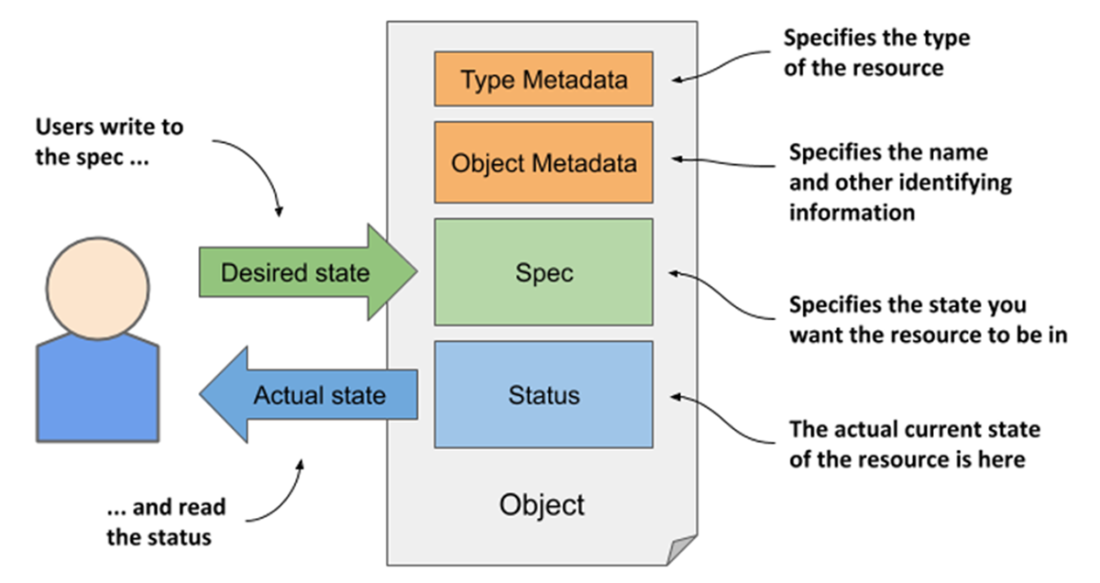
The main sections of a Kubernetes API object
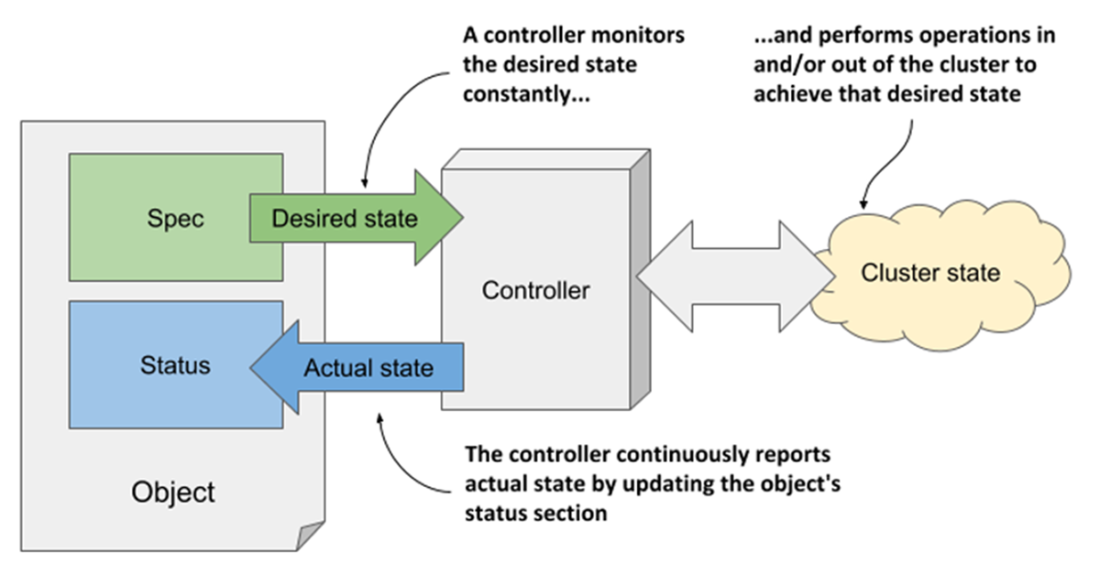
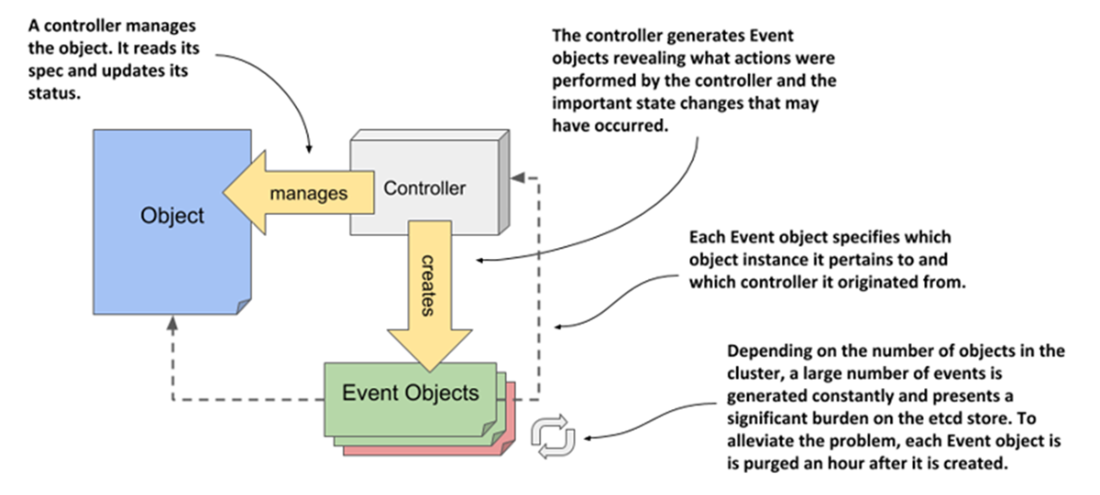
How a controller manages an object
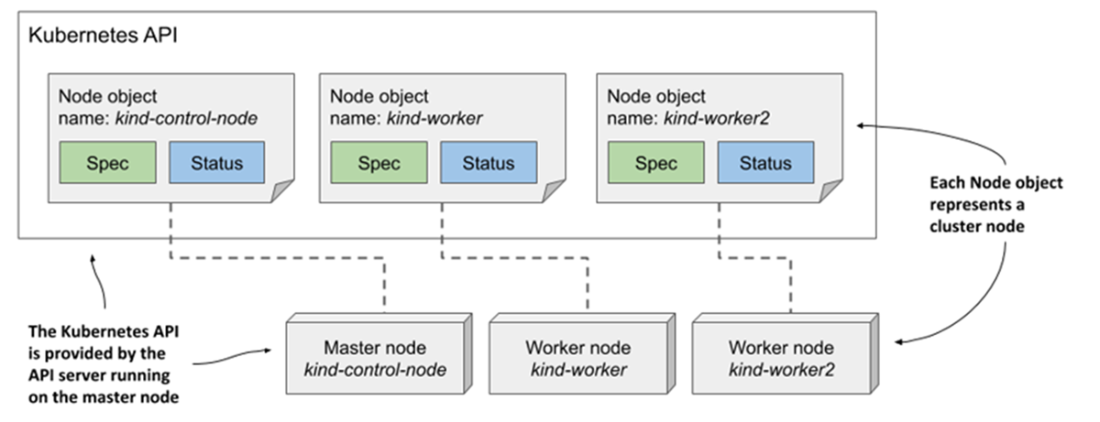
Cluster nodes are represented by Node objects.
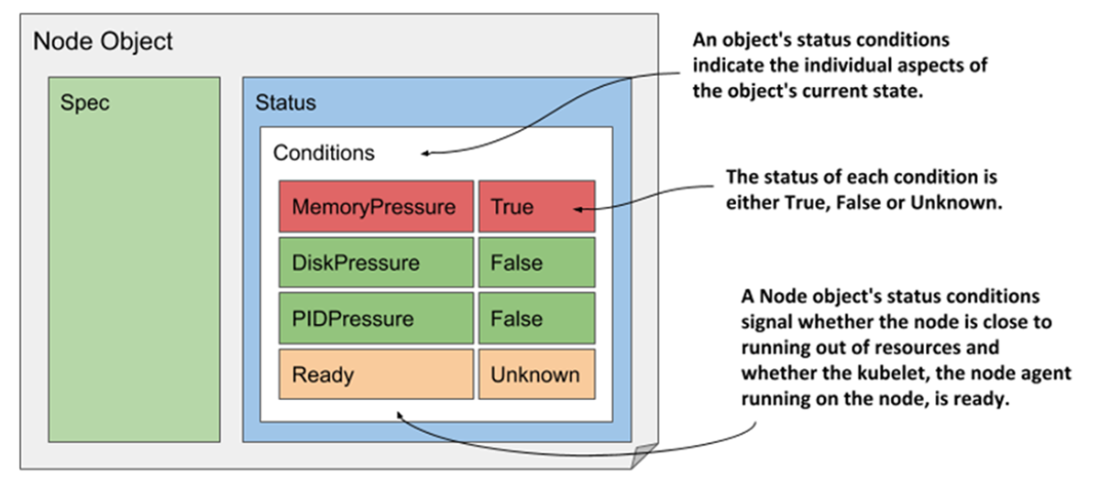
The status conditions indicating the state of a Node object
The relationship between Event objects, controllers, and other API objects
Summary
- Kubernetes provides a RESTful API for interaction with a cluster. API objects map to actual components that make up the cluster, including applications, load balancers, nodes, storage volumes, and many others.
- An object instance can be represented by many resources. A single object type can be exposed through several resources that are just different representations of the same thing.
- Kubernetes API objects are described in YAML or JSON manifests. Objects are created by posting a manifest to the API. The status of the object is stored in the object itself and can be retrieved by requesting the object from the API using a GET request.
- All Kubernetes API objects contain type and object metadata, and most have a spec and status sections. A few object types don’t have these two sections as they only contain static data.
- Controllers bring objects to life by constantly watching for changes in their spec, updating the cluster state and reporting the current state via the object’s status field.
- As controllers manage Kubernetes API objects, they emit events to show what actions they have performed. Like everything else, events are represented by objects and can be retrieved through the API. Events signal what is happening to a Node or other object. They show what has recently happened to the object and can provide clues as to why it is broken.
- The kubectl explain command provides a quick way to look up documentation on a specific object kind and its fields from the command line.
- The status in a Node object contains information about the node’s IP address and hostname, its resource capacity, conditions, cached container images, and other information about the node. Pods running on the node are not part of the node’s status, but the kubectl describe node commands get this information from the pods resource.
- Many object types use status conditions to signal the state of the component that the object represents. For nodes, these conditions are MemoryPressure, DiskPressure, and PIDPressure. Each condition is either True, False, or Unknown and has an associated reason and message that explain why the condition is in the specified state.
FAQ
What is the Kubernetes API and how is it used?
The Kubernetes API is an HTTP-based RESTful interface. You manipulate cluster state by performing CRUD operations on resources via standard HTTP methods (GET, POST, PUT/PATCH, DELETE). Objects are returned and submitted as JSON by default or YAML if requested. These API objects represent everything in the cluster: applications, services, nodes, storage, RBAC, and more.What’s the difference between a “resource” and an “object” in Kubernetes?
A resource is a REST endpoint (a “view”) exposed by the API, while an object is the instance of cluster state. A single object can be exposed by multiple resources, including different API versions (for example, Deployments under/apis/apps/v1 and older /apis/extensions/v1beta1). Some resources (like SubjectAccessReview) don’t persist objects at all—they just return a response.How can I access the API directly without kubectl?
The API uses TLS and typically requires a client cert or token. The simplest way to experiment is to runkubectl proxy, which starts a local HTTP proxy at 127.0.0.1:8001. You can then browse endpoints like http://127.0.0.1:8001/api/v1/nodes/<node-name> using curl or a browser.What are the main sections of a Kubernetes object manifest?
Most objects have four top-level sections: 1) Type metadata:apiVersion and kind; 2) Object metadata: metadata (name, labels, annotations, etc.); 3) spec: desired state; 4) status: last observed state. Not all kinds include spec/status (for example, Event). The API returns the full object on GET, and updates typically send the full object.Who writes spec and status, and how does reconciliation work?
You write the desired state inspec. Controllers (control plane components responsible for a given kind, such as the Deployment controller) read the spec, act to achieve it, and then write the current state into status. This “reconcile” loop runs continuously.How do I inspect Node objects and what key fields should I look at?
Usekubectl get nodes, then kubectl get node <name> -o yaml or kubectl describe node <name>. In spec, note podCIDR and any taints. In status, check addresses, capacity/allocatable, conditions, cached images, and nodeInfo. Node objects are usually registered by the kubelet when a machine joins the cluster.How can I discover the meaning and structure of object fields?
Usekubectl explain <kind> for top-level fields, and kubectl explain <kind>.<field> to drill down (for example, kubectl explain node.spec). If multiple API versions exist, add --api-version. To view the full field tree, use --recursive.What are node status conditions and how do I interpret them?
Nodes commonly report conditions with atype and status of True/False/Unknown: Ready (is the node ready to accept pods?), MemoryPressure, DiskPressure, and PIDPressure (resource pressure signals). Each includes reason, message, lastTransitionTime, and lastHeartbeatTime. Troubleshoot by checking these when a node behaves unexpectedly.What are Event objects and why aren’t they embedded in other objects?
Events are standalone objects created by controllers to record actions and issues during reconciliation. They have atype of Normal or Warning, include the involved object, a machine-facing reason, and a human-friendly message. They’re kept only briefly (for example, about an hour by default) to reduce load on the datastore, so they aren’t stored inside other objects.How do I list and filter events to find problems quickly?
Usekubectl get events (short name ev) to see recent events; add -o wide for more columns. To focus on issues, filter with a field selector, for example kubectl get ev --field-selector type=Warning. The kubectl describe <resource>/<name> command also shows just the events related to that object.
 Kubernetes in Action, Second Edition ebook for free
