3 Deploying your first application on Kubernetes
This chapter presents a hands-on path from standing up a Kubernetes cluster to operating a simple web application on it. It compares lightweight local options (Docker Desktop’s single-node Kubernetes, Minikube, and kind) with managed, multi-node offerings in the cloud (notably Google Kubernetes Engine and Amazon Elastic Kubernetes Service), and explains why newcomers often start with local tools while production systems typically use managed clusters. It then introduces kubectl—the CLI for interacting with the Kubernetes API—showing how to install it, configure access, verify cluster health, and optionally use a web dashboard, while emphasizing that kubectl remains the primary and most capable interface.
With a cluster and kubectl ready, the chapter walks through deploying the sample Kiada application using an imperative workflow: create a Deployment that describes the desired application image and replica count, let Kubernetes schedule and run Pods, and observe status via kubectl. It clarifies that Pods—not individual containers—are Kubernetes’ smallest deployable unit, and that Kubernetes reconciles desired and actual state by pulling container images and starting workloads. To make the app reachable, it creates a Service, typically of type LoadBalancer in cloud environments, and explains alternatives like node ports for local clusters that lack external load balancers. The result is a stable, single access point that forwards traffic to the backing Pods.
Finally, the chapter demonstrates horizontal scaling by increasing the Deployment’s replicas, showing how Kubernetes creates additional Pods and how the Service distributes requests across them. It distinguishes the logical view (Deployment, Pods, Service) from the physical view (nodes, load balancers, and networking) and stresses pod ephemerality: Pods can be replaced at any time, so clients should target the Service’s stable virtual IP rather than Pod IPs. In short, you learn to stand up a cluster, use kubectl, deploy and expose an application, and scale it out—relying on Kubernetes to reconcile state and route traffic reliably.
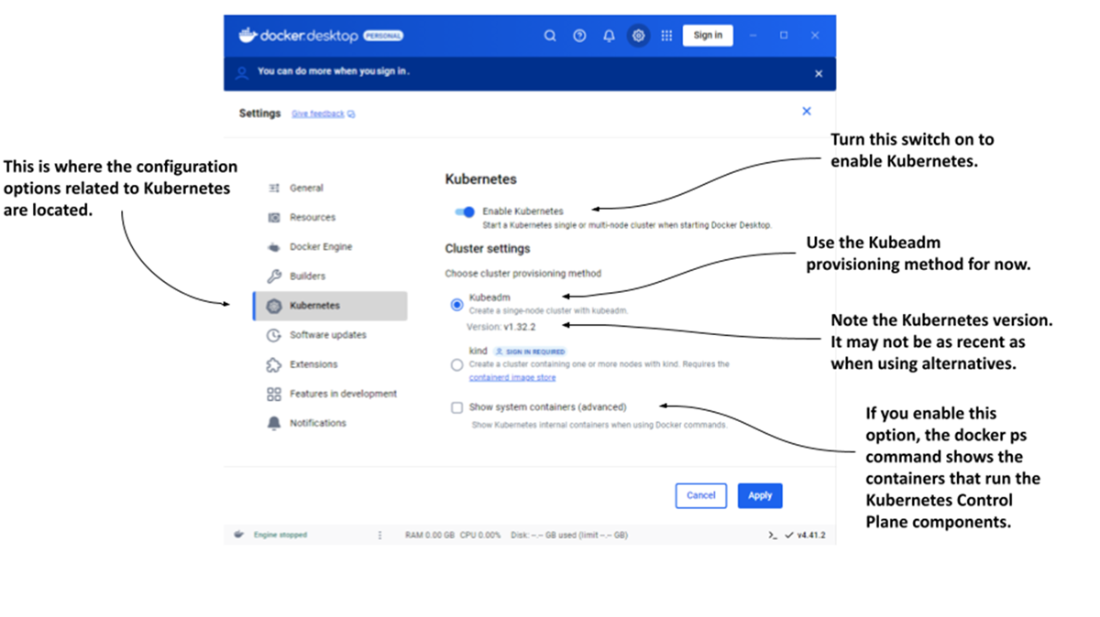
The Settings dialog box in Docker Desktop for Windows
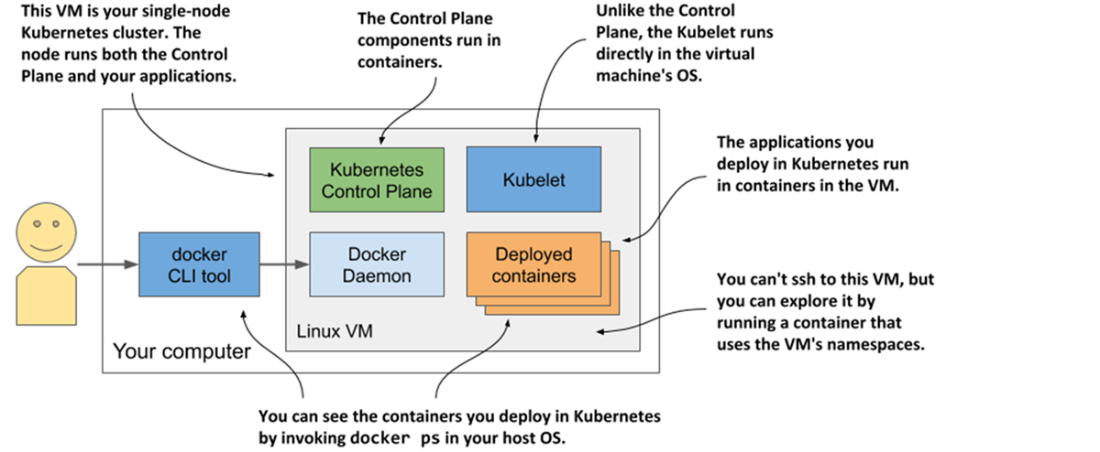
Kubernetes running in Docker Desktop
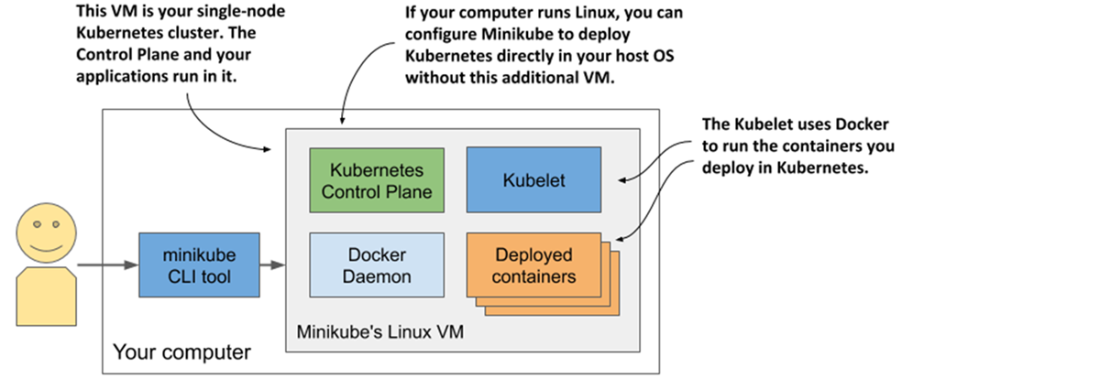
Running a single-node Kubernetes cluster using Minikube
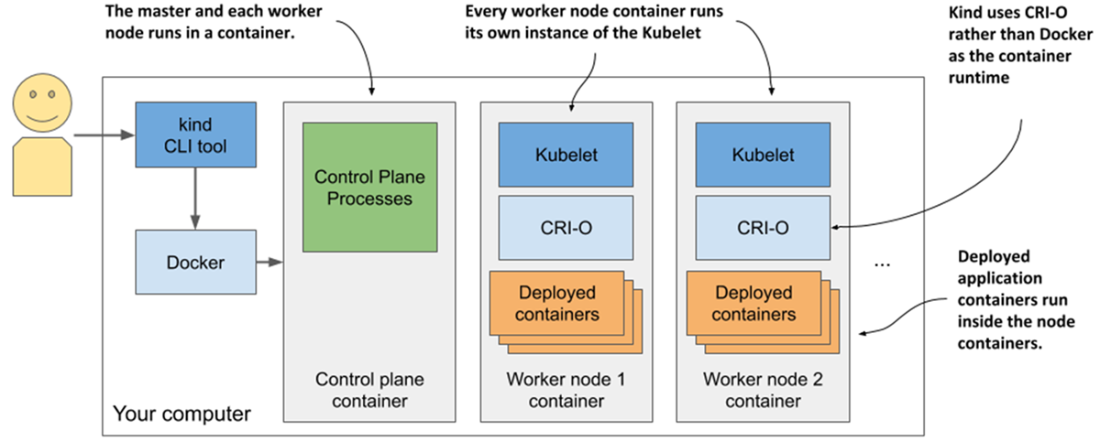
Running a multi-node Kubernetes cluster using kind
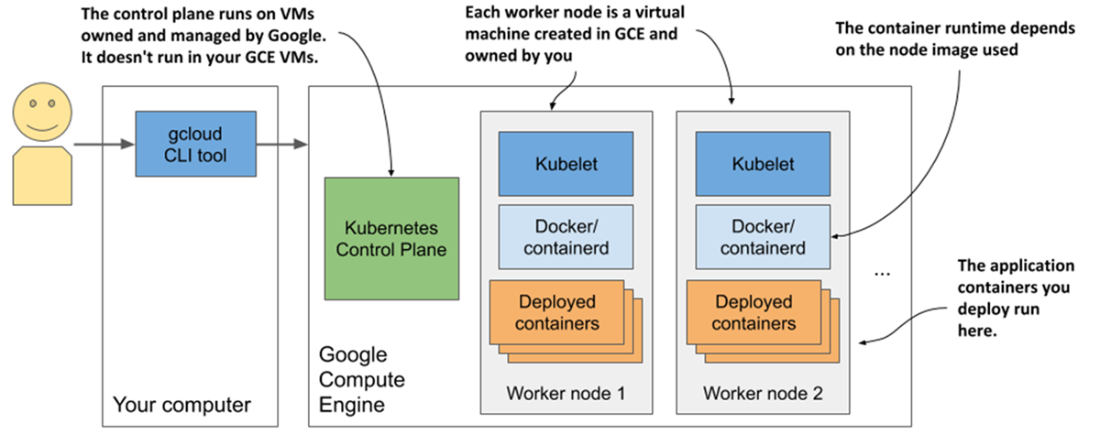
Your Kubernetes cluster in Google Kubernetes Engine
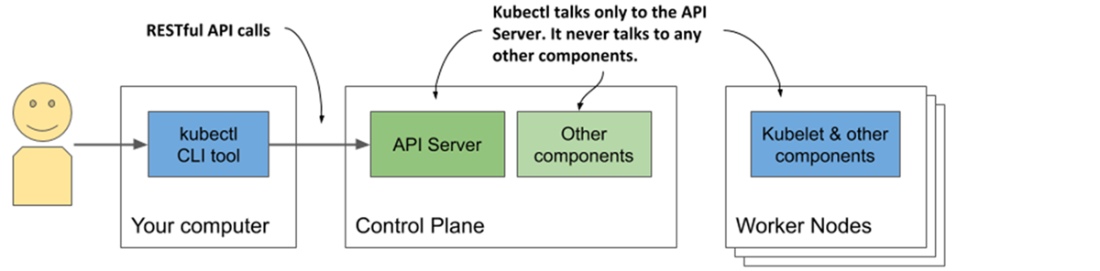
Interacting with a Kubernetes cluster
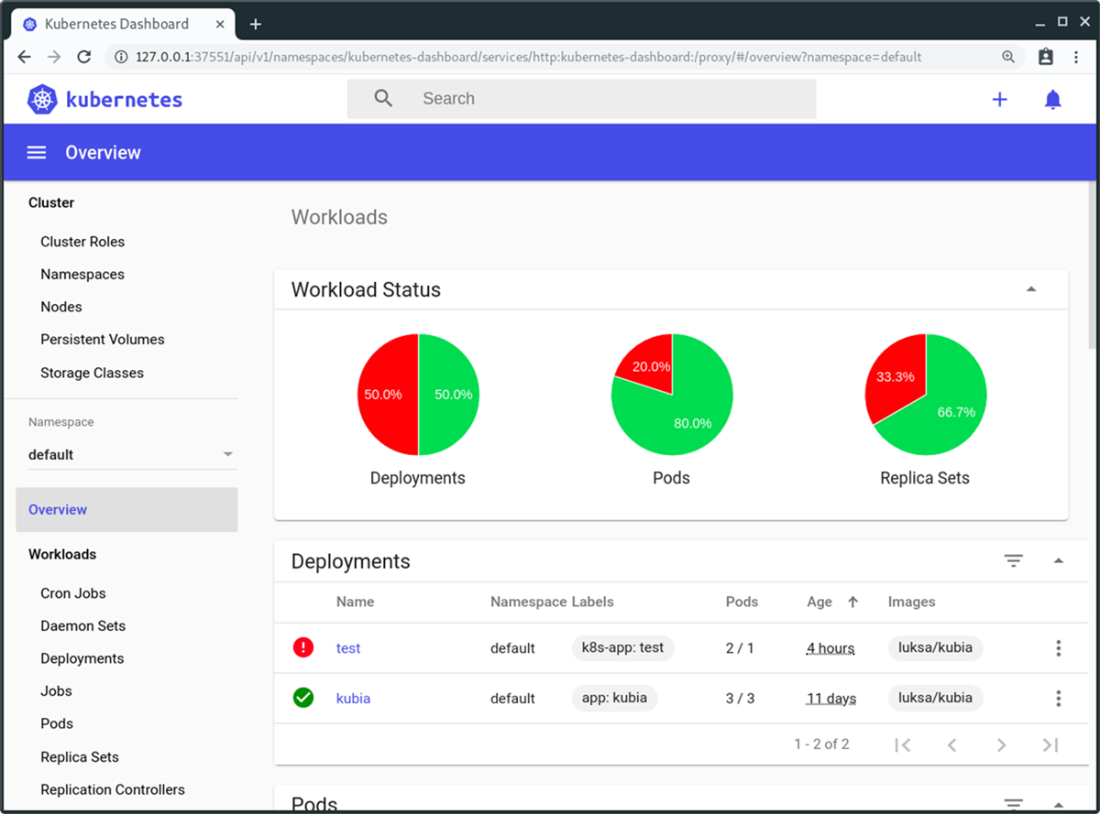
Screenshot of the Kubernetes web-based dashboard
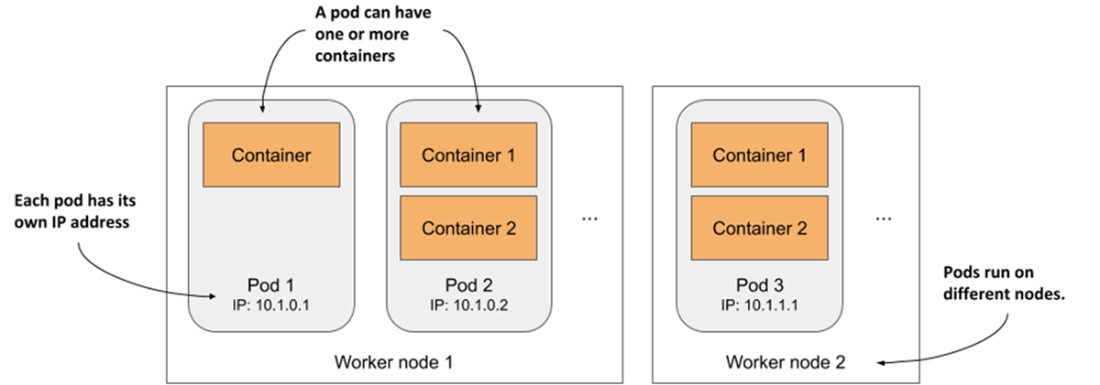
The relationship between containers, pods, and worker nodes
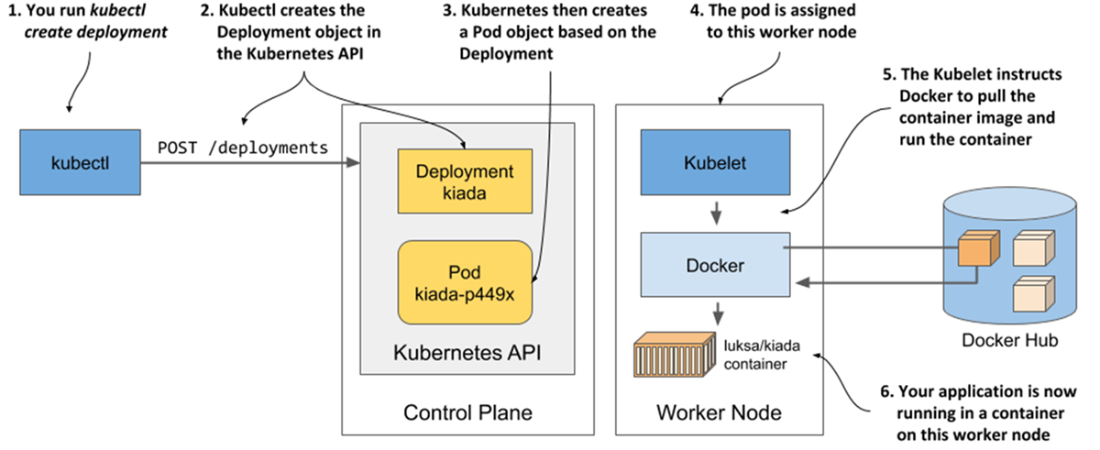
How creating a Deployment object results in a running application container
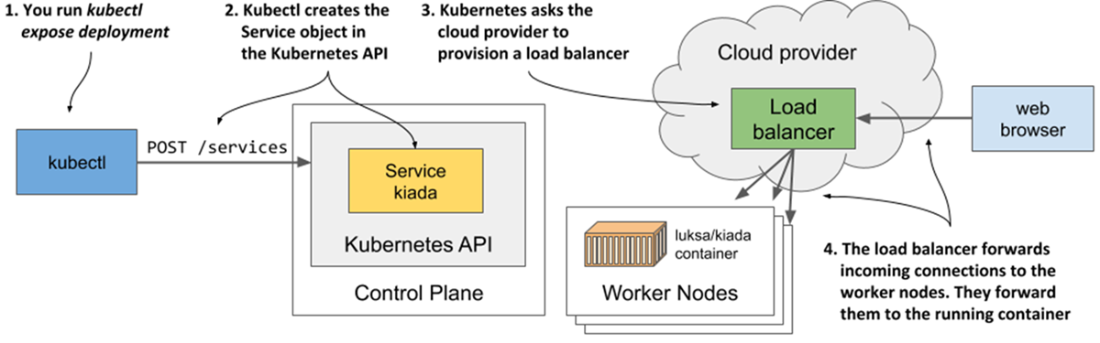
What happens when you create a Service object of type LoadBalancer
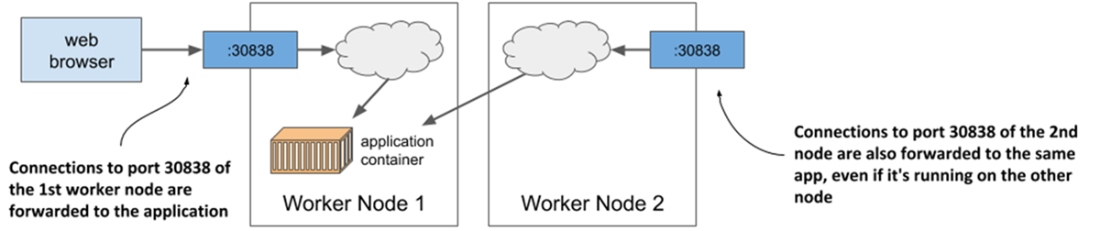
Connection routing through a service’s node port
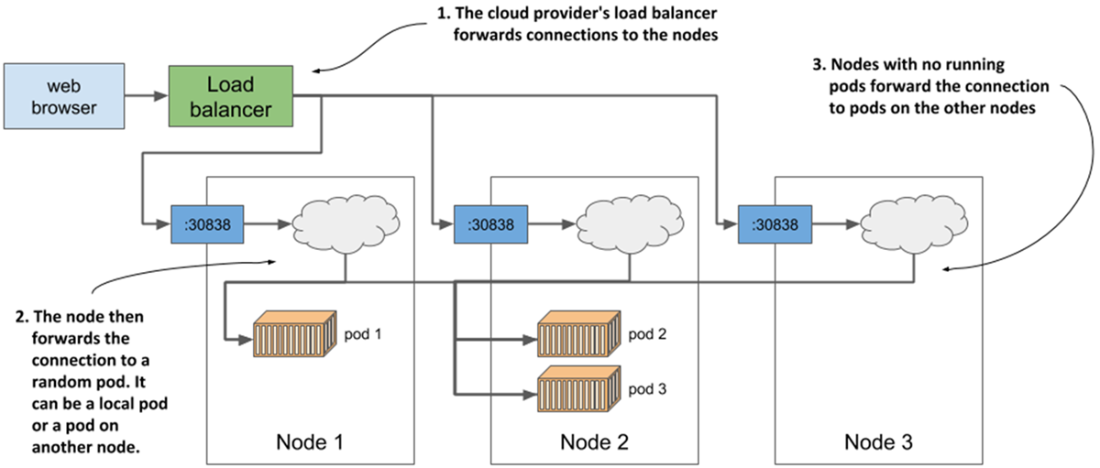
Load balancing across multiple pods backing the same service
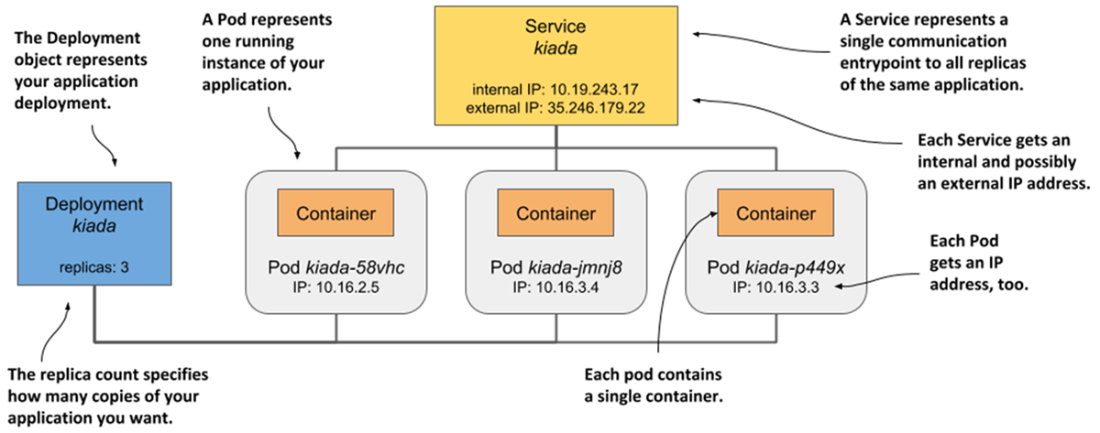
Your deployed application consists of a Deployment, several pods, and a service.
Summary
- Virtually all cloud providers offer a managed Kubernetes option. They take on the burden of maintaining your Kubernetes cluster, while you only use its API to deploy your applications.
- You can also install Kubernetes in the cloud yourself, but this may not be the best idea until you master all aspects of managing Kubernetes.
- You can install Kubernetes locally, even on your laptop, using tools such as Docker Desktop or Minikube, which run Kubernetes in a Linux VM, or kind, which runs the master and worker nodes as Docker containers and the application containers inside those containers.
- Kubectl, the command-line tool, is the usual way you interact with Kubernetes. A web-based dashboard also exists, but it is not as stable and up to date as the CLI tool.
- To work faster with kubectl, it is useful to create a short alias for it and enable shell completion.
- An application can be deployed using kubectl create deployment. It can then be exposed to clients by running kubectl expose deployment. Horizontally scaling the application is trivial: kubectl scale deployment instructs Kubernetes to add new replicas or removes existing ones to reach the number of replicas you specify.
- The basic unit of Deployment is not a container, but a pod, which can contain one or more related containers.
- Deployments, Services, Pods, and Nodes are Kubernetes objects/resources. You can list them with kubectl get and inspect them with kubectl describe.
- The Deployment object deploys the desired number of pods, while the Service object makes them accessible under a single, stable IP address.
- Each service provides internal load balancing in the cluster, but if you set the type of service to LoadBalancer, Kubernetes will ask the cloud infrastructure it runs in for an additional load balancer to make your application available at a publicly accessible address.

 Kubernetes in Action, Second Edition ebook for free
