2 Understanding containers and containerized applications
This chapter provides a practical and conceptual foundation for working with containers as the unit of deployment that Kubernetes manages. It contrasts containers with virtual machines, highlighting lower overhead, faster startup, and different isolation trade-offs when multiple workloads share a single kernel. The narrative introduces the core container workflow and vocabulary—images, registries, and running containers—along with portability caveats such as reliance on host kernel features and CPU architecture compatibility. It also situates Docker within a broader, standards-based ecosystem, explaining the roles of the Open Container Initiative and Kubernetes’ Container Runtime Interface with implementations like containerd and CRI-O.
Readers are guided through a hands-on journey using Docker: pulling and running existing images, understanding tags and variants, and then building, running, and inspecting a simple microservice-based demo application. The chapter demystifies Dockerfiles, image layering, and copy-on-write behavior, showing why layers improve distribution and storage efficiency while warning about operations that inflate image size. It covers the end-to-end workflow from local builds to remote distribution via an image registry, and demonstrates everyday container operations—port mapping, listing and inspecting containers, viewing logs, stopping and restarting containers, and cleaning up images—so that the same images can later be orchestrated by Kubernetes.
Under the hood, the chapter explains the Linux kernel features that make containers possible. Namespaces provide each process with a customized view of system resources (filesystems, PIDs, networking, hostname, users, time, and cgroups), enabling isolation and selective sharing across processes. Control groups enforce resource governance by limiting CPU and memory consumption. Security hardening is addressed by running without elevated privileges, granting only necessary capabilities, filtering syscalls with seccomp, and leveraging mandatory access controls such as AppArmor and SELinux. Together, these mechanisms deliver strong isolation and predictable resource usage for containerized applications while clarifying the differences from the stronger but heavier isolation of virtual machines.
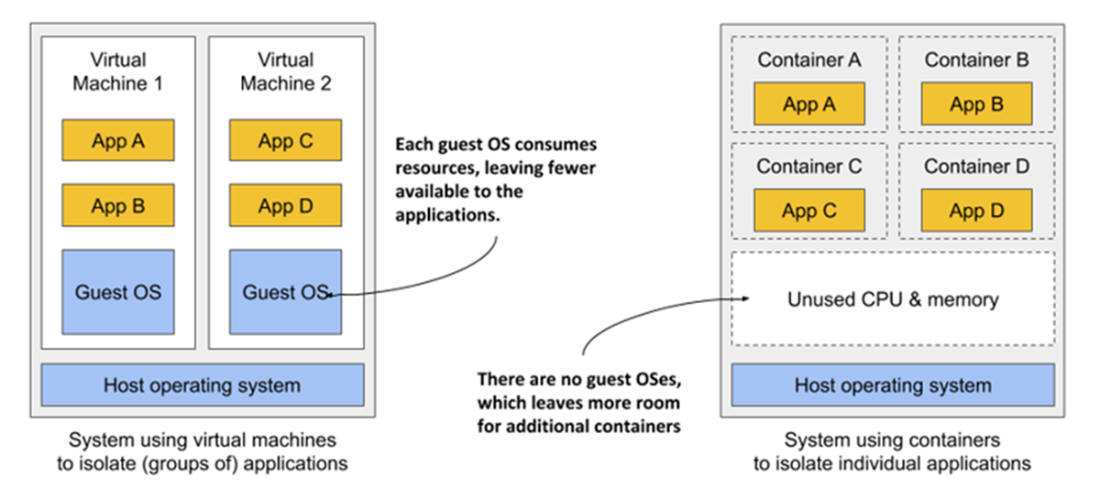
Running applications in VMs vs. containers
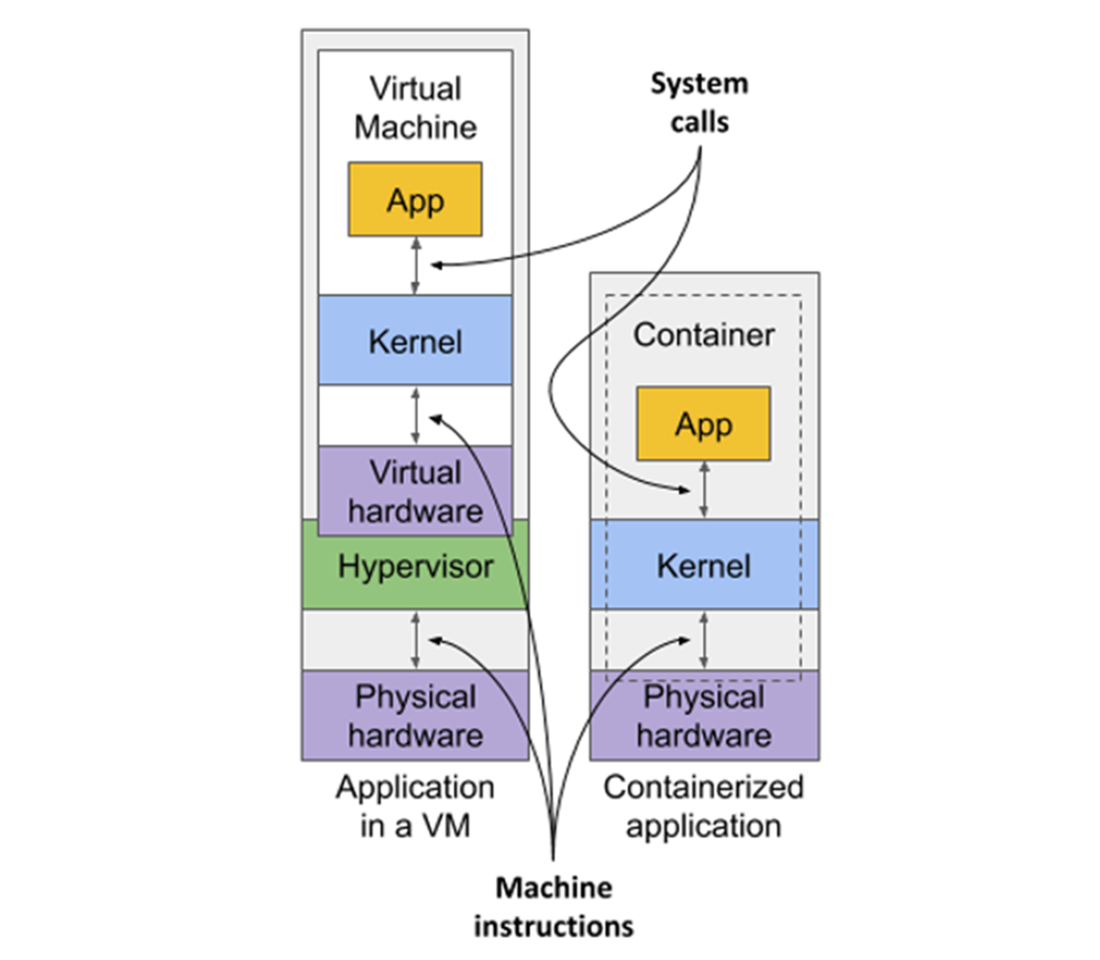
How apps use the hardware when running in a VM vs. in a container
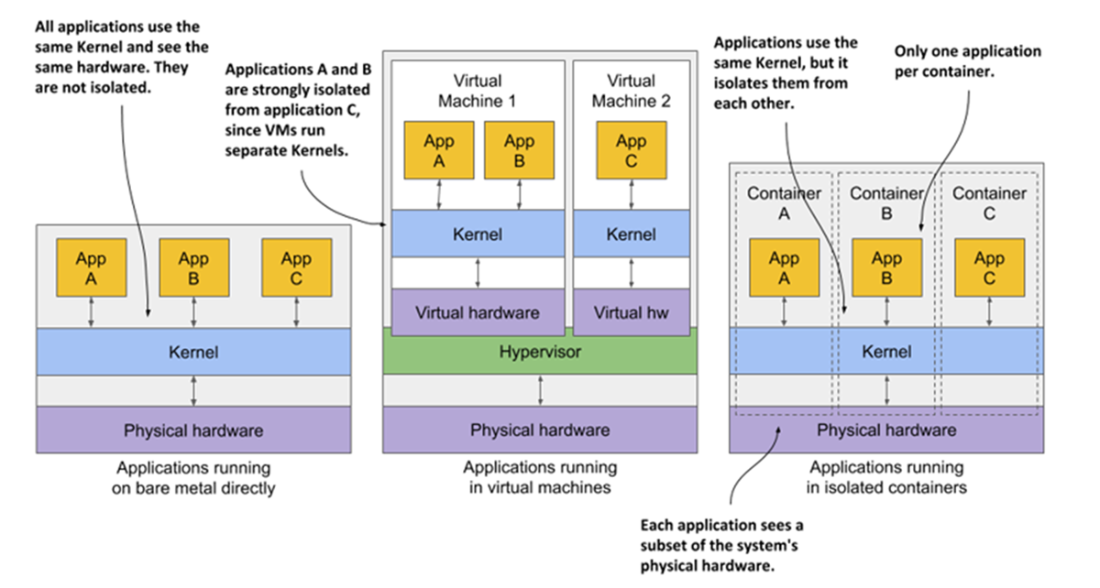
The difference between running applications on bare metal, in VMs, and in containers
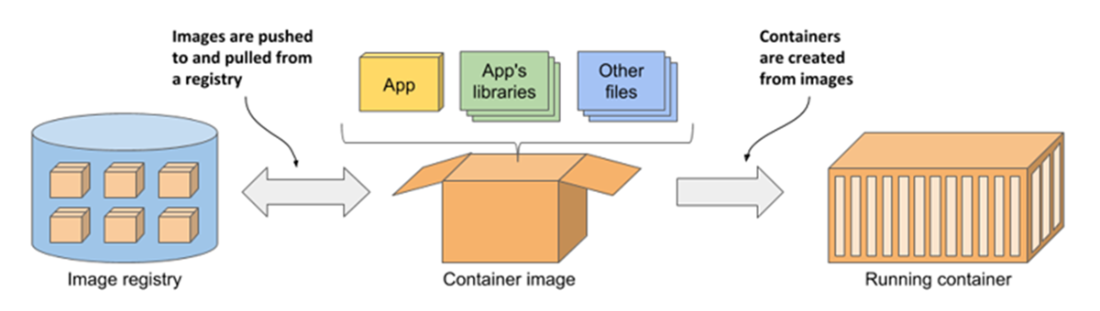
The three main Docker concepts are images, registries, and containers
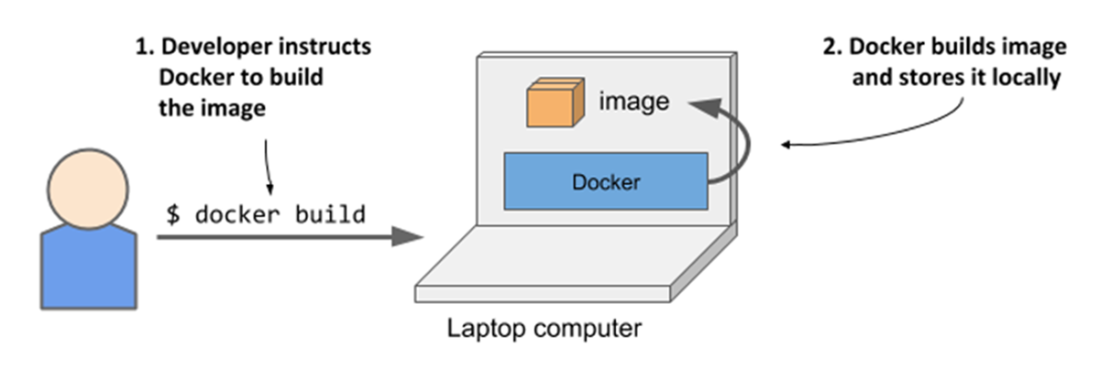
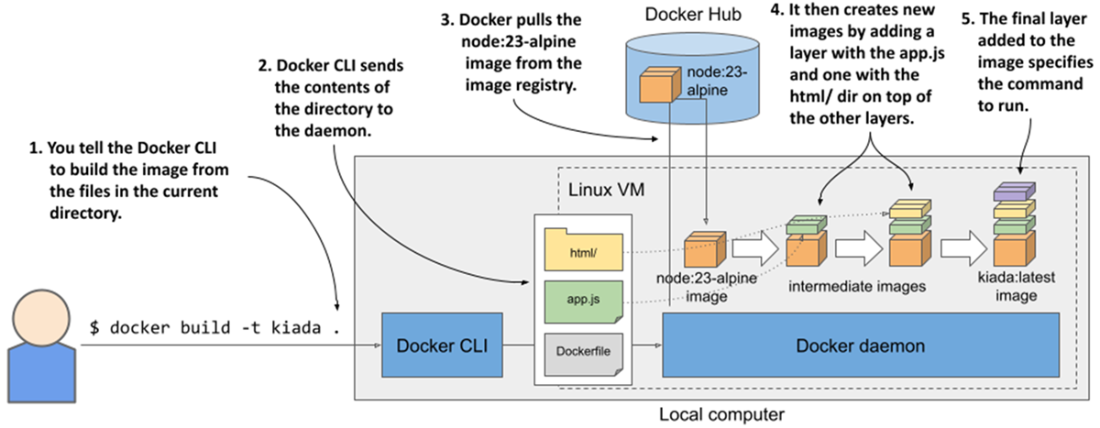
Building a container image
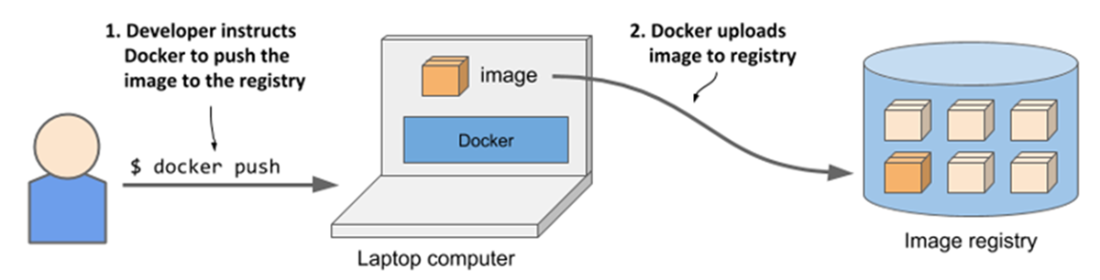
Uploading a container image to a registry
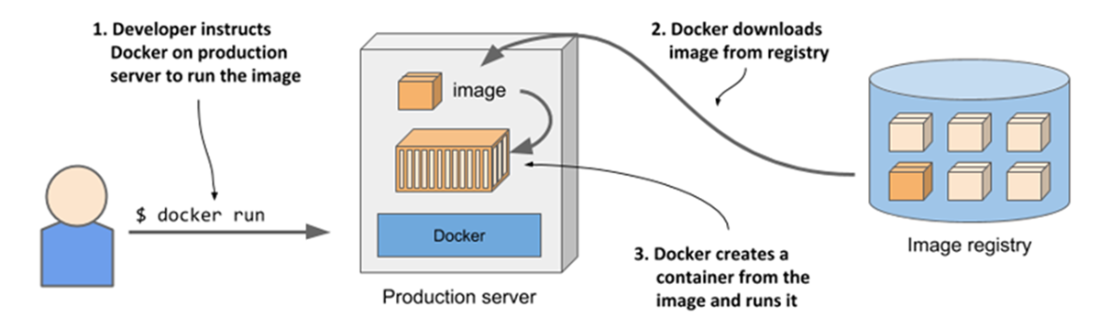
Running a container on a different computer
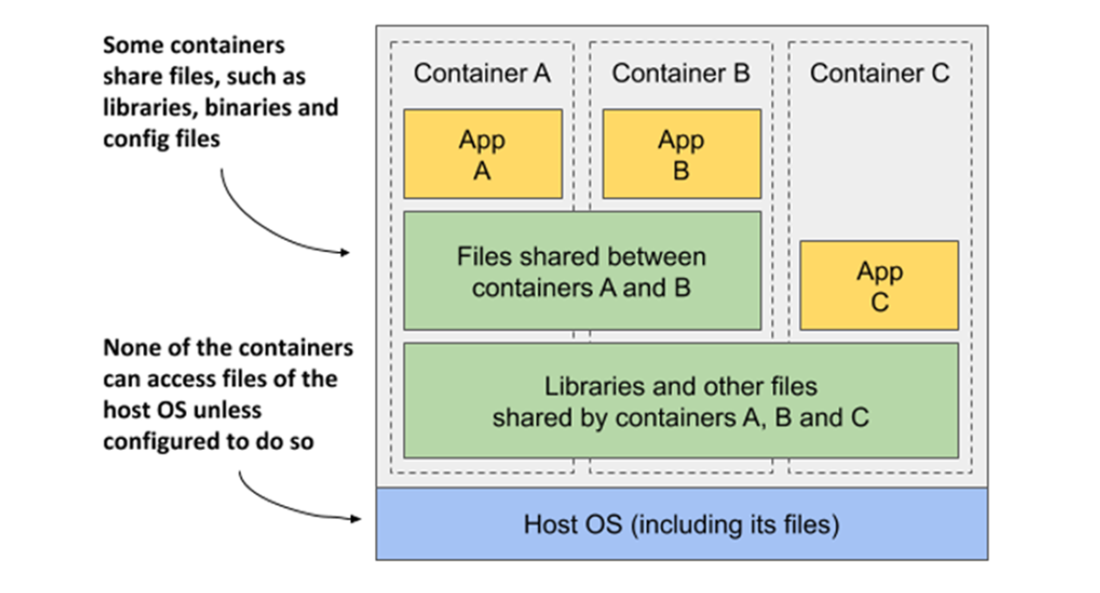
Containers can share image layers.
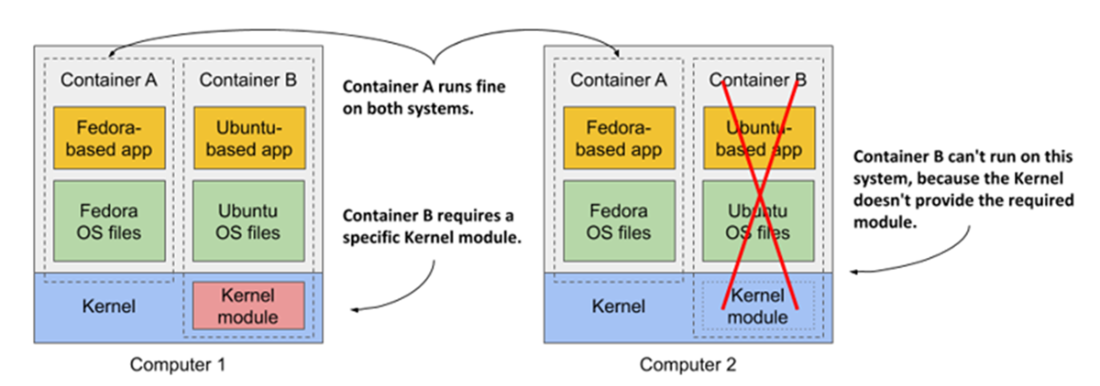
If a container requires specific kernel features or modules, it may not work everywhere.
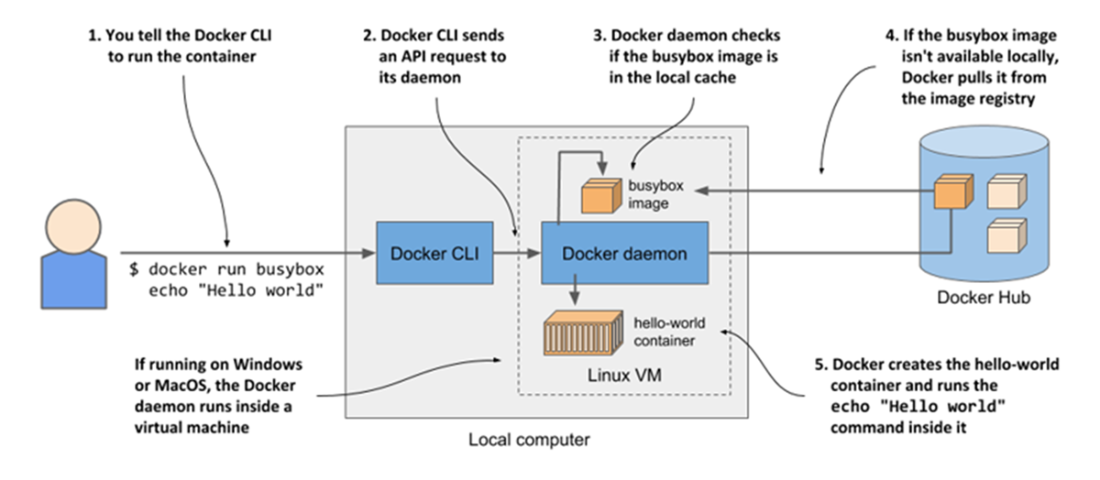
Running echo “Hello, World!” in a container based on the busybox container image
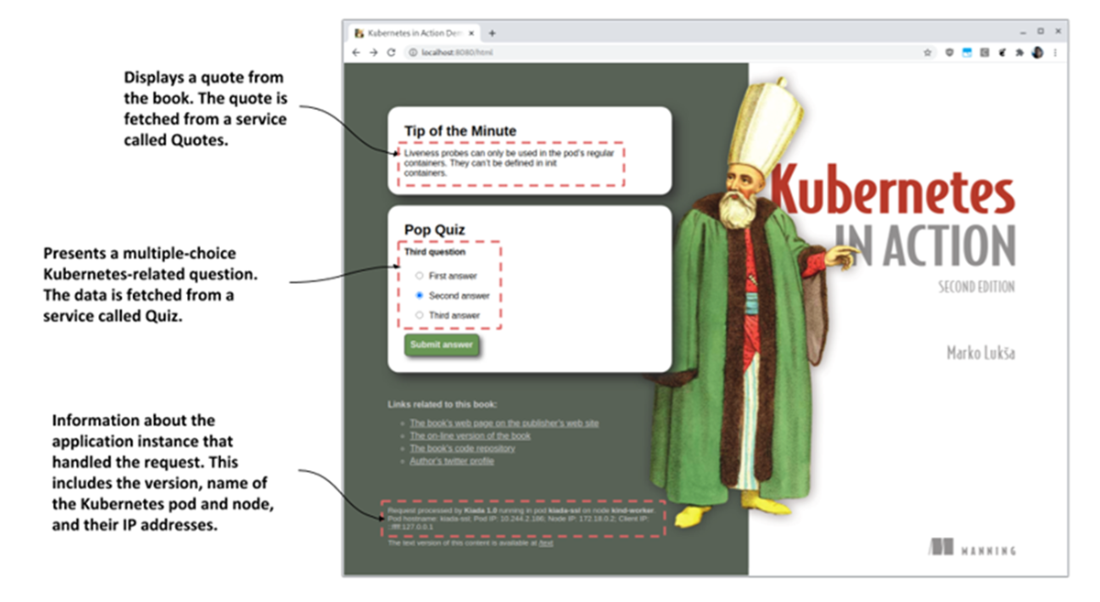
A screenshot of the Kubernetes in Action Demo Application (Kiada)
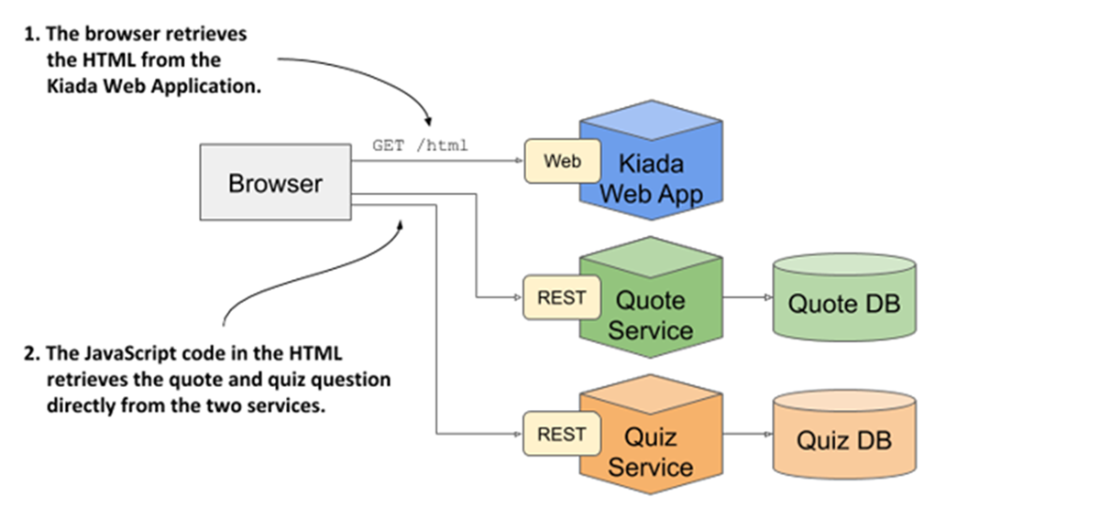
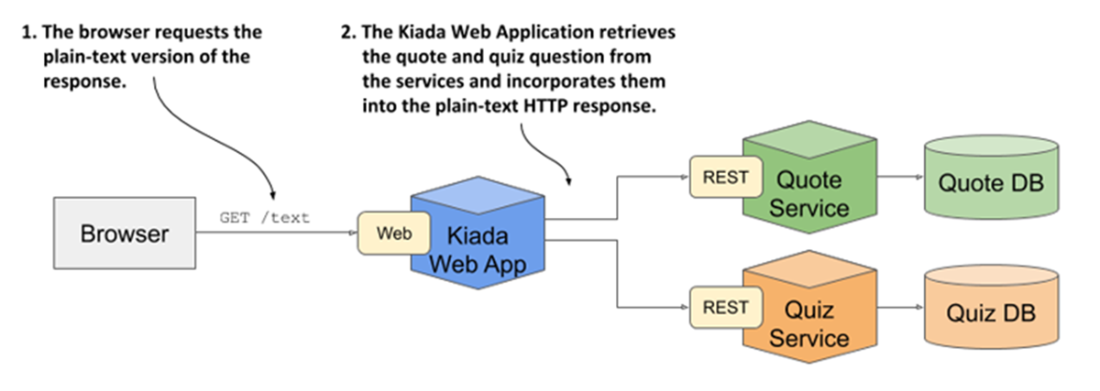
The architecture and operation of the Kiada application
The operation when the client requests the text version
Building a new container image using a Dockerfile
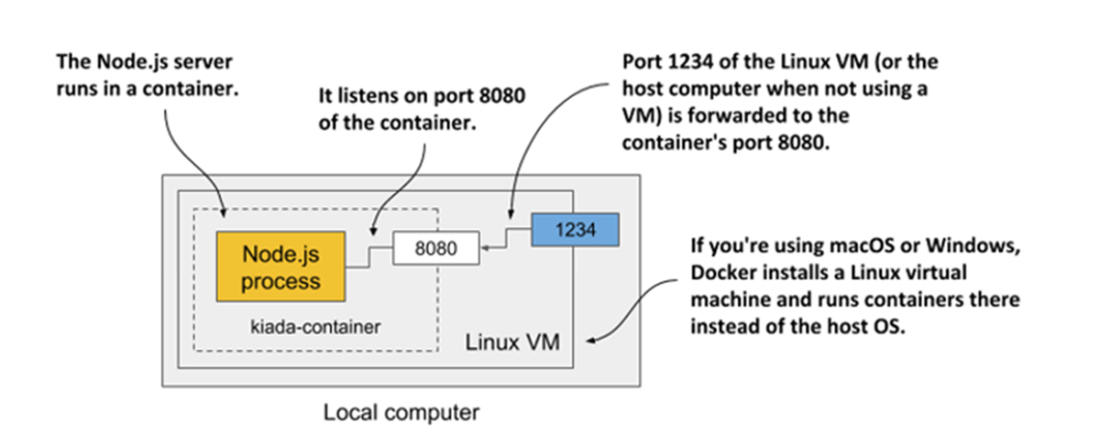
Visualizing your running container
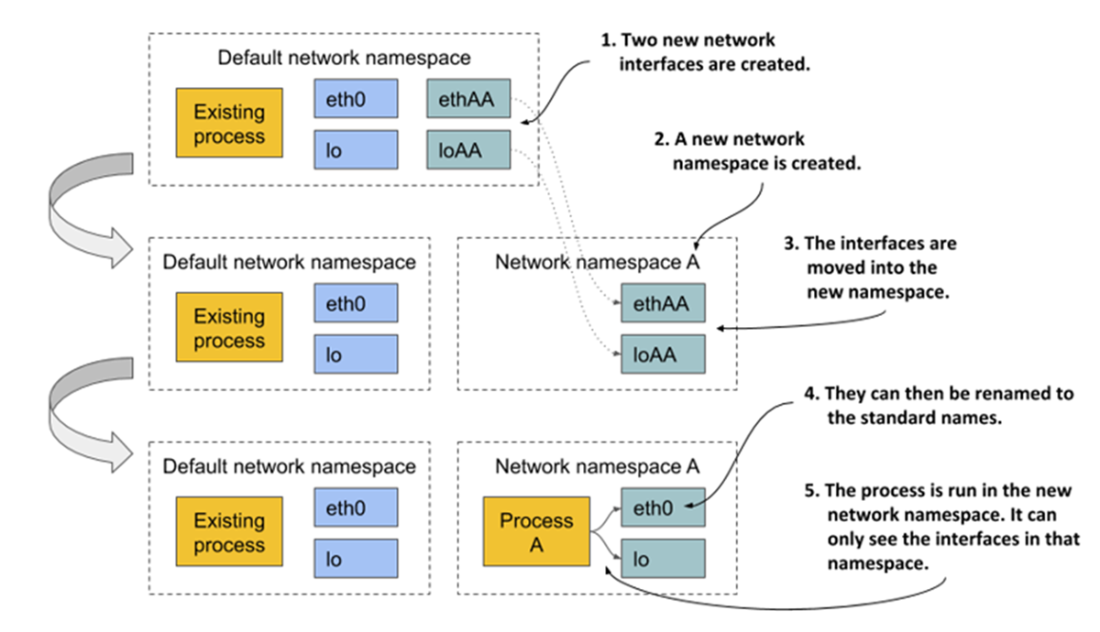
The network namespace limits the accessibility of network interfaces.
Each process is associated with multiple namespace types, some of which can be shared.
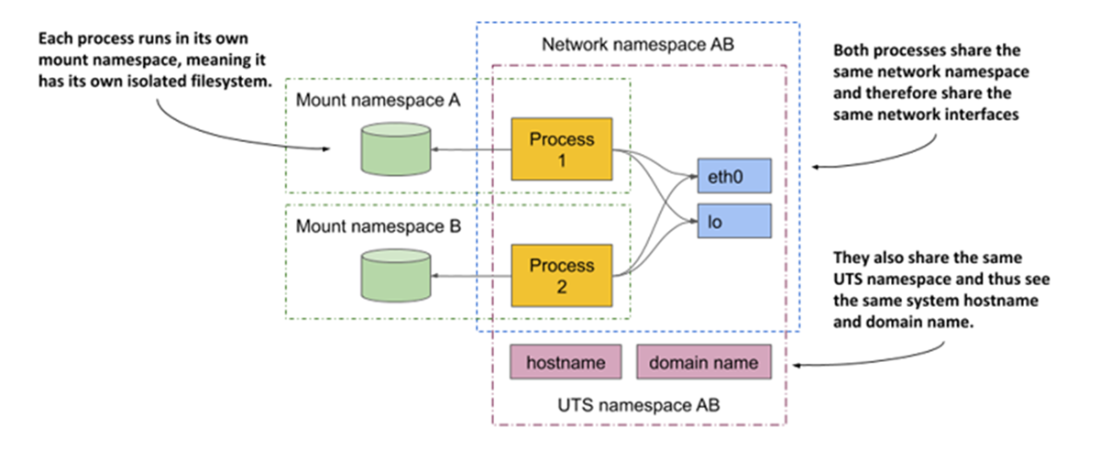
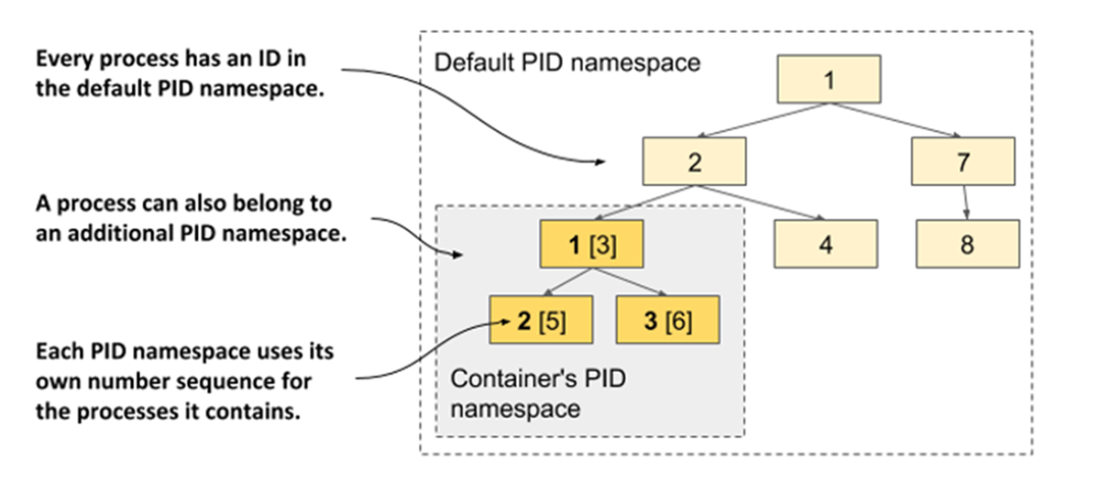
The PID namespace makes a process sub-tree appear as a separate process tree with its own numbering sequence.
Summary
- Containers are regular processes that are isolated from each other and all other processes in the host OS.
- Containers are much lighter than VMs, but because they use the same Linux kernel, they are not as isolated.
- Docker was the first container platform to make containers popular and the first container runtime supported by Kubernetes. Now, other containers are supported through the Container Runtime Interface (CRI).
- A container image contains the user application and all its dependencies. It is distributed through a container registry and used to create running containers.
- Containers can be downloaded and executed with a single docker run command.
- Docker builds an image from a Dockerfile that contains commands to execute during the build process. Images consist of layers that can be shared between multiple images. Each layer only needs to be transmitted and stored once.
- Containers are isolated by Linux kernel features called namespaces, control groups, capabilities, seccomp, AppArmor, and/or SELinux. Namespaces ensure that a container sees only a part of the resources available on the host, control groups limit the amount of a resource it can use, while other features strengthen the isolation between containers.
FAQ
What is a container, and how is it different from a virtual machine (VM)?
Containers are regular processes that run on the host’s operating system but with their environment isolated by the Linux kernel. VMs run a full guest operating system atop a hypervisor. Because containers share the host kernel, they have far less overhead and start faster, but their isolation is weaker than that of VMs, which each have their own kernel.Why are containers lighter and faster to start than VMs?
A container starts only the application process (no guest OS or system daemons). With a single kernel serving many containers, there’s minimal duplication of system processes and memory, leading to higher density and very short startup times compared to booting a VM.How do Docker images, containers, and registries relate?
- Image: a packaged filesystem plus metadata (entrypoint, ports, etc.).- Registry: a repository for sharing images (push/pull).
- Container: a running instance created from an image on the host OS.
Typical flow: build image → push to registry → pull on another host → run as an isolated container.
What are image layers and copy-on-write, and why do they matter?
Images are composed of reusable, cached layers. Multiple images and containers can share read‑only layers to save bandwidth and disk space. Each container gets its own writable layer; when a file in a shared layer is modified, copy‑on‑write creates a private copy in the writable layer. Deleting files in later layers doesn’t shrink earlier layers, and even permission changes can trigger full file copies.What limits the portability of container images?
Images don’t include the kernel. If the host lacks required kernel versions or modules, some images won’t run. CPU architecture must also match (e.g., x86 vs. ARM); otherwise, you’d need emulation or a different image built for that architecture.Which Linux kernel features make containers possible?
- Namespaces: isolate what a process can see (e.g., filesystems, PIDs, network, IPC, hostname, users, time, cgroup view).- cgroups (Control Groups): limit and account for what a process can use (CPU, memory, I/O, network bandwidth).
Together they provide the core isolation and resource control for containers.
What namespace types are commonly used, and what do they isolate?
- mnt (Mount): filesystems and mount points- pid (Process ID): process tree and PIDs
- net (Network): interfaces, stacks, ports
- ipc (Inter‑process communication): message queues, shared memory, etc.
- uts: hostname and NIS domain name
- user: user and group IDs
- time: per‑namespace time offsets
- cgroup: cgroup filesystem root
Processes can also share selected namespaces (e.g., share network but keep separate filesystems).
How can I look inside a running container?
Start an interactive shell with docker exec -itHow do I control CPU and memory usage for a container?
Docker configures kernel cgroups behind the scenes. Common flags include:- CPU: --cpus, --cpuset-cpus, --cpu-quota/--cpu-period, --cpu-shares
- Memory: --memory, --memory-reservation, --memory-swap, --memory-swappiness
These enforce hard or soft limits so one container can’t starve others.
How is container isolation strengthened beyond namespaces and cgroups?
- Run unprivileged by default; avoid --privileged unless absolutely necessary.- Capabilities: add/drop fine-grained privileges (e.g., CAP_NET_ADMIN, CAP_SYS_TIME). Follow the principle of least privilege.
- seccomp: filter individual syscalls with a profile.
- AppArmor/SELinux: mandatory access control policies to confine processes and file access.
These reduce the attack surface even though all containers share the host kernel.

 Kubernetes in Action, Second Edition ebook for free
