18 Batch processing with Jobs and CronJobs
This chapter explains how Kubernetes handles finite, run-to-completion workloads. While Deployments, StatefulSets, and DaemonSets keep Pods running indefinitely, many tasks need to run once or on a schedule. For one-off or bounded batches you use Jobs, and for time-based or recurring execution you wrap a Job in a CronJob. The chapter walks through creating, observing, suspending, and cleaning up these resources, and shows practical patterns for data initialization, batch simulations, aggregation tasks, and scheduled maintenance.
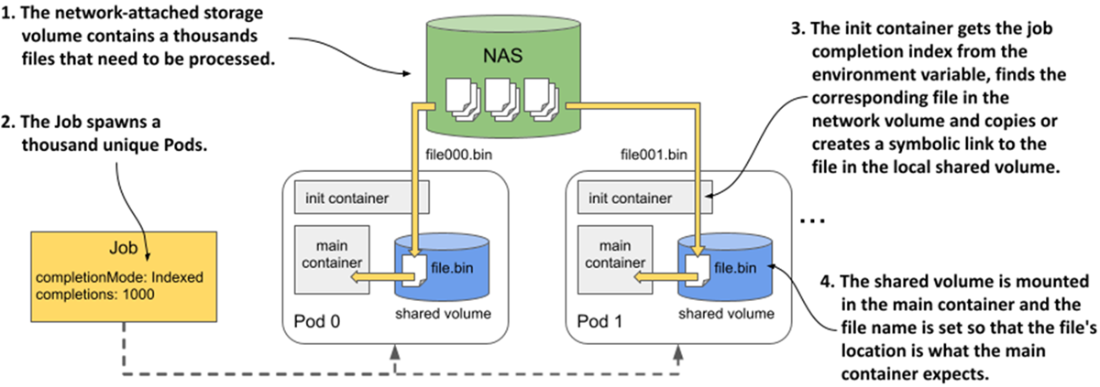
Jobs ensure a task completes successfully by creating one or more Pods and tracking their completion. You control scale and cadence with completions and parallelism, and decide where failures are handled via the Pod’s restartPolicy (OnFailure for in-Pod retries, Never for new Pods) along with backoffLimit, activeDeadlineSeconds, and optional podFailurePolicy rules. Jobs can start suspended, be suspended mid-run, auto-expire via ttlSecondsAfterFinished, and be deleted with or without cascading to their Pods. For input partitioning, NonIndexed Jobs treat Pods identically, whereas Indexed Jobs assign each Pod a stable index (exposed via JOB_COMPLETION_INDEX and an annotation) so each Pod processes a distinct slice; this enables fan-out processing and advanced schemes like using an init container to map indexes to concrete inputs. The chapter also covers queue-driven batches (coarse: one item per Pod; fine: Pods loop until the queue is empty), inter-Pod communication for indexed Jobs using a headless Service plus subdomain DNS, and the right way to run sidecars in Job Pods (as native sidecars via initContainers) so the Job can finish cleanly.
CronJobs add time-based orchestration: you define a Job template and a crontab-style schedule (including special shorthands and an optional timeZone). The controller creates Jobs on schedule, supports suspend/resume, and maintains history limits for successful and failed runs. Operational safeguards include startingDeadlineSeconds to avoid late or bursty catch-up runs and well-defined behavior when the controller has been offline. Concurrency is configurable: Allow (default), Forbid (skip if a prior run is still active), or Replace (terminate the previous run). The chapter also shows how to inspect status and events, label templates to discover created Jobs and Pods, and how deletion behaves—with either normal cascading (removing child Jobs/Pods) or orphaning to preserve them.
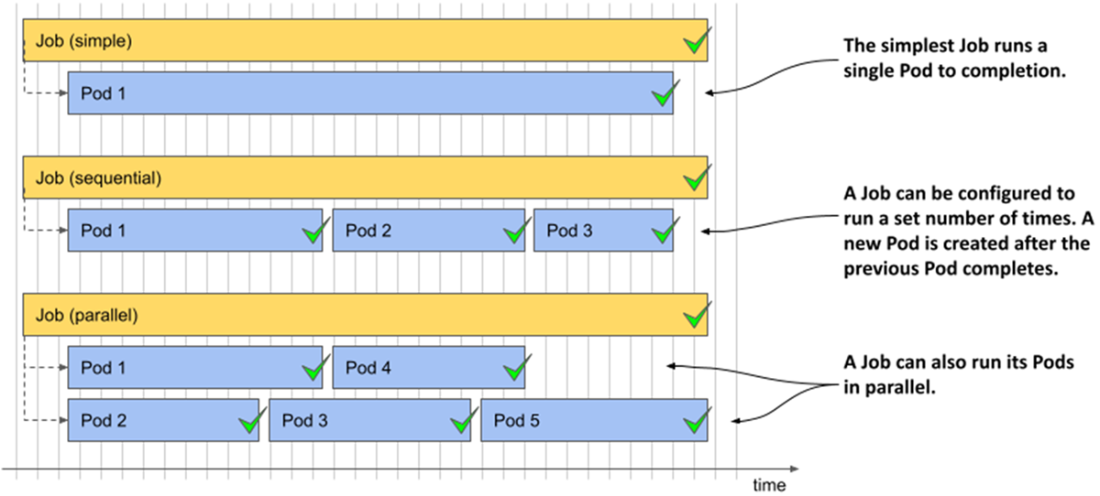
Three different Job examples. Each Job is completed once its pods have completed successfully.
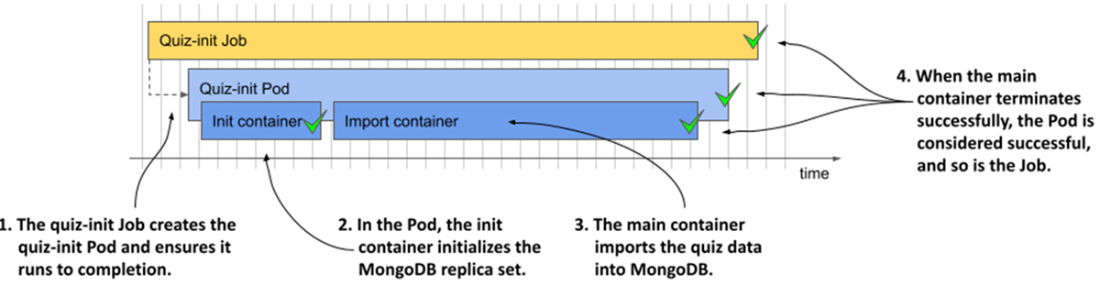
An overview of the quiz-init Job
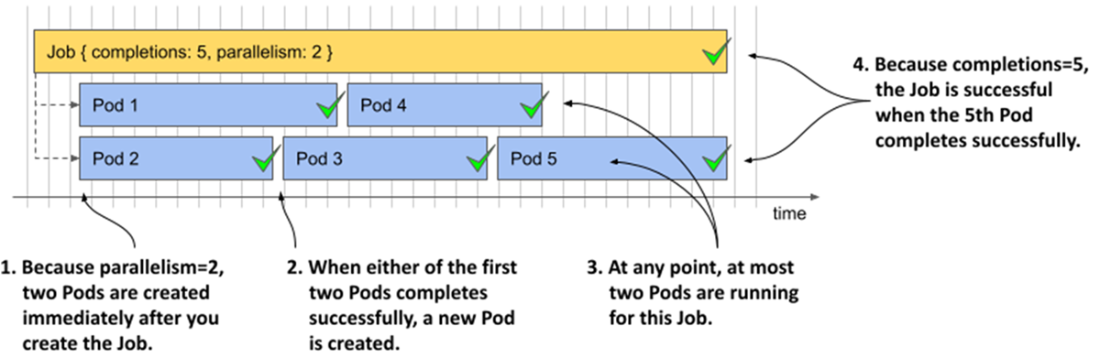
Running a parallel Job with completion = 5 and parallelism = 2
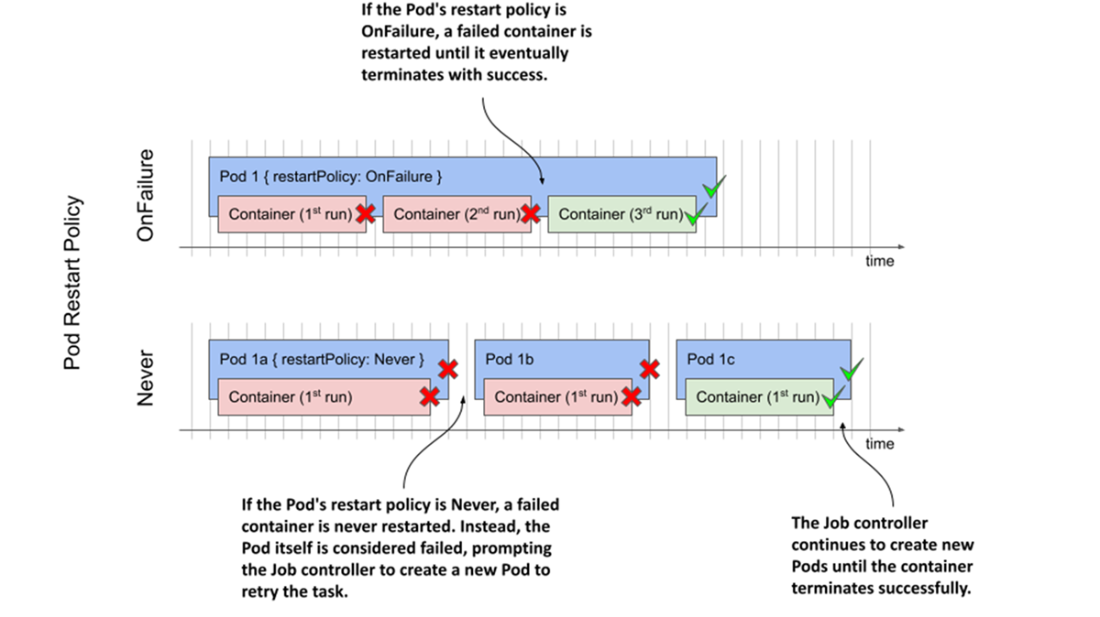
How failures are handled depending on the pod’s restart policy
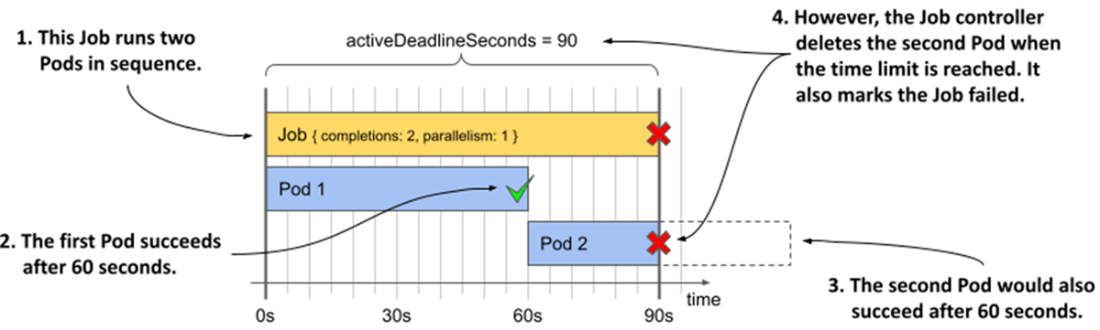
Setting a time limit for a Job
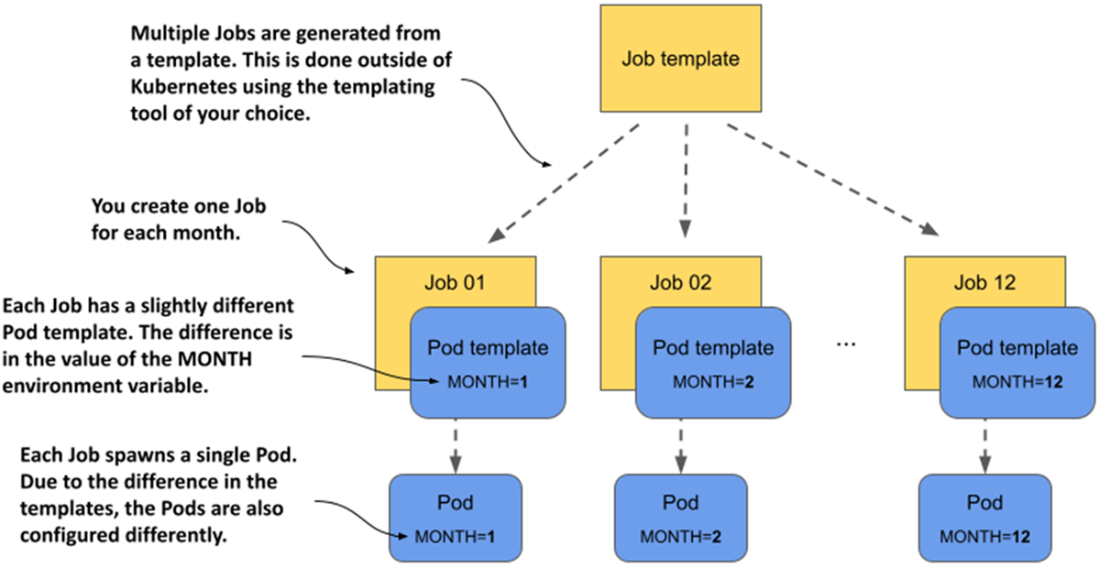
Jobs using the NonIndexed completionMode spawn identical pods

Creating similar Jobs from a template
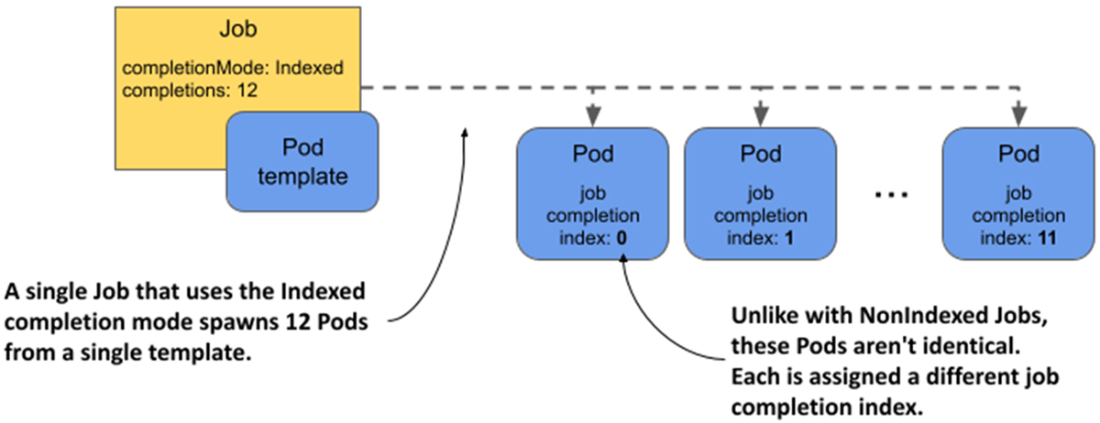
Pods spawned by a Job with the Indexed completion mode each get their own index number.
An init container providing the input file to the main container based on the job completion index
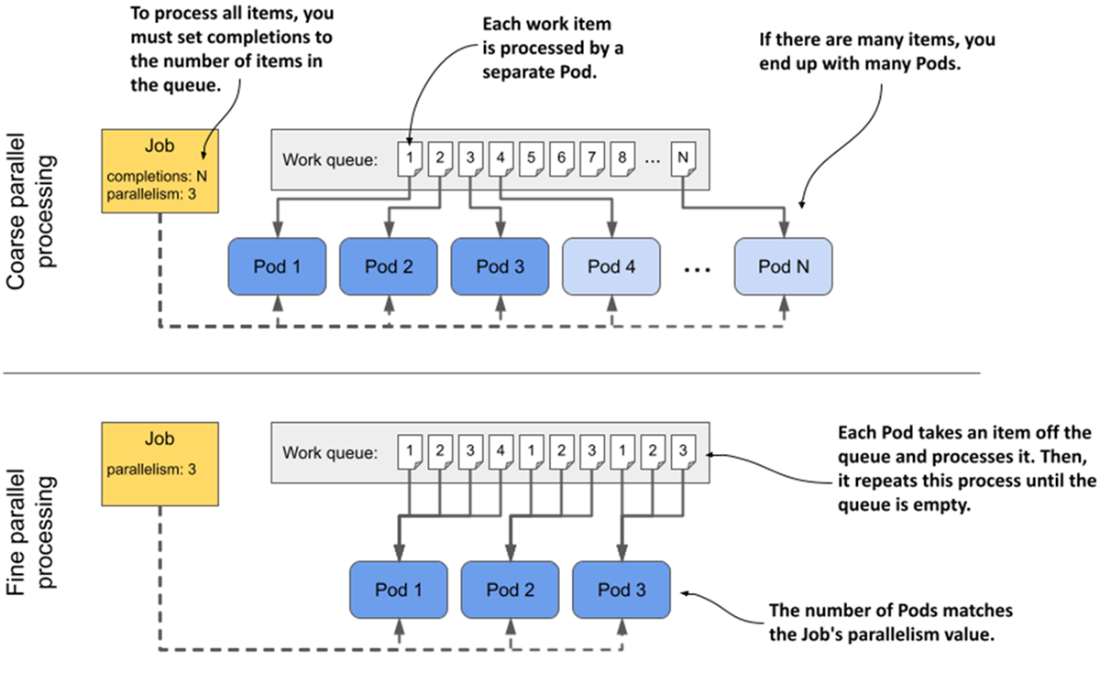
The difference between coarse and fine parallel processing

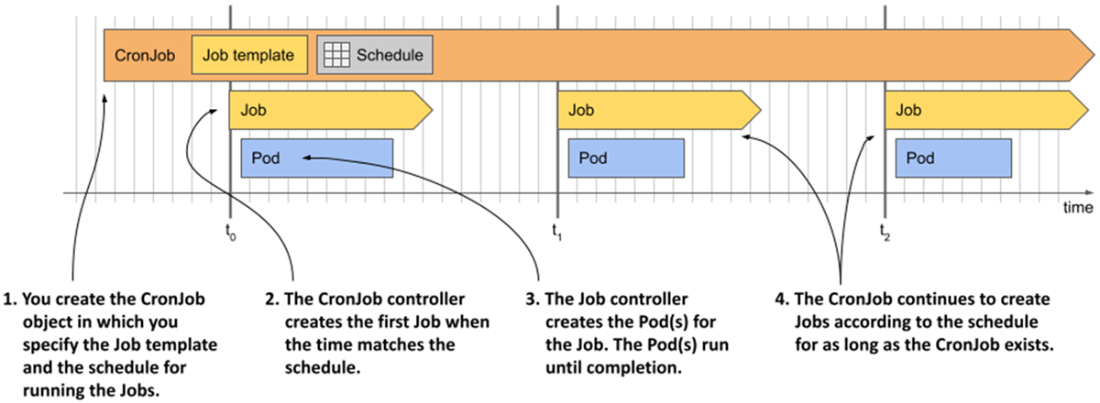
The operation of a CronJob

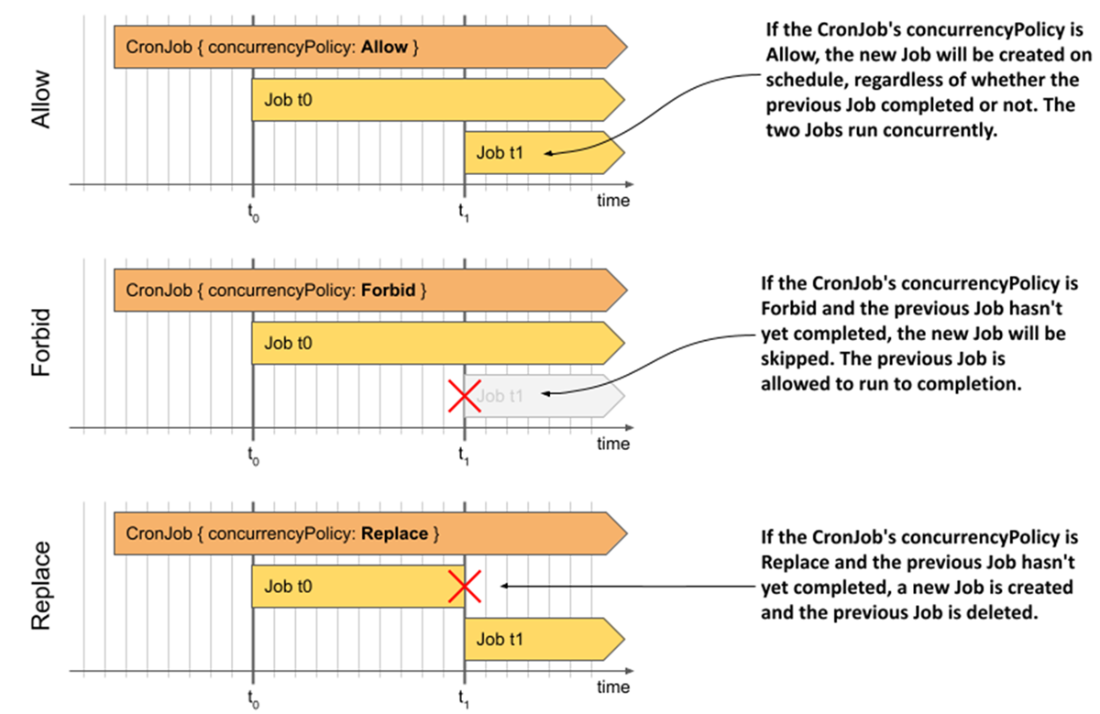
Comparing the behavior of the three CronJob concurrency policies
Summary
- A Job object is used to run workloads that execute a task to completion instead of running indefinitely.
- Running a task with the Job object ensures that the pod running the task is rescheduled in the event of a node failure.
- A Job can be configured to repeat the same task several times if you set the completions field. You can specify the number of tasks that are executed in parallel using the parallelism field.
- When a container running a task fails, the failure is handled either at the pod level by the Kubelet or at the Job level by the Job controller.
- By default, the pods created by a Job are identical unless you set the Job's completionMode to Indexed. In that case, each pod gets its own completion index. This index allows each pod to process only a certain portion of the data.
- You can use a work queue in a Job, but you must provide your own queue and implement work item retrieval in your container.
- Pods running in a Job can communicate with each other, but you need to define a headless Service so they can find each other via DNS.
- If a Job Pod requires a sidecar that never completes on its own, the sidecar must be defined as a native sidecar container (init container with a restartPolicy of Always).
- If you want to run a Job at a specific time or at regular intervals, you wrap it in a CronJob. In the CronJob, you define the schedule in the well-known crontab format.
FAQ
What is a Kubernetes Job and when should I use it instead of a Deployment?
A Job runs finite, one-off tasks to completion. Unlike Deployments/StatefulSets/DaemonSets (which keep pods running and restart containers on exit), a Job ensures a defined number of successful pod completions and then stops. Use Jobs for data imports, batch processing, database initialization, and similar finite workloads.How do restartPolicy settings affect a Job’s behavior?
- OnFailure: The Kubelet restarts failed containers in the same pod. Faster retries, same node and volumes. The Job counts completion when the pod eventually exits successfully.- Never: Failed pods are not restarted in place; the Job controller creates new pods instead (potentially on another node). You’ll see more pods (some with Error status) for the same run.
Jobs can’t use the default Always policy.
What do completions and parallelism mean in a Job?
- completions: How many successful pod completions are required for the Job to finish.- parallelism: Maximum number of pods that may run at the same time.
Notes:
- If neither is set, both default to 1 (single run).
- If only completions is set, pods run sequentially until that count is reached.
- If only parallelism is set, that many pods start, and only one needs to succeed for the Job to complete.
- If parallelism > completions, only completions pods are created.
How are Job failures handled (backoff, deadlines, and custom failure policies)?
- backoffLimit: Maximum pod retry attempts before the Job is marked Failed (default is 6).- activeDeadlineSeconds: Max total time the Job may be active; exceeding it fails the Job (DeadlineExceeded).
- podFailurePolicy: Fine-grained rules to fail the Job (or an index in indexed Jobs) on specific container exit codes. Helpful when certain failures should immediately fail the Job.
How do I run a sidecar in a Job Pod without preventing completion?
Putting a long-running sidecar in spec.containers will keep the pod (and Job) from ever completing. Use a “native sidecar” pattern:- Place the sidecar in initContainers with restartPolicy: Always so the main container can complete and allow the pod (and Job) to finish.
This avoids hanging Jobs while still letting you run helper logic alongside the task.
How can I clean up Jobs automatically or keep their pods after deletion?
- Automatic cleanup: Set spec.ttlSecondsAfterFinished on the Job to auto-delete the Job and its pods after completion (success or failure). Caution: you may lose logs before troubleshooting.- Keep pods when deleting a Job: Delete the Job with --cascade=orphan to preserve its pods for inspection/logs and remove only the Job object.
How can I parameterize work across Job pods (Indexed vs NonIndexed)?
- NonIndexed (default): All pods are identical; to pass different parameters, create separate Job objects (templating outside Kubernetes).- Indexed: Set spec.completionMode=Indexed and spec.completions=N. Each pod gets a unique index (0..N-1) via JOB_COMPLETION_INDEX env var and a pod annotation. Your code can map index→input (e.g., month = index+1).
- You can also surface the index to env via the Downward API if needed.
What’s the best way to process a work queue with Jobs?
Two patterns:- Coarse parallelism: Each pod takes one item from the queue and exits. Use completions to set how many items to process; parallelism controls concurrency.
- Fine parallelism: A small number of pods process many items in a loop until the queue is empty; omit completions so a single successful completion indicates the queue is drained.
Note: Kubernetes doesn’t know about your queue. Adding new items after the Job finishes won’t trigger more processing—use a Deployment (continuous worker) or a CronJob (periodic) if you need ongoing work.
How can pods in the same Job discover and talk to each other?
For deterministic pod-to-pod communication:- Use completionMode: Indexed so each pod has a stable index.
- Create a headless Service (clusterIP: none) selecting the Job’s pods (e.g., by the auto-added label job-name=<job>).
- Set pod spec.subdomain to the Service name.
Pods become reachable at hostnames like <job-name>-<index>.<service> (short form within the namespace), enabling direct peer communication without querying the API.
How do CronJobs relate to Jobs, and how do I control schedule, concurrency, and cleanup?
- What it is: A CronJob wraps a Job template and a schedule; the controller creates Job objects at scheduled times.- Schedule: Use crontab syntax (e.g., "* * * * *") or shortcuts (@hourly, @daily, etc.). You can set spec.timeZone for predictable local-time runs.
- Missed runs: spec.startingDeadlineSeconds caps how late a run may start; too many missed runs can be skipped with a TooManyMissedTimes event.
- Overlaps: spec.concurrencyPolicy controls overlap: Allow (default), Forbid (skip new), Replace (cancel previous).
- History: successfulJobsHistoryLimit / failedJobsHistoryLimit control how many past Jobs are retained (others are auto-deleted).
- Suspend/resume: Patch spec.suspend true/false to pause or resume scheduling; active Jobs are allowed to finish.
- Deletion: Deleting the CronJob removes its Jobs; use --cascade=orphan to keep them.

 Kubernetes in Action, Second Edition ebook for free
