14 Scaling and maintaining pods with ReplicaSets
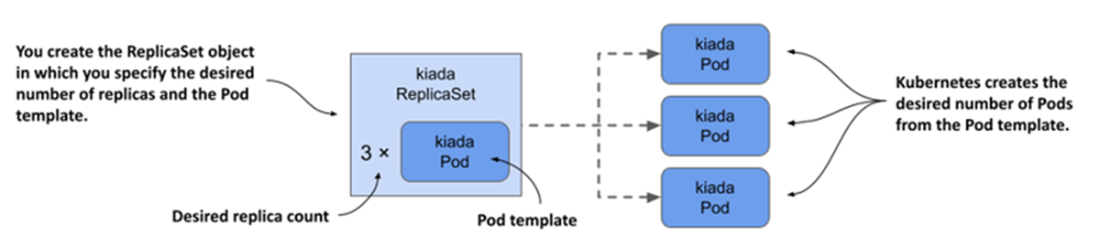
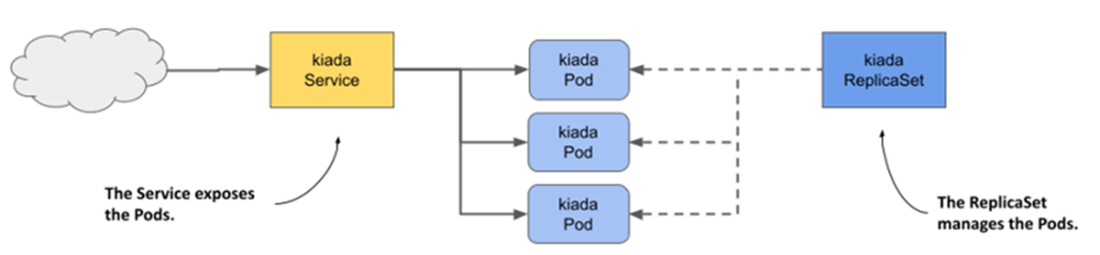
ReplicaSets provide Kubernetes with a simple, declarative way to run and keep a specific number of identical pods alive. Instead of creating pods one by one, you define a pod template, a desired replica count, and a label selector; the controller then creates, adopts, and maintains the matching pods as a single unit. This guarantees replacement of pods when they disappear (for example, after node failures) and allows consistent scaling, while Services are used to expose the group. Although applications are typically managed through Deployments for safe, declarative updates, ReplicaSets are the foundational mechanism that enforce steady-state replication, ownership, and garbage collection of pods.
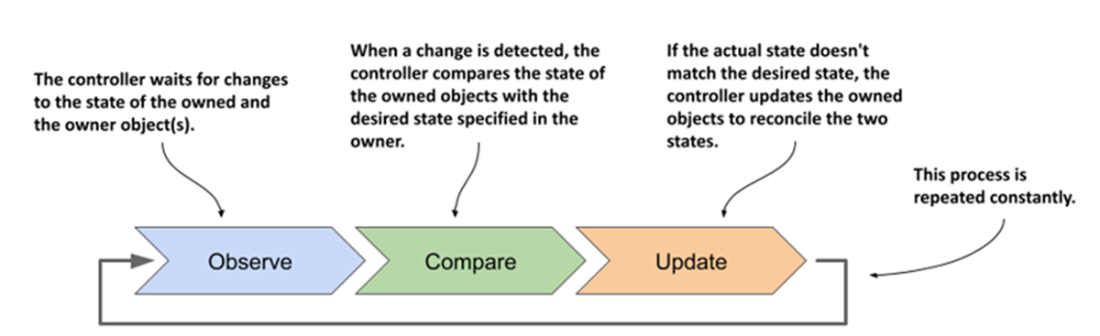
Operationally, a ReplicaSet’s spec revolves around three fields: replicas, selector, and template. Pods created from the template get generated names, are owned via ownerReferences, and can be inspected and logged collectively through the ReplicaSet. Scaling is instantaneous in both directions—including to zero—with deterministic rules for which pods are removed first, an option to influence choice via a deletion-cost annotation, and an effort to keep replicas evenly spread across nodes. Updating the pod template affects only newly created pods; existing ones are left intact. The controller continuously runs a reconciliation loop: it observes ReplicaSets and Pods, compares actual versus desired state, emits events, creates replacements when pods are deleted or nodes fail, and prunes excess pods if extra matching pods appear. Crucially, it ensures the correct quantity of pods, not their health: pods failing readiness or crashing repeatedly aren’t automatically replaced just because they’re unready.
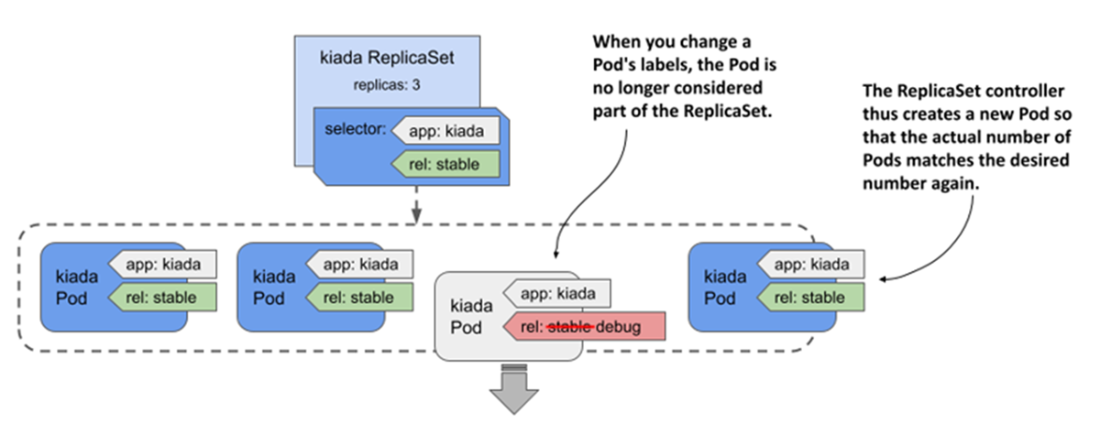
For maintenance, you can temporarily remove a problematic pod from a ReplicaSet by changing its labels so it no longer matches the selector; the controller immediately creates a healthy replacement while you debug the isolated pod. Deleting a ReplicaSet normally cascades to its pods via garbage collection, but you can preserve them by orphaning dependents and later re-associate them by creating a new ReplicaSet with the same selector. Because a selector is immutable, changing it requires delete-and-recreate—another case where orphaning avoids downtime. In practice, use ReplicaSets even for single-instance workloads to get automatic recovery, pair them with Services for stable access, manage scale with the ReplicaSet (or an HPA), remember that labels and selectors define membership and ownership, and rely on Deployments on top of ReplicaSets when you need rolling, versioned updates.
ReplicaSets in a nutshell
The relationship between services, ReplicaSets, and pods
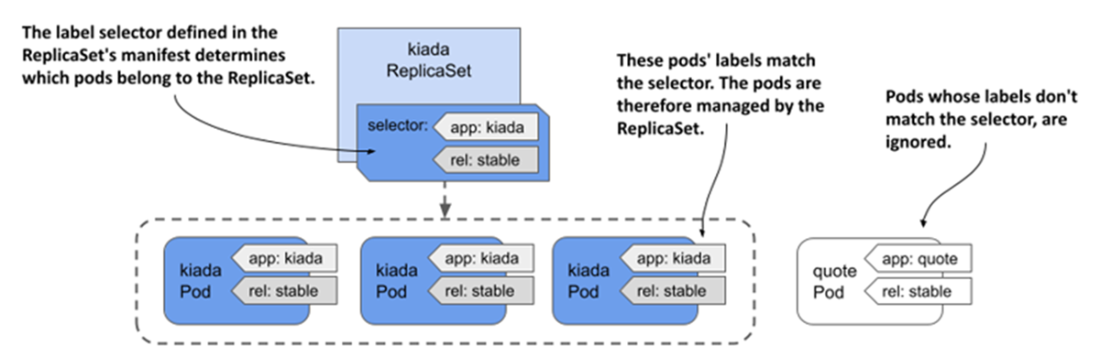
A ReplicaSet only cares about pods that match its label selector.
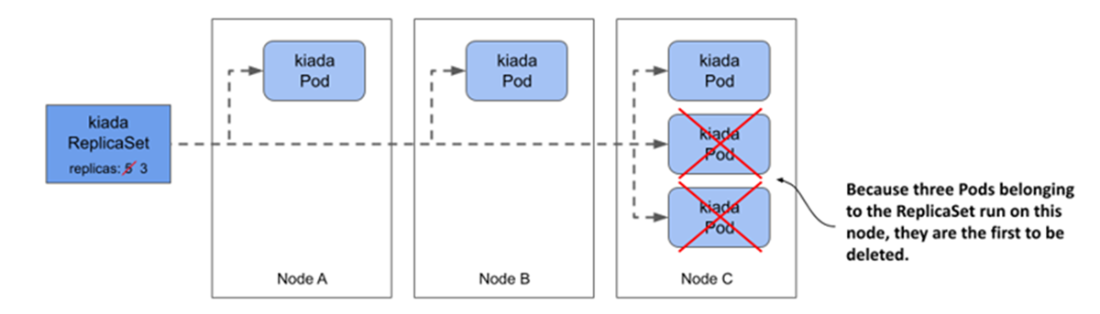
Kubernetes keeps related pods distributed evenly across the cluster nodes.
A controller's reconciliation control loop
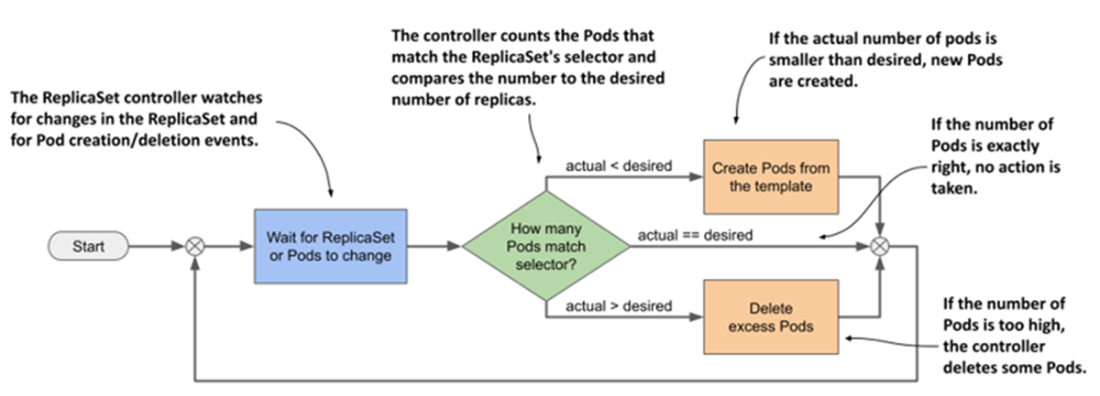
The ReplicaSet controller’s reconciliation loop
Changing a pod’s labels to remove it from the ReplicaSet
Summary
- A ReplicaSet represents a group of identical pods that you manage as a unit. In the ReplicaSet, you specify a Pod template, the desired number of replicas, and a label selector.
- Almost all Kubernetes API object types have an associated controller that processes objects of that type. In each controller, a reconciliation control loop that runs constantly reconciles the actual state with the desired one.
- The ReplicaSet controller ensures that the actual number of pods always matches the desired number specified in the ReplicaSet. When these two numbers diverge, the controller immediately reconciles them by creating or deleting Pod objects.
- You can change the number of replicas whenever needed, and the controller will take the necessary steps to honor your request. However, when you update the Pod template, the controller won’t update the existing pods.
- Pods created by a ReplicaSet are owned by that ReplicaSet. If you delete the owner, the dependents are deleted by the garbage collector, but you can tell kubectl to orphan them instead.
FAQ
What is a ReplicaSet and why use it instead of creating Pods directly?
A ReplicaSet manages a group of identical Pods and continuously ensures a specified number of replicas are running. It recreates missing Pods (for example, after a node failure) and treats Pods as a single unit for scaling and maintenance. Services expose the Pods; ReplicaSets don’t replace Services. In practice, Deployments are used for app rollouts and updates, but they rely on ReplicaSets under the hood. (ReplicationController offered similar behavior but is deprecated.)Which fields matter in a ReplicaSet spec?
- replicas: desired number of Pods (defaults to 1 if omitted)- selector: label selector (matchLabels/matchExpressions) that defines which Pods belong to the ReplicaSet; immutable once created
- template: the Pod template used to create new replicas
Important: labels in the selector must be a subset of labels in the template; otherwise the API rejects the ReplicaSet.
How do label selectors determine membership and “adoption” of existing Pods?
A ReplicaSet manages only Pods whose labels match its selector. If matching Pods already exist (created earlier or manually), the ReplicaSet “adopts” them and counts them toward the desired replica count. To prevent runaway creation, the API rejects a ReplicaSet whose template labels don’t match its selector.How are ReplicaSet Pod names generated?
The Pod template omits a fixed name. Kubernetes sets generateName based on the ReplicaSet name and appends a random suffix (for example, rs-name-abcde). This fits stateless, fungible Pods. For ordered, stable identities (stateful workloads), use StatefulSets, which assign predictable names.What are practical kubectl tips for inspecting ReplicaSets and their Pods?
- Show summary: `kubectl get rs- Show images/containers/selector: `kubectl get rs -o wide`
- Full details: `kubectl describe rs
- List member Pods: `kubectl get po -l key=value[...]` using the ReplicaSet’s selector
- View logs without typing Pod names: `kubectl logs rs/
- Aggregate logs: add `--all-pods` and/or `--all-containers`; use `-f` to stream.
How do you scale a ReplicaSet, and which Pods get removed first when scaling down?
- Scale: `kubectl scale rs/- Deletion order when scaling down (in priority):
1) Unscheduled Pods
2) Unknown phase Pods
3) Not Ready Pods
4) Lower deletion cost (annotation controller.kubernetes.io/pod-deletion-cost)
5) Pods on nodes with more related replicas (to rebalance)
6) Shorter ready duration
7) More container restarts
8) Newer Pods
Kubernetes also tries to keep replicas evenly distributed across nodes.
What happens if you update the Pod template in a ReplicaSet?
Only Pods created after the change reflect the updated template; existing Pods are not modified. This is why Deployments (which orchestrate rolling updates by managing ReplicaSets) are preferred for versioned app rollouts. Tips: the selector is immutable; keep selector labels a subset of template labels; label values must be strings (quote numbers like '0.5').How does the ReplicaSet controller’s reconciliation loop behave?
It watches ReplicaSets and Pods. On any change, it compares the actual Pods that match the selector to the desired count and reconciles by creating or deleting Pods. Examples:- If someone deletes a managed Pod, the controller creates a replacement.
- If someone creates an extra matching Pod, the controller deletes the surplus Pod.
- Actions are recorded as Events (see them via `kubectl describe rs` or `kubectl get events`).
What happens when a node running a ReplicaSet’s Pod fails?
The node is marked NotReady after missed heartbeats; after a grace period, its Pods are marked for deletion. The ReplicaSet controller creates replacement Pods on healthy nodes to restore the desired count. The “Terminating” Pods linger until the node returns (their kubelet then cleans them up).Does a ReplicaSet guarantee healthy or ready Pods, and how can I debug a bad Pod without reducing capacity?
A ReplicaSet guarantees presence, not health. Pods failing readiness/liveness probes aren’t automatically replaced; you may need to intervene. To debug without reducing capacity:- Change the faulty Pod’s label so it no longer matches the selector (for example, set `rel=debug`).
- The ReplicaSet immediately creates a replacement to maintain capacity.
- Investigate the out-of-set Pod at your pace, then delete it when done.

 Kubernetes in Action, Second Edition ebook for free
