Overview
13 Routing traffic using the Gateway API
The chapter introduces the Gateway API as a more expressive, role-friendly successor to Ingress for routing external traffic to Kubernetes Services. It formalizes gateway infrastructure through GatewayClass and Gateway objects, and decouples traffic rules into Route resources (HTTPRoute, TLSRoute, TCPRoute, UDPRoute, GRPCRoute). This separation enables cleaner configs, clearer ownership (cluster admins manage gateways; app teams manage routes), and powerful cross-namespace sharing. The API’s design emphasizes portability and predictability with release channels (standard vs. experimental) and support levels (core, extended, implementation-specific), while exposing rich status and condition fields for diagnostics at both gateway and route levels.
Using a provider such as Istio, you install the Gateway API CRDs and a controller, then define Gateways with listeners (ports/protocols/hostnames) that receive addresses and are typically backed by a LoadBalancer and an Envoy proxy. Services are attached via HTTPRoute using parentRefs and backendRefs, supporting host-based routing, rule matches on method, headers, path, and query parameters, plus weighted backends for canary and traffic splitting. Filters augment traffic without code changes: modify request/response headers, rewrite URLs, redirect clients, and mirror requests to shadow services. Robust status conditions on Gateways, listeners, and Routes (Accepted, Programmed, ResolvedRefs, Ready, and related reasons) guide troubleshooting when traffic doesn’t flow as expected.
For security, you can terminate TLS at the gateway with HTTPS listeners and certificates, or enable end-to-end encryption via TLS pass-through and TLSRoute (routing by SNI hostname). Beyond HTTP/TLS, the API handles generic TCP and UDP with TCPRoute and UDPRoute, and gRPC with GRPCRoute, each paired with the appropriate listener type. Cross-namespace scenarios are first-class: listeners control which namespaces may attach routes (allowedRoutes), and ReferenceGrant objects permit routes to reference backends in other namespaces. Finally, the GAMMA initiative extends these patterns to east/west traffic by letting Routes target Services as parents, reusing the same routing and filtering model to express service-mesh policies without additional application reconfiguration.
Summary
- The Gateway API replaces and improves the Ingress API explained in the previous chapter. It’s more expressive and easier to manage by multiple people.
- The Gateway API requires a Gateway API implementation to be installed in the cluster. Kubernetes does not include one by default.
- A cluster administrator creates one or more Gateway objects. Each object represents one network entry point between external clients and services in the cluster, and it is typically backed by a reverse proxy. A gateway can be shared across multiple Kubernetes namespaces.
- Each cluster provides one or more gateway classes, represented by GatewayClass objects. Each class specifies the controller responsible for provisioning a proxy for each Gateway object. A GatewayClass object can also specify parameters for the proxy configuration.
- To expose an HTTP service through a gateway, an HTTPRoute object is used. It specifies the parent Gateway object, and a set of rules that the service or other backend where HTTP requests matching the specified criteria should be routed to.
- An HTTPRoute can route traffic based on the hostname, HTTP method, request path, headers, and query parameters. Traffic can also be split across multiple services with weight-based traffic splitting, or mirrored to another service.
- An HTTPRoute can also modify HTTP traffic. It can add, remove, and modify HTTP headers, rewrite the request URL, redirect requests, and modify response headers.
- Gateways can either terminate TLS encryption at the gateway itself or pass TLS traffic unmodified to a backend service. A TLSRoute object is used to route this traffic.
- A GRPCRoute is used for routing gRPC messages. Like HTTPRoutes, a GRPCRoute can forward gRPC messages to different backends based on the properties of the gRPC message, and it can also modify them.
- Gateways also support raw TCP and UDP traffic. A TCPRoute object is used to configure TCP traffic routing, whereas a UDPRoute object is used for UDP.
FAQ
What is the Gateway API and how is it different from Ingress?
The Gateway API is a set of Kubernetes resources that route external traffic to Services through gateway proxies. Unlike Ingress (which is L7/HTTP-focused), Gateway API:
- Separates concerns into Gateway (infrastructure) and Route (traffic rules) objects.
- Supports L4 and L7 (TCP, UDP, TLS, HTTP, gRPC).
- Enables role separation (cluster admins manage Gateways; app teams manage Routes).
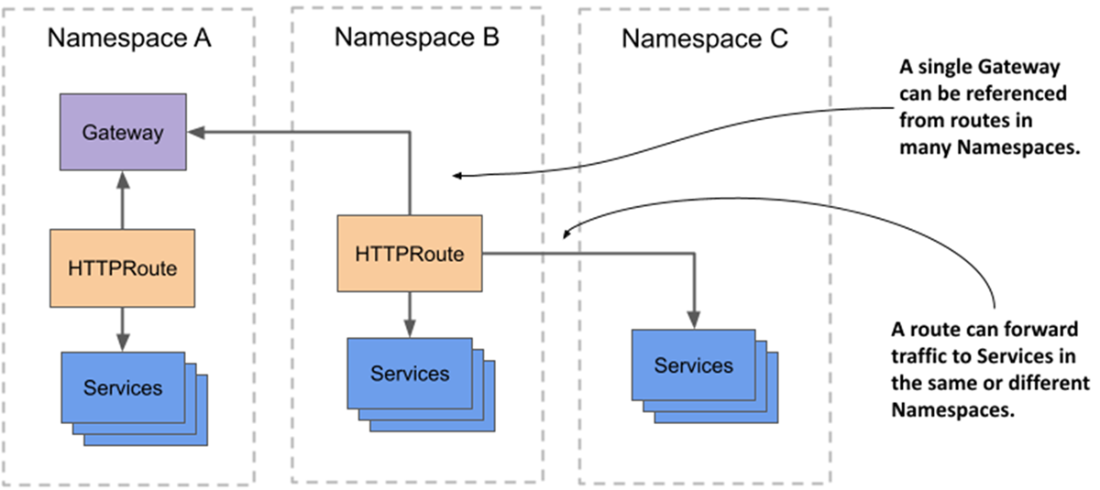
- Allows cross-namespace references, so a single Gateway can serve many namespaces.What needs to be installed to use the Gateway API?
You need:
- Gateway API CRDs: choose the standard or experimental channel (experimental includes more Route kinds).
- A controller (provider) that implements the API (e.g., Istio, Contour, Cilium, GKE, Kong, NGINX Kubernetes Gateway).
Check CRDs with: kubectl get crd gateways.gateway.networking.k8s.io. Install via kustomize if missing. Then install or enable your chosen provider.What is a GatewayClass and how do Gateways relate to it?
GatewayClass defines a class of gateways managed by a specific controller (controllerName). Each Gateway references a GatewayClass via spec.gatewayClassName. Providers typically create one or more GatewayClass objects (e.g., “istio”). The controller uses the class to instantiate the actual data plane (e.g., an Envoy deployment and a LoadBalancer Service).How do I expose an HTTP Service with the Gateway API?
High-level steps:
- Create a Gateway with an HTTP listener (port 80, protocol HTTP, optional hostnames).
- Create an HTTPRoute:
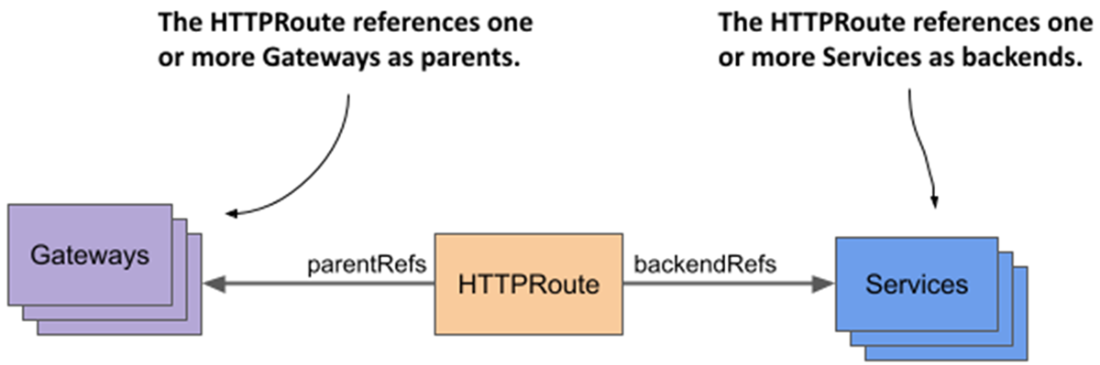
- parentRefs: reference the Gateway (and hostname to match).
- backendRefs: reference the Service and port to forward traffic to.
Once attached, HTTP requests that match the listener and route hostnames/rules are sent to your Service.How do I troubleshoot Gateways and HTTPRoutes?
Inspect status and conditions:
- Gateway.status: addresses; conditions like Accepted and Programmed; listener statuses (Accepted, Conflicted, Programmed, Ready, ResolvedRefs) and attachedRoutes count.
- HTTPRoute.status.parents: per-parent conditions Accepted and ResolvedRefs (e.g., NotAllowedByListeners, NoMatchingListenerHostname, BackendNotFound).
If requests fail, check both the Gateway and listener conditions and the Route’s per-parent status.How can I split or steer HTTP traffic to different backends?
Use HTTPRoute rules:
- Weighted splitting: multiple backendRefs with weight to do canary or gradual rollout.
- Matches for routing: by HTTP method, headers (Exact or regex), path (Exact or PathPrefix; some providers support regex), and queryParams (Exact or regex).
Rules match-if-all-conditions in a match entry are satisfied; traffic goes to the rule’s backends.What HTTP filters are available and what do they do?
Common HTTPRoute filters include:
- RequestHeaderModifier and ResponseHeaderModifier: add/set/remove headers.
- URLRewrite: change hostname and path (replace full path or just the matched prefix).
- RequestRedirect: send a 3xx redirect (optionally changing scheme, host, port, path).
- RequestMirror: copy requests to another backend (response from primary only).
- ExtensionRef: provider-specific filters via a separate custom resource.How do I configure TLS: termination vs pass-through?
Two patterns:
- Termination at the Gateway: HTTPS listener (port 443), tls.mode: Terminate, certificateRefs to a Secret. Use HTTPRoutes to route decrypted HTTP traffic to backends.
- Pass-through (end-to-end): TLS listener (protocol TLS), tls.mode: Passthrough. Use TLSRoutes to route based on SNI hostname only; the backend terminates TLS (e.g., sidecar). HTTPRoutes do not apply in pass-through.How do I expose TCP, UDP, and gRPC services?
Add listeners and Routes:
- TCP: Gateway listener protocol TCP; TCPRoute routes to Service:port (weighting supported; no content-aware routing).
- UDP: Gateway listener protocol UDP; UDPRoute routes to Service:port (provider support varies).
- gRPC: Gateway listener protocol HTTP (optionally hostname); GRPCRoute matches service/method and routes to backends; filters similar to HTTP. Many non-HTTP routes are v1alpha2; check provider support and the Route’s status.How do I use Gateways and backends across namespaces securely?
Two controls:
- Share Gateways: on each listener use allowedRoutes.namespaces.from (Same, All, or Selector). When referencing a gateway in another namespace, set parentRefs.namespace.
- Reference backends across namespaces: create a ReferenceGrant in the backend’s namespace, specifying which Route kinds/namespaces (from) may reference which objects (to). Then set backendRefs.namespace in your Route. Without a ReferenceGrant, routes will show ResolvedRefs=False (RefNotPermitted).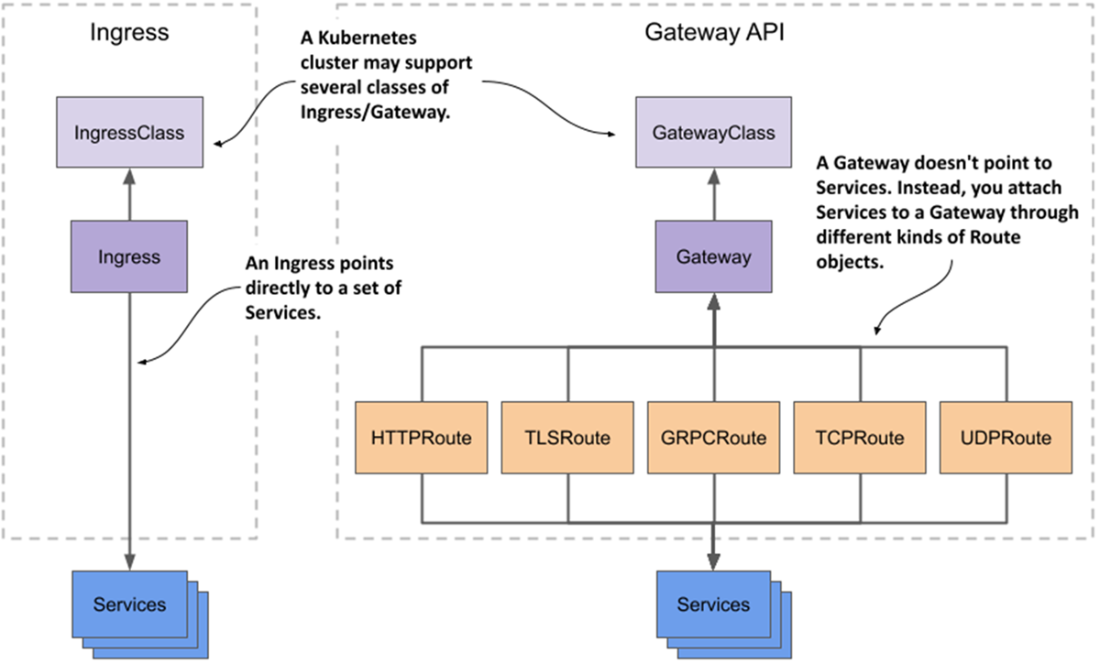

 Kubernetes in Action, Second Edition ebook for free
