12 Using Ingress to route traffic to services
This chapter explains how Kubernetes Ingress provides a single, HTTP-aware entrypoint to route external traffic to multiple services, avoiding a public IP per service and adding Layer 7 capabilities such as authentication, cookie-based session affinity, and URL rewriting. An Ingress solution consists of three parts: the Ingress API object (declarative rules), a reverse proxy or L7 load balancer that actually handles requests, and an ingress controller that watches Kubernetes resources and configures the proxy. Controllers can run in-cluster or rely on cloud load balancers, and different implementations (for example, NGINX, HAProxy, Envoy based) offer varied features. Because routing is based on virtual hosts, clients must send the correct Host header, typically enabled via DNS or local host mappings during development.
You use Ingress rules to route by host and path to backend services, often consolidating many services behind one public IP. Path matching supports Exact, Prefix, and ImplementationSpecific semantics; rules can include multiple paths, use host wildcards, or even omit the host to match any. A single Ingress can cover multiple services and hosts, and most proxies route directly to pod endpoints learned from Service and EndpointSlice objects. A default backend can be defined to handle requests that match no rule, enabling custom responses or catch‑all routing. Operationally, you inspect Ingress status for the externally reachable address and confirm the controller has reconciled the object.
Security and customization build on the core: TLS can be passed through to backends (controller specific) or more commonly terminated at the proxy using a Secret that holds the certificate and key, securing all hosts covered by the Ingress. Controller-specific configuration is supplied via annotations or dedicated custom resources, enabling features like cookie-based session affinity, rewrites, redirects, and CORS; for example, NGINX uses annotations, while GKE uses BackendConfig objects. Clusters can run multiple controllers; IngressClass and the spec.ingressClassName field select which controller processes an Ingress, and classes can carry custom parameters via controller-specific CRDs (such as AWS IngressClassParams). Some controllers even allow nonservice resource backends to express advanced routing. The net result is a flexible, scalable, and secure edge for Kubernetes services with clear separation between declarative intent and controller implementation.
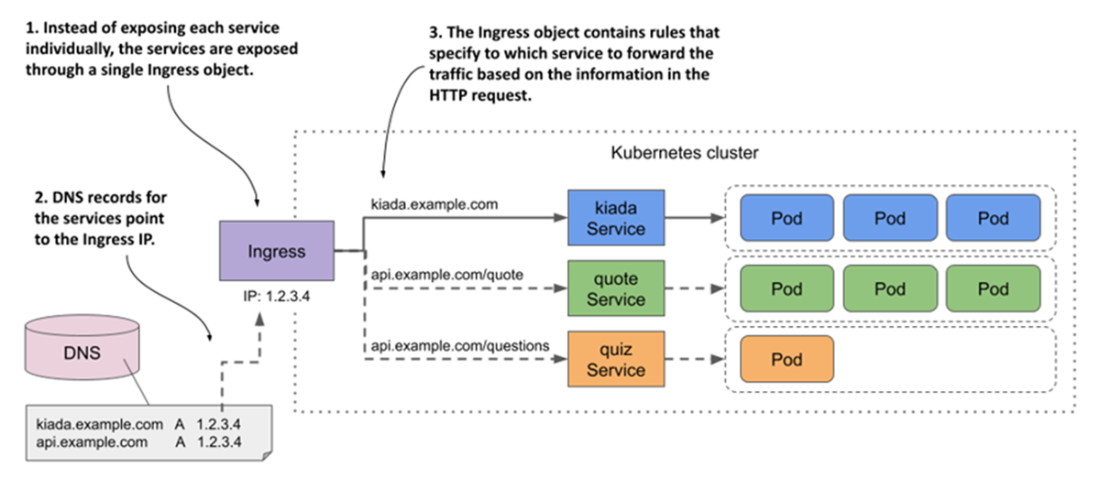
An Ingress forwards external traffic to multiple services
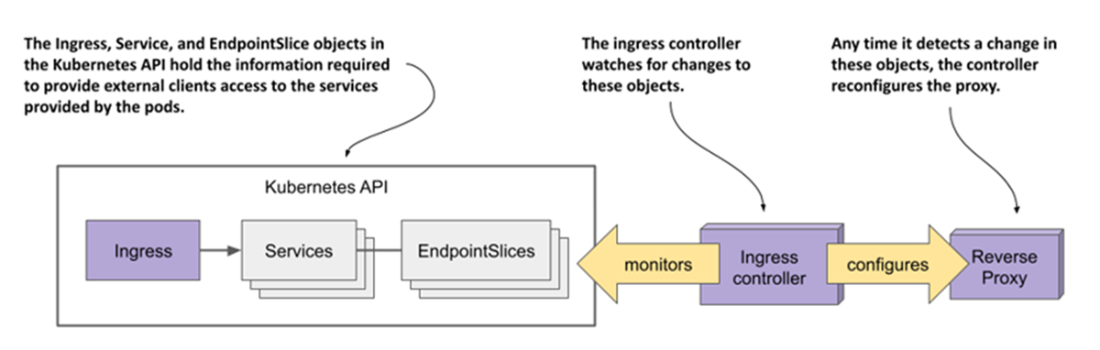
The role of an ingress controller
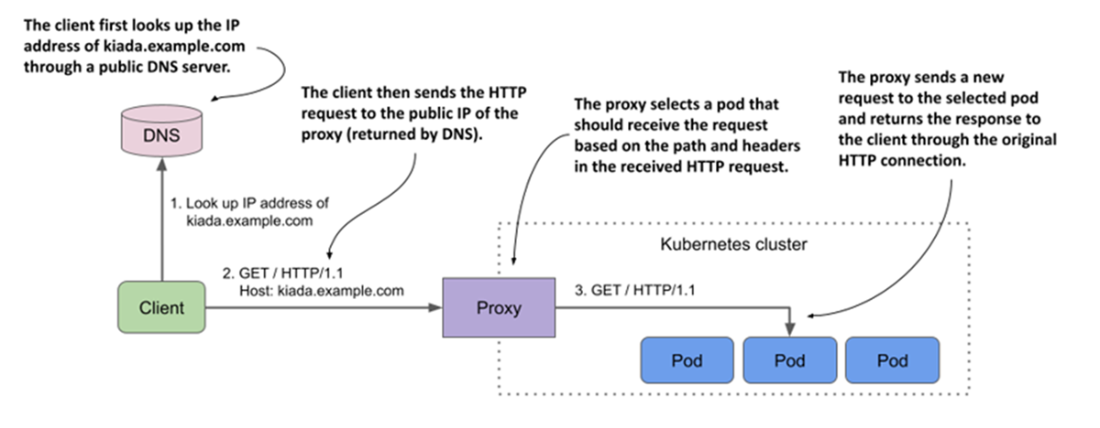
Accessing pods through an Ingress
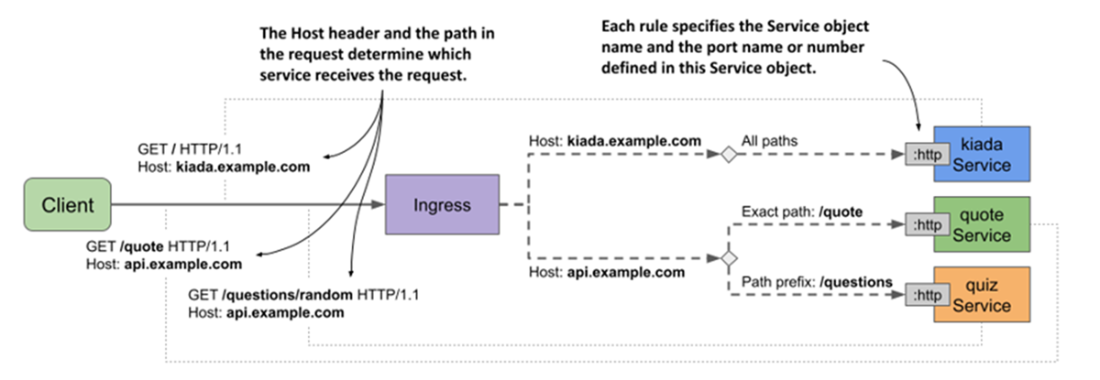
How the kiada-example-com Ingress object configures external traffic routing
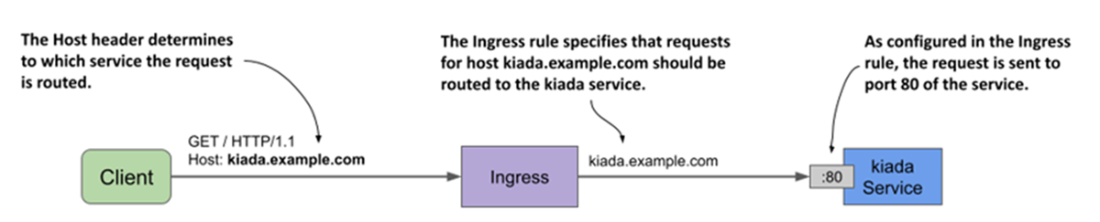
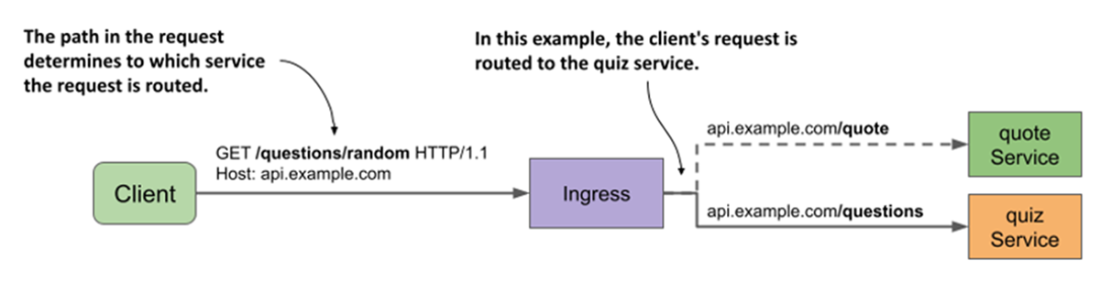
Path-based ingress traffic routing
An Ingress object covering all services of the Kiada suite
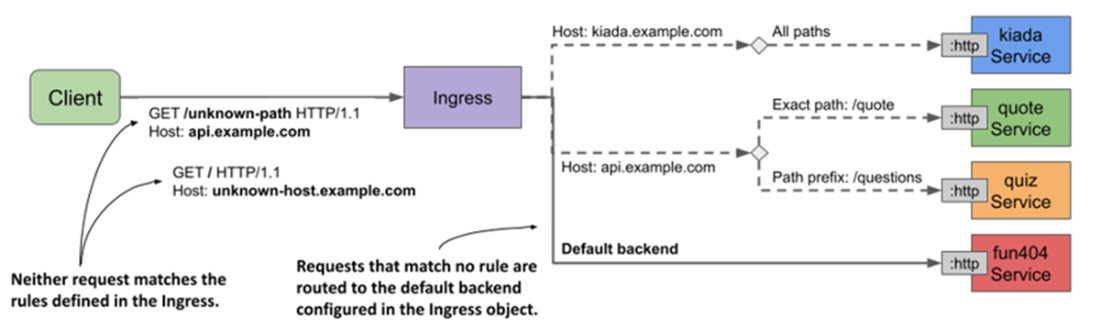
The default backend handles requests that match no ingress rule
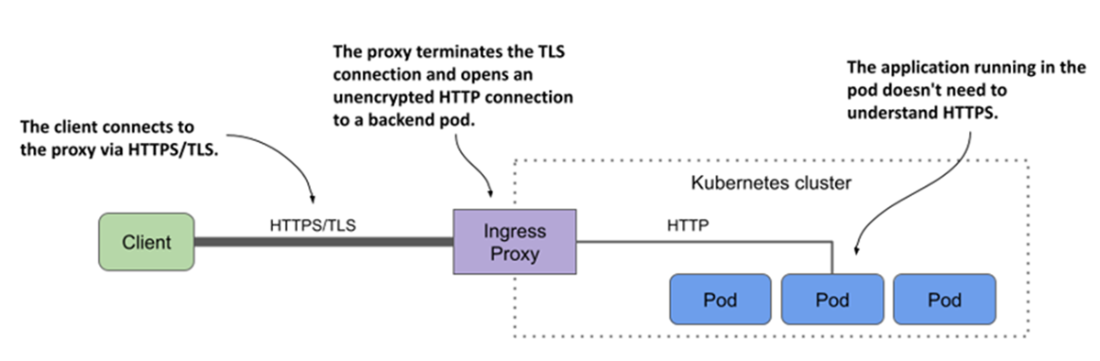
Securing connections to the Ingress using TLS
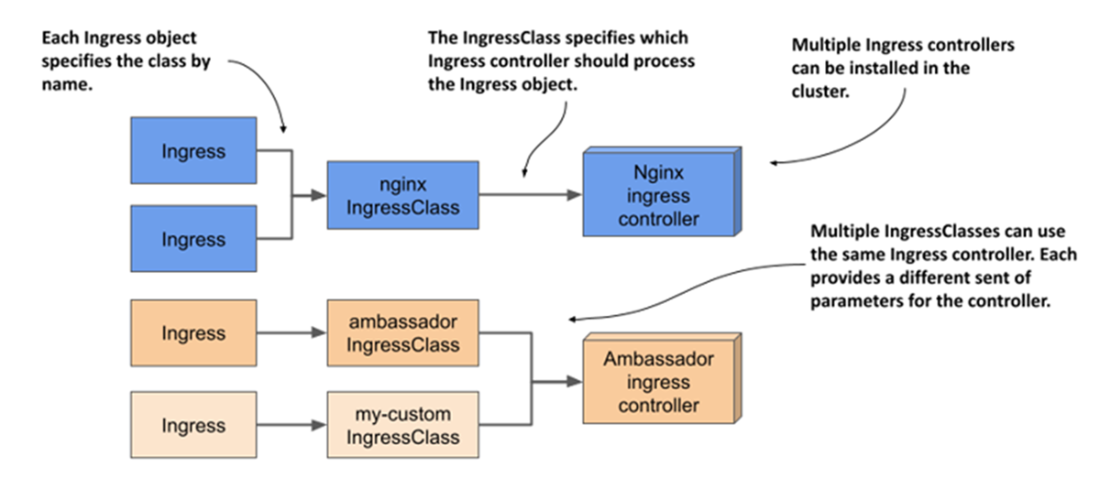
The relationship between Ingresses, IngressClasses, and ingress controllers
Summary
- An ingress controller configures an L7 load balancer or reverse proxy based on the configuration in the Ingress object.
- While a Service is an abstraction over a set of pods, an Ingress is an abstraction over a set of services.
- An Ingress requires a single public IP regardless of the number of services it exposes, whereas each LoadBalancer service requires its own public IP.
- External clients must resolve the hostnames specified in the Ingress object to the IP address of the ingress proxy. To accomplish this, you must add the necessary records to the DNS server responsible for the domain to which the host belongs. Alternatively, for development purposes, you can modify the /etc/hosts file on your local machine.
- An Ingress operates at Layer 7 of the OSI model and can therefore provide HTTP-related functionality that services operating at Layer 4 cannot.
- An ingress proxy usually forwards HTTP requests directly to the backend pod without going through the service IP, but this depends on the ingress implementation.
- The Ingress object contains rules that specify to which service the HTTP request received by the ingress proxy should be forwarded based on the host and path in the request. Each rule can specify an exact host or one with a wildcard and either an exact path or path prefix.
- The default backend is a catch-all rule that determines which service should handle requests that don’t match any rule.
- An Ingress can be configured to expose services over TLS. The Ingress proxy can terminate the TLS connection and forward the HTTP request to the backend pod unencrypted. Some ingress implementations support TLS passthrough.
- Ingress configuration options that are specific to a particular ingress implementation are set via annotations of the Ingress object or through custom Kubernetes object kinds that the controller provides.
- A Kubernetes cluster can run multiple ingress controller implementations simultaneously. When you create an Ingress object, you specify the IngressClass. The IngressClass object specifies which controller should process the Ingress object. Optionally, the IngressClass can also specify parameters for the controller.
FAQ
What is a Kubernetes Ingress and how does it work with Services and controllers?
An Ingress exposes HTTP(S) access to Services from outside the cluster through a single entrypoint. It involves three pieces: (1) the Ingress API object (your routing rules), (2) an L7 reverse proxy/load balancer that actually handles traffic, and (3) an ingress controller that watches Ingress/Service/EndpointSlice objects and configures the proxy. Most implementations forward directly to pod IPs discovered from Endpoints/EndpointSlices.Do my Services need to be type LoadBalancer when using an Ingress?
No. Typically you keep Services as typeClusterIP. Some ingress implementations require NodePort; check your controller’s docs. The proxy itself is what’s exposed publicly (often via a single cloud load balancer IP).My Ingress has no external address—what’s wrong?
Likely no ingress controller is running, or the controller isn’t selected. Install one (for example, NGINX Ingress) and either use the cluster’s default IngressClass or setspec.ingressClassName (the older kubernetes.io/ingress.class annotation is deprecated). Cloud controllers may take a few minutes to allocate an address.How do I find and test the public entrypoint for an Ingress?
- Get the address:kubectl get ing or kubectl describe ing; it’s also under status.loadBalancer.ingress.- For local testing without DNS, use curl with a Host mapping:
curl --resolve kiada.example.com:80:11.22.33.44 http://kiada.example.com, or add the IP-to-host mapping to /etc/hosts. Ensure the HTTP Host header matches an Ingress rule.How does path-based routing work and what does pathType mean?
pathType controls matching: Exact (path must match exactly), Prefix (match by path elements; /foo matches /foo/bar but not /foobar), and ImplementationSpecific (controller-defined). If multiple paths match, Exact takes precedence over Prefix.Can a single Ingress cover multiple hosts and use wildcards?
Yes. One Ingress can contain multiple rules for different hosts and paths, letting many Services share one public IP. Host wildcards like*.example.com match exactly one DNS label (e.g., api.example.com but not foo.api.example.com). Exact host rules take precedence over wildcard rules.What happens when no rule matches the request?
By default, the proxy returns 404. You can set a catch-all default backend viaspec.defaultBackend.service. Some controllers also fall back to a cluster-wide default-http-backend if configured.How do I secure an Ingress with TLS? What about passthrough?
For TLS termination at the proxy: create a TLS Secret (keystls.crt/tls.key), then reference it in spec.tls with the host names covered by the certificate. Clients then use HTTPS to the proxy; the proxy typically forwards HTTP to backends. TLS passthrough (letting backends terminate TLS) is controller-specific and usually enabled via annotations and controller flags.How do I enable features like authentication, URL rewrites, CORS, or cookie-based session affinity?
These are controller-specific. Many controllers (e.g., NGINX Ingress) use annotations (for example,nginx.ingress.kubernetes.io/affinity: cookie, .../session-cookie-name). Others (e.g., GKE) use custom API objects referenced from Services (like BackendConfig). Check your controller’s documentation for supported options.Can an Ingress use non‑Service backends?
Some controllers support resource backends so the Ingress points to a custom resource (e.g., Citrix’sHTTPRoute) that defines advanced routing. This is controller-specific and not part of the core Ingress feature set.
 Kubernetes in Action, Second Edition ebook for free
