This chapter explains how Kubernetes Services provide a stable, single access point to groups of ephemeral pods so clients don’t need to track changing pod IPs or instance counts. Using a Service, traffic is load-balanced across matching pods, allowing replicas to scale and move freely across nodes. The chapter grounds the concepts with a multi-service example (application pods calling other internal services) to show how to wire services together, discover them reliably, and expose them to clients both inside and outside the cluster.
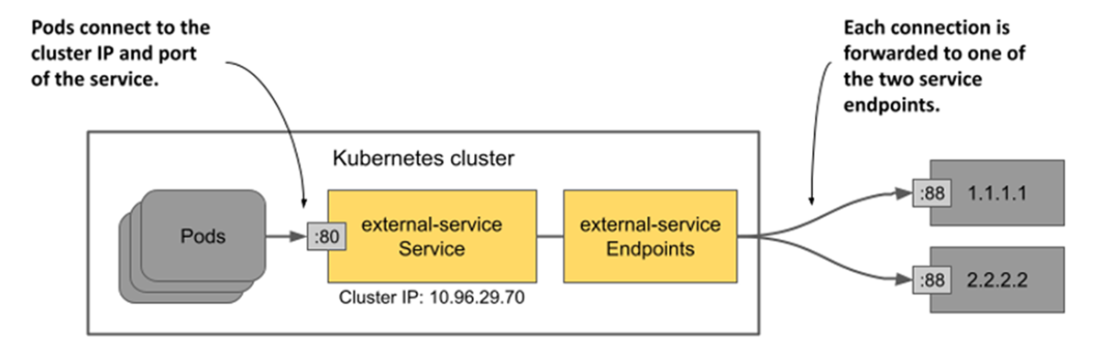
You learn how a Service selects backend pods via label selectors and exposes one or more ports, with ClusterIP as the default, cluster-internal type. Service discovery is primarily DNS-based (short names within a namespace and fully qualified names across namespaces), with legacy environment variables still available but often discouraged. Headless services return pod IPs directly so clients can choose targets or connect to all peers, while ExternalName services create DNS aliases that point to existing DNS names. Behind every Service, Kubernetes manages dynamic backend lists through Endpoints and the scalable EndpointSlice API; you can also omit selectors and define endpoints manually to front external systems.
To reach clients outside the cluster, the chapter compares NodePort (node-level ports), LoadBalancer (cloud or add-on provisioned L4 balancer), and the option to front Services with Ingress. It covers traffic policies that affect source IP visibility and hop count (externalTrafficPolicy) and node-local routing for in-cluster calls (internalTrafficPolicy), plus topology-aware hints to prefer zone-local endpoints in multi-zone clusters. Finally, readiness probes control when pods enter or leave Service backends, preventing traffic from hitting unready instances and avoiding cascading outages; practical guidance includes using purpose-built health endpoints, cautious timeouts and thresholds, and avoiding overzealous checks of external dependencies that can cause flapping.
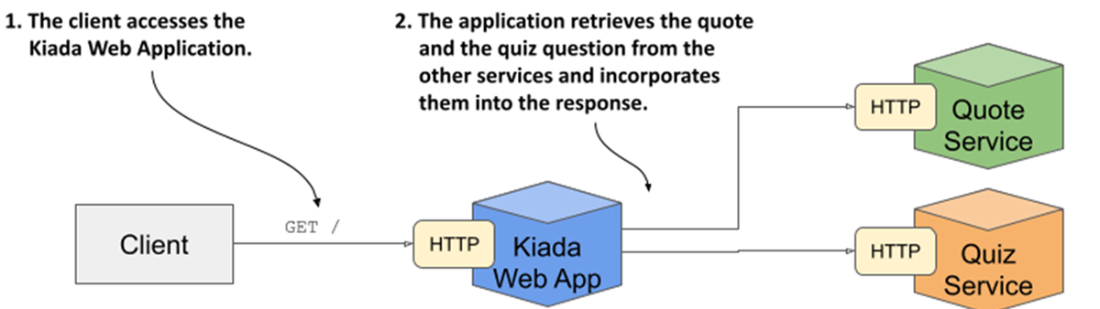
The architecture and operation of the Kiada suite
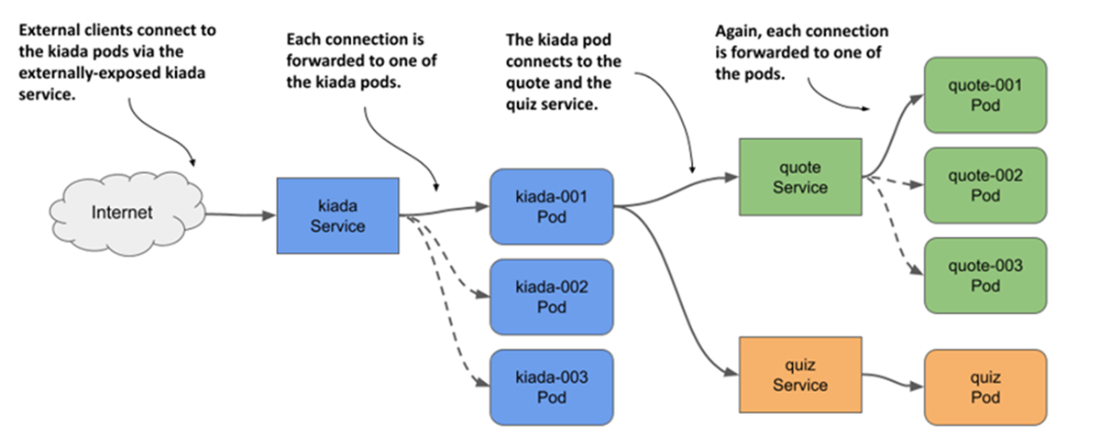
Exposing pods with Service objects
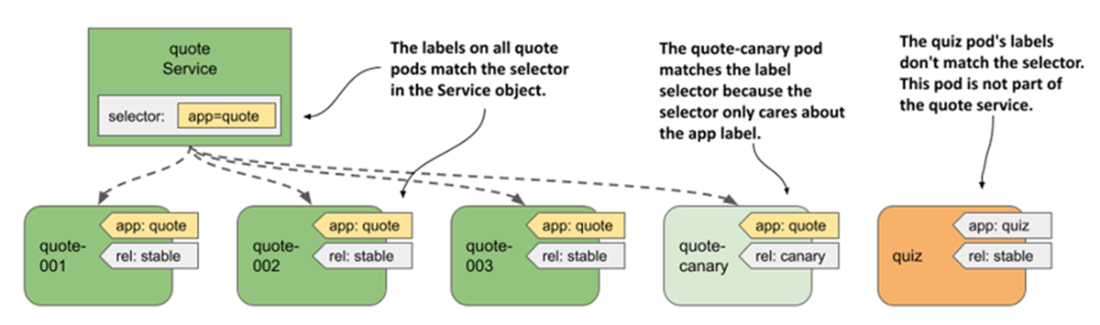
Label selectors determine which pods are part of the service.
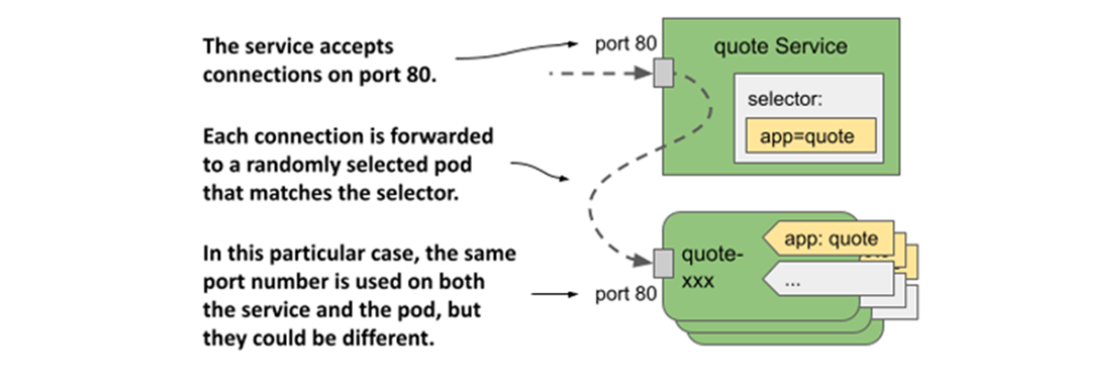
The quote service and the pods that it forwards traffic to
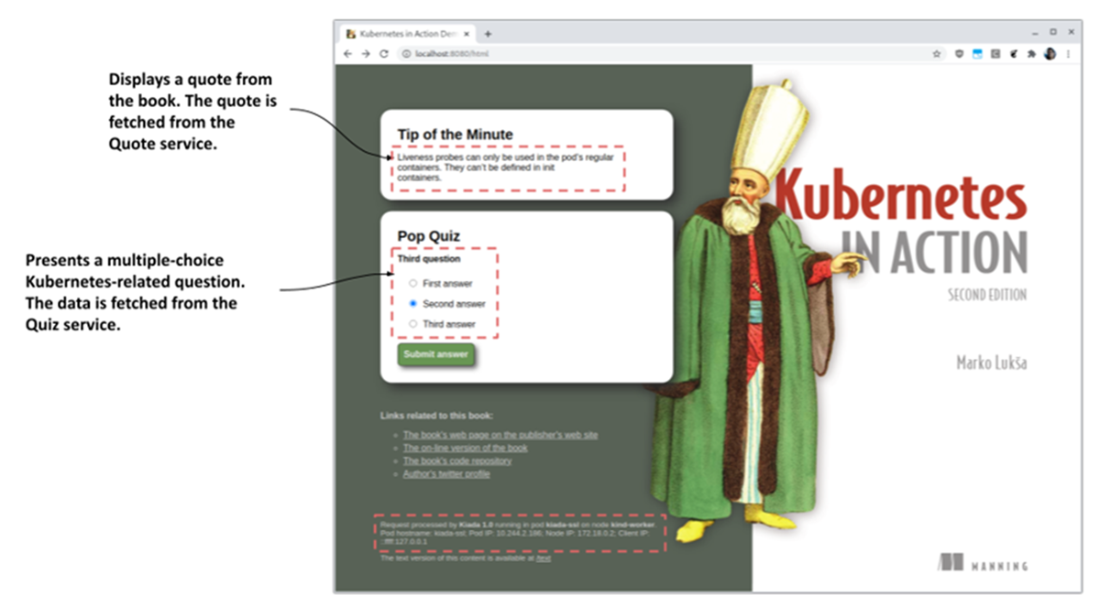
The Kiada application when accessed with a web browser
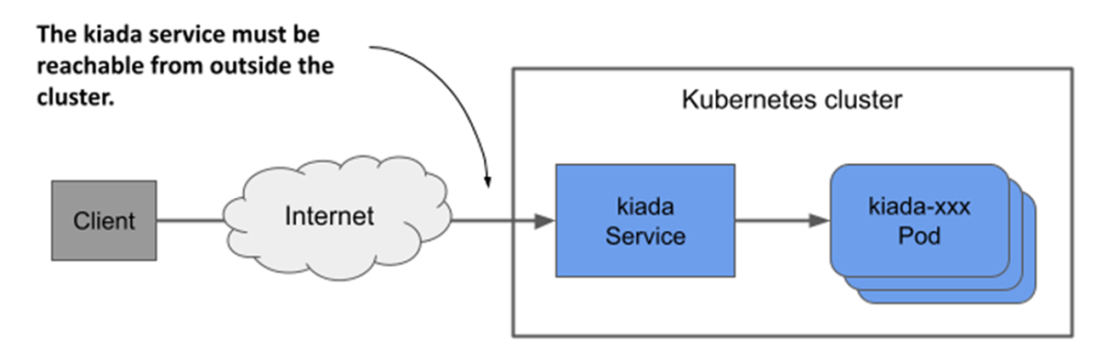
Exposing a service externally
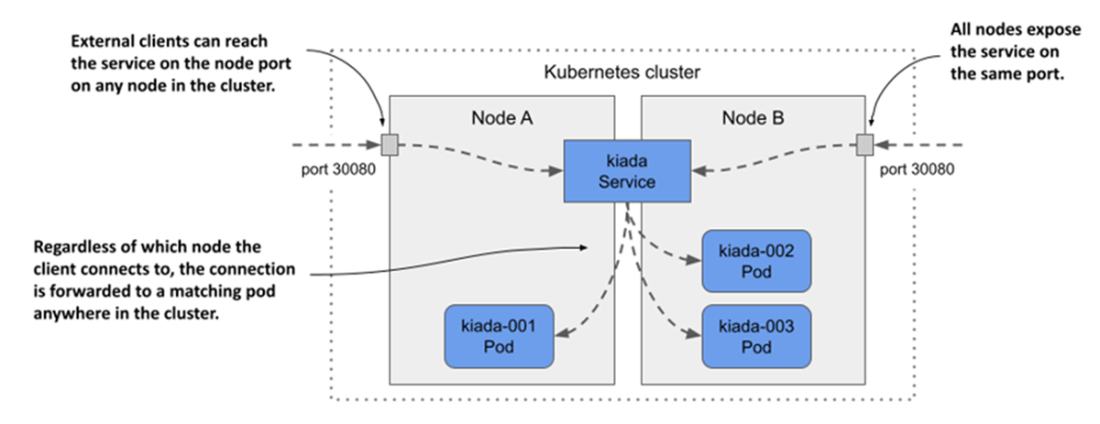
Exposing pods through a NodePort service
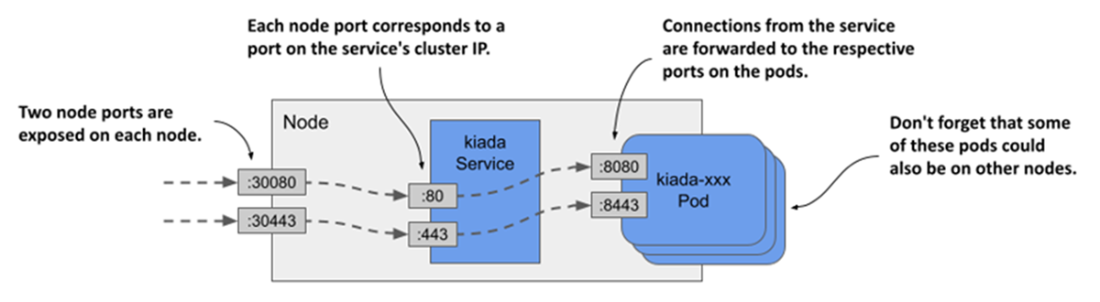
Exposing multiple ports through with a NodePort service
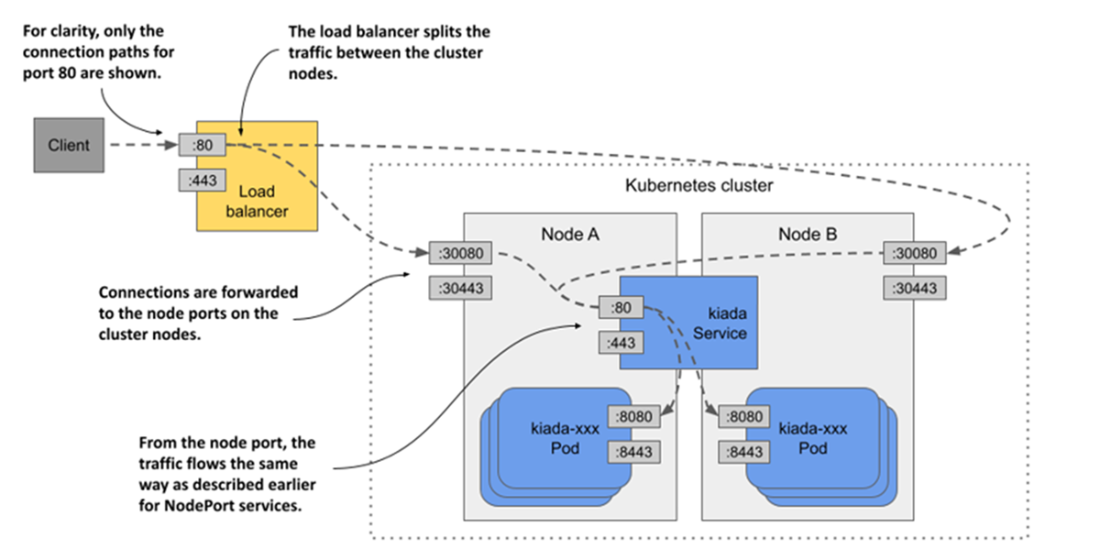
Exposing a LoadBalancer service
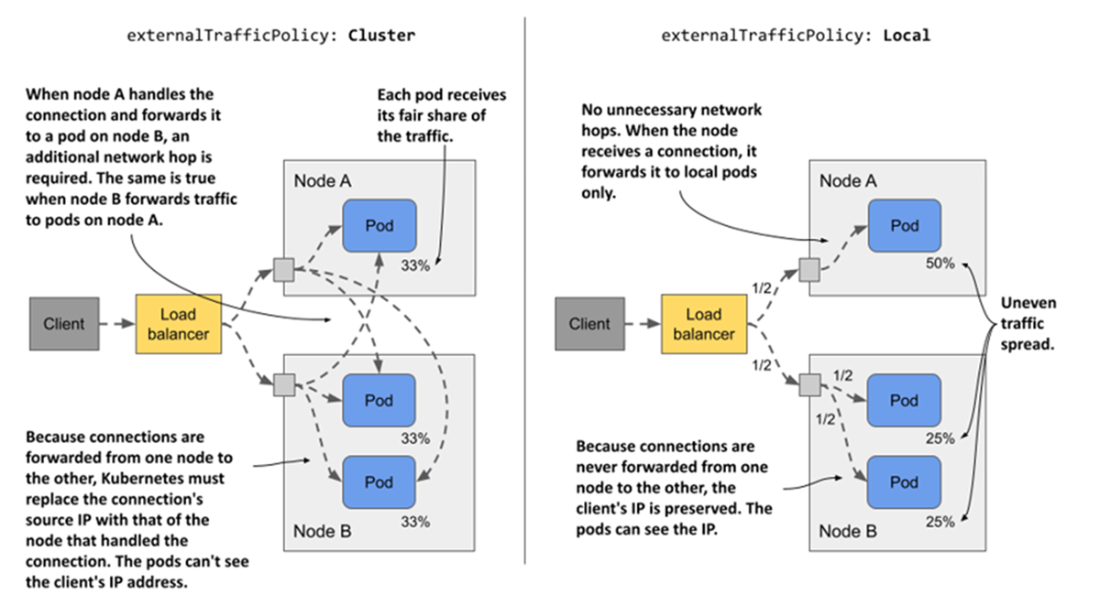
Understanding the two external traffic policies for NodePort and LoadBalancer services
Pods consuming a service with two external endpoints
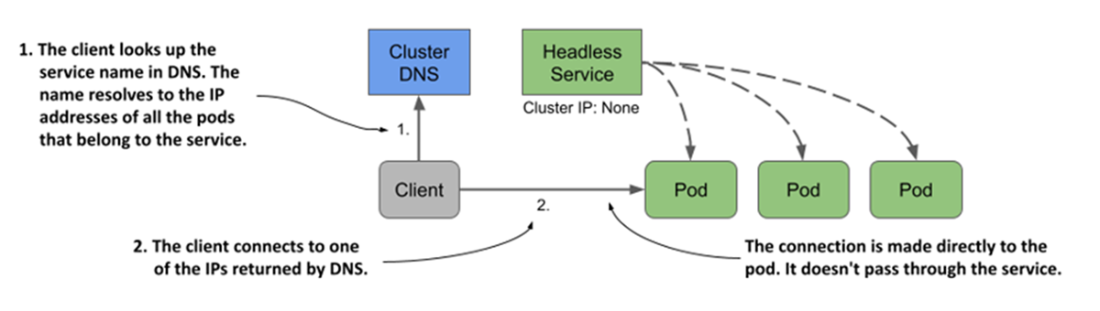
With headless services, clients connect directly to the pods.
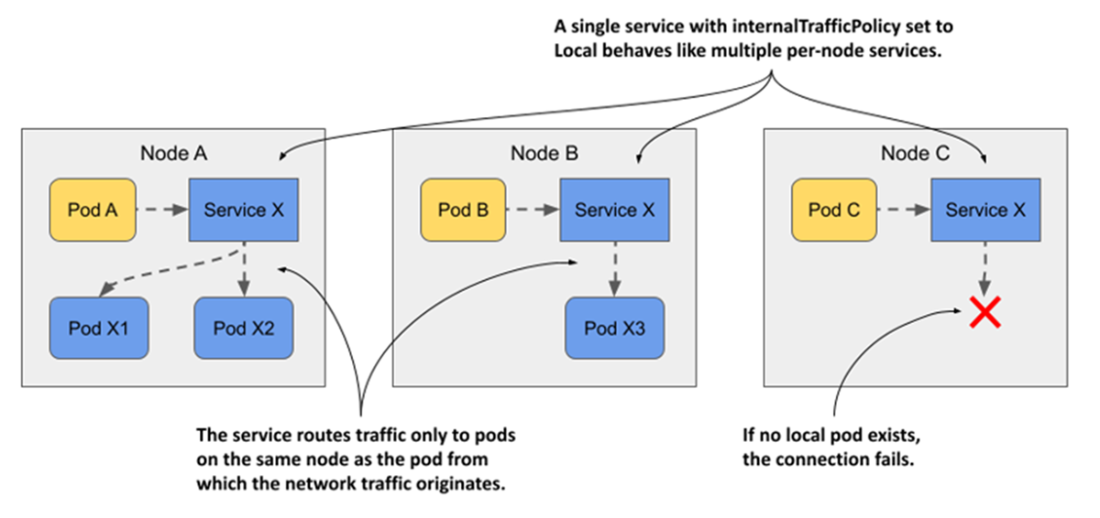
The behavior of a service with internalTrafficPolicy set to Local
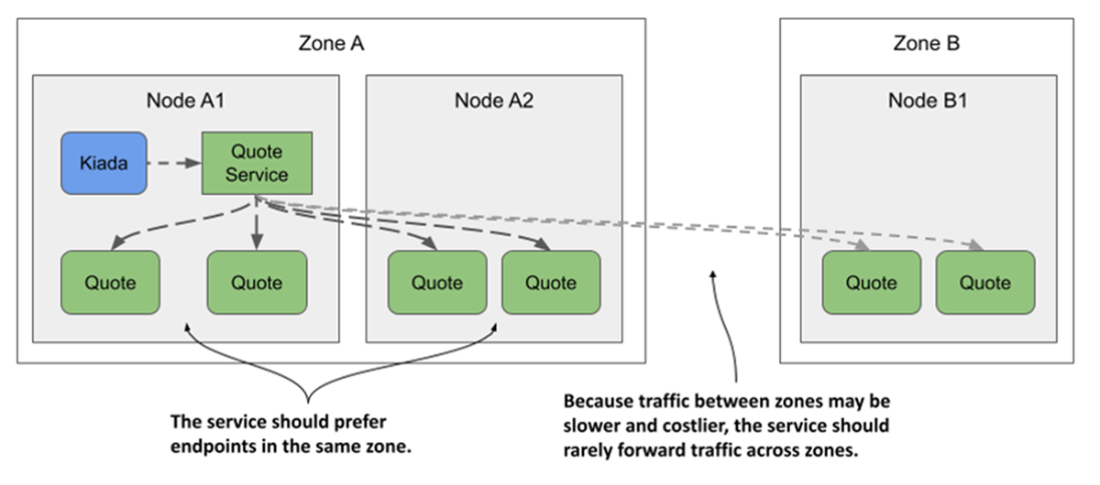
Routing serviced traffic across availability zones
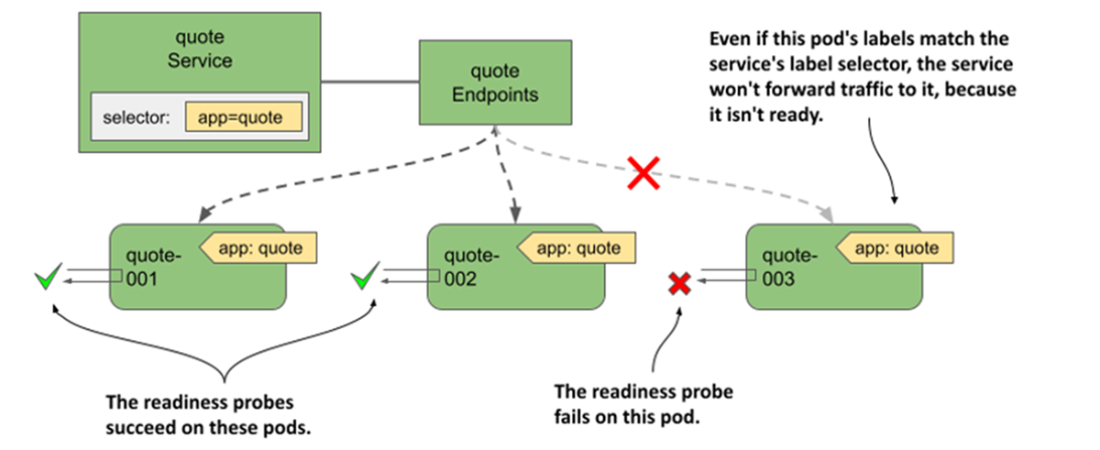
Pods that fail the readiness probe are removed from the service
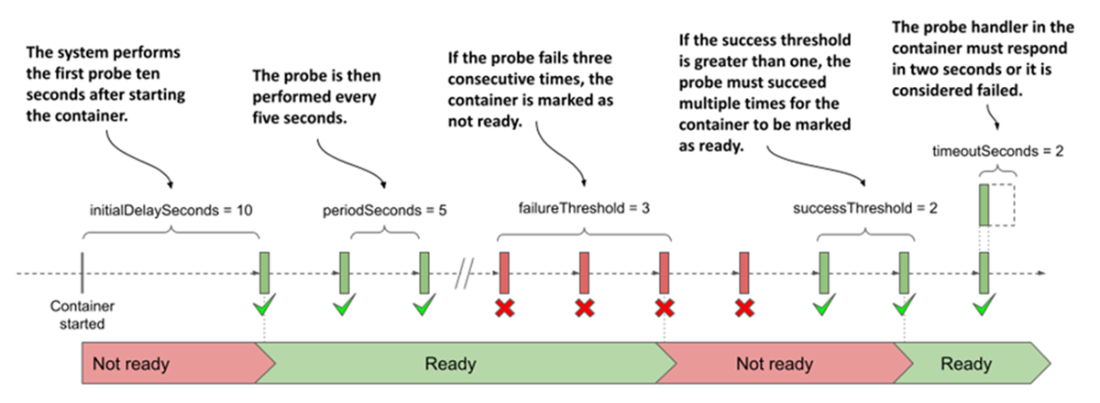
Readiness probe execution and resulting readiness status of the container
Summary
Pods communicate over a flat network that allows any pod to reach any other pod in the cluster, regardless of the actual network topology connecting the cluster nodes.
A Kubernetes service makes a group of pods available under a single IP address. While the IPs of the pods may change, the IP of the service remains constant.
The cluster IP of the service is reachable from inside the cluster, but NodePort and LoadBalancer services are also accessible from outside the cluster.
Service endpoints are either determined by a label selector specified in the Service object or configured manually. These endpoints are stored in the Endpoints and EndpointSlice objects.
Client pods can find services using the cluster DNS or environment variables. Depending on the type of Service, the following DNS records may be created: A, AAAA, SRV, and CNAME.
Services can be configured to forward external traffic only to pods on the same node that received the external traffic, or to pods anywhere in the cluster. They can also be configured to route internal traffic only to pods on the same node as the pod from which the traffic originates from. Topology-aware routing ensures that traffic isn’t routed across availability zones when a local pod can provide the requested service.
Pods don’t become service endpoints until they’re ready. By implementing a readiness probe handler in an application, you can define what readiness means in the context of that particular application.
FAQ
What problem do Kubernetes Services solve?A Service provides a single, stable virtual IP and DNS name for a group of pods that offer the same functionality. Because pods are ephemeral and their IPs change when they’re recreated or scaled, clients shouldn’t connect to individual pod IPs. Services load-balance connections across matching pods and let you scale, upgrade, or move pods without changing the client’s address.How does a Service choose which pods receive traffic?Through labels and a label selector in the Service spec. Any pod whose labels match the Service’s selector becomes an endpoint. Kubernetes automatically creates and updates the corresponding Endpoints and EndpointSlice objects as pods appear or disappear. You can adjust the selector (for example, kubectl set selector service my-svc app=myapp) to include or exclude pods. If you create a Service without a selector, you must manage Endpoints yourself.What Service types exist and when should I use each?- ClusterIP (default): Internal-only access inside the cluster.
- NodePort: Exposes the Service on a port on every node (range usually 30000–32767). Useful for simple external access or when fronted by your own L4 load balancer.
- LoadBalancer: Provisions an external load balancer (cloud providers or MetalLB on bare metal) and forwards to nodePorts.
- ExternalName: Adds a DNS CNAME alias to another DNS name; no cluster IP or endpoints.
Other options: externalIPs (rarely used) and Ingress (HTTP/S routing via an ingress controller) as alternatives for external exposure.How do clients discover and connect to Services inside the cluster?Via cluster DNS. A Service is resolvable as: service (same namespace), service.namespace, service.namespace.svc, and service.namespace.svc.cluster.local. Pods get appropriate search domains in /etc/resolv.conf, so short names usually work. You can also connect by the Service’s ClusterIP. Legacy service env vars are injected at container start; you can disable them with enableServiceLinks=false. Note: kubectl port-forward svc/... selects a backing pod and connects directly to it, bypassing Service load balancing.Why can’t I ping a Service IP?A Service IP is virtual and only meaningful with a transport protocol and port (TCP/UDP). ICMP echo (ping) isn’t handled, so pinging a Service IP fails. Test Services with application protocols (for example, curl http://service:port) instead.What is a headless Service and when should I use one?A headless Service sets spec.clusterIP=None. DNS then returns A/AAAA records for each backing pod rather than a single Service IP. Clients can connect directly to individual pods (client-side load balancing, peer discovery, stateful workloads). Headless Services can also omit a selector and return the IPs you provide in an Endpoints object, enabling DNS-based access to external backends.What are Endpoints and EndpointSlices, and how do they differ?Endpoints lists the IP:port pairs a Service routes to. EndpointSlice is the scalable successor: it splits endpoints across slices, includes readiness conditions and optional topology hints, and is labeled with kubernetes.io/service-name. Kubernetes manages both automatically when a Service has a selector. You can list them with kubectl get endpoints and kubectl get endpointslices. If you omit the selector, you must create the Endpoints object (Kubernetes then mirrors it into EndpointSlices).How do I expose a Service externally and what are the trade-offs?- NodePort: Access via nodeIP:nodePort on any node; ensure firewalls allow the port range.
- LoadBalancer: Cloud/provider adds an external IP and forwards to nodePorts; use MetalLB on bare metal.
- externalIPs: Treat traffic to given IPs as Service traffic (rare).
- Ingress: Central HTTP/S ingress via an ingress controller.
For NodePort/LoadBalancer, externalTrafficPolicy=Cluster forwards traffic to any pod across nodes (adds an extra hop and obscures client IP). externalTrafficPolicy=Local preserves client IP and avoids cross-node hops, but only nodes with local endpoints should receive traffic (use healthCheckNodePort) and traffic distribution can become uneven across pods.Can a Service keep a client “sticky” to the same pod?Yes. Set spec.sessionAffinity=ClientIP to route connections from the same source IP to the same backend pod for a configurable duration (spec.sessionAffinityConfig.clientIP.timeoutSeconds, default ~3 hours). Cookie-based affinity isn’t supported because Services operate at L4, not HTTP.How do readiness probes control whether a pod receives Service traffic?A pod is added to Service endpoints only when it’s “ready.” Readiness probes (exec, httpGet, or tcpSocket) are run by the kubelet; success means the pod can accept traffic. Failures remove the pod from Service endpoints without restarting it. Tune initialDelaySeconds, periodSeconds, timeoutSeconds, failureThreshold, and successThreshold. Prefer checking only in-pod dependencies; external checks can cause cascading removals during transient issues. publishNotReadyAddresses=true publishes non-ready pods in DNS when needed. During pod termination, Kubernetes removes the pod from Services automatically.
pro $24.99 per month
access to all Manning books, MEAPs, liveVideos, liveProjects, and audiobooks!

 Kubernetes in Action, Second Edition ebook for free
