10 Persisting data with PersistentVolumes
This chapter explains how Kubernetes abstracts persistent storage so application developers can request what they need without caring about the underlying technology. It introduces three core resources: PersistentVolume (PV) representing actual storage, PersistentVolumeClaim (PVC) representing a user’s request/ownership of storage, and StorageClass describing classes of storage and their provisioners. Clusters rely on CSI drivers to provision, attach, and mount volumes, enabling both network-attached and node-local storage. Provisioning can be dynamic (on demand when a PVC appears) or static (administrators pre-create PVs), and lifecycle behaviors are governed by reclaim policies such as Retain and Delete.
Readers learn how to create and use PVCs in pods, specifying minimum size, access modes (ReadWriteOncePod, ReadWriteOnce, ReadWriteMany, ReadOnlyMany), and volume modes (Filesystem or Block). StorageClasses influence binding timing through volumeBindingMode (Immediate vs. WaitForFirstConsumer), which can delay provisioning until a consumer pod is scheduled for better placement. The chapter contrasts multi-pod usage and node placement constraints across access modes, shows how claims persist beyond pod lifecycles for reuse, and details node-local PVs with node affinity to guarantee scheduling on the correct host. It also covers operational management: deleting pods vs. claims, recycling or reusing released PVs, and resizing PVCs (subject to allowVolumeExpansion) with a pod restart to finish filesystem expansion.
Beyond basics, the chapter demonstrates cloning and pre-populating volumes via PVC data sources and introduces first-class snapshotting with VolumeSnapshot and VolumeSnapshotClass, plus restoring new PVCs from snapshots. It explains the CSIDriver resource and the roles of controller and per-node components in the CSI model. Finally, it presents ephemeral volumes: a pod-level “ephemeral” type that uses a volumeClaimTemplate to create a dedicated PVC/PV per pod, combining predictable capacity limits and snapshot/initialization capabilities with a lifecycle tied to the pod—providing a more feature-rich alternative to emptyDir when temporary but managed storage is desired.
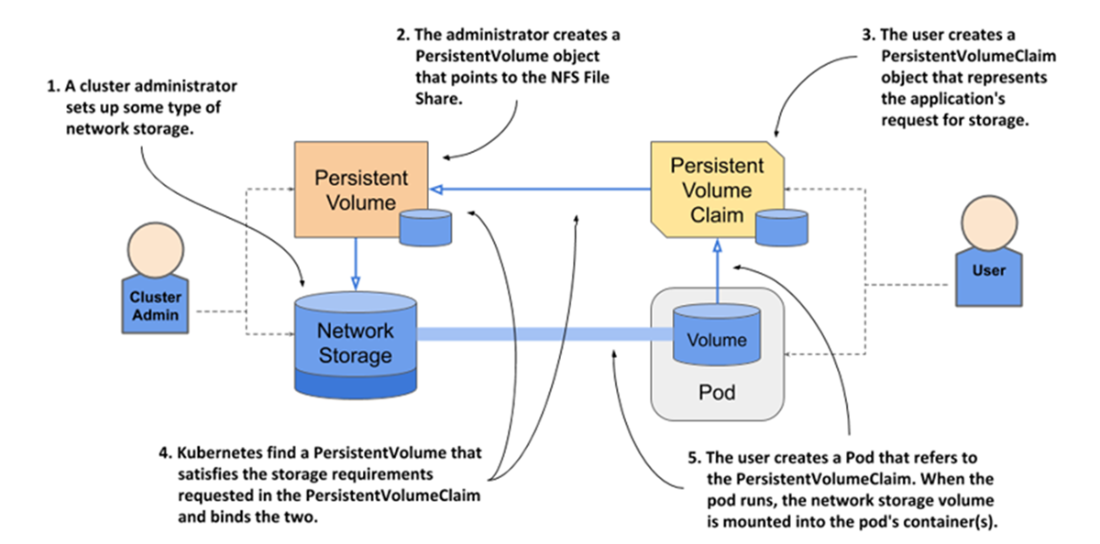
Using PersistentVolumes and PersistentVolumeClaims to attach network storage to pods
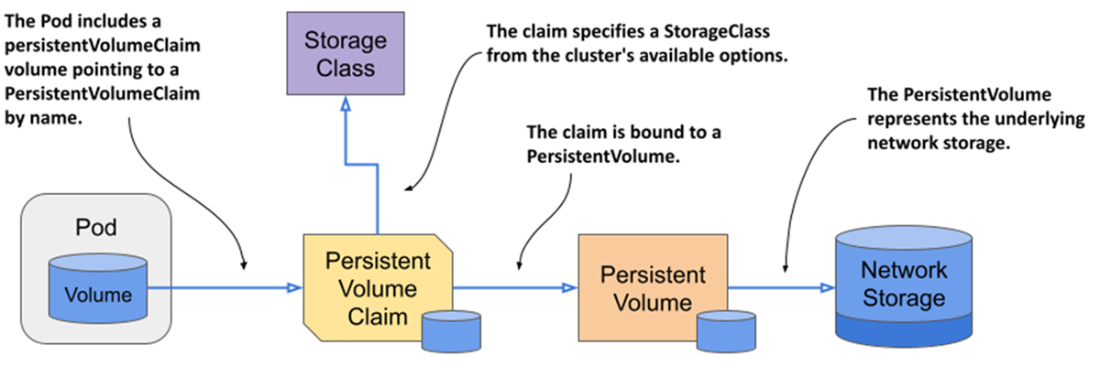
Mounting a PersistentVolume into the pod’s container(s)
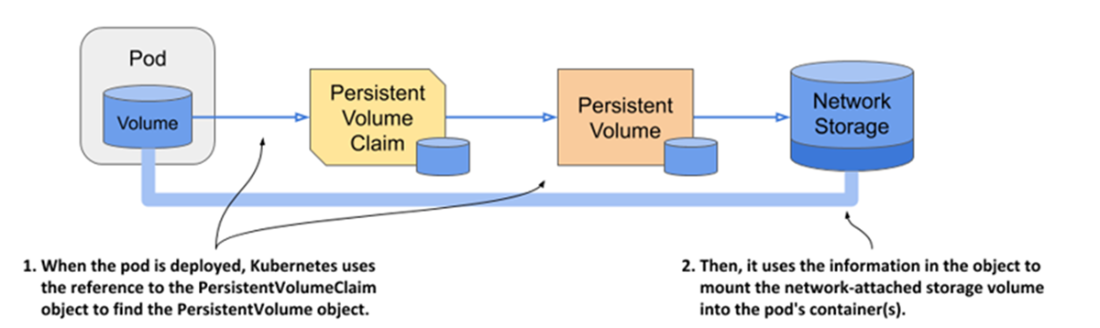
Using the same PersistentVolumeClaim in multiple pods
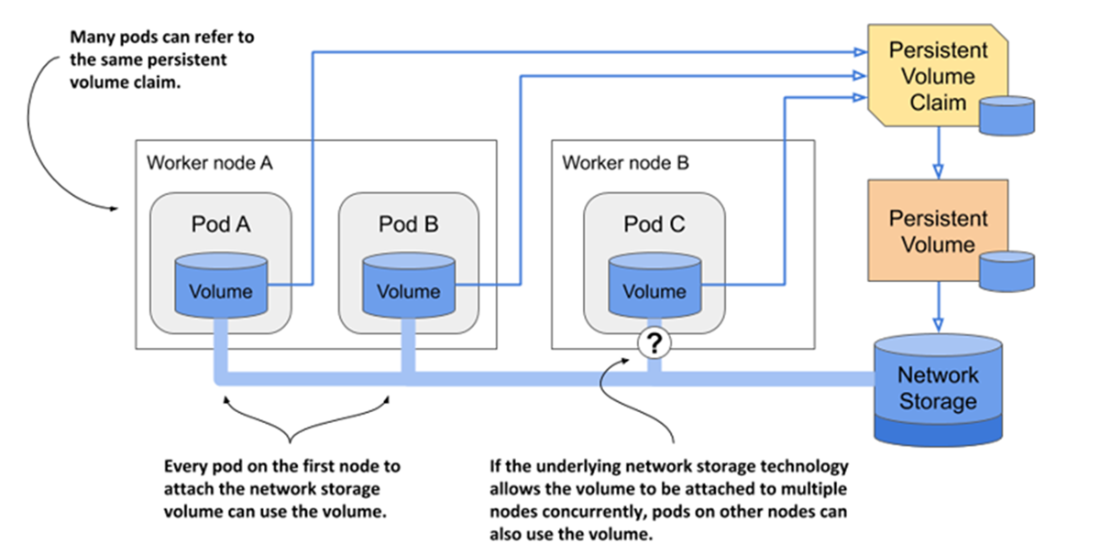
Dynamic provisioning of PersistentVolumes
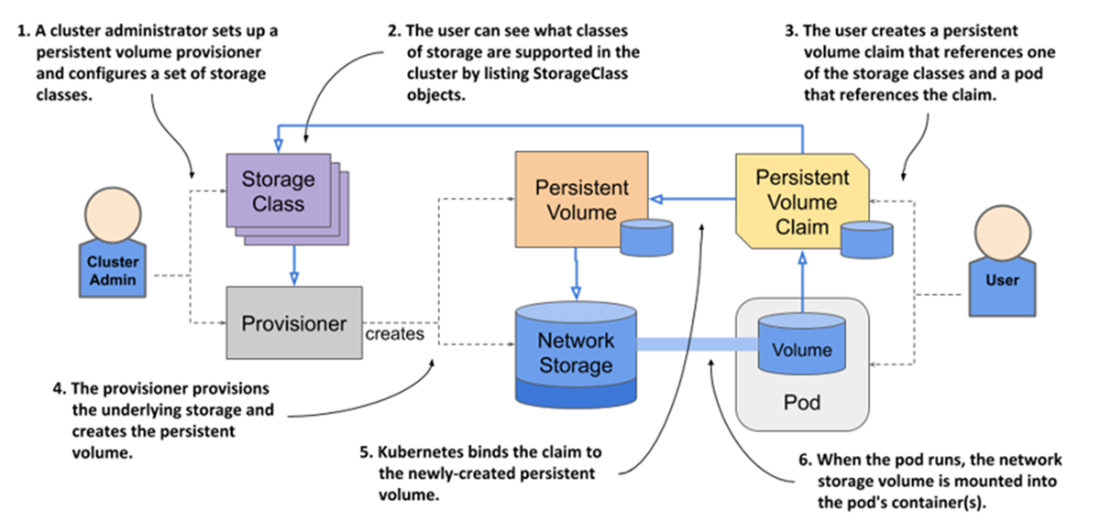
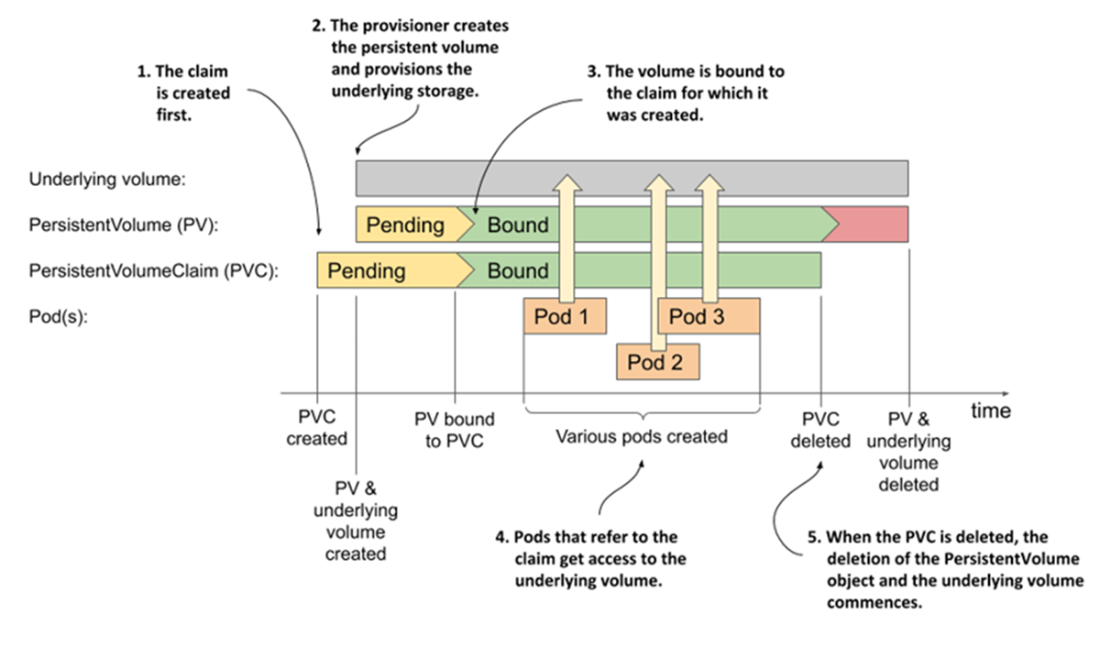
The lifecycle of dynamically provisioned PersistentVolumes, claims, and the pods using them
Static provisioning of PersistentVolumes
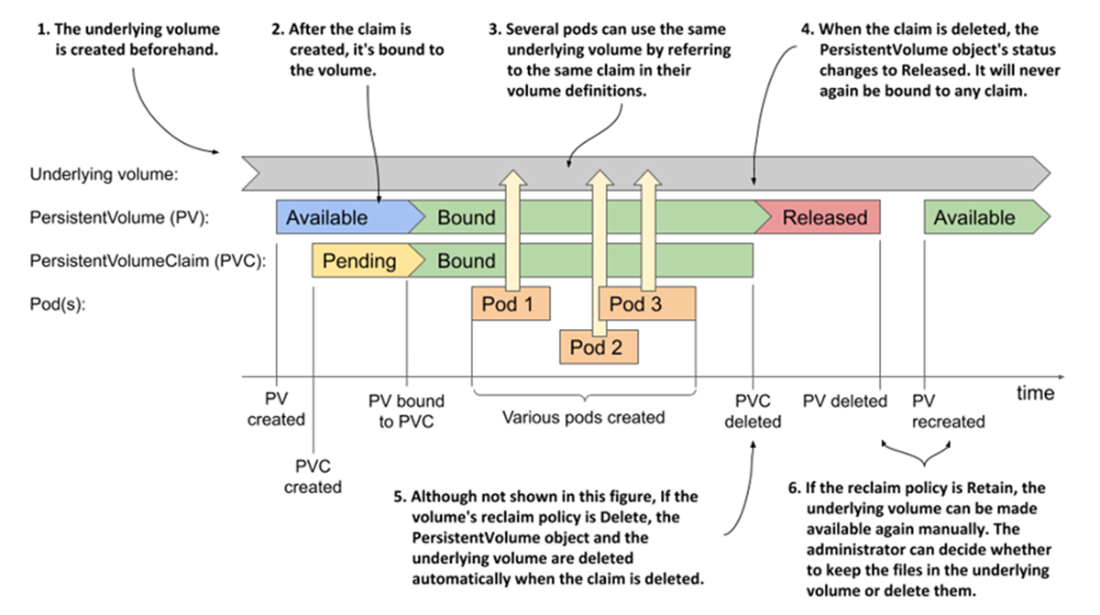
The lifecycle of statically provisioned PersistentVolumes, claims, and the pods using them
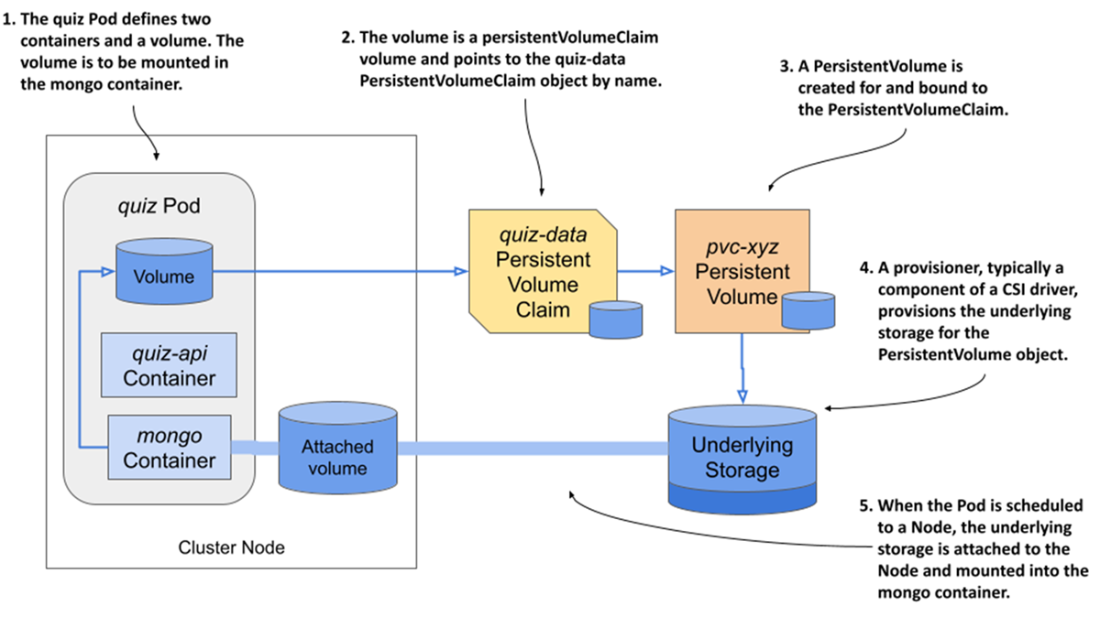
The quiz Pod and its PersistentVolume
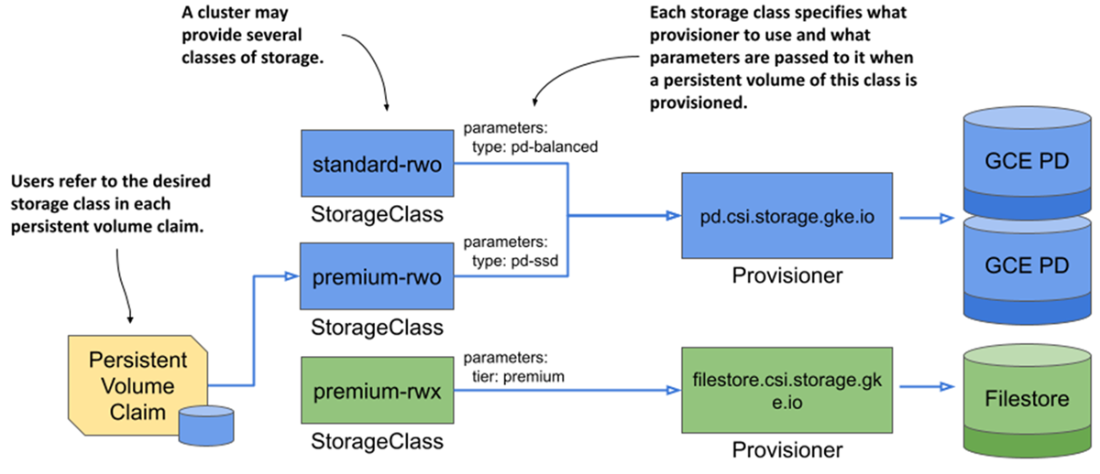
The relationship between StorageClasses, PersistentVolumeClaims, and volume provisioners
Summary
- The management of persistent storage is done by both Kubernetes itself and by the Container Storage Interface (CSI) drivers installed in the cluster.
- A PersistentVolume object represents a local or network-attached storage volume that is available to applications within the cluster.
- Before an application can use a PersistentVolume, the user who deploys the application must claim the PersistentVolume by creating a PersistentVolumeClaim object.
- A PersistentVolumeClaim object specifies the minimum size and other requirements that the PersistentVolume must meet.
- When using statically provisioned volumes, Kubernetes finds an existing PersistentVolume that meets the requirements set forth in the claim and binds it to the claim.
- When using dynamic provisioning, a new PersistentVolume is created for each PersistentVolumeClaim on demand. The volume is created based on the requirements specified in the PersistentVolumeClaim and the StorageClass referenced in it.
- A PersistentVolume’s access modes determine whether a single or multiple pods can use the volume simultaneously and whether they can only read or also write to it.
- A user can expand the size of a PersistentVolume by updating the requested storage size in the PersistentVolumeClaim object.
- A snapshot of a PersistentVolume can be requested by creating a VolumeSnapshot object.
- A new PersistentVolume can be initialized with data from another PersistentVolume, a VolumeSnapshot, or any other supported data source.
- Local PersistentVolumes are used when applications need to access disks that are directly attached to nodes. This affects the scheduling of the pods, since the pod must be scheduled to one of the nodes that can provide a local PersistentVolume. If the pod is subsequently deleted and recreated, it will always be scheduled to the same node.
- A PersistentVolumeClaim template can be specified in the pod’s manifest by defining an ephemeral volume. When the pod is created, the PersistentVolumeClaim is created from the template automatically.
FAQ
What are PersistentVolumes, PersistentVolumeClaims, and StorageClasses, and how do they relate?
- PersistentVolume (PV) represents actual storage (local or network-attached) available to the cluster.
- PersistentVolumeClaim (PVC) is a user request for storage with specific properties (size, access mode, class).
- StorageClass defines a class of storage (provisioner/driver and parameters) and enables dynamic provisioning.
- Flow: a pod references a PVC; the PVC is bound to a PV; the PV is mounted into the pod without exposing infrastructure details.
What’s the difference between dynamic and static provisioning of PersistentVolumes?
- Dynamic provisioning: a CSI driver and StorageClass automatically create a PV when a PVC appears. Default reclaim policy is usually Delete.
- Static provisioning: an administrator pre-creates the storage and a matching PV; users bind to it via a PVC. Common reclaim policy is Retain.
- Both modes can coexist in the same cluster.
- Static is often used for node-local storage or pre-provisioned external volumes; dynamic is common for cloud/storage backends.
How do I use a PersistentVolumeClaim in a pod?
- Create a PVC (specify size, accessModes, and optionally storageClassName).
- In the pod spec, add a volume of type persistentVolumeClaim with claimName pointing to your PVC.
- Mount that volume into containers using volumeMounts.
- Multiple pods may reference the same PVC, subject to the PV’s supported access mode.
Which access modes are available and when should I use each?
- ReadWriteOncePod (RWOP): read/write by exactly one pod in the whole cluster.
- ReadWriteOnce (RWO): read/write by many pods on a single node (only one node can attach the volume).
- ReadWriteMany (RWX): read/write by pods across multiple nodes concurrently (requires backend support).
- ReadOnlyMany (ROX): read-only by pods across multiple nodes.
- Note: there is no “ReadOnlyOnce.” You can mount an RWO/RWX volume as read-only in a pod.
Why is my PersistentVolumeClaim stuck in Pending?
- No default StorageClass and the PVC didn’t specify storageClassName.
- PVC references a non-existent StorageClass (watch for ProvisioningFailed events).
- VolumeBindingMode is WaitForFirstConsumer: binding happens only when a consuming pod is scheduled.
- No PV (for static) matches the PVC’s size/accessModes/class, or a local PV can only bind where node constraints are met.
What are PV reclaim policies and how do they affect data?
- Retain: releasing a PVC leaves the PV and underlying data intact; admin must manually clean up and/or rebind.
- Delete: releasing a PVC deletes the PV and typically the underlying storage (default for dynamically provisioned PVs).
- Recycle: deprecated; do not rely on it.
- Tip: changing a Released PV from Retain to Delete will cause deletion of the PV and storage.
When is a dynamically provisioned volume actually created and bound?
- Immediate: PV is provisioned and bound as soon as the PVC is created; suitable for storage accessible from any node.
- WaitForFirstConsumer: PV is provisioned and bound when the first consuming pod is scheduled, allowing placement that respects topology (zones, node-local constraints).
How can I resize a PersistentVolumeClaim?
- Ensure the StorageClass allows expansion (allowVolumeExpansion: true).
- Edit the PVC to increase spec.resources.requests.storage (you can’t shrink).
- For filesystem volumes, complete resize often requires restarting the pod so the filesystem can be grown (you’ll see FileSystemResizePending until then).
- Capacity shows the PV’s actual size; it updates once expansion completes.
How do I snapshot or clone a volume and restore from it?
- Clone: create a new PVC with dataSourceRef pointing to an existing PVC to initialize a fresh PV with the source’s data.
- Snapshot: create a VolumeSnapshotClass (driver, policy), then a VolumeSnapshot pointing at the source PVC.
- Restore: create a PVC whose dataSourceRef points to the VolumeSnapshot (apiGroup: snapshot.storage.k8s.io).
- Use case: initializing ReadOnlyMany volumes from a pre-populated source via cloning/snapshotting.
What are ephemeral PersistentVolumes and when should I use them?
- Define an ephemeral volume in a pod with volumeClaimTemplate; Kubernetes auto-creates a PVC/PV just for that pod.
- The PVC/PV lifecycle is tied to the pod; when the pod is deleted, the claim and volume are typically deleted.
- Compared to emptyDir, ephemeral PVs can use CSI-backed storage, support snapshots/cloning, and enforce explicit size (and later expansion).
- Good for per-pod scratch/workspace needs that still benefit from storage class features.

 Kubernetes in Action, Second Edition ebook for free
