8 Designing streaming applications
This chapter explains how to design real-time streaming applications on Kafka, contrasting stream processing with batch-oriented ETL and ELT and emphasizing latency as the key differentiator. It guides architects on where and how to transform, join, and aggregate events, and when to choose a dedicated framework over ad hoc service code. Using scenarios such as order enrichment and a Customer360 operational data store, it shows how intermediate streaming services can precompute joins and aggregations, publish enriched topics (for example, using log compaction to retain latest state), and simplify downstream services.
The core of the chapter details Kafka Streams, a library embedded in Java services that read from and write to Kafka topics, scale with partitions, and recover automatically through rebalancing. It introduces the DSL abstractions KStream and KTable, stateless operations (filter, map, route), and stateful capabilities backed by local state stores (typically RocksDB) with changelogs in Kafka. Architectural concepts include topologies (DAGs), tasks, and state management; operations span windowing (tumbling, hopping, session), joins across streams and tables that require copartitioning or rekeying, and sliding windows for stream-to-stream joins. The Processor API enables custom logic such as anomaly detection, exactly-once semantics ensure atomic consume-process-produce, and interactive queries expose materialized state for direct lookups.
Beyond Kafka Streams, the chapter surveys alternatives: ksqlDB for declarative, continuously running SQL (with push and pull queries), Apache Flink for unified batch and streaming with rich connectors, flexible state backends and checkpointing, CDC integration, SQL, and ML, as well as managed cloud stream-processing services. It closes with common operational pitfalls and remedies: planning memory and disk for RocksDB and intermediate topics, choosing correct keys and partition counts, handling out-of-order and late data via event-time extractors and grace periods, accelerating state restoration with partitioning, tuning, and standby tasks, and improving visibility through metrics, logging, and distributed tracing.
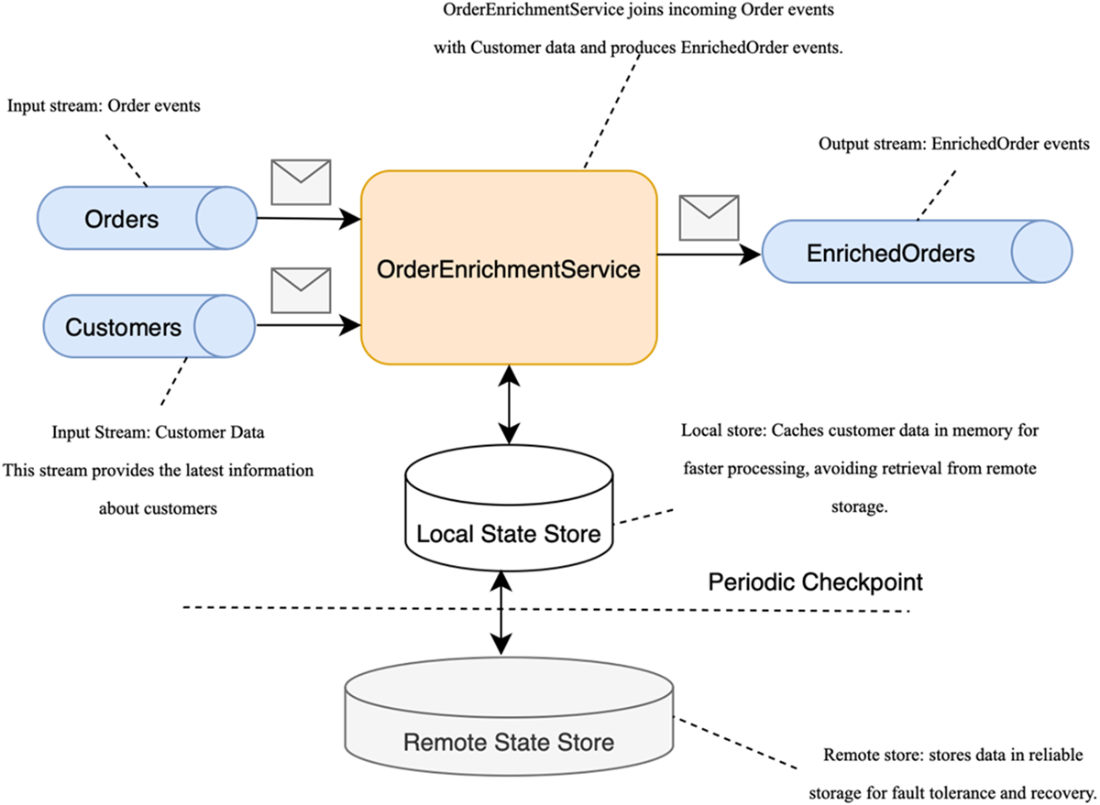
Example of a real-time streaming application. OrderEnrichmentService processes Order events by enriching them with customer data, producing EnrichedOrder events as the output.
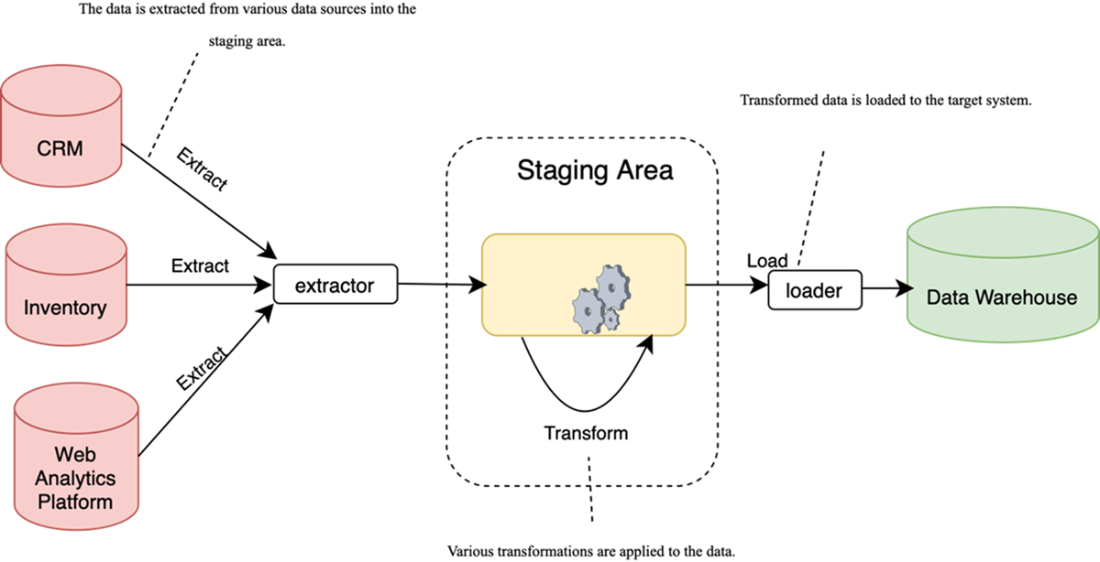
An example of the ETL process. Data is loaded from various data sources into the staging area, transformed there, and then it’s loaded into the target system.
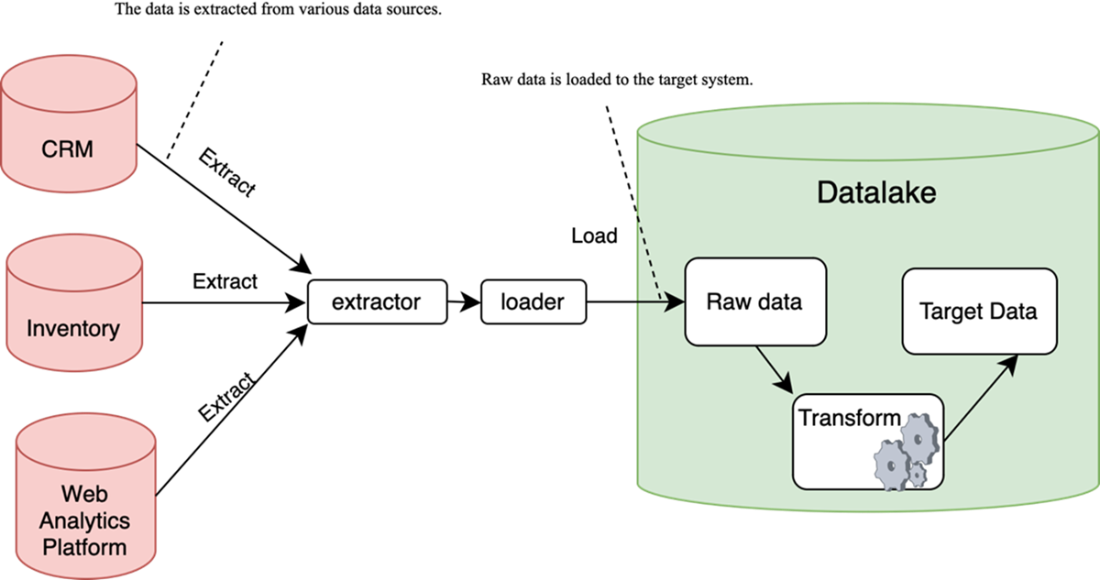
In the ELT process, transformation happens on the side of the target system.
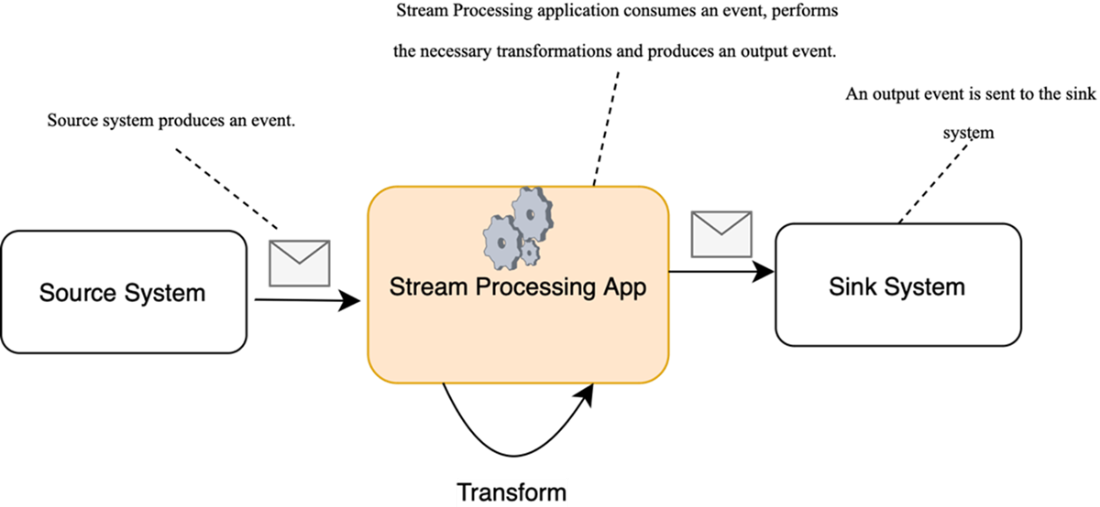
An example of a stream-processing application where data is processed event-by-event in real time, rather than being periodically loaded in batches
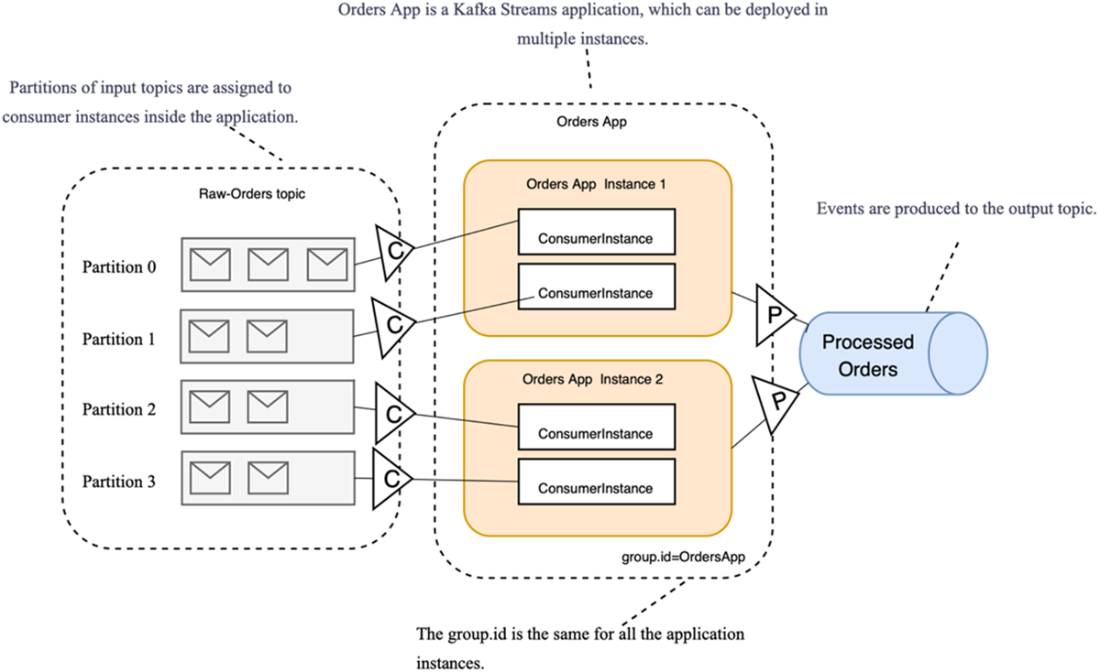
The Orders app is a Kafka Streams application that reads raw orders from an input topic, processes them, and sends the processed results to an output topic. It can be deployed in multiple instances, all of which operate as part of a single consumer group.
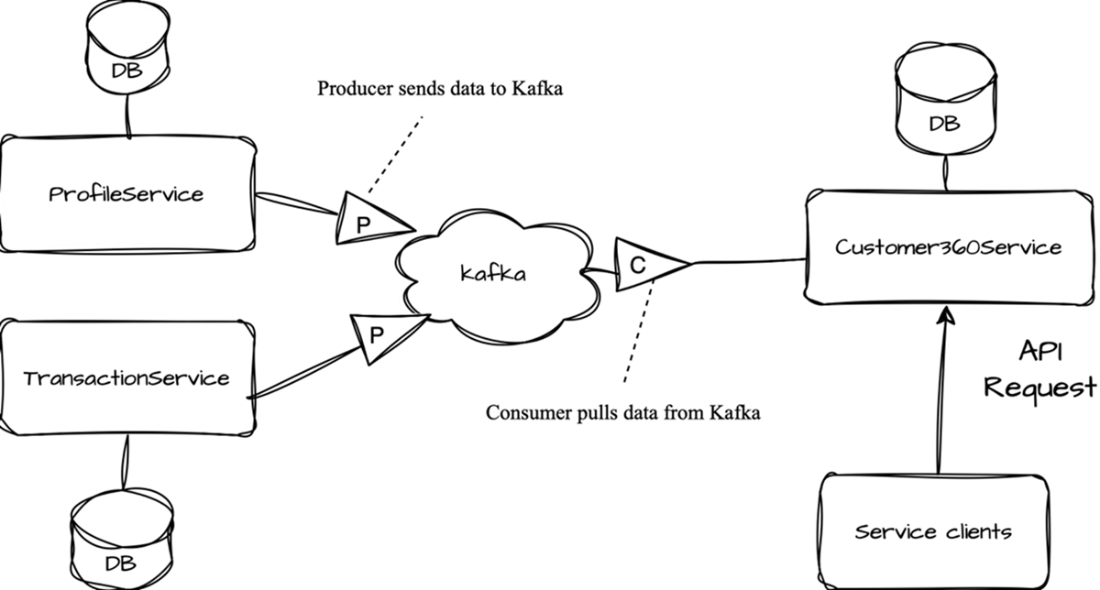
The initial sketch of the service design
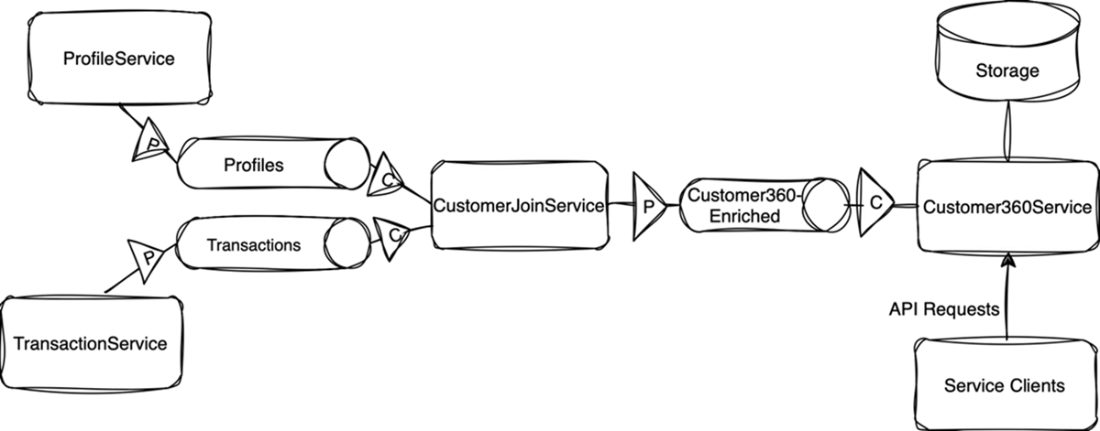
In the updated design using a streaming service, joining of different topics is performed in the intermediate CustomerJoinService service.
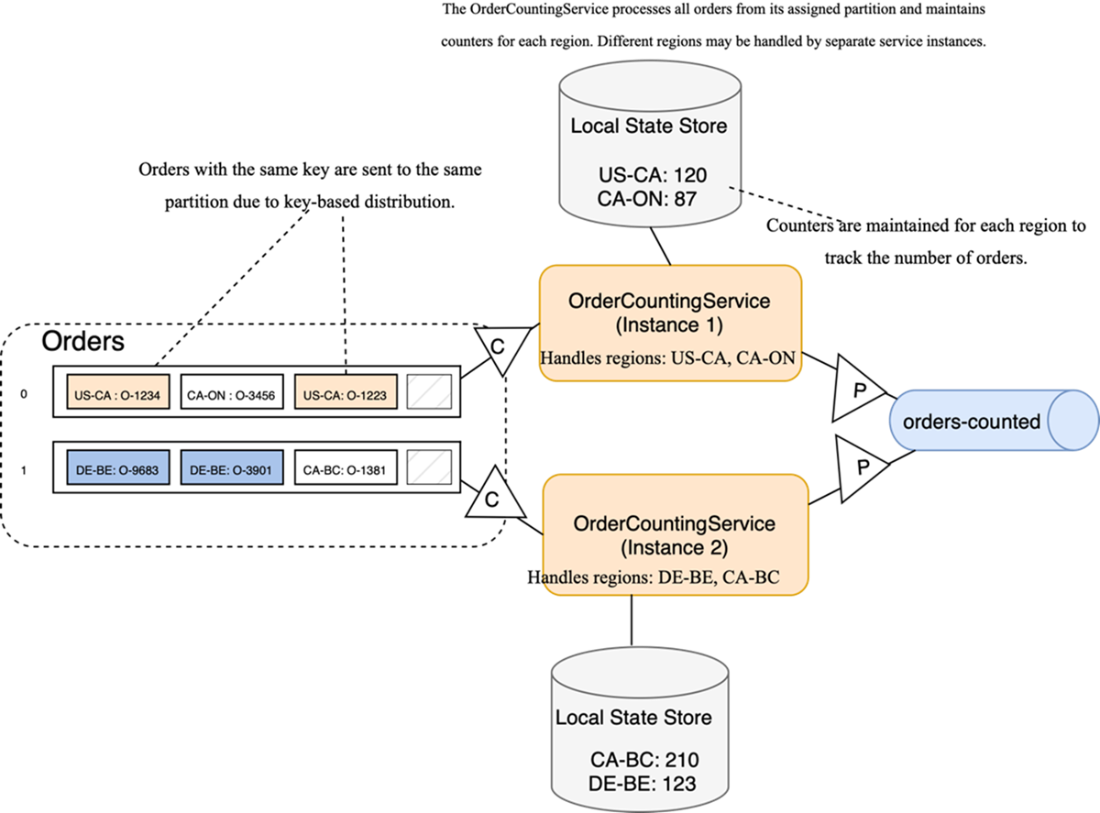
OrderCountingService counts orders per region, with each instance maintaining its own set of counters.
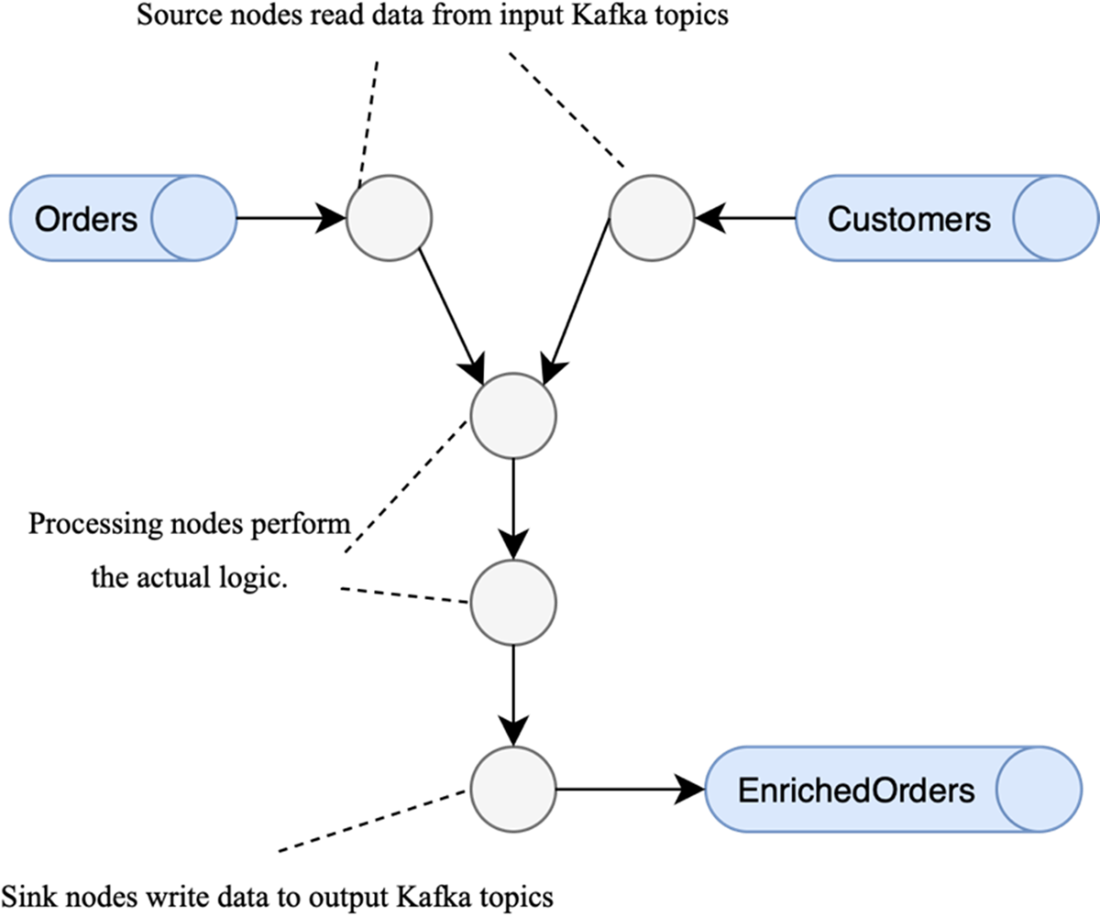
Internally, the Kafka Streams application is represented as a graph. Events flow from input topics through source nodes, are processed by processing nodes, and are finally published to output topics via sink nodes.
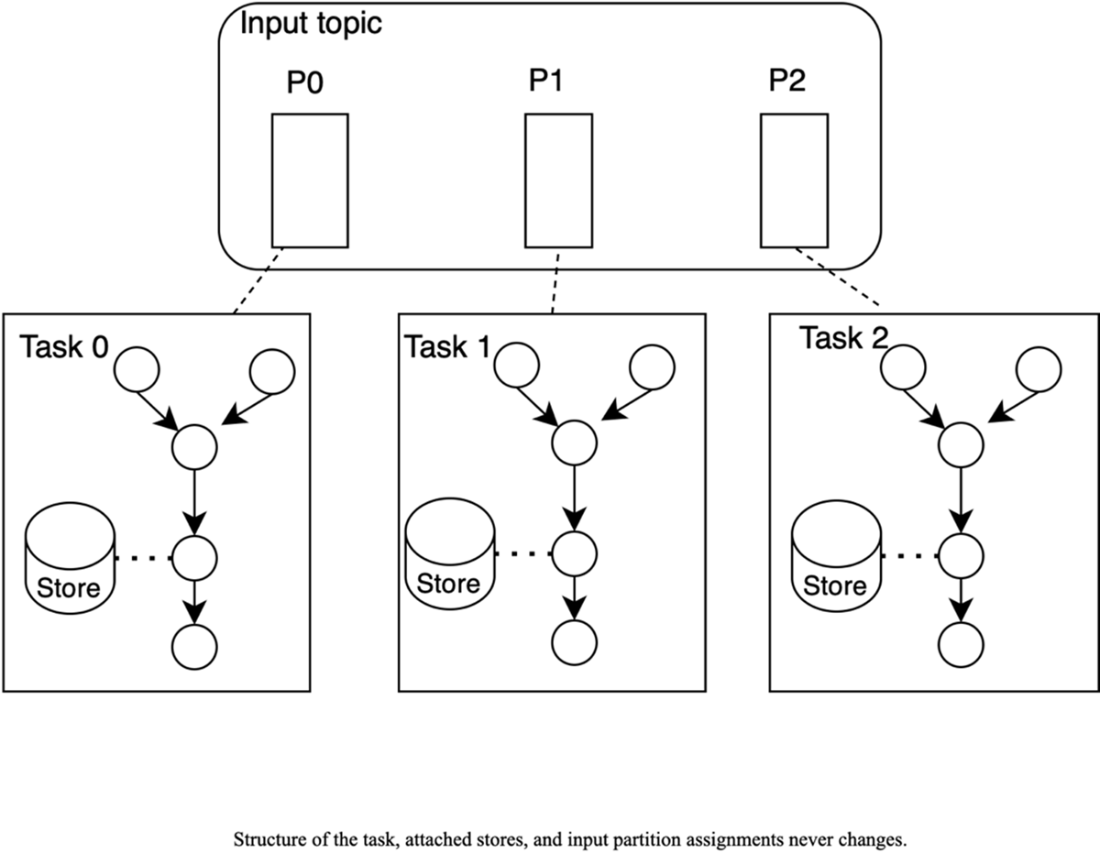
The internal architecture of a Kafka Streams application: partitions of input topics and state stores are assigned to tasks, and these assignments remain static throughout the application’s lifecycle.
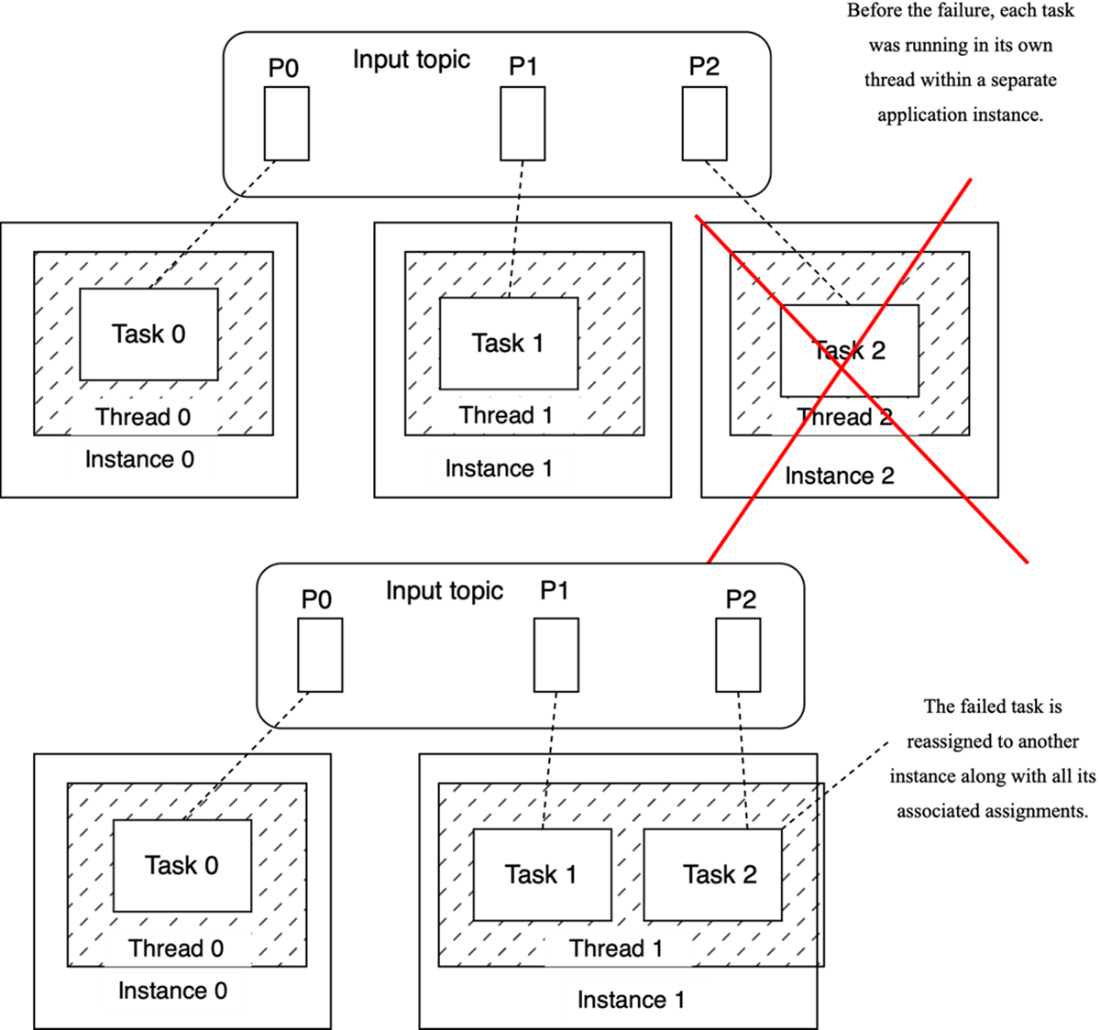
In case of failure, tasks are reassigned to one of the healthy instances.
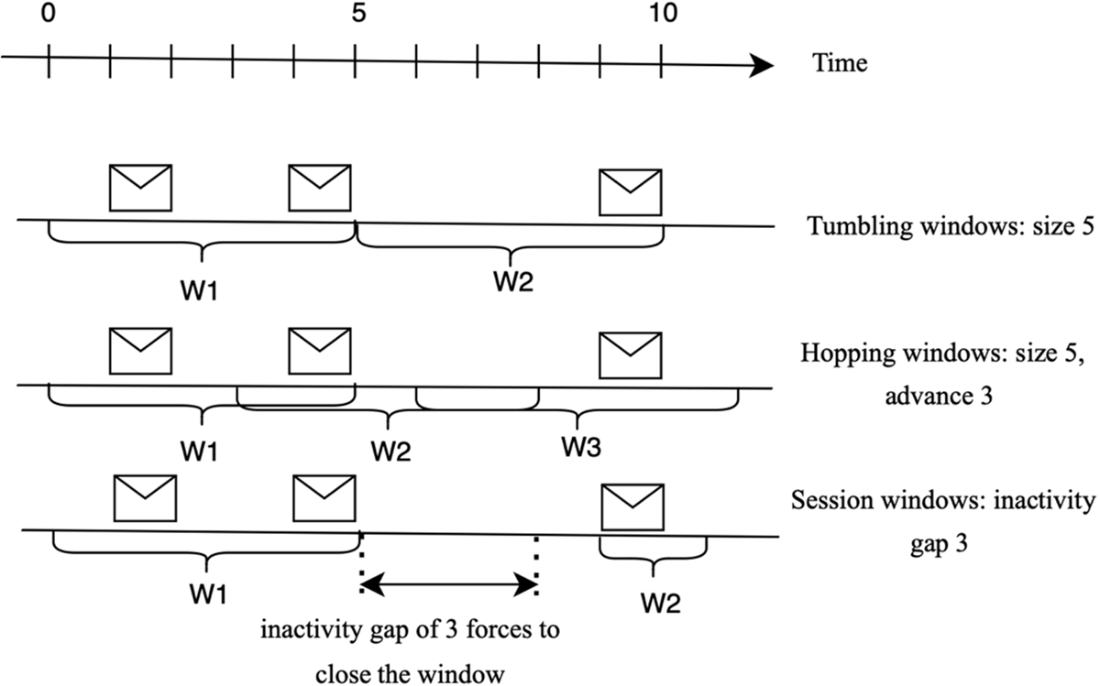
Windowing in Kafka Streams. Brackets show window intervals (W1, W2, …) along the time axis; the icons indicate messages that fall within each window.
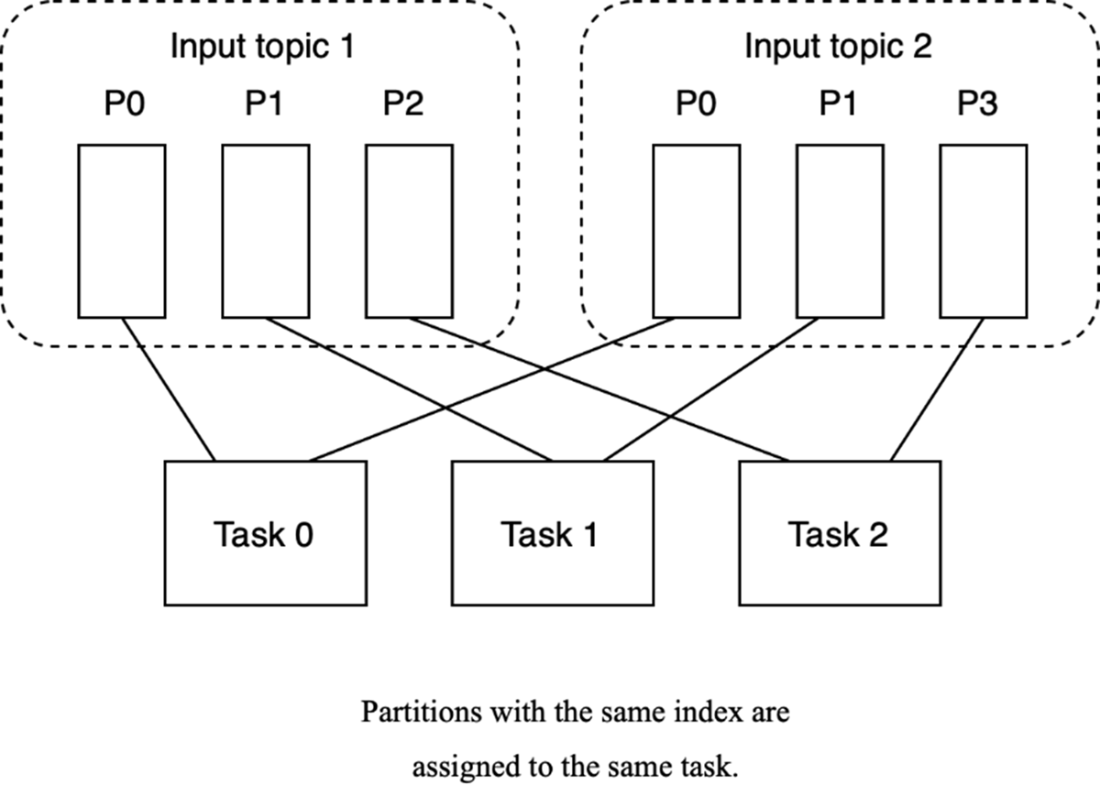
Partitions with the same index are assigned to the same task, and this assignment remains fixed. Elements in input topics that arrive in partitions with the same index will be processed together.
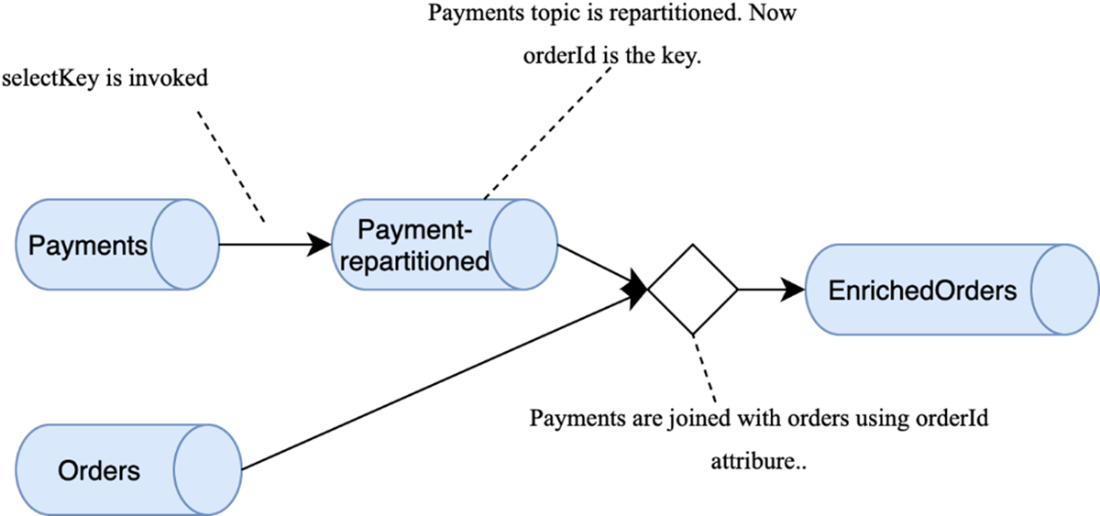
When the Payments and Orders topics are joined, they must have the same number of input partitions and the same key (orderId).
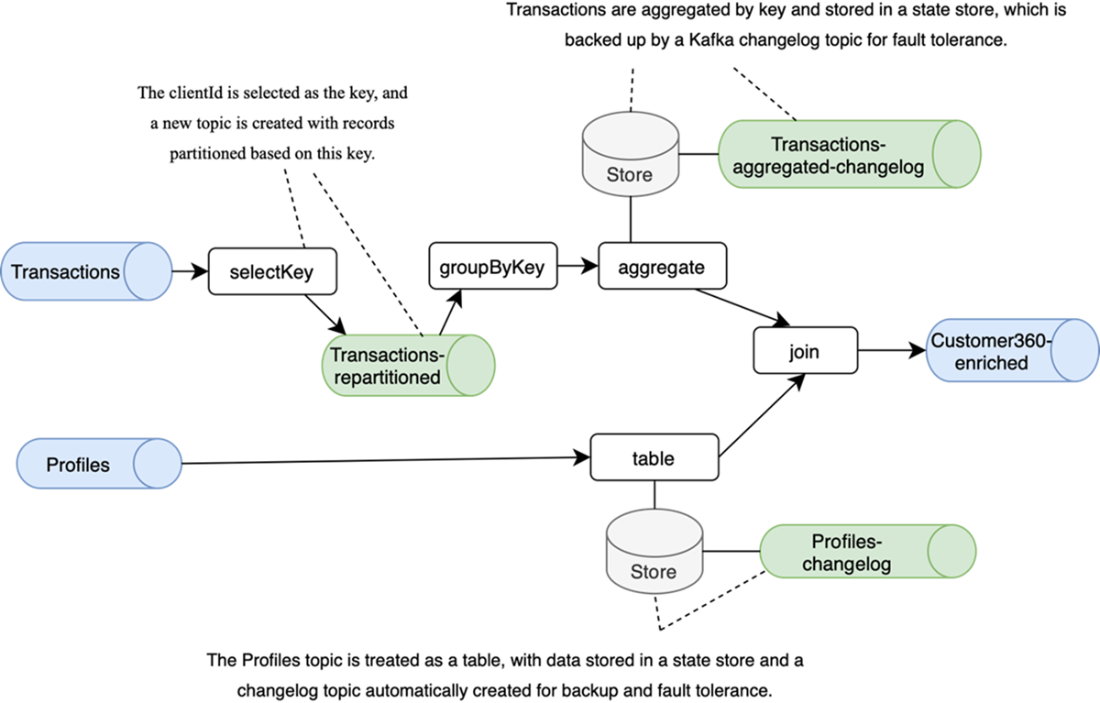
A pipeline design using Kafka Streams. The source topics, Profiles and Transactions, serve as input streams, while Customer360-enriched is the output topic. Kafka Streams automatically creates intermediate topics for operations like repartitioning and changelog management. Both source topics are converted into tables using state stores, and the resulting tables are joined to produce the enriched output.
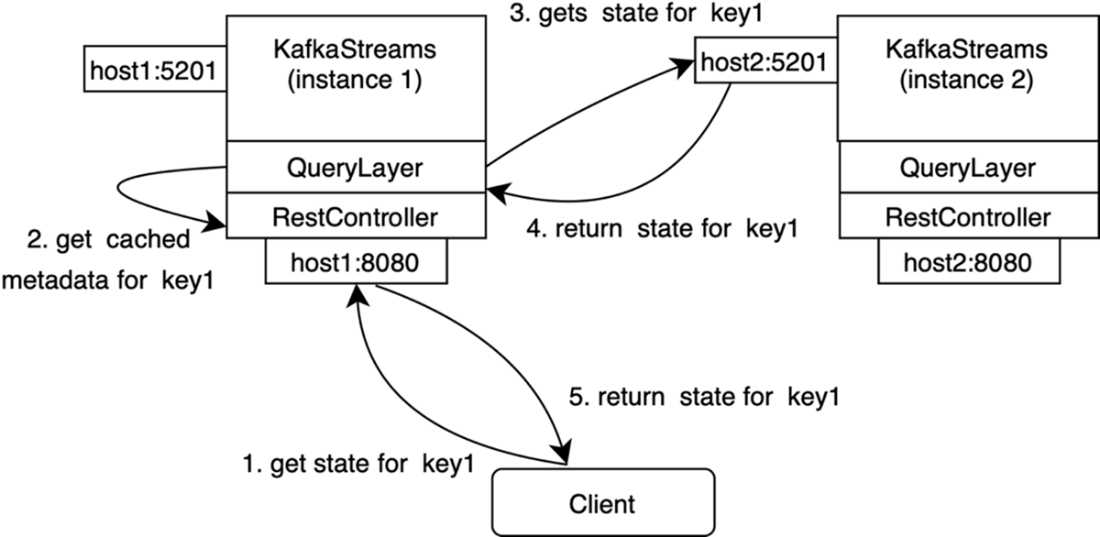
When a client requests the state for a given key, the instance first checks its locally cached metadata. If the state resides on another instance, the metadata identifies the correct instance to forward the query to.
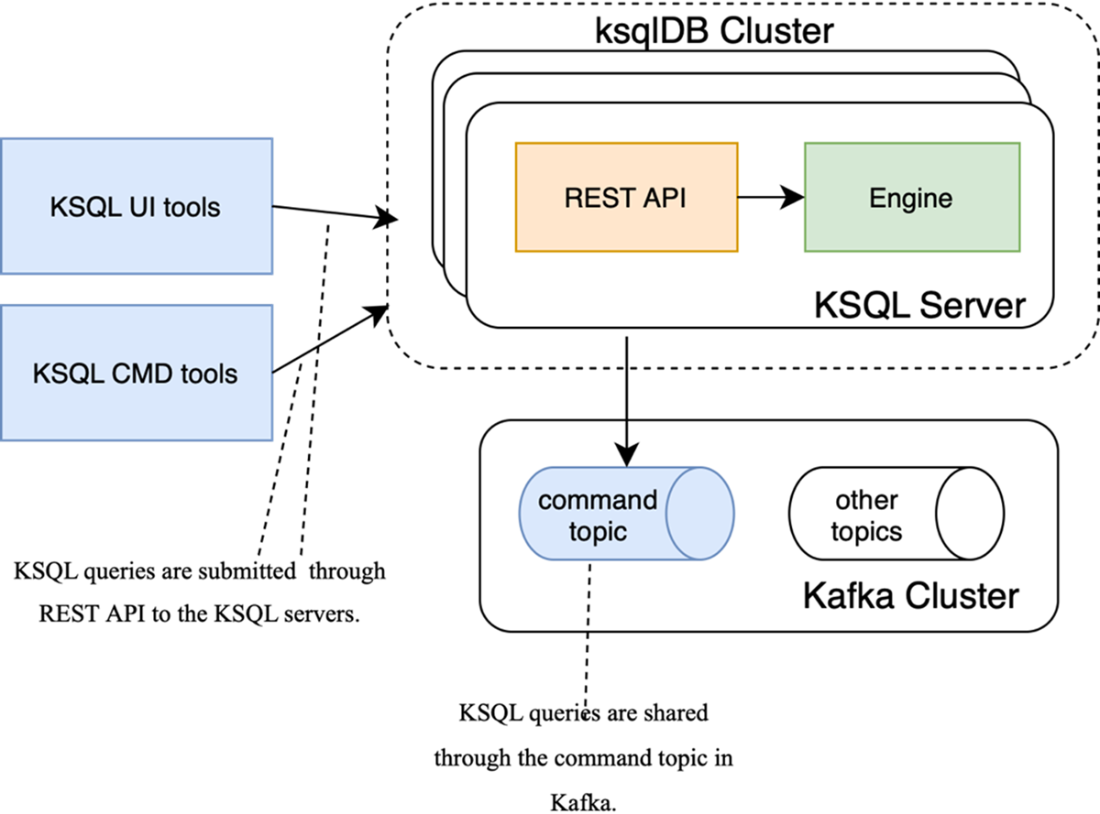
KSQL queries are submitted through a REST API and are shared through the command topic.
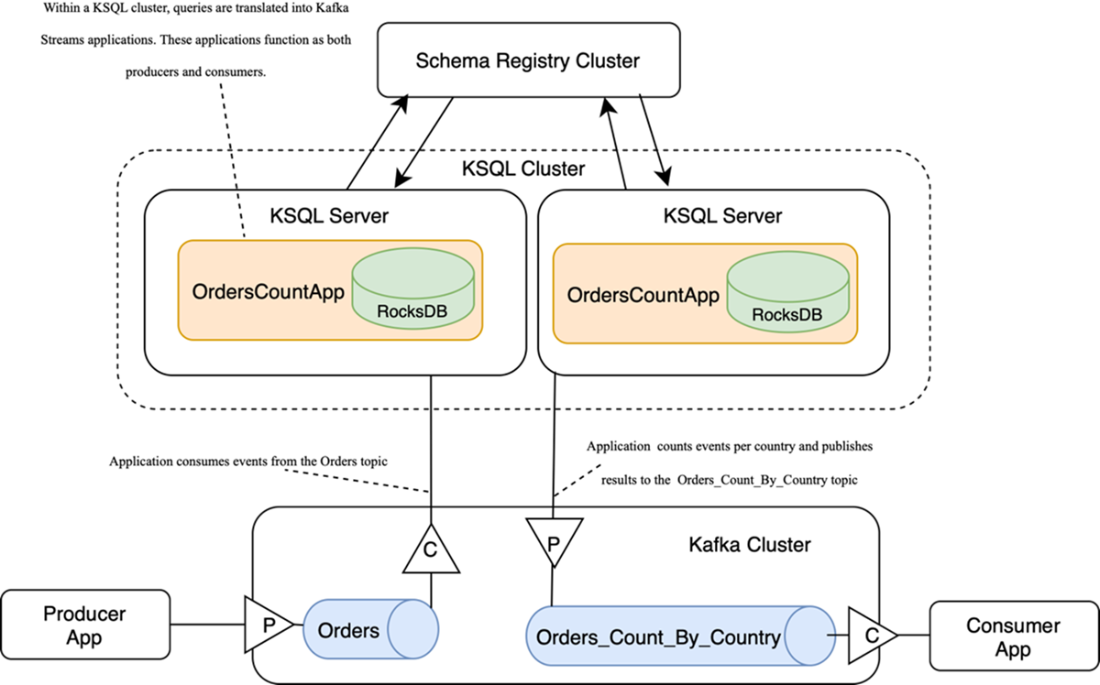
In the ksqlDB server, the KSQL query is transformed into multiple instances of Kafka Streams applications. These applications consume events from the Orders topic, process the data, and produce the results to the Orders_Count_By_Country topic.
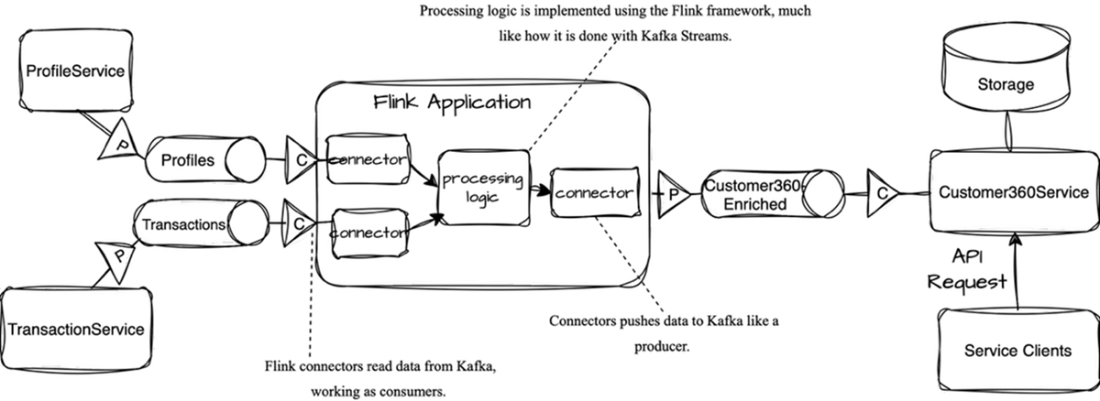
Implementing the Customer360 ODS with Apache Flink
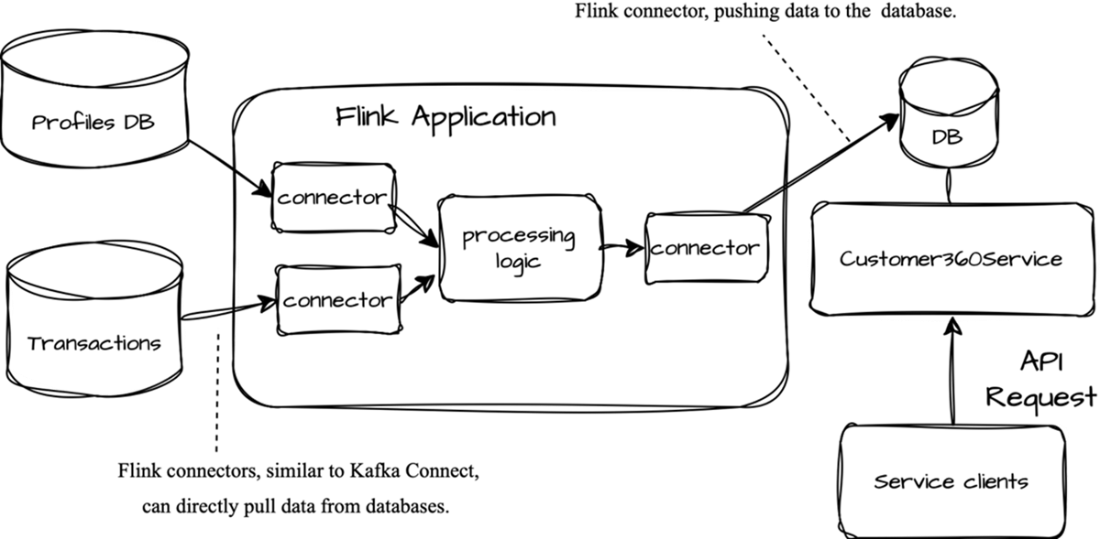
Implementing the Customer360 ODS with Flink but without Kafka
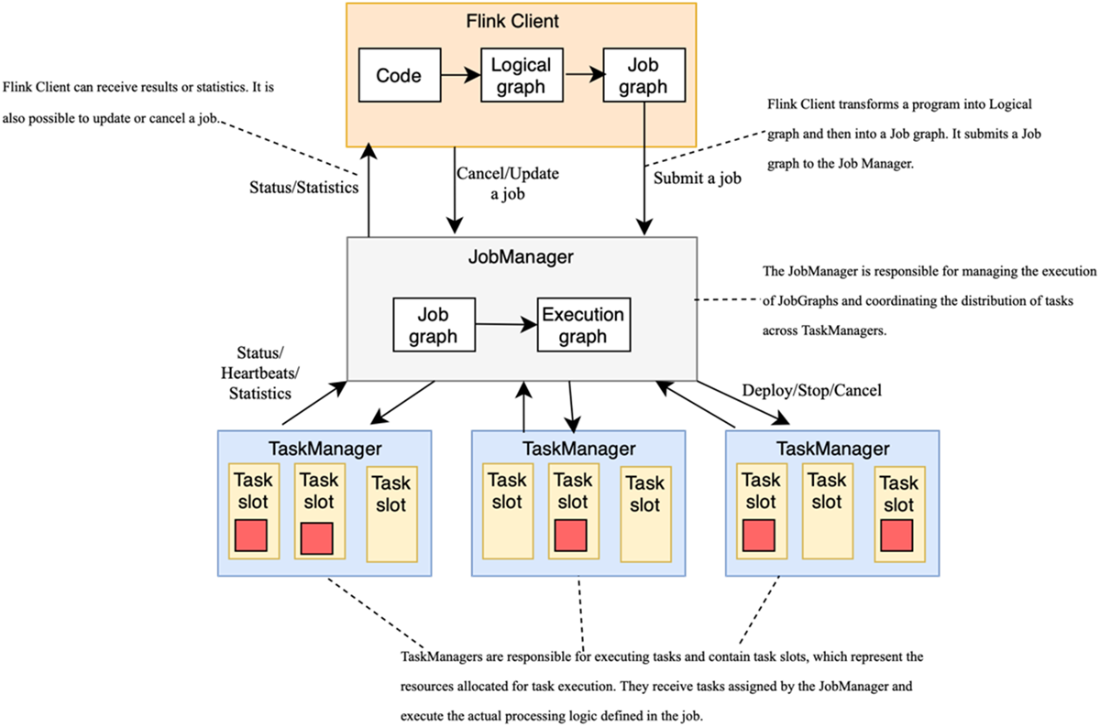
The Flink architecture. The Flink Client is responsible for transforming a program into a graph, which is submitted to the JobManager. JobManager converts it into an ExecutionGraph and deploys tasks to available TaskManagers.
Summary
- Real-time processing enables low-latency transformation of data compared to traditional batch-oriented ETL and ELT pipelines. Consider using streaming frameworks when latency is a crucial requirement.
- Kafka Streams integrates seamlessly with Kafka and simplifies operations such as filtering, transformation, aggregation, and joins. This is a good solution for most cases for processing in Java. Applications implemented with Kafka Streams are fault-tolerant, scalable, and support exactly-once processing semantics (EoS), ensuring reliability.
- Kafka Streams supports stateful operations using state stores backed by RocksDB and changelog topics for fault tolerance. The concept of windows is supported in queries used for time-based aggregations over event streams.
- Alternatives like Apache Flink and ksqlDB offer additional flexibility for stream processing and make it possible to create processing logic declaratively with SQL-like languages.
- Cloud-based solutions such as AWS Kinesis, Azure Stream Analytics, and Google Dataflow provide fully managed options for real-time data pipelines.
FAQ
When should I choose stream processing over traditional ETL/ELT?
Use stream processing when you need low-latency, continuous handling of events as they arrive (near real time). ETL/ELT run on schedules (e.g., hourly/daily) and operate on batches. The core steps (extract, transform, load) are the same; the key difference is latency and continuous processing. Note: Kafka still batches under the hood, but batches are small and transparent to your code.What is Kafka Streams and how does it integrate with Kafka?
Kafka Streams is a Java library embedded in your service. Your app consumes from Kafka topics, processes events, and produces results to Kafka topics. Multiple instances share the same group.id and form a consumer group; parallelism and scalability are bounded by the number of input partitions. If an instance fails, Kafka rebalances partitions and processing continues.What’s the difference between KStream and KTable?
- KStream: a continuous stream of events (topic-as-stream) for stateless and stateful processing.- KTable: a table-like, up-to-date view keyed by record key, backed by a compacted changelog topic; great for aggregations and “latest value” state. You can emit table updates as a stream with toStream().
How does Kafka Streams manage state and ensure fault tolerance?
State is kept in local state stores (RocksDB by default) for low-latency access and is backed up to changelog topics in Kafka for durability and recovery. On failure, state is restored from the changelog. Changelog topics follow the naming pattern <application_id>-<store_name>-changelog and are compacted.How do I get exactly-once processing in Kafka Streams?
Enable transactions by setting processing.guarantee=EXACTLY_ONCE_V2. Kafka Streams then atomically: (1) produces to output topics, (2) updates state stores (and their changelogs), and (3) commits source offsets—ensuring each record is processed exactly once even on failures.How do windowing operations work (tumbling, hopping, session) and what is a grace period?
- Tumbling: fixed, non-overlapping windows; each event belongs to exactly one window.- Hopping: fixed-size windows that advance by a smaller step; events can appear in multiple overlapping windows.
- Session: gaps of inactivity close the window per key.
Windows are evaluated by event timestamps and are per key. A grace period defines how long to accept late events after the window end; events later than end + grace are dropped.
How do joins work in Kafka Streams, and what are copartitioning requirements?
- Requirements: input topics must have the same partition count and the same key/partitioner so matching keys land in partitions with the same index. Use selectKey() to rekey and trigger repartitioning when needed.- Stream–stream joins are windowed (sliding windows based on timestamp differences) to handle different arrival times.
- Stream–table joins emit when the stream event arrives; table updates don’t retroactively rejoin prior stream events.
- Table–table joins emit on updates from either side. GlobalKTable can broadcast a (read-only) table to bypass partition alignment.
When should I use the Processor API instead of the high-level DSL?
Use the Processor API for custom logic not easily expressed in the DSL—e.g., calling external services, custom state access, scheduling periodic actions, or fine-grained control over the processing topology. You build processors and the topology explicitly and can still use state stores.What are interactive queries and how can clients use them?
Interactive queries let your application read its local state stores directly (e.g., to serve counts by key) without going through Kafka. Since state is sharded across instances, use Kafka Streams metadata to locate which instance owns a key, then route the query to that instance via your own HTTP/RPC layer. Each instance exposes an endpoint; the app forwards or serves locally based on the metadata.What common pitfalls should I watch for in streaming apps?
- Memory/disk sizing: plan for RocksDB caches/buffers and for extra Kafka topics (repartition and changelog).- Incorrect partitioning: ensure the right key and consistent partition counts/partitioners across joined topics; test custom partitioners carefully.
- Out-of-order data: if logic depends on event time, implement a TimestampExtractor.
- Late data: set appropriate window grace periods to avoid silent drops.
- Slow state restoration: tune RocksDB, increase partitions, and consider standby tasks to speed failover.
- Limited visibility: integrate metrics and tracing (e.g., OpenTelemetry/Jaeger/Zipkin) for lag, throughput, and per-processor flow.

 Kafka for Architects ebook for free
