11 Operating Kafka
Operating Kafka in production differs markedly between managed cloud offerings and self-managed, on-premises deployments. The chapter frames operations around foundational principles: evolving clusters safely, monitoring effectively, tuning performance, and planning for recovery. It explains why upgrades matter (bug fixes, features, stability), the ecosystem compatibility they must respect (OS, JRE, brokers, Connect, Schema Registry, clients), and how the move to KRaft changes metadata management by removing ZooKeeper. Safe change management includes staging, automation, rolling upgrades in the right order (controllers, brokers, then supporting services), and validating each step. Day‑to‑day evolution—adding brokers, rebalancing partitions to use new capacity, or decommissioning nodes carefully to avoid under‑replication—can be scripted or automated with tools such as Cruise Control. Because Kafka relies on replication rather than native backups, organizations often add external copies or dedicated snapshot solutions, but the chapter stresses testing restore procedures as the only true measure of protection.
The monitoring guidance distinguishes what to watch and who should own it. It defines core metric types (errors, saturation, resource use, performance) and separates observability across host, JVM, and Kafka layers: disk capacity and I/O at the host; GC pauses and memory in the JVM; and Kafka‑specific indicators such as under‑replicated or offline partitions, request latencies, consumer lag, leadership activity, and Connect task states. Business metrics complement technical ones to confirm end‑to‑end correctness. Dead‑letter topics deserve dedicated alerts because they signal processing failures. The chapter highlights shared responsibility between development and operations to avoid gaps—particularly around Kafka‑specific and business metrics—and outlines a widely used toolchain based on JMX-exported metrics collected, visualized, and alerted on with open source monitoring stacks. In cloud‑native setups, providers often collect infrastructure signals by default, letting teams focus on Kafka and application semantics.
Performance tuning centers on explicit trade‑offs. For throughput, increase parallelism and batch efficiency; for latency, send sooner and reduce overhead; for resilience, tune replication and recovery. The chapter shows how producer, consumer, and broker settings influence these goals and how optimizing one axis can stress another. It then reframes tuning as an availability versus durability choice: settings such as acknowledgments, idempotence, isolation level, minimum in‑sync replicas, leader election behavior, and rack awareness let teams dial toward data safety or uptime according to SLAs. Finally, it lays out disaster‑recovery patterns and their RTO/RPO implications: stretched clusters across data centers (strongest protection, with strict latency considerations), active‑passive replication (simpler, with some data loss and failover time), and active‑active designs (zero downtime under normal failover, but eventual consistency risks). The throughline is disciplined change, measurable observability, deliberate trade‑offs, and rehearsed recovery.
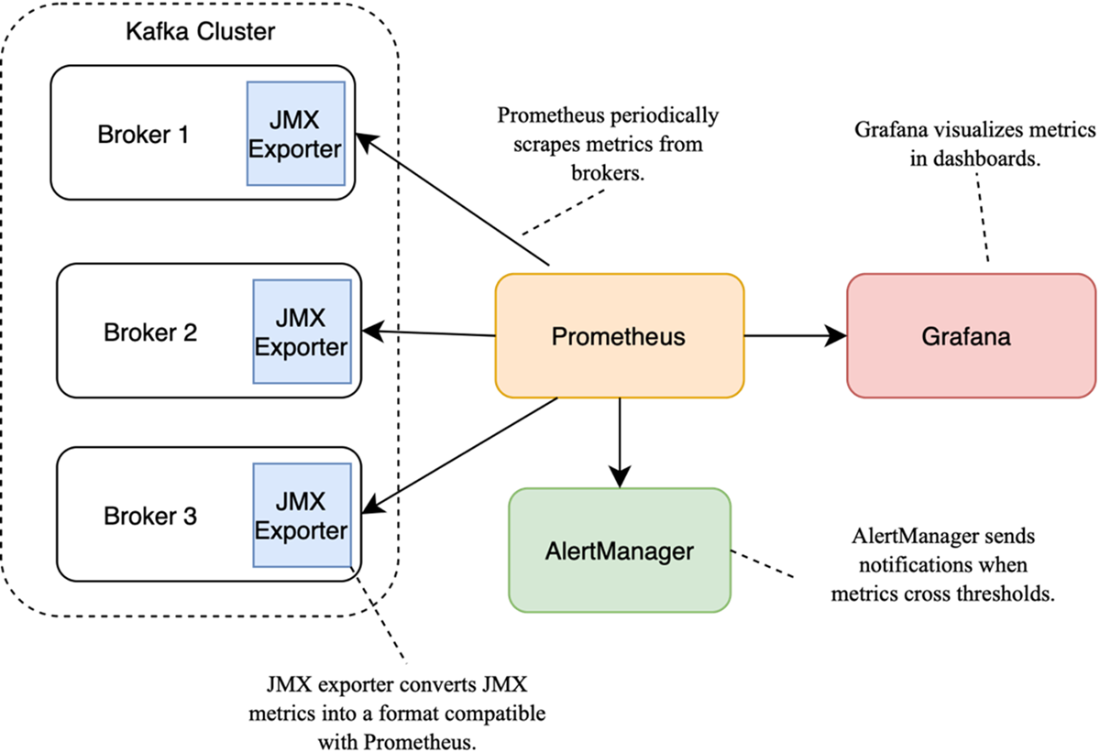
Exporting metrics in the Prometheus-Grafana monitoring stack
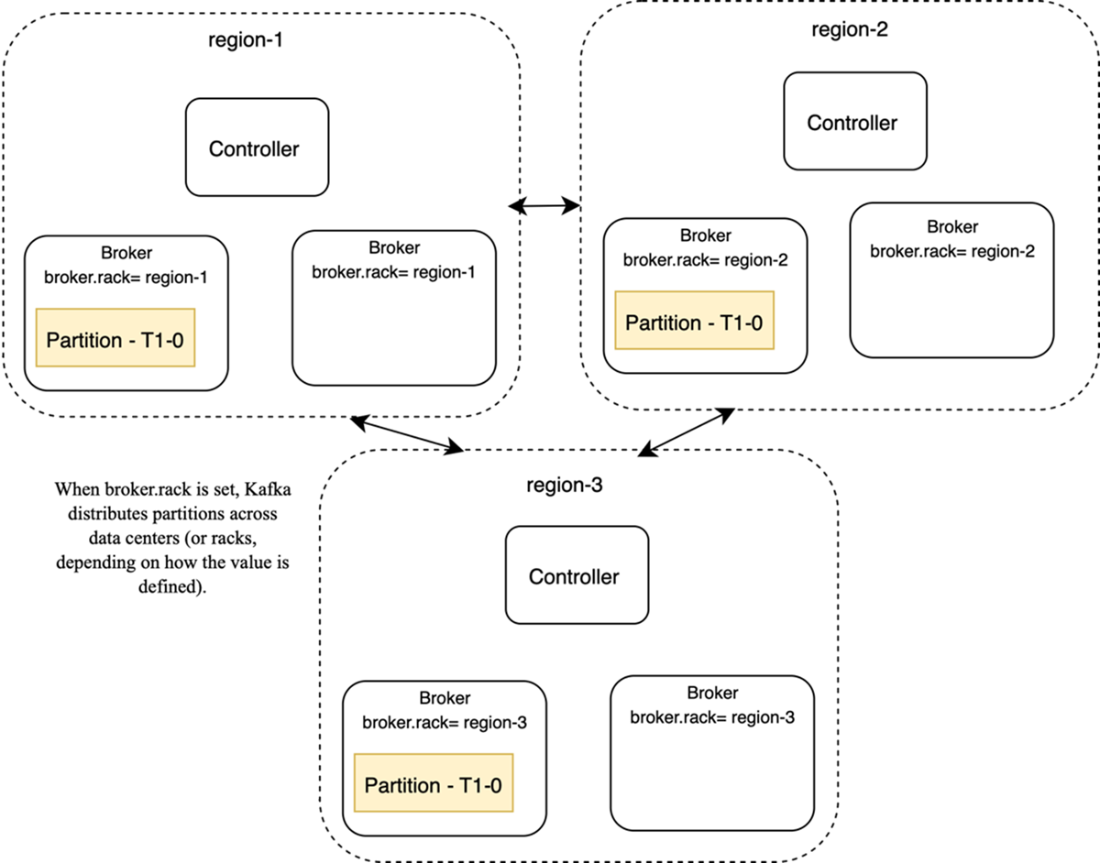
Deploying a stretched cluster across three data centers
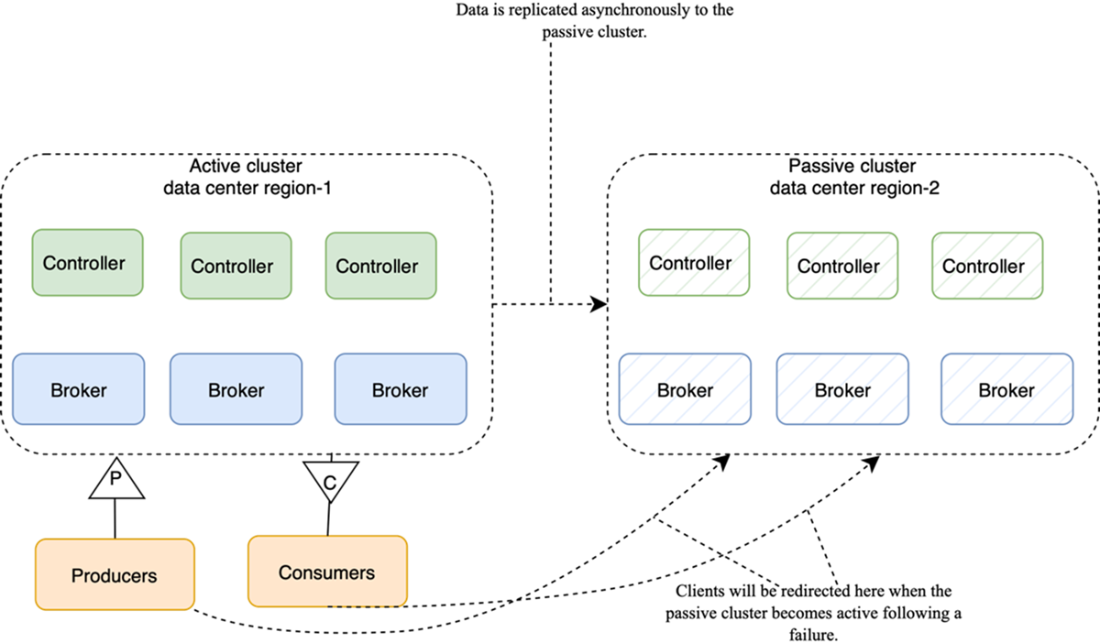
Replicating data in active-passive configuration
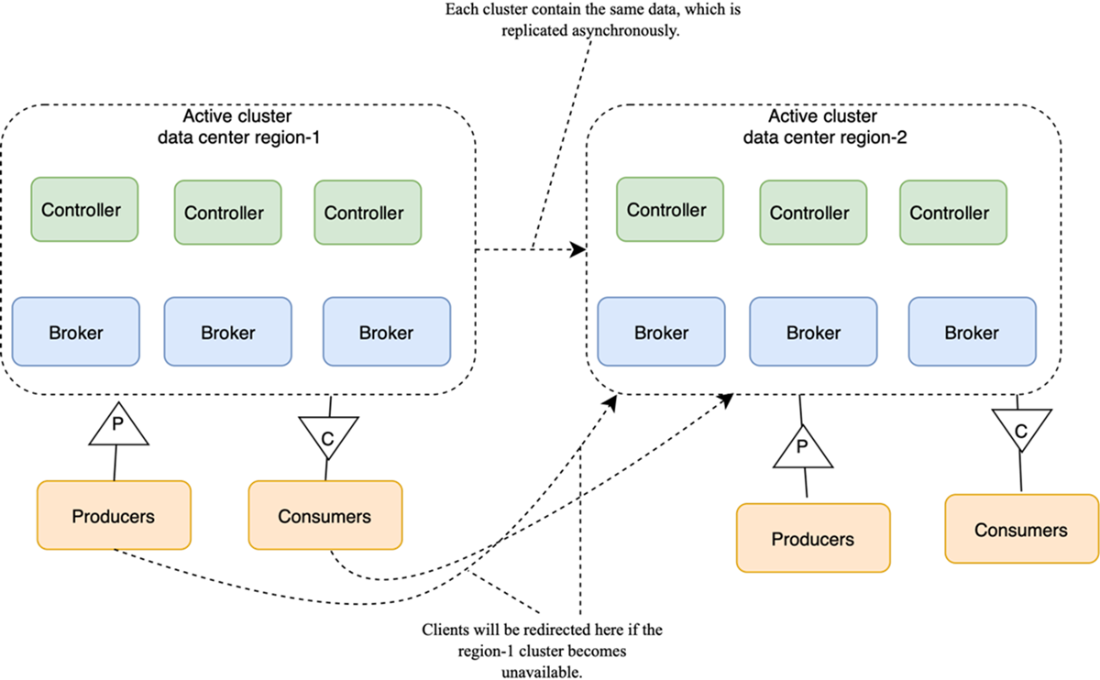
Replicating data in active-active configuration
Summary
- Upgrades are critical for security, stability, and new features. Interdependencies between Kafka brokers, Kafka Connect, Schema Registry, and client libraries must be carefully managed.
- After adding brokers, the partition reassignment tool should be used to balance load. Removing brokers requires carefully reassigning leadership and removing metadata.
- Kafka’s strong backward/forward compatibility helps, but delaying upgrades leaves clients vulnerable to bugs and misses out on improvements.
- Monitoring ensures that Kafka remains reliable and efficient, providing visibility into system performance, resource usage, and potential failures.
- Performance tuning involves carefully adjusting Kafka settings to meet workload demands, balancing factors like throughput, latency, and resource utilization.
- Disaster recovery strategies, such as replication and cross-datacenter deployments, protect against catastrophic failures and data loss by ensuring data availability and system continuity.
FAQ
Why should I upgrade a Kafka cluster, and what complexities should I anticipate?
Upgrades deliver bug fixes, security patches, new features, and performance/stability improvements. However, Kafka rarely runs alone—brokers, KRaft/ZooKeeper, Kafka Connect, Schema Registry, REST Proxy, and client libraries must remain compatible throughout the process. Some releases involve architectural changes (for example, moving to KRaft and removing ZooKeeper in 4.0). Always consult the official compatibility matrix, verify OS/JRE compatibility, and plan for ecosystem component alignment before proceeding.
What is the safest way to perform a rolling upgrade in production?
Prepare by backing up all broker and controller/ZooKeeper configs, validating the plan in a staging environment that mirrors production, and automating with tools like Ansible or Terraform. Follow the typical order: 1) upgrade KRaft controllers (or ZooKeeper), 2) upgrade brokers, 3) upgrade ecosystem components (Connect, Schema Registry, REST Proxy). Upgrade one node at a time, validate between steps, and monitor closely to reduce risk and downtime.
How do I add a new broker and distribute load across the cluster?
Give the new broker a unique ID and correct cluster/security/network configs, then start it; it will join by contacting the controller quorum. Add its address to client bootstrap.servers for better fault tolerance. Note: existing partitions are not automatically moved. Use the partition reassignment tool (kafka-reassign-partitions.sh) to redistribute partitions, adjust replication factors, change preferred replicas, or move data directories. For automation and continuous rebalancing, consider Cruise Control.
What is the correct procedure to remove a broker safely?
1) Reassign leadership and replicas off the broker using a reassignment plan that excludes it. 2) Gracefully shut down the broker to avoid leadership flapping. 3) Clean up metadata in the controller quorum (or ZooKeeper if legacy) and update client bootstrap.servers to remove the broker. Tools like Cruise Control can help automate decommissioning and rebalancing.
Do I really need to upgrade Kafka clients if they are backward/forward compatible?
Yes. Kafka’s bidirectional compatibility reduces upgrade risk, but postponing client upgrades means missing new features, security patches, and performance improvements. Client upgrades typically require rebuilding and redeploying applications with newer libraries—this investment pays off in long-term stability and capability.
Which Kafka metrics should I monitor to keep the cluster healthy?
Track metrics across layers: Host-level (free disk space, disk I/O, CPU, network, page cache; free disk is critical), JVM-level (GC frequency and pause time is especially important, heap usage, threads), and Kafka-specific (under-replicated/offline partitions, request latencies, consumer lag, controller/leader activity, throughput, producer batch/compression). If you use dead-letter topics (DLTs), alert immediately on new records to prevent silent failures and backlog growth.
What monitoring stack works well with Kafka, and how do I collect metrics?
The Prometheus + Grafana + Alertmanager stack is widely used. Kafka components expose JMX metrics; run a JMX exporter (Java agent/sidecar) to translate JMX into Prometheus format. Prometheus scrapes the exporter over HTTP and stores time-series data; Grafana visualizes it; Alertmanager routes alerts (email, Slack, PagerDuty, etc.). In cloud-native environments, many host/JVM metrics come out of the box, but you still must instrument Kafka-specific and business metrics.
How can I tune Kafka for maximal throughput versus minimal latency?
Throughput: increase partitions for parallelism; use larger producer batches (batch.size) and higher linger.ms; enable compression; ensure sufficient producer buffer; increase consumer batch sizes (fetch.min.bytes, fetch.max.wait.ms, max.poll.records). Latency: send immediately (linger.ms=0), use smaller batches, reduce consumer wait thresholds, and avoid CPU-heavy compression if not required. Expect trade-offs: batching boosts throughput but can add per-message delay.
How do I balance data safety (durability) with uptime (availability)?
For durability: use acks=all, increase min.insync.replicas, disable unclean leader election, consider higher replication factor, commit consumer offsets manually after processing, and prefer isolation.level=read_committed. For availability: tolerate fewer in-sync replicas (lower min.insync.replicas), allow unclean leader election, and consider looser producer/consumer settings (e.g., acks=1/0, larger batches). Choose settings that match business needs (e.g., finance vs. log ingestion).
What disaster recovery topologies are available, and how do they affect RTO/RPO?
Stretched cluster across three data centers (with broker.rack set for replica placement) offers the best metrics: RTO=0 and RPO=0, but requires a KRaft controller majority and cross-DC latency tolerance. Active–passive replicas data asynchronously to a standby cluster; failover yields some data loss and downtime (RPO>0, RTO>0). Active–active keeps both sites serving traffic with cross-cluster replication; typically RTO=0 but RPO>0 due to asynchronous writes and potential conflicts. Note: Kafka has no built-in backup; use sinks to cloud storage, passive replication, or filesystem snapshots, or commercial solutions—always test restores.

 Kafka for Architects ebook for free
