9 Postgres for time series
This chapter introduces how to use Postgres effectively for time-series workloads by leaning on two core data traits—every record has a timestamp and data is largely append-only—and illustrates ideas with a smartwatch app that streams heart-rate measurements. It motivates splitting recent and historical data to keep common, “latest-first” queries fast while preserving access to older records. Native range partitioning in Postgres solves the “single giant table” problem, and the TimescaleDB extension builds on that foundation to automate partition management while adding time-series–specific storage and analytical capabilities.
TimescaleDB converts ordinary tables into hypertables that automatically create and query the right time-based chunks, expanding seamlessly as new data arrives. You can inspect and control chunks, add retention policies to prune old data, and even use columnar storage for analytic-heavy, older partitions. For near-real-time insights, continuous aggregates precompute and incrementally refresh results (on a schedule or on demand), enabling patterns like five-minute windows for low heart-rate detection without repeatedly scanning raw measurements.
On the query side, specialized functions such as time_bucket simplify rollups (with control over bucket alignment and time zones), while time_bucket_gapfill, paired with LOCF or interpolate, produces smooth, continuous series even when devices miss intervals. Performance hinges on indexing and data layout: B-tree (often composite on recorded_at, watch_id) accelerates targeted lookups and aggregations over recent slices; BRIN indexes are tiny and exploit the natural time ordering of inserts to speed large scans with minimal storage. Together with prudent schema minimalism, chunk sizing, retention policies, and (optionally) columnar storage for deep history, these tools let Postgres deliver predictable, scalable performance for time-series data.
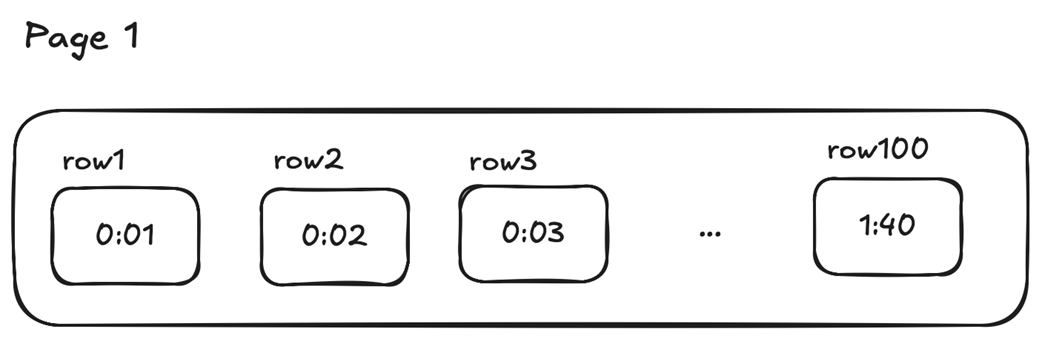
The measurement time (recorded_at column) is always greater in rows added last to the page.
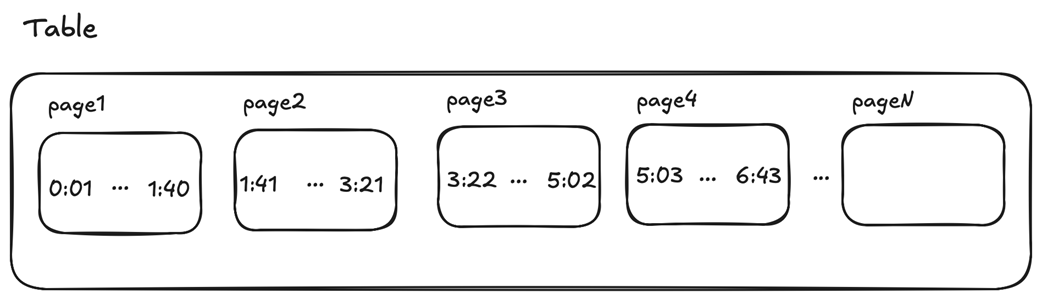
The measurement time (recorded_at column) of inserted rows continues to increase in the next available pages.
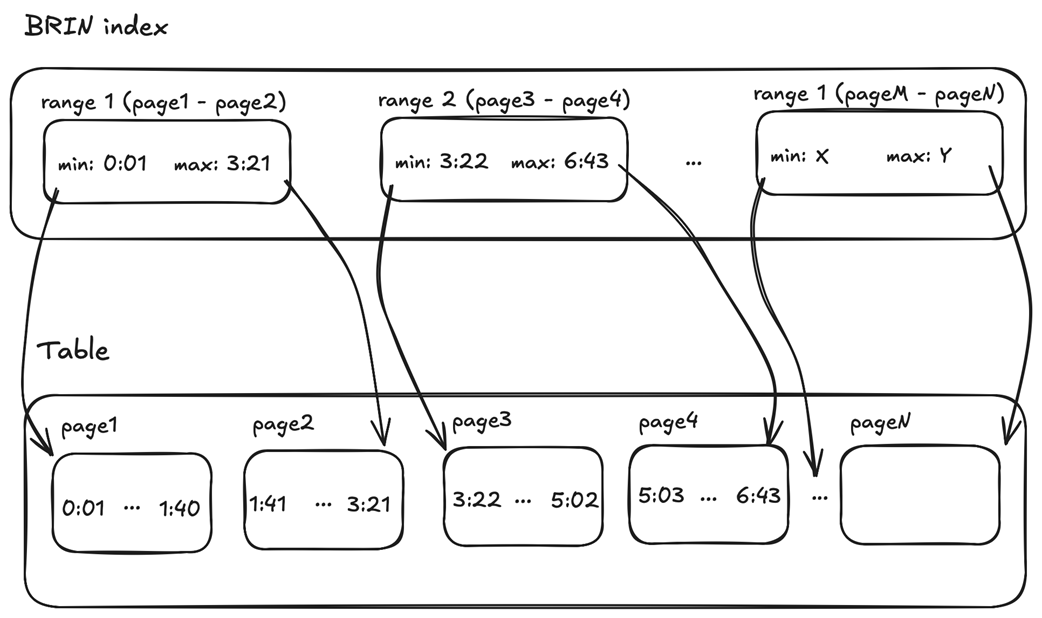
Sample BRIN index on the table with heart rate measurements
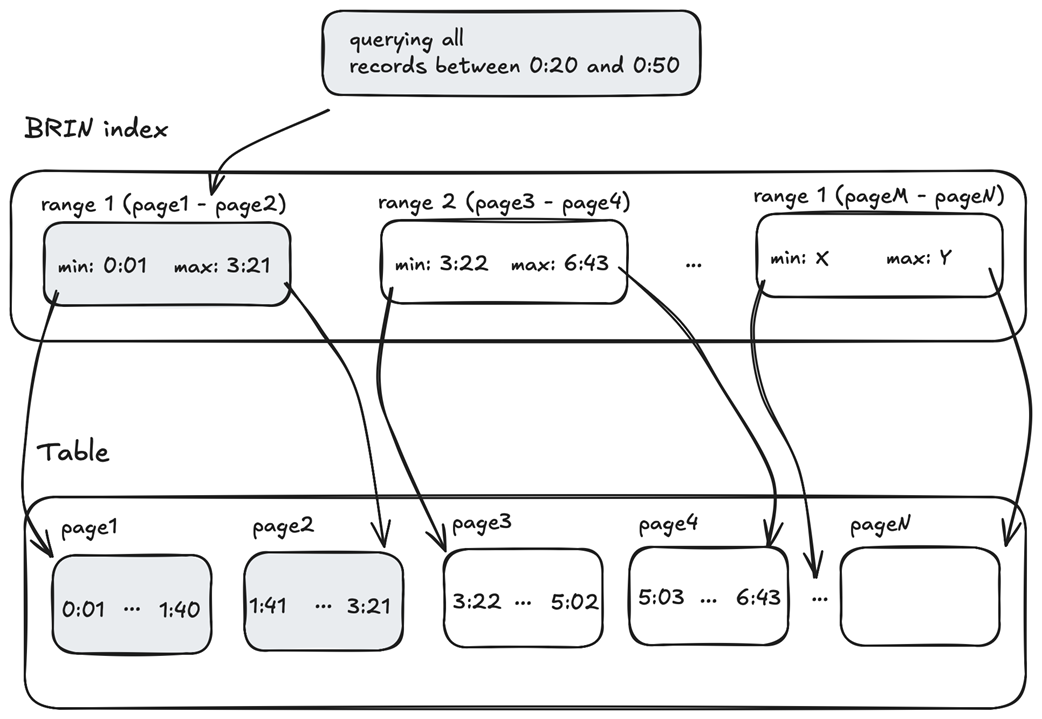
Searching for records with measurement times between 0:20 and 0:50
Summary
- Postgres can be easily used for time-series workloads that need to process data ingested both continuously and at irregular intervals.
- Postgres’s table partitioning feature allows us to split a large table with time-series data into partitions, each holding a subset of the dataset. This makes queries more efficient by targeting only the partitions that satisfy the search criteria.
- The TimescaleDB extension turns Postgres into a time-series database by automatically partitioning tables, providing specialized functions for querying time-series data, supporting a columnar storage engine optimized for analytical queries, and much more.
- The specialized functions are designed to efficiently process and analyze large volumes of time-series data while maintaining high performance.
- The time_bucket function simplifies the aggregation of time-series data by grouping timestamps into buckets, which are useful for rollups and aggregations.
- The time_bucket_gapfill function creates a continuous set of time buckets, including gaps that can be filled using the LOCF or interpolation function.
- TimescaleDB supports continuous aggregates, which store a precomputed query result and refresh it in the background based on a predefined policy.
- The extension allows us to define a retention policy for both hypertables and continuous aggregates that runs automatically and discards data older than a specified interval.
- Queries over time-series data can be optimized using both B-tree and BRIN index types, letting us find the right balance between index size and performance.
FAQ
What makes time-series data unique, and why does that matter for Postgres?
Time-series data has two key traits: every record has a timestamp, and data is typically append-only (new points are added, existing points are rarely updated). In Postgres, this influences schema design (keep rows minimal), storage strategy (partition by time), indexing (optimize for time filters), and query patterns (recent vs historical access).Why partition time-series tables, and how does time-range partitioning work in Postgres?
- Partitioning splits a large logical table into smaller physical tables (partitions) to keep recent queries fast and isolate historical data for compression/retention.- Range partitioning uses non-overlapping time windows (for example, monthly). Bounds are inclusive on the lower end and exclusive on the upper end.
- The planner prunes partitions automatically, scanning only those whose ranges match the query’s time filter.
How does TimescaleDB simplify partitioning with hypertables and chunks?
- A hypertable is a regular Postgres table that TimescaleDB auto-partitions into chunks by time (and optionally by another dimension).- create_hypertable() defines the time dimension and interval (for example, monthly); new chunks are created automatically on insert as time advances.
- You can inspect chunks with show_chunks() and see each chunk’s time range in its check constraints.
- Choose chunk intervals carefully: smaller (daily/hourly) as device count or ingest rate grows.
What’s a good schema and data type choice for events like heart-rate measurements?
- Keep rows minimal: device ID, timestamp, value(s), and a small set of attributes (for example, activity).- Use TIMESTAMPTZ for points in time; Postgres stores in UTC and converts to the session or server time zone on read.
- A lean schema limits storage growth and speeds ingestion/analysis.
How do I start Postgres with TimescaleDB in Docker and confirm it’s available?
- Run the official TimescaleDB image (timescale/timescaledb:latest-pg17), expose port 5432, and persist data with a Docker volume.- Connect with psql and verify the extension via SELECT from pg_available_extensions WHERE name = 'timescaledb'. If installed_version is set, the extension is active for that database.
How do I aggregate by fixed intervals with time_bucket, align weeks, and respect user time zones?
- time_bucket(bucket_width, ts [, origin, timezone, offset]) groups rows into fixed windows (minutes, hours, weeks).- origin aligns bucket boundaries (for example, start weeks on a specific date).
- timezone computes bucket edges in a desired zone; you can also SET LOCAL time zone inside a transaction so timestamptz comparisons and bucket boundaries use the user’s locale.
How do I handle missing points for charting with gap filling?
- time_bucket_gapfill() returns a continuous set of buckets, including those with no data.- Fill missing values using hyperfunctions:
- LOCF (last observation carried forward) for mostly stable signals.
- interpolate for smoothly changing signals (linear interpolation between surrounding values).
What are continuous aggregates, and how are they refreshed?
- Continuous aggregates are materialized views that precompute and store aggregated results (for example, 5-minute buckets) in a hypertable for fast reads.- Define with WITH (timescaledb.continuous). Query them like tables.
- Automate updates with add_continuous_aggregate_policy (start_offset, end_offset, schedule_interval).
- For historical/demo data or custom windows, refresh explicitly with CALL refresh_continuous_aggregate(...).
- You can also add retention policies to aggregates.
Which indexes should I use for time-series queries: B-tree or BRIN?
- B-tree: best for selective queries over relatively small time windows; supports sort/filter by time and composite keys (for example, (recorded_at, watch_id)). Timescale creates local indexes per chunk; the planner uses only relevant chunks.- BRIN: very small indexes that summarize min/max per page range; great for large append-only tables where time correlates with storage layout. They often shine when you scan larger windows and want tiny index sizes.
- Trade-off: B-tree usually wins on highly selective lookups; BRIN wins on index size and can be competitive as scans widen.
What other operational tips matter: composite index order, retention, and long-term analytics?
- Composite index order matters: with (recorded_at, watch_id), PostgreSQL 17 and earlier need the leading column to be used; PostgreSQL 18 adds skip-scan support for some cases that skip the first column.- Use add_retention_policy on hypertables and on continuous aggregates to drop old chunks automatically.
- For very large historical analytics, consider TimescaleDB’s columnar storage (Hypercore) for older partitions; keep recent data in row-store with indexes for fast operational queries.

 Just Use Postgres! ebook for free
