8 Postgres for generative AI
This chapter shows how to turn Postgres into a practical backbone for generative AI applications. It introduces large language models (LLMs) and embedding models, then frames a movie recommendation service as a running example to demonstrate semantic search and retrieval-augmented generation (RAG). Beyond simple chat-style interactions, the chapter emphasizes how LLMs can act as agents that use tools and data sources—including Postgres—to ground responses in up-to-date, domain-specific knowledge.
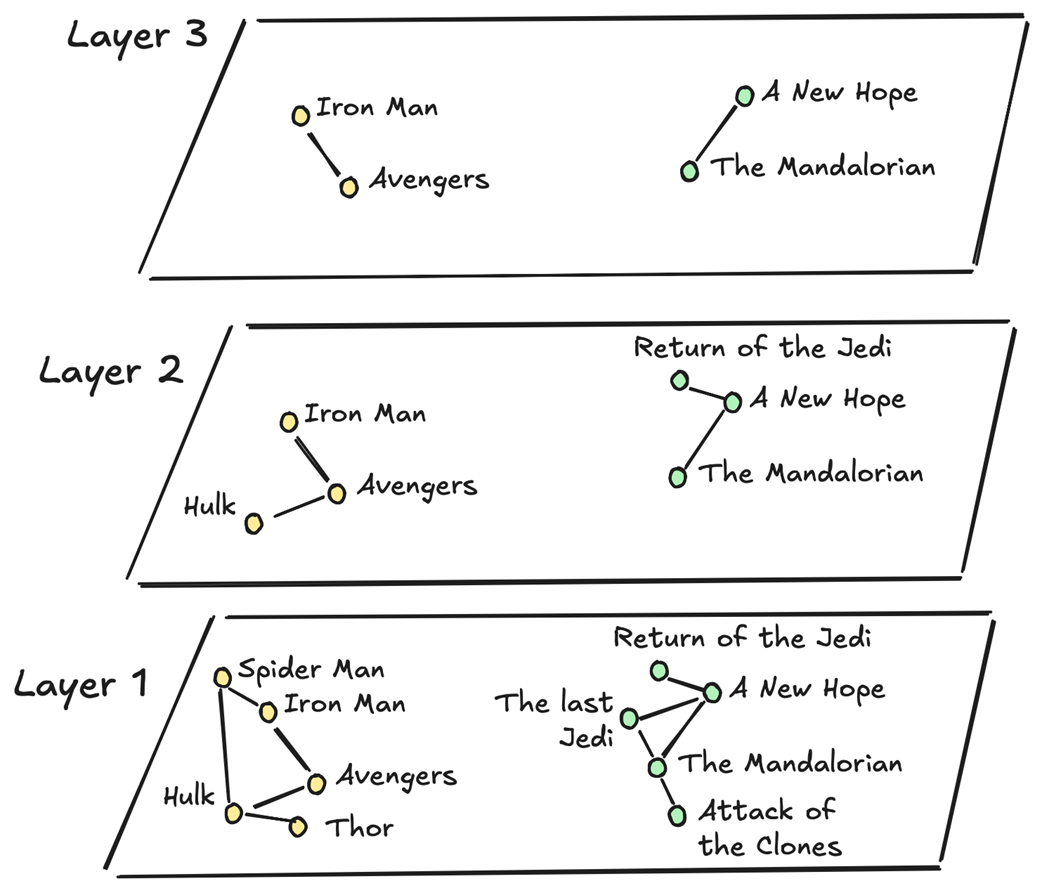
The core enabler is the pgvector extension, which adds a vector type, distance operators, and ANN indexes so Postgres can store embeddings and execute fast similarity searches. The chapter walks through generating 1,024‑dimensional embeddings for movie titles and descriptions, storing them in a movie_embedding column, and querying with cosine distance. It highlights data quality considerations (chunking, context, hallucinations) and explains why specificity in queries improves results. For performance and accuracy at scale, it compares IVFFlat (clustered lists with tunable probes) and HNSW (multi-layer graph with tunable construction and search parameters), showing how each trades index size, build time, recall, and latency. With a growing catalog, HNSW is chosen for its stable recall and speed under updates.
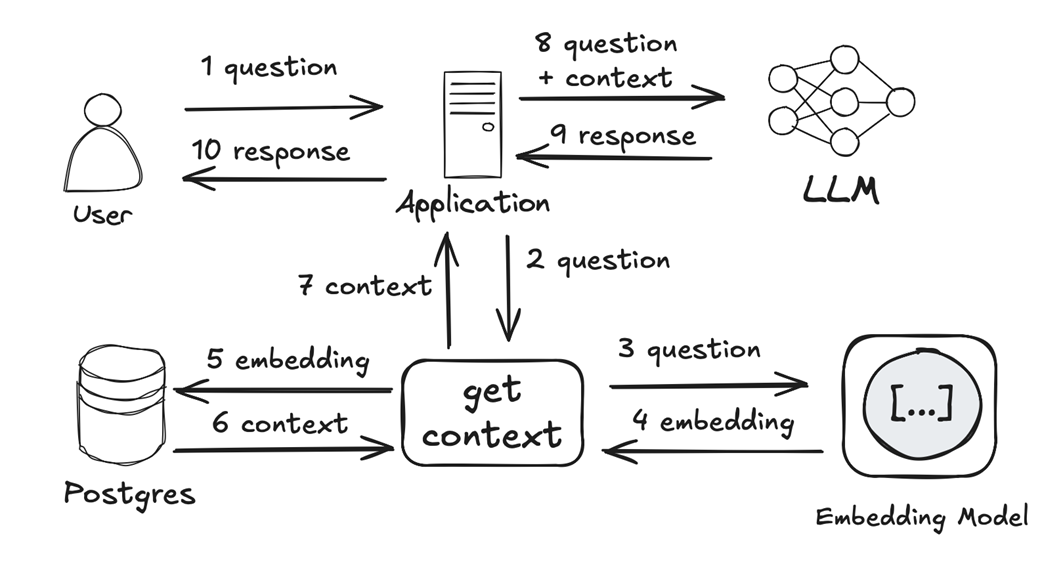
Finally, the chapter assembles a simple RAG pipeline: embed the user’s question, retrieve top matches from Postgres, and pass that context to an LLM to produce an answer. A lightweight prototype (using TinyLlama and a Python stack) illustrates prompt construction, context formatting, and the importance of handling conversation history and model hallucinations. The takeaway is a clear blueprint: use Postgres plus pgvector as your vector database, tune IVFFlat or HNSW to meet recall and latency goals, and layer RAG to ground LLM outputs in your private data—whether implemented with an application framework or pushed closer to the database with a SQL-centric approach.
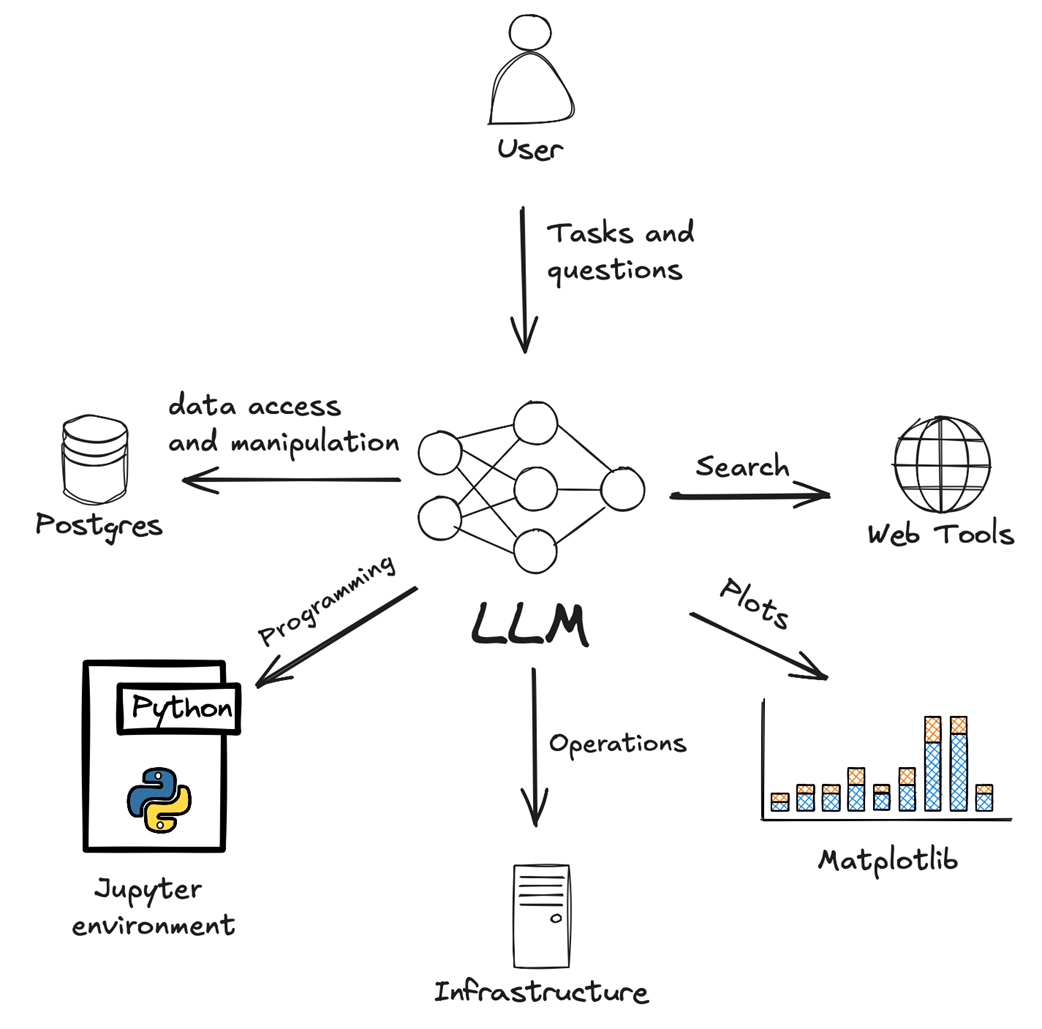
The LLM uses various tools to perform tasks following user prompts.
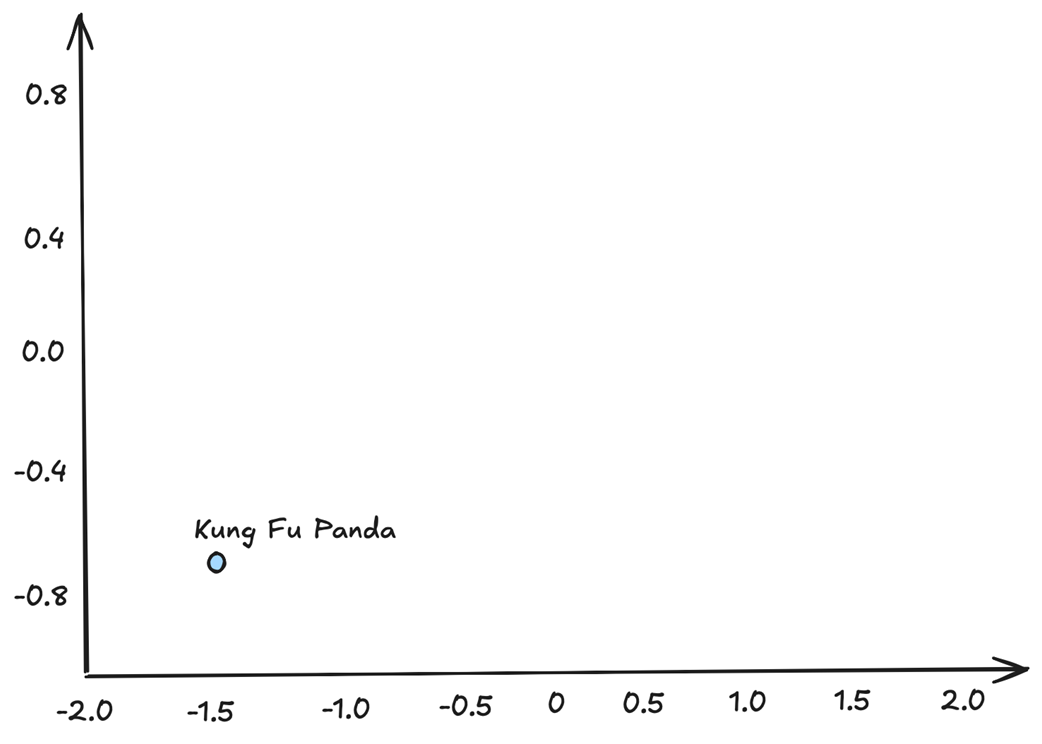
Positioning of the phrase “Kung Fu Panda” in a two-dimensional vector space
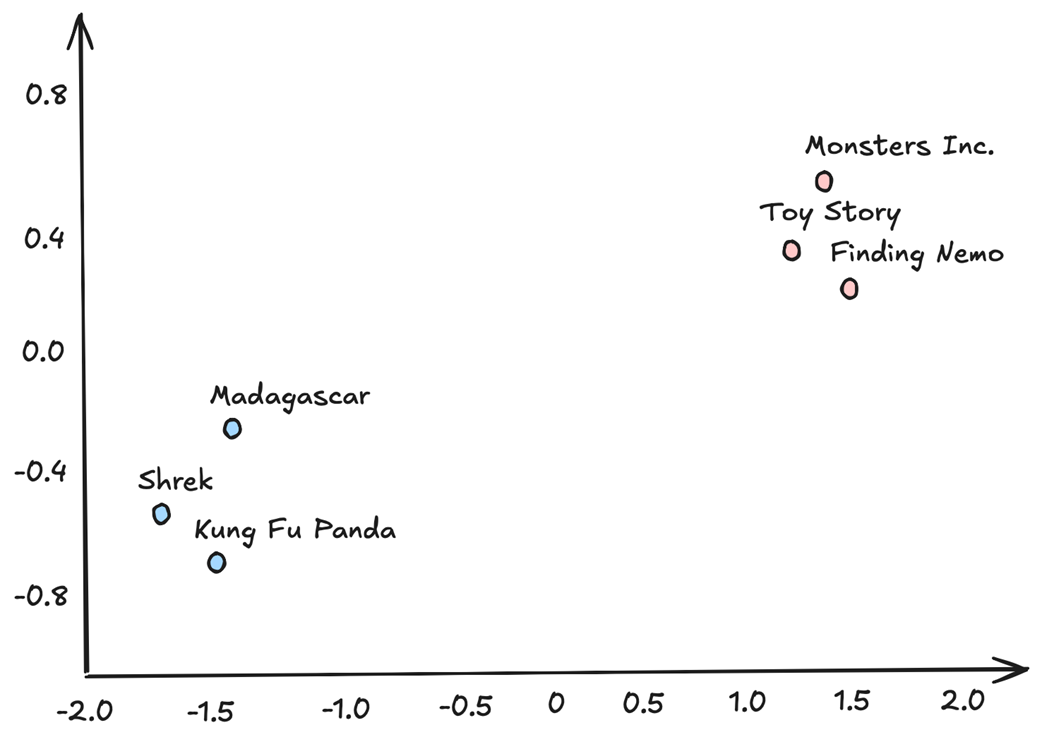
Clusters of movies related by animation studio
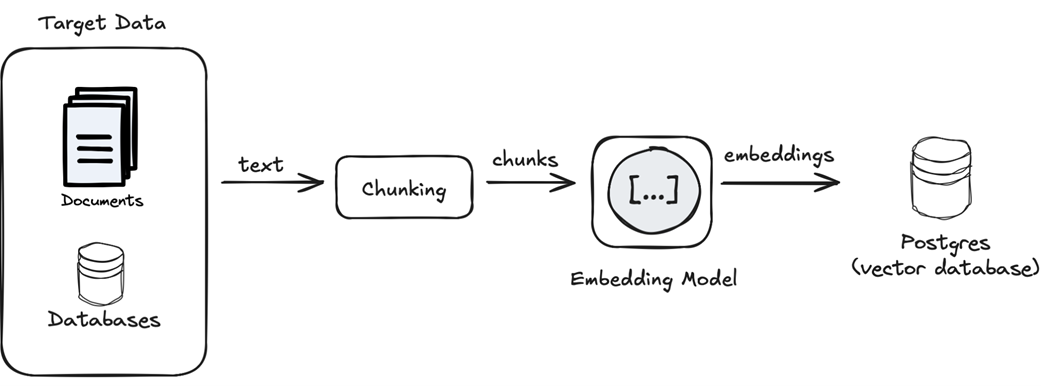
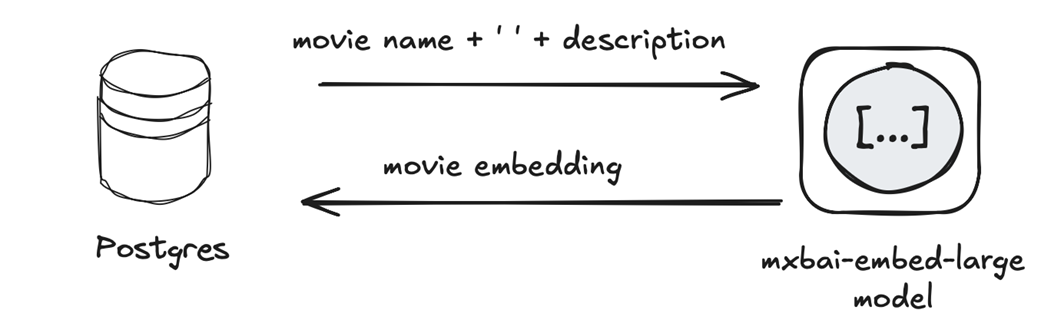
Generating and storing embeddings for target text data
Generating embeddings for the movies dataset
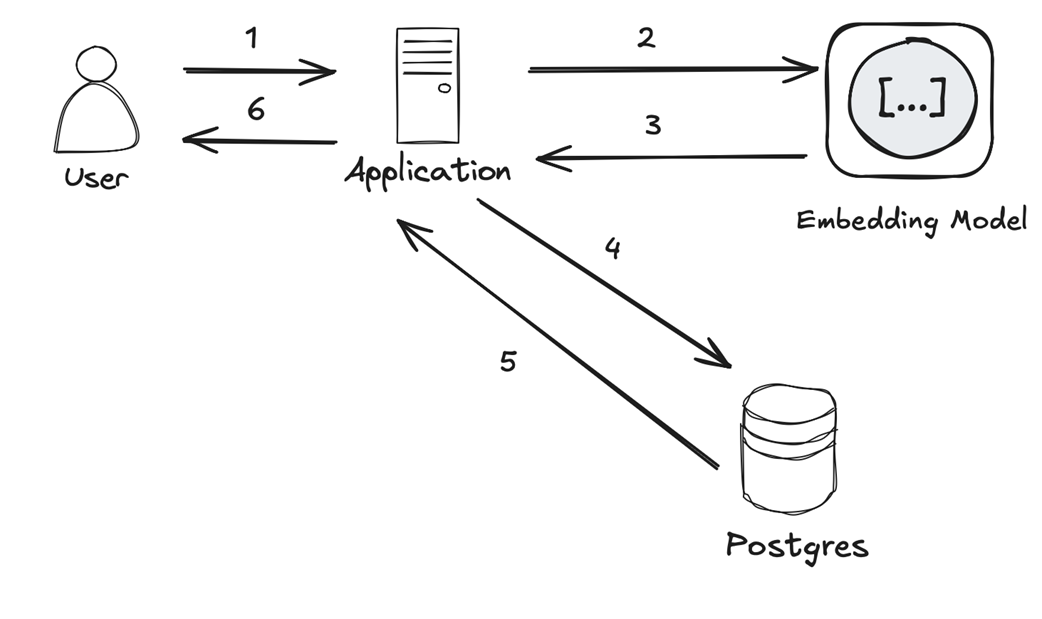
Performing vector similarity search with Postgres
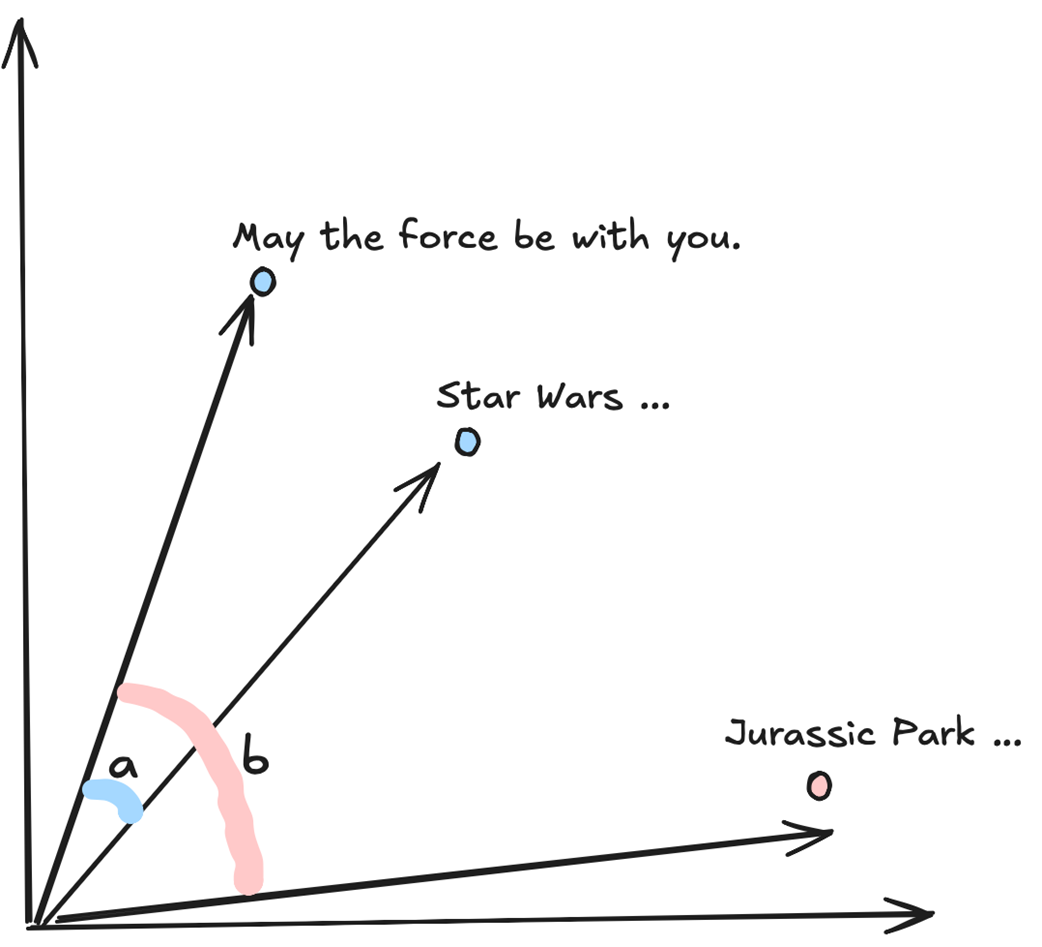
Angle difference between more and less related vector embeddings.
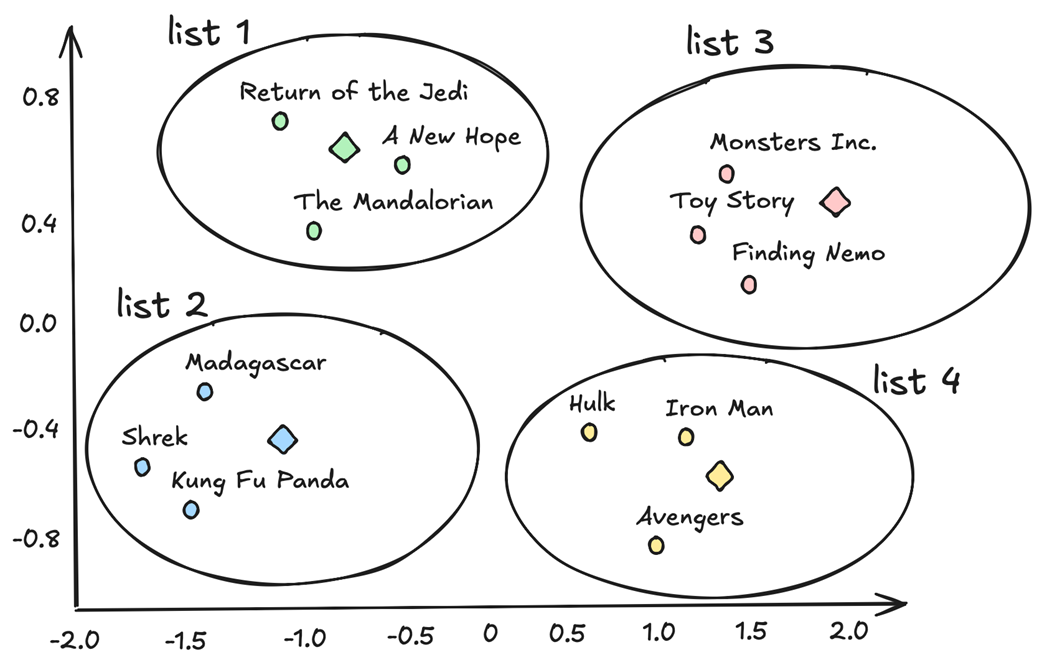
Sample IVFFlat index with movie embeddings
Sample HNSW index with movie embeddings
Implementing RAG with an LLM, an embedding model, and Postgres
Summary
- Postgres can be easily used alongside LLMs and embedding models to build new types of gen AI applications, including recommendation services and autonomous AI agents.
- The pgvector extension turns Postgres into a vector database capable of storing vector embeddings, performing vector similarity searches, and optimizing those searches with specialized index types.
- pgvector supports IVFFlat and HNSW indexes, helping you find the right trade-off between search performance, recall, and index size.
- Postgres can serve as a powerful vector database for implementing RAG and other gen AI use cases.
FAQ
What does the pgvector extension add to Postgres for generative AI?
pgvector turns Postgres into a vector database by adding a vector data type, distance operators for similarity search (for example, cosine<=>, Euclidean <->, inner product <#>), and specialized ANN indexes (IVFFlat and HNSW). This lets you store embeddings and run fast nearest-neighbor queries directly in SQL.How do I quickly start Postgres with pgvector and enable it?
- Run the Docker image:docker run --name postgres-pgvector -e POSTGRES_USER=postgres -e POSTGRES_PASSWORD=password -p 5432:5432 -d pgvector/pgvector:pg17- Connect with psql and enable the extension:
CREATE EXTENSION vector;- Verify with:
SELECT * FROM pg_available_extensions WHERE name='vector';How should I store embeddings in a table, and how do I pick the dimension?
Create a column of typevector(N) where N matches the embedding model’s output size. Example: movie_embedding VECTOR(1024) for the mxbai-embed-large model. Ensure all stored vectors share the same dimensionality; Postgres will enforce it at insert/update time.What’s the typical pipeline to generate embeddings for my data?
- Choose target text (e.g., titles + descriptions) and decide whether to chunk.- Select an embedding model (proprietary via API or open source via local runtime).
- Generate embeddings and write them into a
vector(N) column.- Optionally, generate a phrase/query dictionary for demos. You can implement this in your app code or explore database-side options like the
pgai extension.How do I run a vector similarity (semantic) search in SQL?
Use ORDER BY with a distance operator and a LIMIT. Example with cosine distance:SELECT id, name FROM omdb.movies ORDER BY movie_embedding <=> :query_embedding LIMIT 3; Pass the query’s embedding as a parameter from your application. You can also use a subquery that returns a vector (e.g., from a phrases table).Which distance metric should I use for text embeddings?
Cosine distance is commonly used for normalized text embeddings. It ranks results by the angle between vectors (smaller angle = more similar). Euclidean and inner product are available, but make sure your index/operator class matches the operator you use in queries.How do IVFFlat indexes work, and how do I tune them?
IVFFlat clusters embeddings into lists via k-means and searches only the nearest lists (ANN). Create with, for example:USING ivfflat (movie_embedding vector_cosine_ops) WITH (lists = ...). Guidelines: lists ≈ rows/1000 (up to ~1M rows) or ≈ √rows (beyond). Improve recall by increasing ivfflat.probes (number of lists visited). IVFFlat works best on relatively static datasets.What is an HNSW index, and when should I use it?
HNSW builds a multi-layer proximity graph and navigates it during search. Create with, e.g.,USING hnsw (movie_embedding vector_cosine_ops) WITH (m=8, ef_construction=16). Tune search-time recall with hnsw.ef_search. HNSW typically provides higher accuracy and stable recall as data changes, at the cost of larger index size and longer build times.How do I implement RAG with Postgres, an embedding model, and an LLM?
- Embed the user’s question with the same model used for your data.- Run a similarity query in Postgres to retrieve relevant rows (context).
- Construct a prompt that includes the question and retrieved context.
- Ask the LLM to answer or act based on that context. This pattern augments the model with your private data without retraining.
What are common pitfalls and best practices for Postgres + gen AI?
- Use the same embedding model for data and queries; normalize if required.- Provide sufficient context when generating embeddings; empty/short text degrades results.
- Expect ANN indexes to trade perfect accuracy for speed; tune recall (
ivfflat.probes, hnsw.ef_search).- Ensure queries are planner-friendly for index usage (e.g., use parameterized values or subselects rather than complex functions in ORDER BY).
- Monitor with EXPLAIN and re-create IVFFlat if the dataset changes substantially.
- Mitigate LLM/embedding hallucinations by improving prompts and context.

 Just Use Postgres! ebook for free
