Postgres has evolved into a mature platform for storing and processing JSON, capable of acting like a document database while retaining the strengths of relational modeling. Using a pizza-ordering application as a running example, the chapter explains how to store order details as JSON and why jsonb is the practical default: it enables efficient reads, richer operators/functions, and indexing at the cost of slightly slower writes and losing original formatting/ordering. It advocates a hybrid model—keep frequently queried, integrity-critical attributes (such as order identifiers and price) in relational columns, and place flexible, largely static details (like customizable pizza recipes) in jsonb—striking a balance between agility and performance.
The chapter shows how to work with JSON data directly in SQL. Core operators like -> and ->> extract fields (including nested ones and array elements), ? checks for key existence, and @> tests containment of one JSON object within another. SQL/JSON path expressions further simplify multilevel lookups and filtered searches across arrays, enabling concise, powerful queries for analytics (for example, popular pizza types or ingredient usage). For updates, jsonb_set edits specific fields or array elements in place, and the #- operator removes paths—avoiding round trips of whole documents through the application when only small changes are needed.
To make JSON queries fast, the chapter covers indexing strategies. B-tree expression indexes can accelerate predicates on specific extracted fields (such as pizza ->> 'type'), but they are brittle to expression changes and don’t scale to many fields. GIN indexes solve this by indexing entire jsonb documents: the default jsonb_ops variant indexes keys, values, and array elements and supports operators like ?, @>, and JSON path matches; the jsonb_path_ops variant indexes hashed paths, yielding smaller indexes and faster @> lookups, but it drops key-existence support. The guidance is to pick jsonb, use a hybrid schema, and choose GIN (and variant) or targeted expression indexes based on actual query patterns to achieve both flexibility and performance.
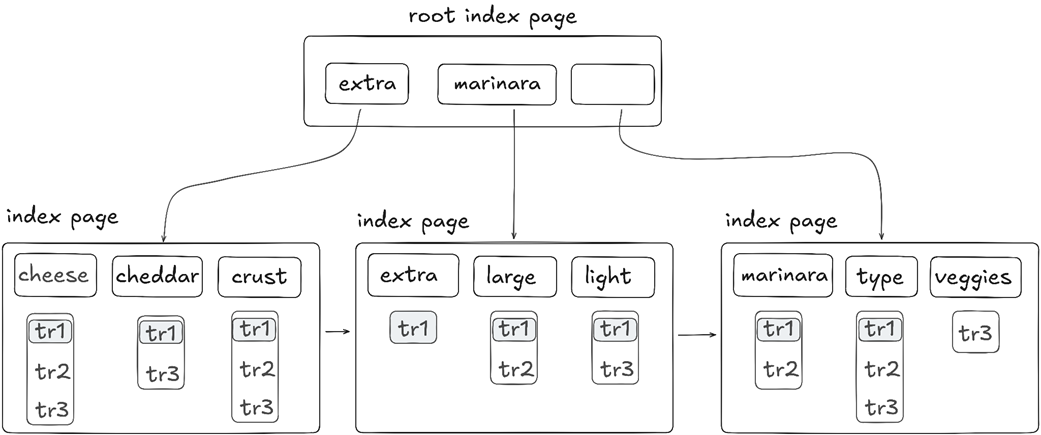
A sample default GIN index holding references to the table row tr1 with our sample pizza order
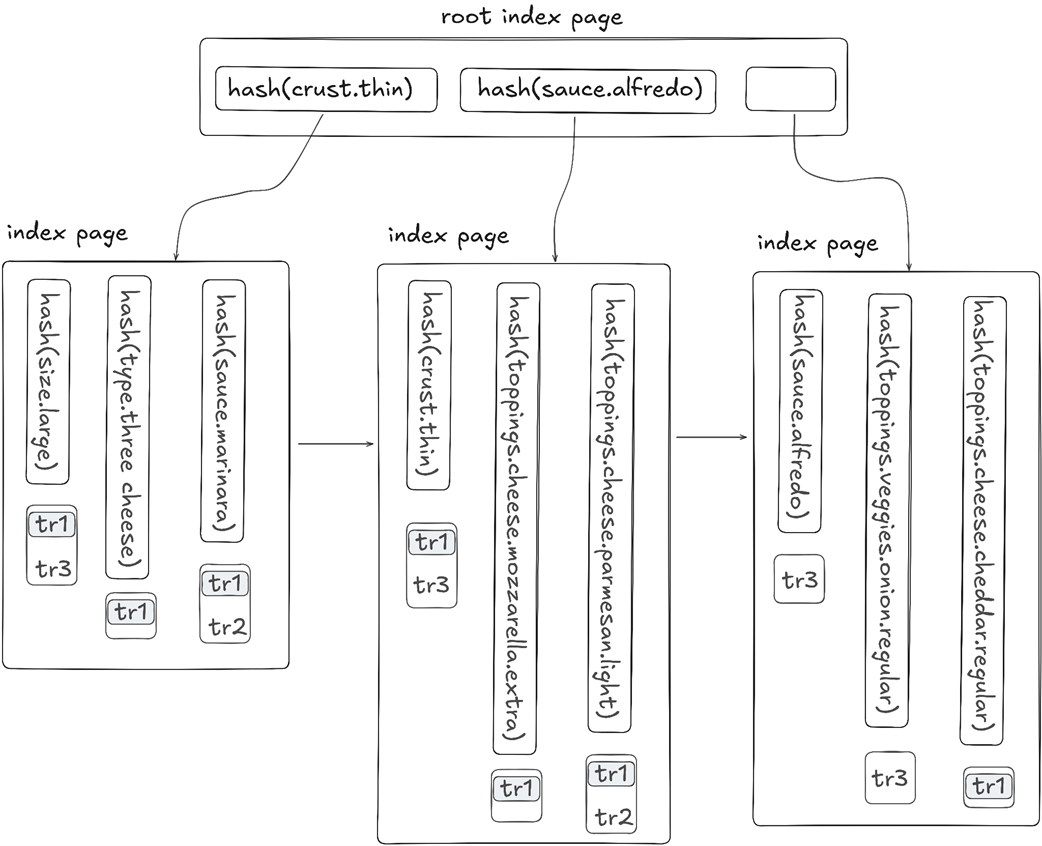
A sample nondefault GIN index holding references to the table row tr1 with our sample pizza order
Summary
Postgres introduced initial support for JSON in 2012. Since then, JSON-specific capabilities and improvements have been added on a regular basis.
The database supports two JSON-specific data types: json and jsonb. The jsonb data type should be used by default because it stores JSON objects in an internal binary format, which improves search performance.
Postgres supports various operators and functions for querying JSON structures, such as the key-exists (?) and containment (@>) operators.
In addition to the basic JSON functions and operators, Postgres offers a powerful JSON path language engine capable of executing expressions written in the SQL/JSON language.
The database provides the jsonb_set function for updating existing JSON objects and the #- operator for removing specific data from a JSON structure.
Postgres supports two types of GIN indexes for JSON objects, each storing indexed data differently and supporting distinct operator classes for data access.
FAQ
What’s the difference between json, jsonb, and text in Postgres, and which should I choose?text stores the raw JSON string and can’t use JSON operators; good only for store/retrieve. json preserves original formatting/key order and parses on every read. jsonb stores a binary form (whitespace/dup keys removed, key order not preserved), offers more operators/functions, and supports GIN indexing. Choose jsonb by default unless you must preserve original formatting/key order.How do the -> and ->> operators differ, and how do I filter with them correctly?-> returns JSON; ->> returns text. Filter JSON with JSON and text with text. Example: pizza->'size' = '"small"' (note the double quotes inside) versus pizza->>'crust' = 'thin'. You can chain and index into arrays: pizza->'toppings'->'veggies'->0->>'onion'.How can I test whether a key exists, including inside arrays of objects?Use ? with jsonb objects: pizza->'toppings' ? 'meats'. For arrays, expand then test, or use JSONPath: jsonb_path_exists(pizza, '$.toppings.meats[*] ? (exists(@.sausage))').What does the @> containment operator do, and what can it match?It checks whether the left JSONB contains the right JSON structure and values along the same path. Examples: pizza @> '{"crust":"gluten_free"}' and pizza->'toppings'->'veggies' @> '[{"tomato":"extra"}]'. Key order doesn’t matter in jsonb, but hierarchy/path does.When should I use JSON path expressions like jsonb_path_query and jsonb_path_exists?Use them for concise, powerful traversal of multilevel objects/arrays and for complex filters that otherwise need subqueries. Basics: $ is the document, .key accesses a field, [*] iterates arrays, ?(...) filters, and @ is the current item. Example: jsonb_path_exists(pizza, '$ ? (@.type == "custom") .toppings.cheese[*].parmesan ? (@ == "extra")').How can I update or remove parts of a JSONB document without rewriting the whole object?Use jsonb_set(target, path, new_value, create_missing) to update, e.g. jsonb_set(pizza, '{crust}', '"regular"', false). For arrays or nested fields include indexes/keys in the path, e.g. '{toppings,veggies,0,tomato}'. Remove with the #- operator, e.g. pizza = pizza #- '{toppings,meats}'.Should I model everything as JSON in Postgres?No. Prefer relational columns for frequently filtered/joined/aggregated data and integrity constraints; use JSON for static/infrequently updated, sparse, or flexible schema data. A hybrid model works well: keep ids/price as columns and store variable order details in a jsonb column.How do I speed up JSON queries—B-tree expression indexes or GIN?B-tree expression index: index a specific expression like (pizza->>'type'); great for equality/range on that exact expression but brittle if the expression changes and you may need many indexes. GIN on the jsonb column: a single index accelerates many predicates (e.g., @>, ?, JSONPath matches) across the whole document.What’s the difference between the default GIN (jsonb_ops) and jsonb_path_ops?jsonb_ops (default) indexes keys, values, and array elements; supports @>, ?, @?, @@; flexible but larger. jsonb_path_ops indexes hashed paths from root to each value; supports @>, @?, @@ but not ?; typically smaller and faster for containment lookups.Why is Postgres doing a sequential scan even though I created an index?Common causes: the query’s expression doesn’t match a B-tree expression index (e.g., using -> instead of ->>), the operator isn’t supported by the index’s operator class (e.g., ? with jsonb_path_ops), or planner estimates favor a Seq Scan. Align the query with the indexed expression, choose the right GIN operator class, or add the appropriate index.
pro $24.99 per month
access to all Manning books, MEAPs, liveVideos, liveProjects, and audiobooks!

 Just Use Postgres! ebook for free
