This chapter explains why indexes are often the first and best tool for accelerating queries in Postgres, contrasting their logarithmic lookup time with linear table scans. It introduces B-tree indexes as the default, highlighting their sorted structure and ability to serve equality, range, and ordered queries efficiently, and frames all indexes in two ways: what we index (scope and purpose) and how we index (underlying access method). Using a multiplayer game dataset, it stresses starting with EXPLAIN/EXPLAIN ANALYZE to understand current plans and confirm whether an index is actually needed before creating one.
Through practical examples, the chapter shows how to interpret sequential scans, index scans, index-only scans, and bitmap scans, and how options like buffers reveal memory versus disk usage. It demonstrates single-column indexes: B-trees for general equality and range filters (e.g., leaderboards by score) and hash indexes for fast equality-only lookups (e.g., champion_title). These patterns illustrate how indexes cut down table lookups, when Postgres prefers bitmap strategies for batch fetching, and how ordering defined in an index can eliminate sort steps and enable index-only access when all needed columns are available from the index.
The chapter then moves to composite indexes and their caveats: column order matters for both filtering and ORDER BY, and skipping leading columns can prevent index usage in some cases. It shows how a well-chosen composite index can replace multiple single-column ones and how covering indexes (INCLUDE) eliminate heap fetches for hot queries. Partial indexes target frequently accessed subsets to reduce size and maintenance, while functional/expression indexes speed filters that depend on computed values (e.g., win_count - loss_count). Throughout, it emphasizes trade-offs—index maintenance on writes, planner overhead with too many indexes, the importance of keeping statistics fresh with ANALYZE, and the need to avoid over-indexing by aligning indexes with real query patterns.
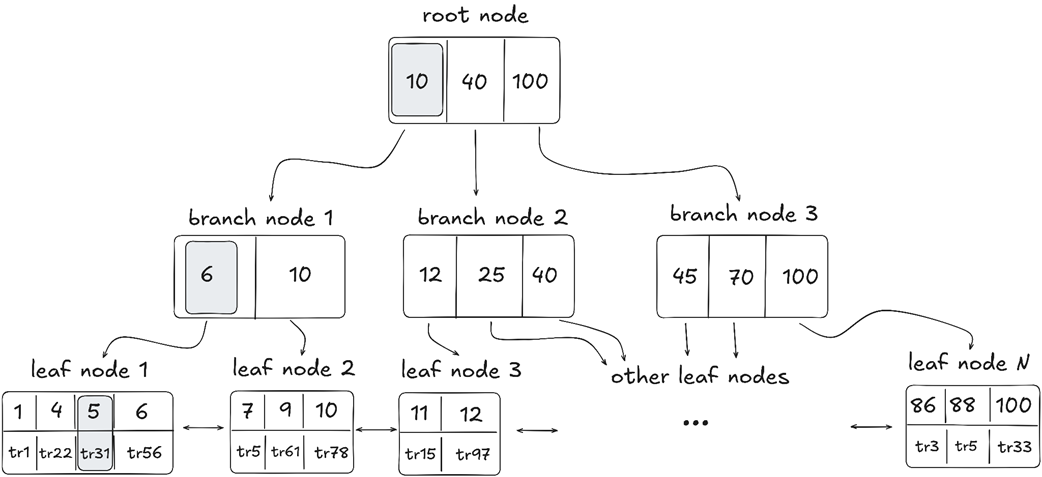
A sample B-tree index showing the search path to the index entry with ID = 5
Summary
Indexes are a popular optimization technique because they improve search performance by querying only a subset of the indexed data. Many indexes have an algorithmic complexity of O(logbN).
Indexes in Postgres can be categorized by index scope or functional purpose (what we index) and by underlying data structure and access method (how we index).
Postgres uses B-tree as the default underlying data structure (how we index).
The EXPLAIN statement lets us analyze the query execution plan so that we can decide on the most efficient query optimization techniques.
Single-column and composite indexes optimize queries that filter or order data by one or more columns.
Covering indexes include table data in the index structure, reducing the number of lookups to the table.
Partial indexes are useful when indexing only a subset of table data.
Functional and expression indexes allow indexing the result of a function or expression applied to one or more table columns.
FAQ
Why are indexes so popular in Postgres?Because they reduce search complexity from O(N) table scans to roughly O(log_b N) with B-trees. With high branching factors, only a handful of node visits are needed even for millions or billions of rows. B-tree leaf nodes are linked, which also speeds up range scans and ordered retrieval.What are the main categories of index types in Postgres?Two big groups: (1) What we index (scope/purpose): single-column, composite (multicolumn), covering (INCLUDE), partial, and functional/expression indexes. (2) How we index (structure/access method): B-tree (default), hash, bloom, GIN, RUM, GiST, SP-GiST, BRIN, HNSW, IVFFlat. Use USING to pick a structure; otherwise B-tree is used.When should I use EXPLAIN vs EXPLAIN ANALYZE, and which options matter?Use EXPLAIN to see the plan without running the query. Use EXPLAIN ANALYZE (or EXPLAIN (analyze)) to execute and show actual timings and row counts. Helpful options include buffers on (memory vs disk I/O) and costs off (compact output). Remember EXPLAIN (analyze) will run the statement, so UPDATE/DELETE will modify data.What’s the difference between Seq Scan, Index Scan, Index Only Scan, and Bitmap scans?- Seq Scan: reads every row and filters. Chosen when an index would touch too many rows. - Index Scan: walks the index and fetches matching table rows. - Index Only Scan: reads everything from the index (Heap Fetches: 0) when the index covers all requested columns. - Bitmap Index Scan + Bitmap Heap Scan: collects many matching row locations first, then fetches them in bulk to reduce random table lookups; bitmap can be exact or lossy.When do I choose a B-tree vs a hash index?B-tree is general-purpose: equality and range operators, sorting, and ordering. Hash indexes are single-column and only support equality/IN lookups; good for very selective equality checks (for example, champion_title = 'Naval Warlord'). Range queries require B-tree.How do composite (multicolumn) indexes work, and what are common pitfalls?They’re ordered by the listed columns (for example, region, then score DESC, then win_count DESC). The leading column(s) should appear in WHERE/ORDER BY for the index to be most useful. Changing ORDER BY order (e.g., sorting by win_count then score) or omitting the leading column can prevent index use. Starting in Postgres 18, skip scans expand cases where leading columns can be skipped.What is a covering index and when should I use INCLUDE?A covering index stores extra columns via INCLUDE so queries can be satisfied from the index alone, enabling Index Only Scan and avoiding table lookups. Use it for hot read paths when the included columns change infrequently; the tradeoff is extra index maintenance on updates.What is a partial (filtered) index and how does it affect planning?It indexes only rows matching a predicate (for example, WHERE play_time <= '50 hours'). It’s smaller and reduces write overhead because unrelated rows don’t update the index. The planner uses it only when the query’s predicate implies the index’s condition; even small deviations (like 50 hours 1 second) can make it inapplicable.How do functional/expression indexes help?They index the result of an expression (for example, (win_count - loss_count)). The planner uses them when the same expression appears in WHERE/ORDER BY, turning a full scan into an index-driven plan (often a bitmap scan) with better performance as data grows.How do I avoid over-indexing, and should I run ANALYZE?Each index speeds reads but increases write cost and planning time. Prefer a minimal set that serves multiple critical queries (for example, a well-designed composite or covering index). Drop unused or redundant indexes. After creating indexes, run ANALYZE to refresh statistics so the planner can pick the new index effectively.
pro $24.99 per month
access to all Manning books, MEAPs, liveVideos, liveProjects, and audiobooks!

 Just Use Postgres! ebook for free
