10 Postgres for geospatial data
This chapter introduces spatial and geospatial concepts and shows how Postgres supports location-aware workloads. It distinguishes basic geometric representations (points, lines, polygons) from Earth-referenced geodata, explains how real-world layers (buildings, roads, demographics, climate, traffic) combine in GIS workflows, and motivates why native Postgres geometry types are useful but insufficient for geographic accuracy and standards. PostGIS addresses these gaps by adding OGC-compliant geometry and geography types, SRID-aware projections, rich spatial functions, and seamless interoperability with GIS tools, enabling practical applications such as city planning, retail site selection, and travel exploration.
The chapter walks through a hands-on workflow using an OpenStreetMap dataset for Florida: running Postgres with PostGIS in Docker, loading data with osm2pgsql into a florida schema, and exploring the core tables for points, lines, roads, and polygons. It demonstrates practical querying and analysis patterns with PostGIS functions—transforming coordinates (ST_Transform, ST_X, ST_Y), proximity and distance (ST_DWithin, ST_Distance), constructing points (ST_MakePoint, ST_SetSRID), polygon analytics (ST_NPoints, ST_Area, ST_Within, ST_Equals), and line work (ST_Length, ST_Intersects). Through scenarios like locating the center of Tampa, finding restaurants near a hotel, examining the size and internal parks of Walt Disney World, and identifying major roads intersecting Miami, it illustrates how to read, filter, and analyze spatial features stored in SRID 3857 or 4326, and how to visualize them with QGIS.
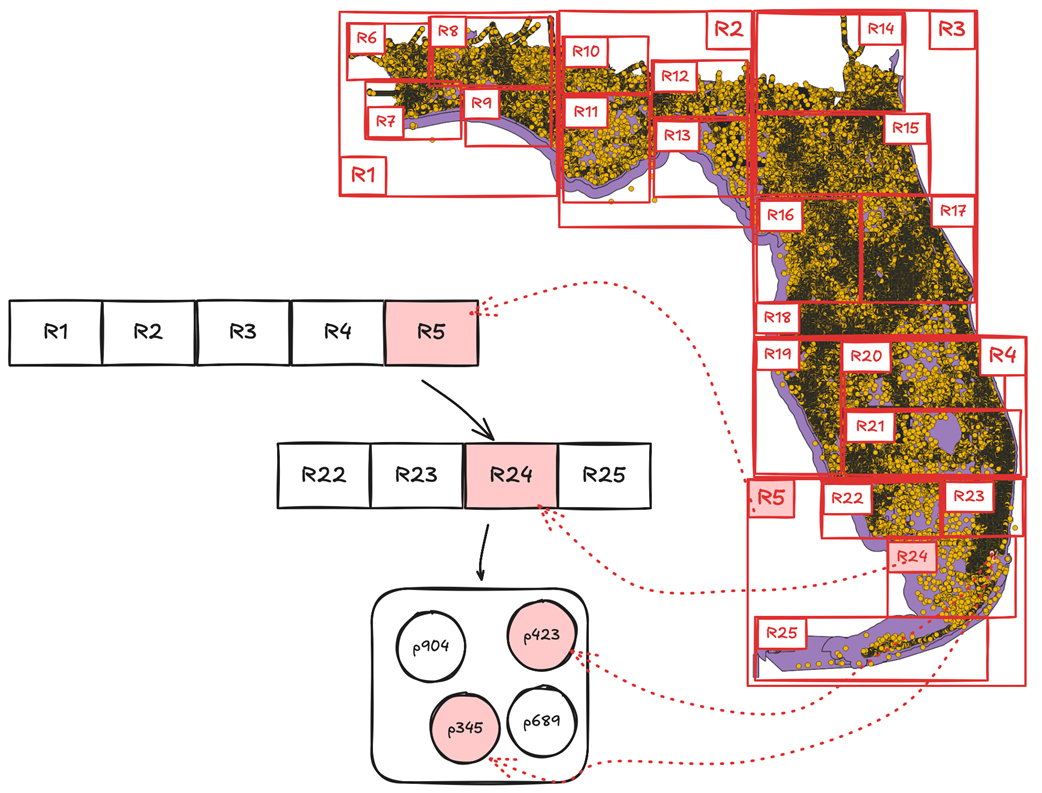
To scale geospatial queries, the chapter explains spatial indexing strategies and how PostGIS leverages Postgres index types. It compares GiST (the general-purpose choice for spatial operators), SP-GiST (effective for evenly distributed, low-overlap data like points), and BRIN (compact and order-aware for large tables), then details how GiST’s R-tree–like structure uses bounding boxes to accelerate searches. It shows how index-aware predicates (for example, ST_DWithin, ST_Intersects, ST_Contains) benefit from GiST via bounding-box filtering, why ST_Distance alone is not index-aware, and how complementary B-tree indexes (such as on name) can remove full scans in lookup phases. The result is a clear blueprint for storing, visualizing, querying, and optimizing geospatial workloads with Postgres and PostGIS.
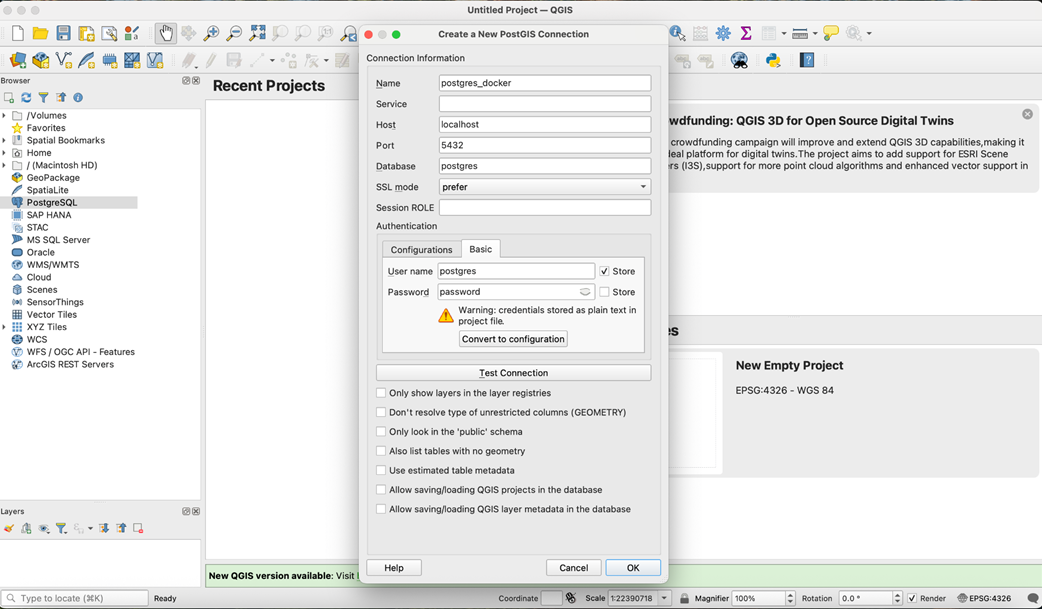
Configuring a PostGIS connection in QGIS
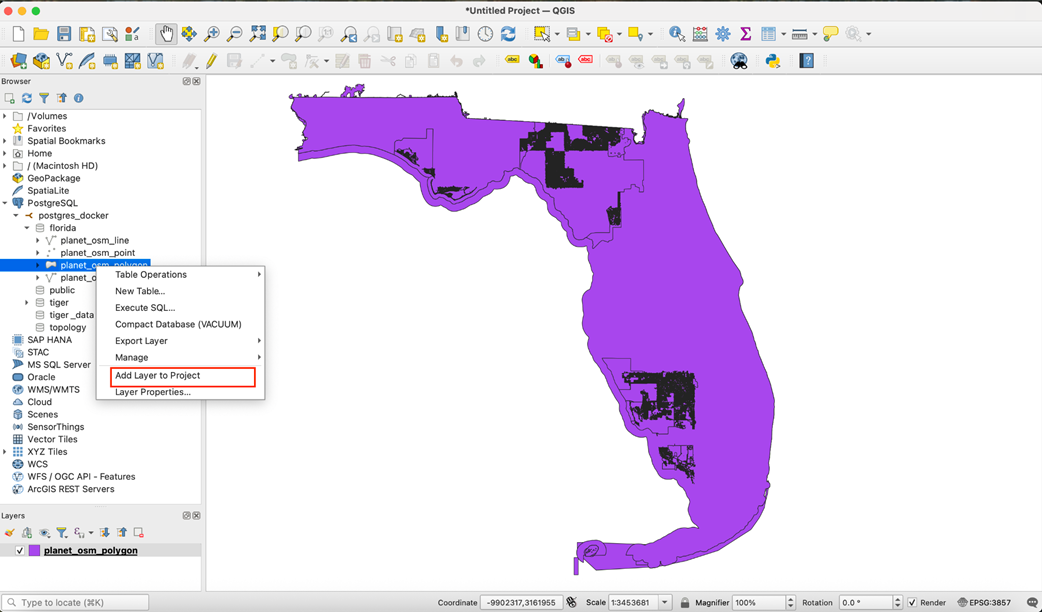
Visualizing polygons from the planet_osm_polygon table
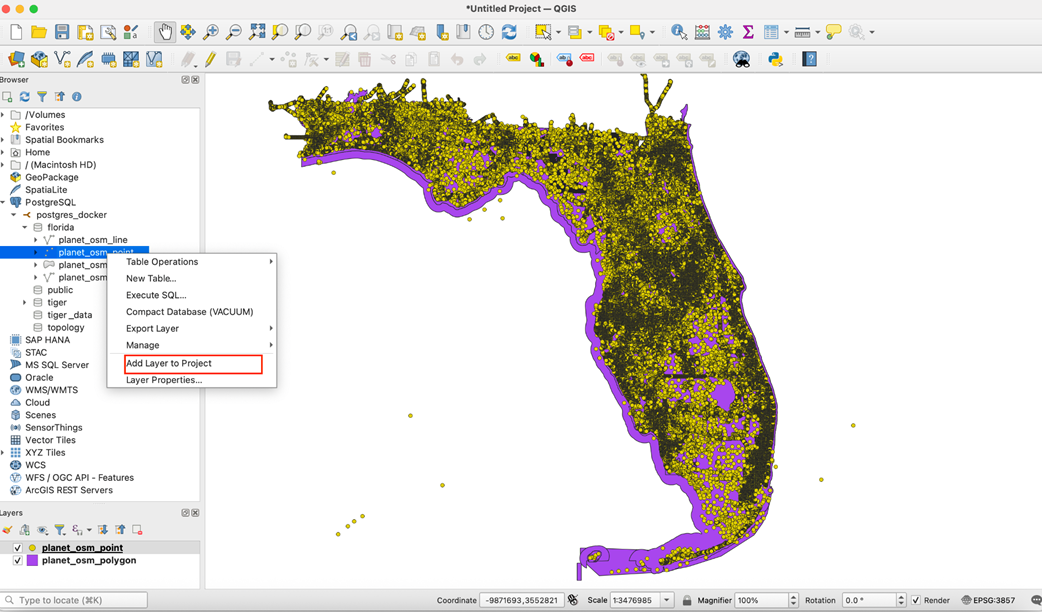
Visualizing points from the planet_osm_point table
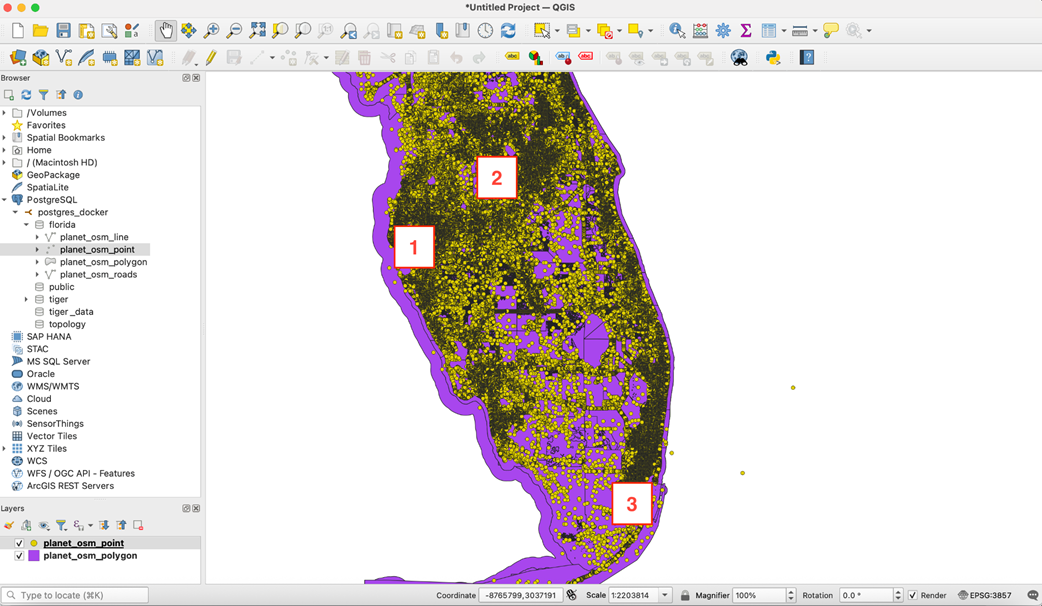
Areas in Florida to query on
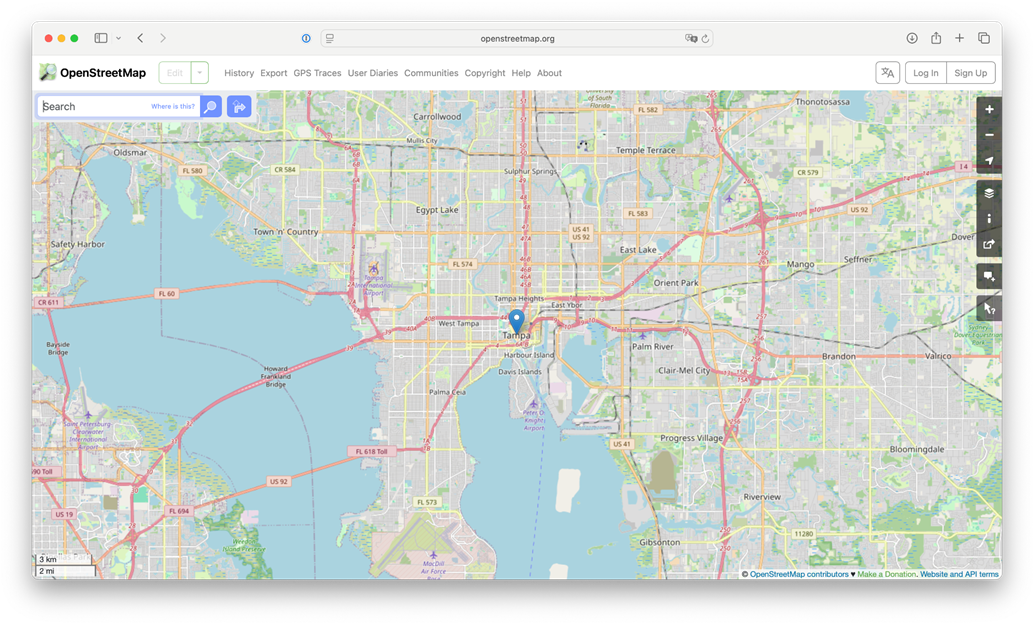
Map view with the marker showing the center of Tampa. Photo credit: OpenStreetMap, https://www.openstreetmap.org/copyright.
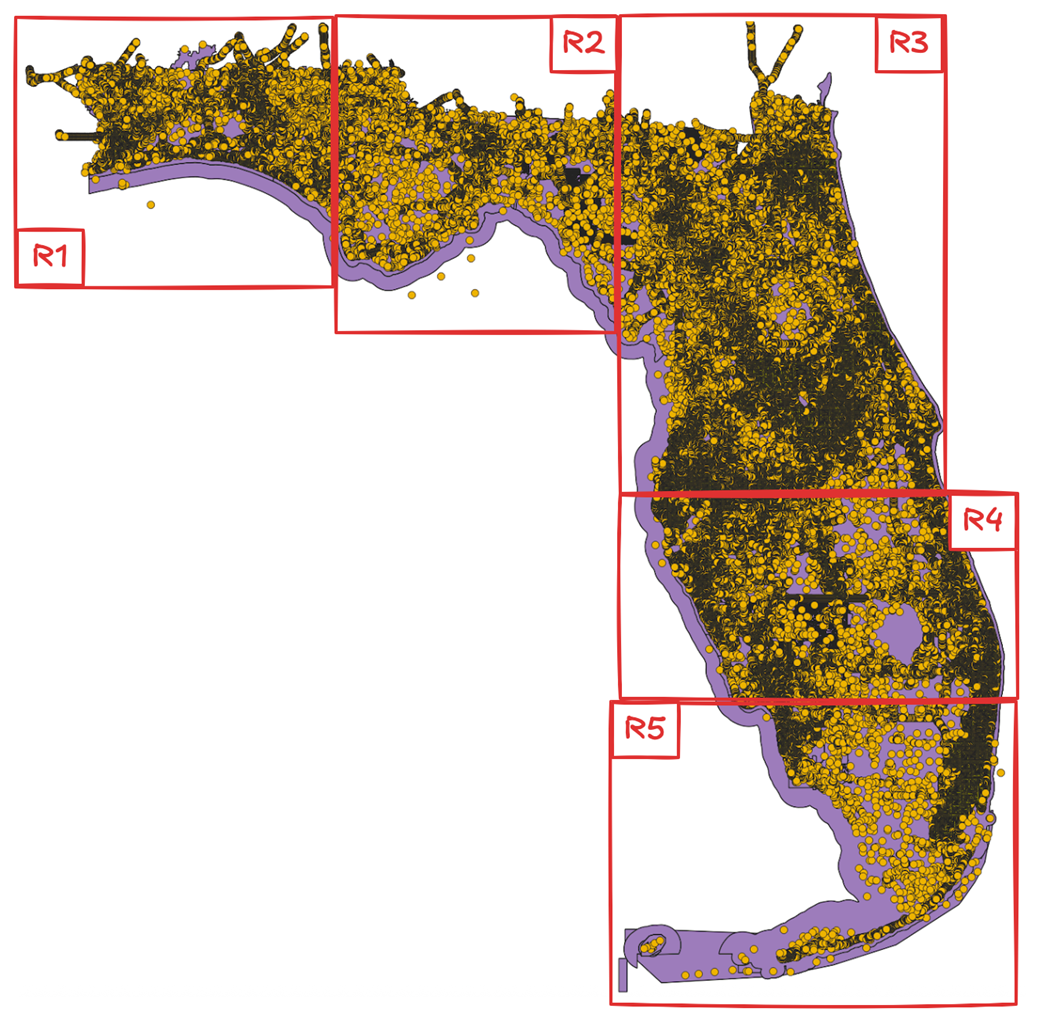
The top-level bounding rectangles of the GiST index covering points from the dataset for Florida
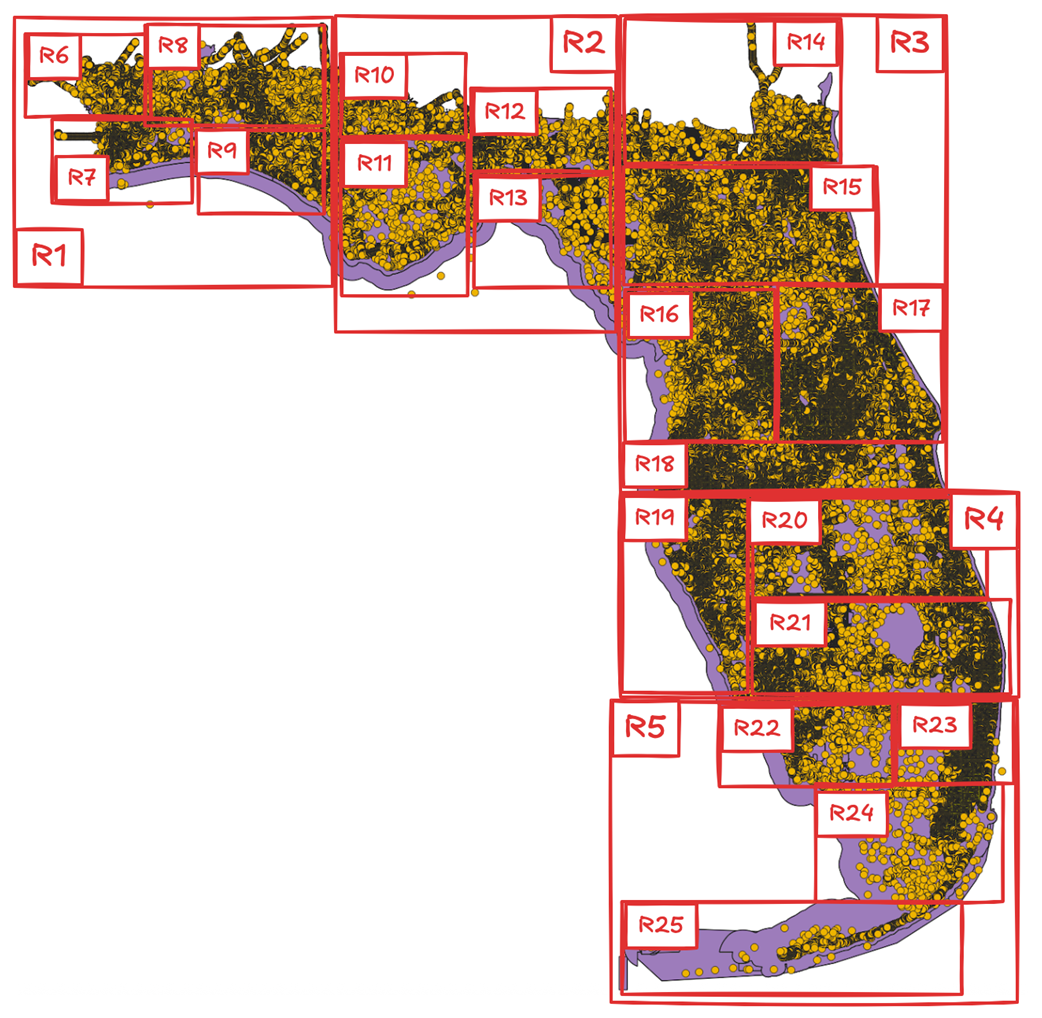
The next-level bounding rectangles of the GiST index covering points from the dataset for Florida
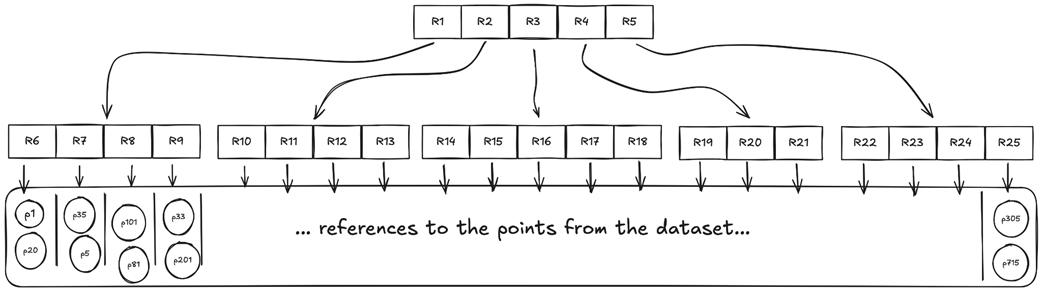
Sample GiST index structure with two levels of bounding rectangles
Using the GiST index to find cultural places near Downtown Miami
Summary
- PostGIS is an extension that turns Postgres into a geospatial database.
- The extension introduces special data types and adds a wide range of functions for geospatial data querying and processing.
- The geometry data type uses a Euclidean plane to represent geospatial objects and relies on Cartesian mathematics for calculations, which makes them easier to implement and faster to execute.
- The geography data type takes the Earth's curvature into account by using a spherical model for calculations, making them more accurate than those performed with the geometry type but slower due to more complex underlying math.
- Dozens of geospatial functions let you query, create, transform, and process geospatial data in Postgres.
- PostGIS integrates with various systems and tools that allow querying and working with geospatial data through a GUI.
- Queries over geospatial data can be optimized using GiST, SP-GiST, and BRIN indexes. GiST is considered the default choice for geospatial data.
- Index-aware functions such as ST_DWithin, ST_Contains, and ST_Intersects can use the GiST index.
FAQ
What’s the difference between spatial and geospatial data?
Spatial data represents the position and shape of objects in geometric space (points, lines, polygons). Geospatial data is a subset tied to locations on Earth, typically referenced by a spatial reference system (for example, latitude/longitude in WGS 84). Examples: a building footprint (polygon), a bus stop (point), a road (line), or a city boundary (polygon).Which geometric types does Postgres include natively, and why use PostGIS?
Postgres includes 2D geometric types such as point, line, lseg, box, path, polygon, and circle, plus operators like <-> (distance) and <@ (contains). These are great for planar geometry but lack geospatial standards, Earth curvature support, SRIDs/projections, and deep GIS integration. PostGIS adds OGC-compliant geometry and geography types, hundreds of spatial functions, spatial indexing, and tool integrations.PostGIS geometry vs geography: when to use each, and which SRIDs matter?
- geometry: Planar math on an Euclidean plane. Fast and widely used; accuracy decreases over large areas. You pick an SRID/projection, e.g., 3857 (Web Mercator, meters).- geography: Spheroidal model that accounts for Earth’s curvature. More accurate over long distances; some operations can be slower. Default SRID is 4326 (WGS 84: lon/lat degrees; results typically in meters).
Examples:
- geometry(Point, 3857) for fast planar operations (OSM rendering, local searches).
- geography(Point, 4326) for accurate distance/area on the globe.
How do I start Postgres with PostGIS in Docker?
- Use the PostGIS image: postgis/postgis:17-3.5- Create a volume and run the container exposing port 5432. Example (Linux/macOS amd64):
docker volume create postgres-postgis-volume
docker run --name postgres-postgis -e POSTGRES_USER=postgres -e POSTGRES_PASSWORD=password -p 5432:5432 -v postgres-postgis-volume:/var/lib/postgresql/data -d postgis/postgis:17-3.5
- On Apple Silicon (arm64), add --platform linux/amd64. On Windows, use PowerShell/CMD syntax accordingly.
Connect with psql and verify PostGIS via pg_available_extensions or \dx.
How do I load the Florida OpenStreetMap dataset with osm2pgsql, and what tables will I get?
- Create a schema (e.g., CREATE SCHEMA florida;).- Run the osm2pgsql Docker container against your Postgres+PostGIS, pointing it to the Florida .osm.pbf URL provided in the chapter.
- Expect these tables in the florida schema:
• planet_osm_point (points of interest, amenities, etc.)
• planet_osm_line (ways that are lines: roads, rivers, railways)
• planet_osm_polygon (closed ways/polygons: cities, parks, buildings)
• planet_osm_roads (subset optimized for low zoom)
Plus osm2pgsql_properties with import metadata.
How are coordinates stored in planet_osm_* tables, and how do I convert to lon/lat?
- All geometry is stored in SRID 3857 (Web Mercator, meters) in the way column.• planet_osm_point: geometry(Point,3857)
• planet_osm_line: geometry(LineString,3857)
• planet_osm_polygon: geometry(Geometry,3857) (Polygon/MultiPolygon, etc.)
- Convert to lon/lat (WGS 84, SRID 4326) with ST_Transform(way, 4326). Extract lon/lat with ST_X and ST_Y on the transformed point. Example:
SELECT ST_Y(ST_Transform(way,4326)) AS lat, ST_X(ST_Transform(way,4326)) AS lon FROM florida.planet_osm_point WHERE name='Tampa' AND place='city';
How do I find nearby places efficiently (e.g., restaurants within 500m)?
- Use ST_DWithin for an index-aware search with meters in SRID 3857:... JOIN florida.planet_osm_point p ON ST_DWithin(hotel.way, p.way, 500) WHERE p.amenity='restaurant' ORDER BY ST_Distance(hotel.way, p.way) LIMIT 5;
- ST_DWithin can leverage the GiST index on way; ST_Distance cannot and is used for final sorting or filtering after the coarse filter.
- If you know coordinates, create a point with ST_MakePoint and set SRID with ST_SetSRID(...,3857).
How can I work with polygons to measure area and find features within boundaries?
- Measure polygon complexity and size:• ST_NPoints(geom) counts vertices
• ST_Area(geom) returns area in SRID units (m² for 3857; divide/convert as needed)
- Find features within a region (e.g., parks inside “Walt Disney World”):
• ST_Within(A,B) checks if A is completely inside B
• ST_Equals(A,B) helps exclude identical geometries (e.g., the container polygon itself)
Example flow: select boundaries for “Walt Disney World”, then query polygons/points where ST_Within(geom, boundaries) and filter by tags (tourism, amenity, name).
How do I query roads that intersect a city and compute their lengths?
- Use planet_osm_line (geometry(LineString,3857)). Common tags include highway types (primary, secondary, residential, etc.).- Get roads intersecting a city boundary with ST_Intersects(road.way, city.boundaries). Compute length with ST_Length(road.way) in meters (SRID 3857). Example pattern:
WITH city AS (SELECT way FROM florida.planet_osm_polygon WHERE name='Miami' AND place='city') SELECT l.name, l.highway, round(ST_Length(l.way)) FROM florida.planet_osm_line l JOIN city c ON ST_Intersects(l.way, c.way) WHERE l.highway IN ('primary','secondary') ORDER BY 3 DESC LIMIT 10;
How do spatial indexes (GiST, SP-GiST, BRIN) speed up queries, and why prefer ST_DWithin over ST_Distance?
- GiST: General-purpose spatial index (R-tree over bounding boxes). Default choice; supports many spatial operators and functions. PostGIS uses it to quickly narrow candidates via bounding boxes (e.g., && with ST_Expand) before precise checks.- SP-GiST: Space-partitioned; great for uniformly distributed point data with little overlap; supports fewer operators than GiST.
- BRIN: Very compact and fast to scan ranges; best when table data is physically ordered (see time-series analogy).
- Prefer index-aware predicates (ST_DWithin, ST_Intersects, ST_Contains, ST_Overlaps). They translate to bounding-box prefilters that GiST can use. ST_Distance requires exact distance computation and typically triggers a (parallel) seq scan unless paired with an index-aware prefilter.
How can I visualize PostGIS data with QGIS?
- Install QGIS and create a PostGIS connection to your running container (host: localhost, port: 5432, db: postgres, user: postgres, password: password).- Add layers from the florida schema, e.g., planet_osm_polygon and planet_osm_point. QGIS renders polygons first, then points over them as separate layers.
- Note: Basic auth stores credentials in the project; use QGIS’s auth system for production. Rendering large layers can take time depending on machine resources.

 Just Use Postgres! ebook for free
