3 Collecting data
This chapter moves from what to analyze to how to collect and explore investment data with Python. It outlines why financial data is comparatively clean yet still requires careful preparation and interpretation, then classifies the inputs investors use into fundamental, technical, and non‑financial data. To tame the vast universe of listed companies, it introduces stock screeners and explains why many practitioners begin their research in a browser but do the bulk of their exploration in data science notebooks, which are faster and more flexible than building full applications for one‑off analyses.
The chapter’s hands‑on core uses yfinance as a practical gateway to both fundamentals and price data. It shows how to pull income statements, balance sheets, and cash flows; extract company metadata and ready‑made ratios; and compute custom ratios directly from statements. On the technical side, it demonstrates loading historical prices, normalizing series for fair comparisons, and calculating simple and logarithmic returns, as well as volatility statistics like standard deviation and variance. Through examples comparing different tickers and time windows, it illustrates how performance and risk characteristics can shift, and why context matters when interpreting recent results.
Because yfinance relies on scraping and is not supported by Yahoo, the chapter highlights its limits and presents API‑based alternatives. Finviz offers a rich screener and an API but focuses on U.S. listings; EODHD provides global exchange coverage with data structures similar to yfinance; Alpha Vantage supplies time series, adjusted prices via premium endpoints, and news sentiment; and OpenBB unifies access across multiple providers and asset classes beyond equities. The chapter closes with practical criteria for choosing libraries—active maintenance, community traction, cross‑platform simplicity, and broad market coverage—plus a reminder to manage API keys properly. The recommended approach is to start with yfinance for rapid exploration and augment it with commercial or multi‑provider tools when robustness, coverage, or additional datasets are required.
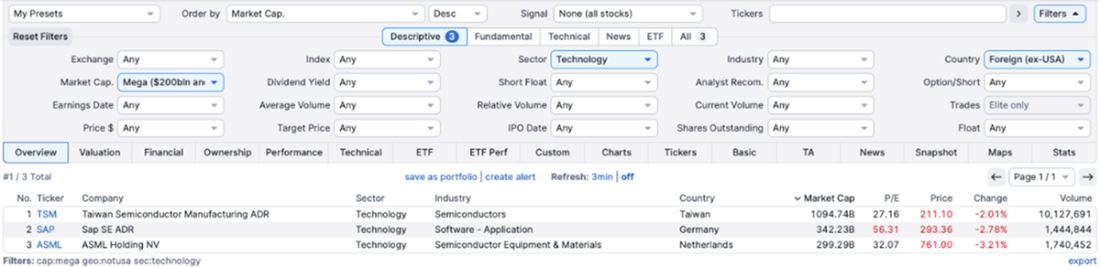
FINVIZ.com (https://finviz.com) is one of many financial services platforms that offer a stock screener to help users find companies through various filters. In this screenshot, we selected non-US technology companies with a market capitalization of over $ 200 billion and received three results.
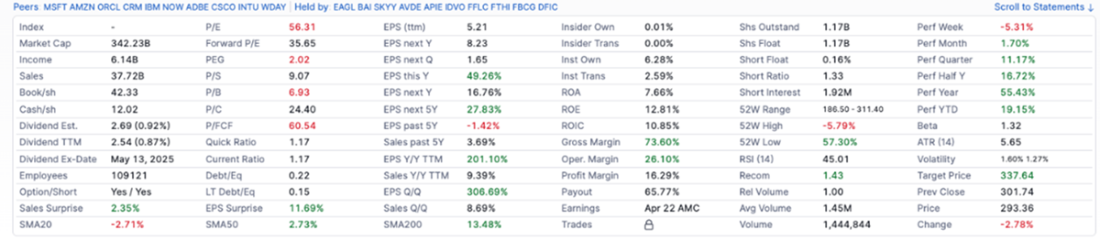
Looking at the fundamental data of SAP on Finviz.com
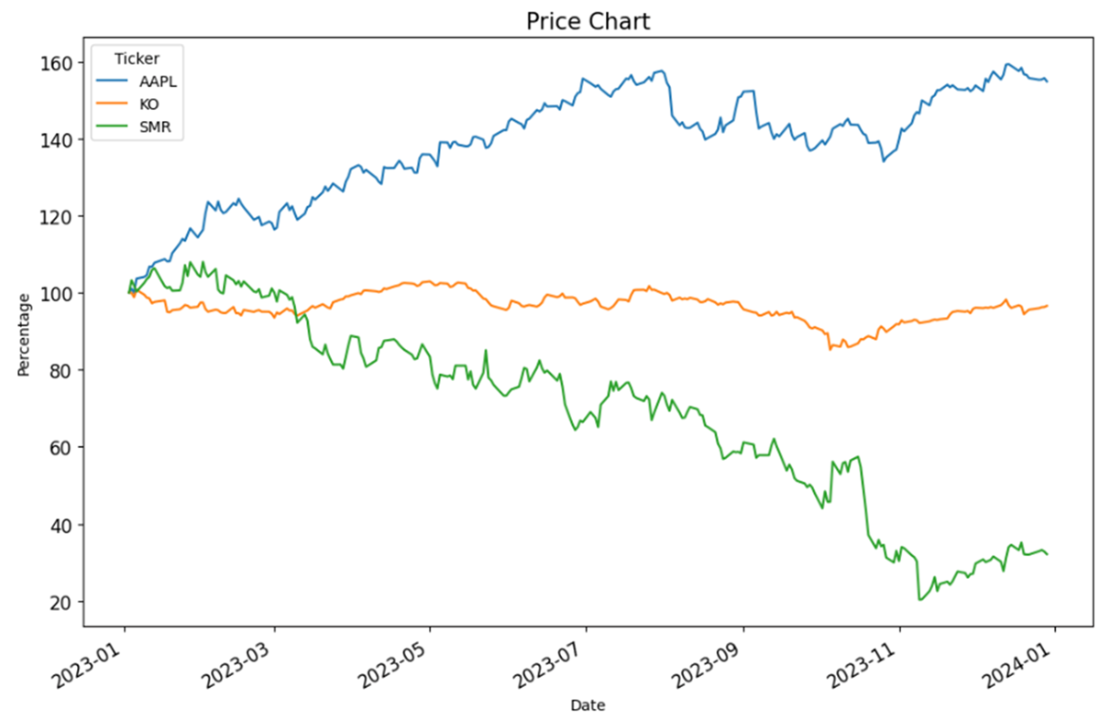
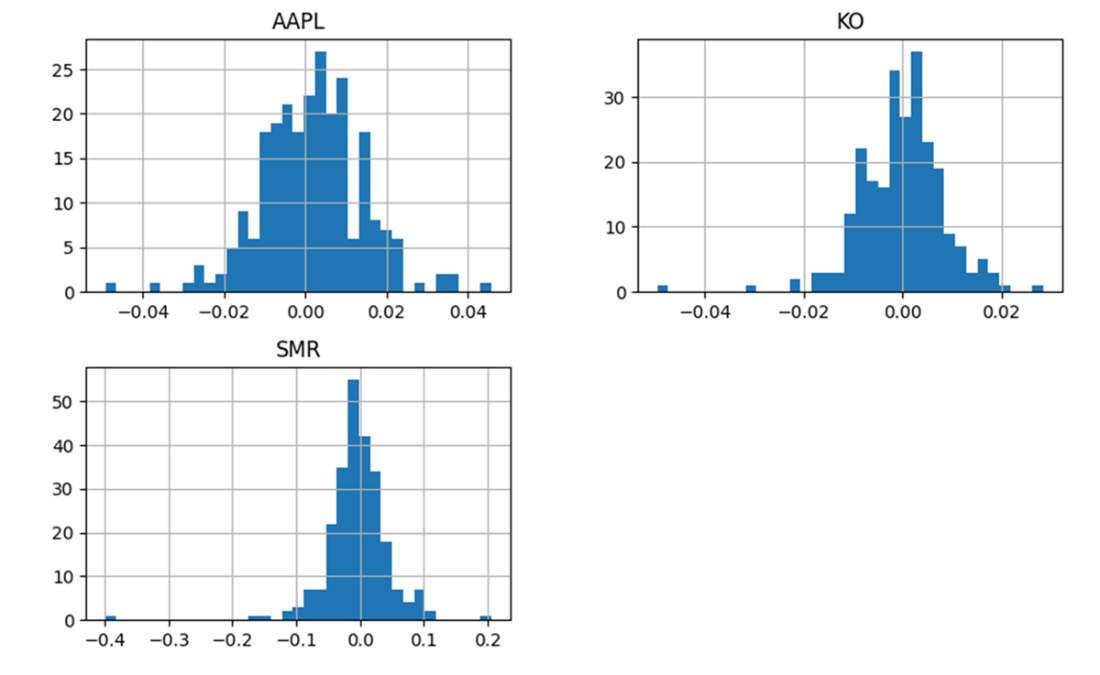
The share price development of Apple(AAPL), Coca-Cola(KO), and NuScale(SMR).
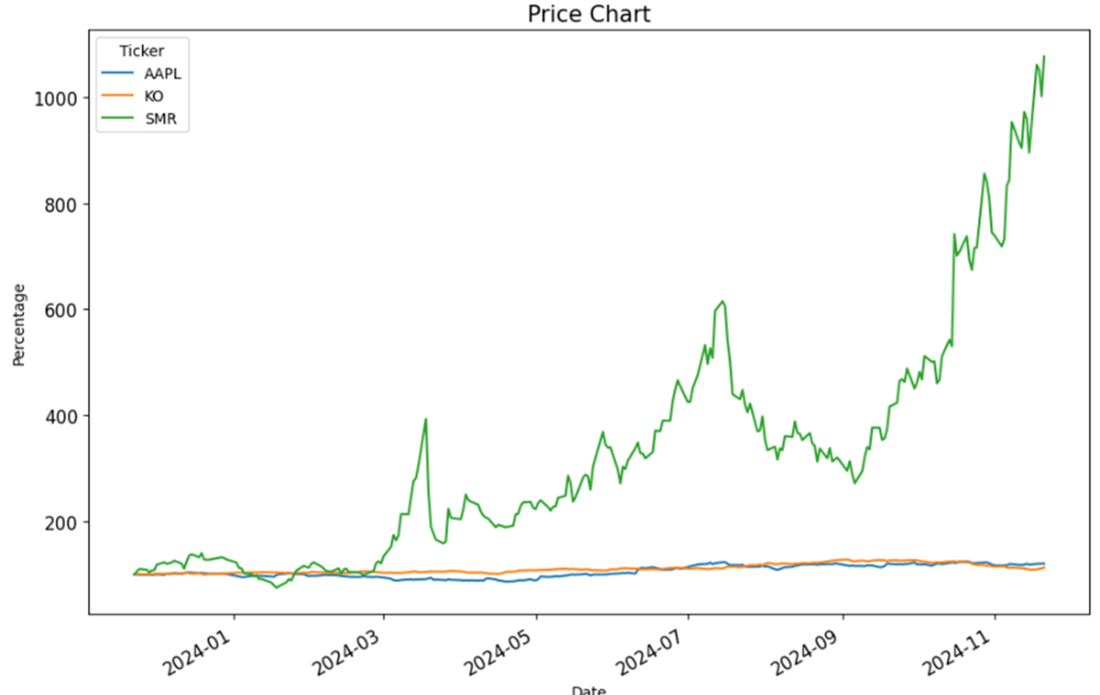
The share price development of Apple(AAPL), Coca-Cola(KO) and Nuscale(SMR) in 2024
The histogram of the returns for Apple, Coca-Cola, and NuScale.
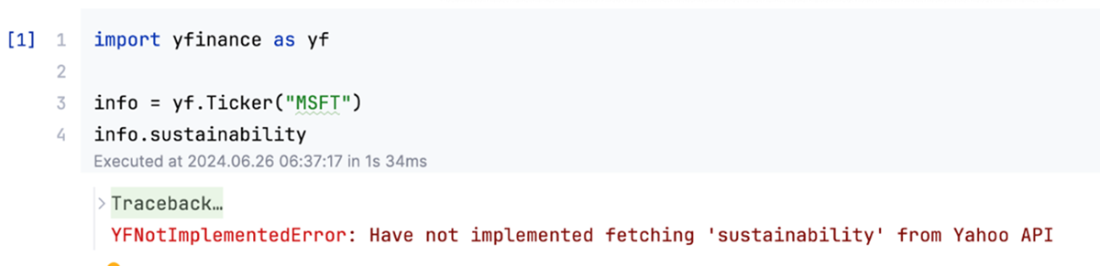
Initial limitations of yfinance with sustainability data. Please note that this problem is gone with newer versions.
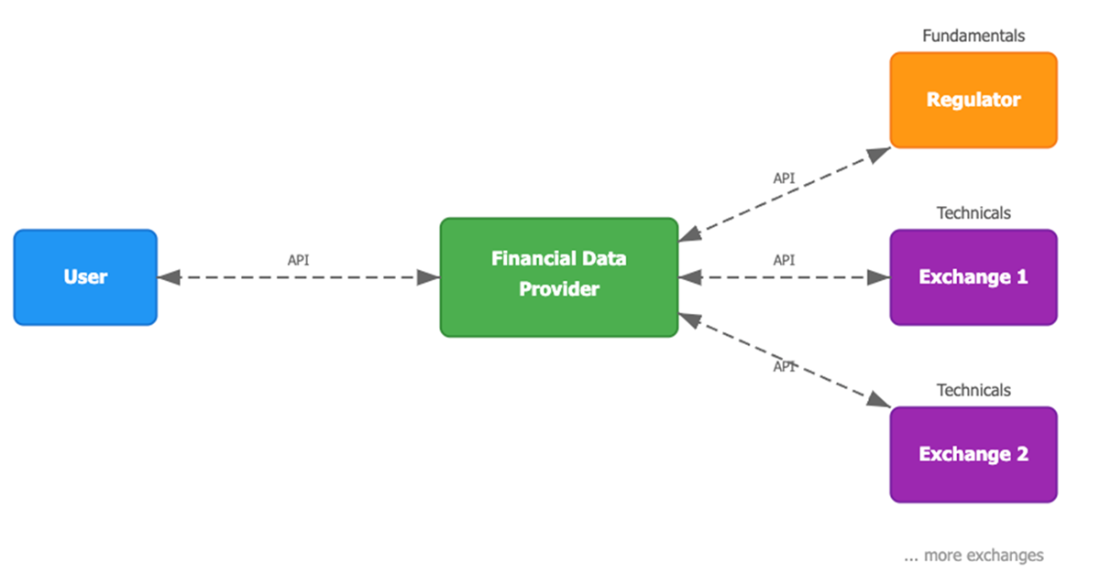
In a slightly simplified way, users can collect data from financial data providers, who collect technical data from one or more exchanges per country and one regulator per country.
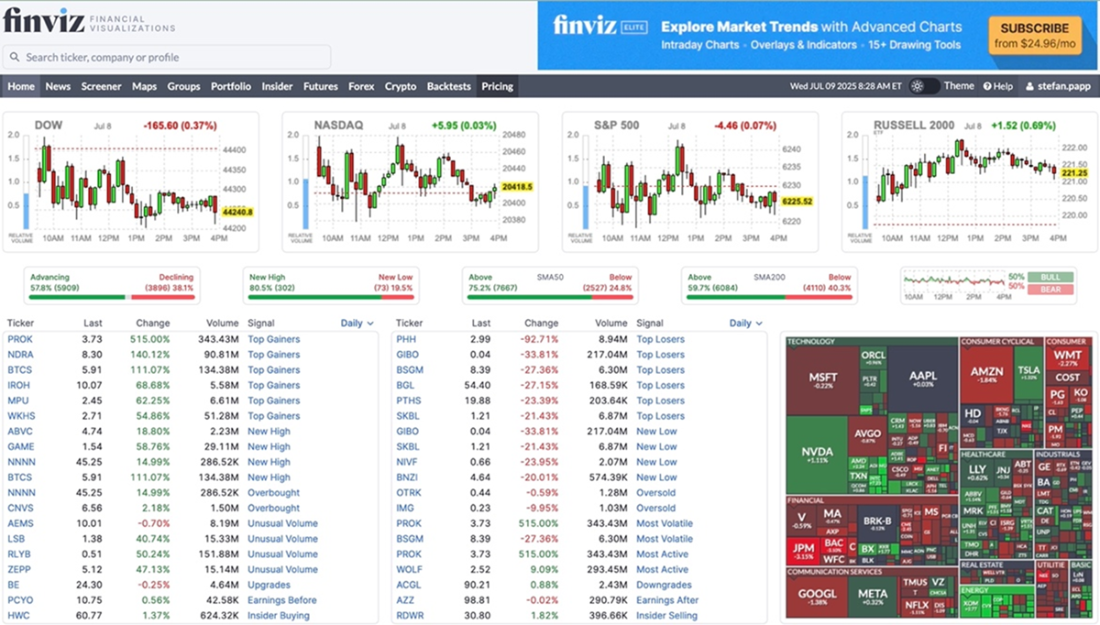
Finviz stock screener home page showing various tickers
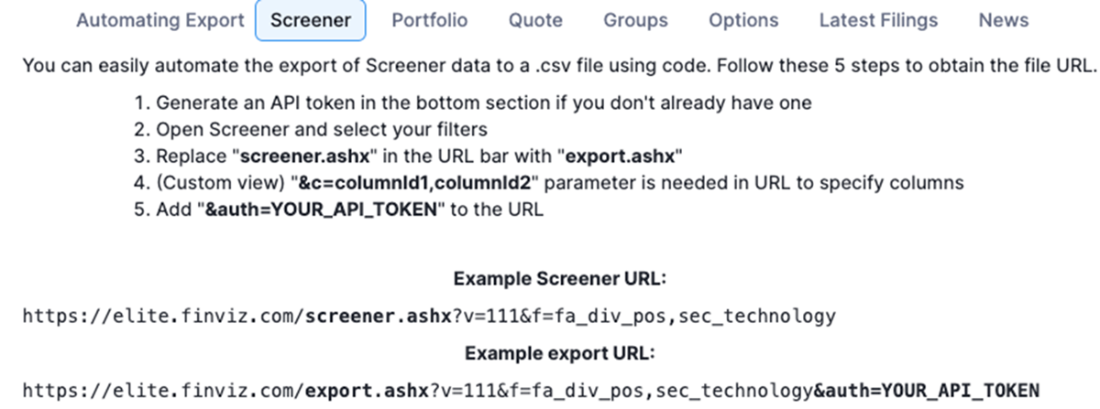
Finviz screen that explains how to use the API
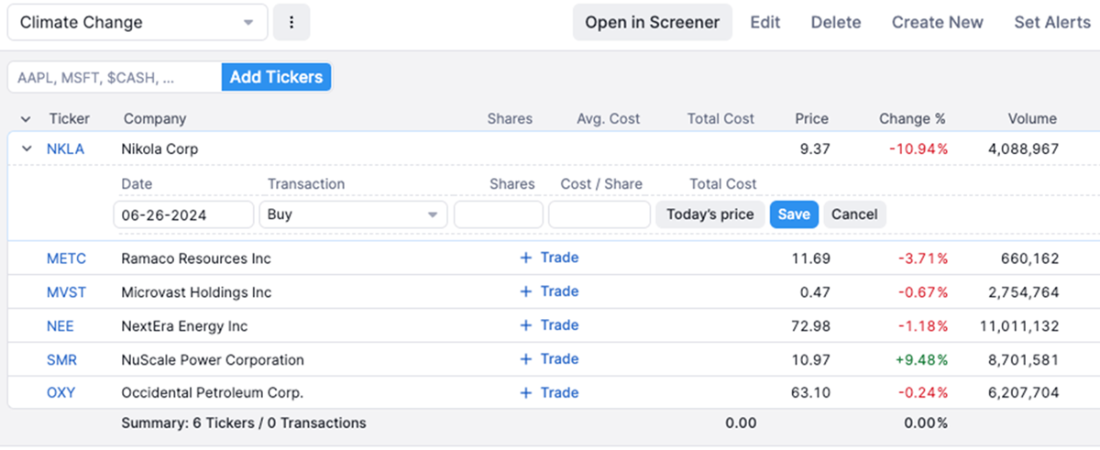
Example portfolio with Finviz containing assets associated with climate change.
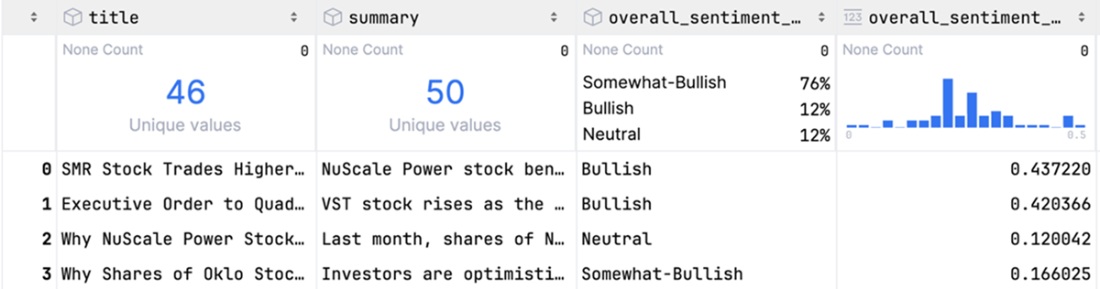
The sentiment analysis results for the nuclear energy company NuScale.
Summary
- We can categorize data into three groups: fundamental, technical, and non-financial.
- Data science notebooks are ideal for analyzing individual stocks, as their interactive nature allows you to explore data and discover insights rapidly.
- Fundamental analysis involves examining financial reports and ratios.
- Technical analysis involves analyzing asset prices to inform sound investment decisions.
- Non-financial analysis encompasses all data unrelated to technical and fundamental analysis and may, for instance, include sentiment analysis about a company.
- Different libraries offer different advantages and have other constraints. It is good to know more than one library to load financial data.
- Yfinance is the best library for beginners experimenting with financial data. It is free. It provides stock data from numerous exchanges (both U.S. and non-U.S.) for fundamental and technical analysis.
- Using the yfinance library for professional financial products is risky because Yahoo does not officially support it. Any changes to the Yahoo Finance platform can cause the library to break without warning.
- To build a commercial product using financial data, you need libraries that offer a paid subscription and provide service guarantees. EODHD, Finviz, Alpha Vantage, and OpenBB are candidates that could be explored in more detail.
- Finviz provides an API on a paid subscription basis and supports only stocks listed on U.S. exchanges. It can be a good option for investors who plan to invest only in the U.S. market.
- EODHD is a commercial data provider that offers a free version with limited API calls, supporting many exchanges. If you have a limited number of daily calls, use the free EODHD version.
- Alpha Vantage is a commercial data provider with a limited free version. One challenge with the free API is that it does not provide adjusted close prices. Alpha Vantage allows you to collect news sentiments through its library, making it unique among similar libraries.
- OpenBB is a commercial data provider that offers access to a wide range of assets beyond stocks, including bonds, cryptocurrencies, and foreign exchange markets. Use this library if you are interested in more generic investment strategies and are not limited to investing in stocks.
FAQ
What types of data are used in financial analysis and how do they differ?
Financial data falls into three categories: Fundamental data (quarterly/annual statements like income, balance sheet, cash flow; slower-moving, audited but open to accounting interpretation), Technical data (prices, volumes, short interest; fast-moving, used for trading), and Non-financial data (unstructured sources such as social media or voice/video sentiment that can augment analysis and raise ethical considerations).Why start with stock screeners, and which platforms are highlighted?
Screeners help narrow a universe of ~58,000 listed companies to candidates that fit your criteria. The chapter demonstrates FINVIZ.com for preselection (e.g., mega-cap non-US technology stocks) and notes that many platforms offer similar features; choice often comes down to preference. Use a screener UI to explore before committing to programmatic collection.Why use data science notebooks instead of building an app UI for personal research?
Notebooks (Jupyter/Databricks) let you iterate quickly with code cells, record hypotheses, and rerun or tweak queries without the overhead of UI development. For personal buy/sell/hold decisions, console output and plots usually suffice; app UIs (e.g., Streamlit) can come later if needed.How do I retrieve fundamental statements and key ratios with yfinance?
Use yfinance’s Ticker object. Example:m = yf.Ticker("MSFT") then m.income_stmt, m.balance_sheet, m.cash_flow return Pandas DataFrames (columns = dates, rows = metrics). Many ratios/fields are in m.info (a dict): convert to a Series (pd.Series(m.info)) and access keys like currentPrice, forwardPE, priceToBook, etc.How can I compute ratios not directly provided by yfinance?
Use the statement DataFrames and basic formulas. Examples (using latest statement columns): ROA =Net Income / Total Assets; ROE = Net Income / Stockholders Equity; Profit Margin = Net Income / Total Revenue; Asset Turnover = Total Revenue / Total Assets; Debt-to-Equity = Total Debt / Stockholders Equity. The chapter shows accessing by date-indexed columns to compute these.How do I download historical prices and analyze returns and volatility?
Load history withyf.Ticker("MSFT").history(start="YYYY-MM-DD", end="YYYY-MM-DD"). Compute simple returns with df["Close"].pct_change() and log returns with np.log(price / price.shift(1)). Summarize risk with mean, standard deviation, and variance via df.agg(["mean", "std", "var"]), and visualize distributions with histograms.What are the limitations and risks of using yfinance?
yfinance scrapes Yahoo Finance (e.g., via BeautifulSoup) and isn’t maintained by Yahoo. UI or internal API changes, rate limits, or anti-scraping measures can break code without notice. Features can be temporarily missing (e.g., sustainability data was unsupported in mid‑2024 but later fixed). For production or broader coverage, know alternatives.When should I consider commercial/freemium APIs, and which ones are covered?
Consider them for reliability, broader coverage, faster data, higher quotas, or features not available via scraping. Covered options: EODHD (global coverage; free tier with last year’s history; paid tiers up to high request rates), Alpha Vantage (free and paid tiers; time series, adjusted close via premium, news sentiment via REST), FINVIZ Elite (rich screener and portfolio export; US markets), and OpenBB (multi-provider, multi-asset interface).How do tickers and exchange codes differ across APIs?
Suffixes vary by provider. Yahoo often uses exchange suffixes likeRR.L (Rolls‑Royce on LSE) and ALV.DE (Allianz on Frankfurt). EODHD uses codes like RR.LSE. Always confirm the correct symbol format for each API to avoid mismatches (e.g., same base ticker on different exchanges).
 Investing for Programmers ebook for free
