The chapter explains that annotation interfaces are not just a presentation layer, but a major factor in the quality, speed, and fairness of human-in-the-loop systems. Good design depends on understanding human–computer interaction principles such as affordance, feedback, and agency: controls should look and behave as expected, actions should visibly register, and annotators should feel that the interface supports meaningful work rather than forcing them into awkward or frustrating interactions. The text emphasizes that there is no universal interface style, so designers must choose layouts, controls, and workflows that fit the task, the workforce, and the surrounding work practices.
It then explores practical design choices for annotation tools, including how to reduce eye movement, scrolling, and unnecessary context switching, and how to use familiar UI elements and keyboard shortcuts to increase efficiency. The chapter also warns against overusing game-like conventions, since annotation is paid work and should not feel like a gimmick. At the same time, it shows that some unconventional tools can be effective when used thoughtfully, such as scrolling for batch annotation on imbalanced data, foot pedals for audio and video tasks, and speech input for labeling or navigation. Throughout, it highlights the importance of testing interfaces in realistic conditions and respecting accessibility, device constraints, and local conventions.
A major theme is that task order and interface context can bias annotations through priming, especially in subjective or continuous judgments. The chapter recommends randomization, diverse sampling, and careful training to reduce repetition effects, while also noting cases where priming can help by speeding up work or providing useful contextual cues. It also compares levels of machine learning integration—from unassisted annotation to assisted, predictive, and adjudication workflows—and argues that the best interface depends on balancing efficiency, accuracy, agency, implementation effort, and perceived usefulness. In particular, machine learning should be introduced in ways that feel supportive rather than disruptive, preserve annotator control, encourage feedback, and, where possible, improve completeness and quality without undermining trust or existing daily workflows.
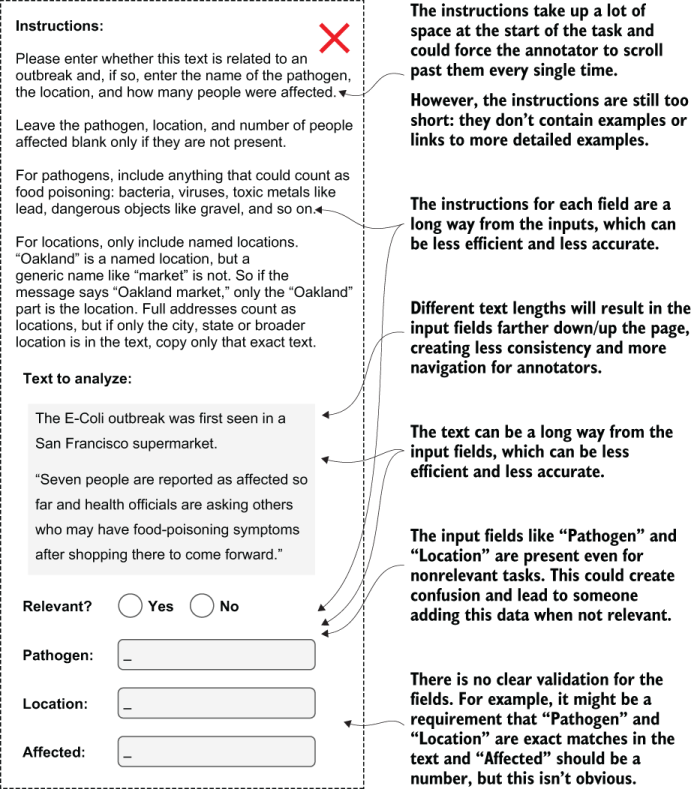
An example of a bad interface for annotation. This interface requires an annotator to continually move their attention around the screen, and the length of the input data can change the layout of the objects on the screen, which reduces consistency. This interface is likely to reduce the efficiency and accuracy of the annotations.
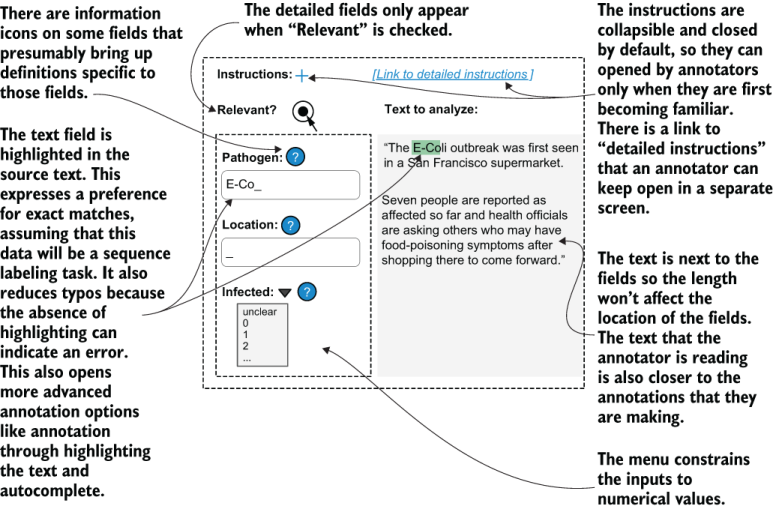
An example of a good interface for annotation. This interface puts the source text closer to the fields where the annotations are being entered. It also provides multiple options for the annotator to access instructions, which don’t interrupt the design or layout of the task. You can expect that this layout will be more efficient and more pleasant to use, and will result in more accurate data than the interface in figure 11.1. (Your interface should also have an obvious Submit button and fields for annotator feedback; these buttons are omitted here to keep the example less cluttered.)
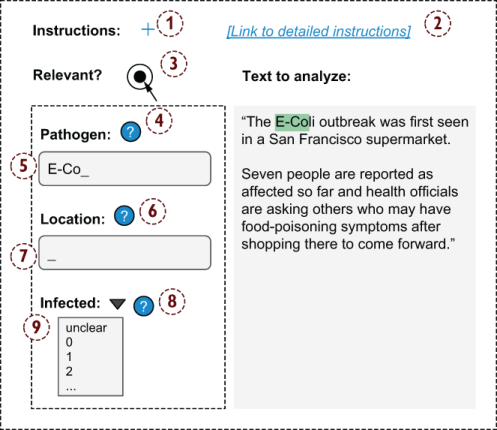
An example of tab order, showing the order in which pressing Tab will change the focus from one element to the next. This interface has nine clickable elements that would be part of the default order of focus for web-based interfaces, but only four of these elements are input fields for the annotation task, so the task could be improved by defining a different tab order.
An example of using ranking as an alternative to absolute values for a task that requires annotation of continuous values. People are generally much more consistent with one another, and with themselves at different times, when they are asked to rank items instead of give an absolute score.
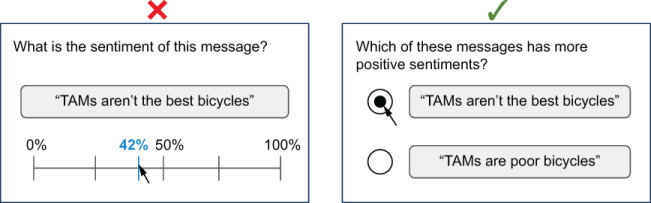
Table 11.1 A scale with increasing levels of machine learning participation in the annotation. Efficiency is the speed at which the annotator works. Quality is the accuracy of the annotations (high quality equals fewer errors). Agency is the sense of power and ownership perceived by the annotator. Implementation effort is the amount of engineering needed to implement the interface. Efficiency increases with more automation through machine learning, but the other columns do not follow the same order, and each approach has trade-offs. The right interface depends on the factor(s) you want to optimize.

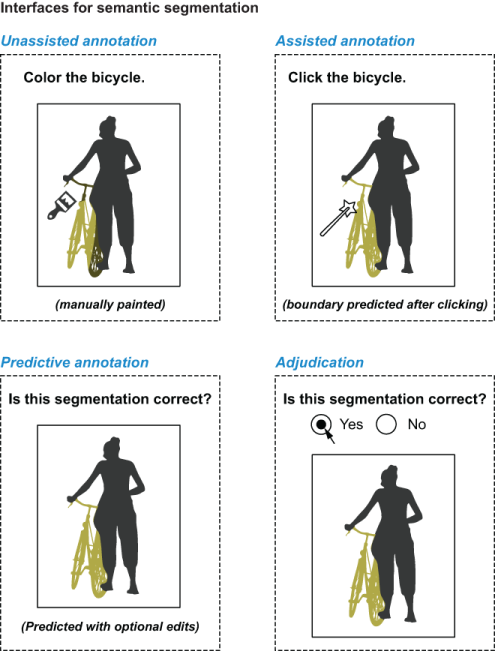
Semantic segmentation interfaces. An unassisted annotation interface for semantic segmentation looks like simple image-editing software: annotators use brushes, pencils, and other freehand tools to color certain areas, which are given a label (in this case, a bicycle). Most image-editing software (and most semantic segmentation annotation tools) also have assisted annotation.
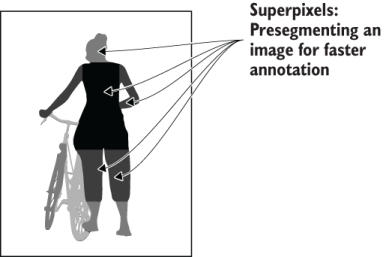
Superpixels example. The image is segmented, but not labeled, into regions that are larger than pixels (hence the name superpixels) but small enough that they don’t overlap with many significant boundaries between the regions that need to be annotated. In most annotation tools, the annotator can control the granularity of the superpixels to optimize annotation efficiency.
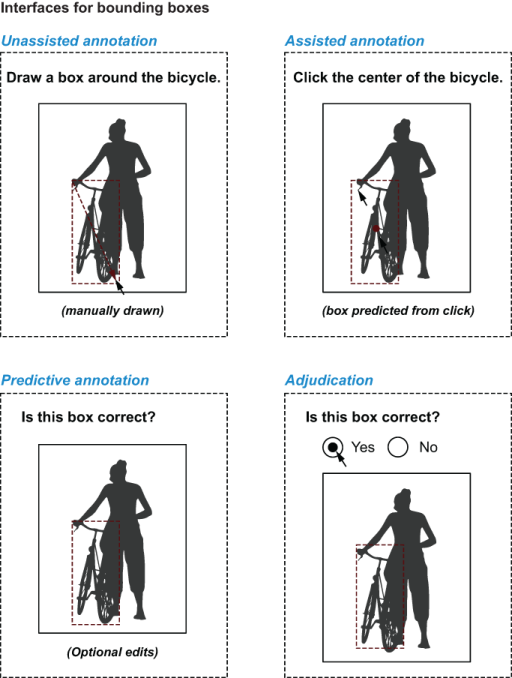
Different types of bounding-box annotation interfaces. In an unassisted annotation interface, the annotator manually draws the box (or polygon). In many cases, the box can be guessed for predictive annotation interfaces that a person can edit or adjudicate (bottom row). For assisted interfaces, the annotator can click the middle of the object, and the interface predicts the most likely bounding box for that click.
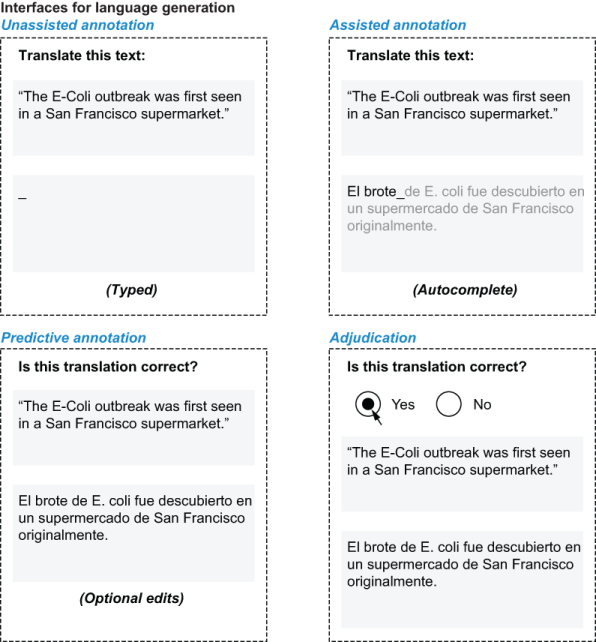
Language generation interfaces, using the example of translation between languages. In addition to unassisted typing, assisted interfaces can use autocomplete functionality, and predictive interfaces can present predicted text that can be edited. Adjudication interfaces allow an annotator to accept or reject an annotation.
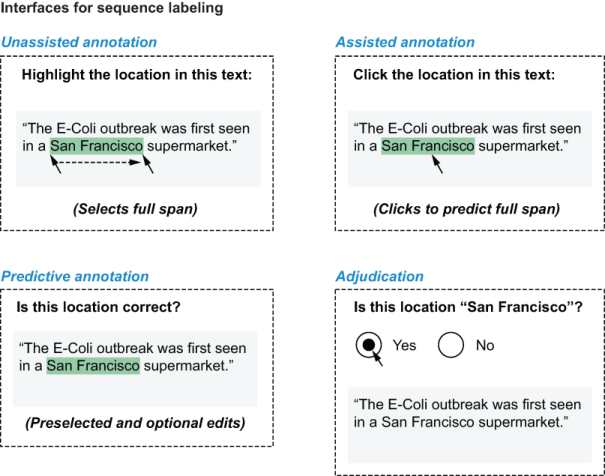
Different types of sequence labeling interfaces. For the unassisted interface, the annotator highlights the text starting at one boundary and ending at the other. For the assisted interface, the annotator clicks the middle of the span, and the model predicts the boundaries. For predictive annotation, the annotator is presented with a model’s predictions of the spans and can accept or edit them. For adjudication, the annotator is confirming or rejecting the proposed span.
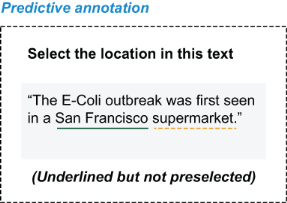
A predictive annotation interface that is an alternative to the one in figure 11.9. In this interface, the location is predicted by the model but underlined instead of preselected. Therefore, the annotator needs to highlight or click the location to make the annotation. This interface slows the annotation process compared with having the span selected, but it reduces bias because the annotator cannot passively accept predictions. This interface also allows for a richer annotator experience, with information such as the dotted line indicating a low-confidence prediction.
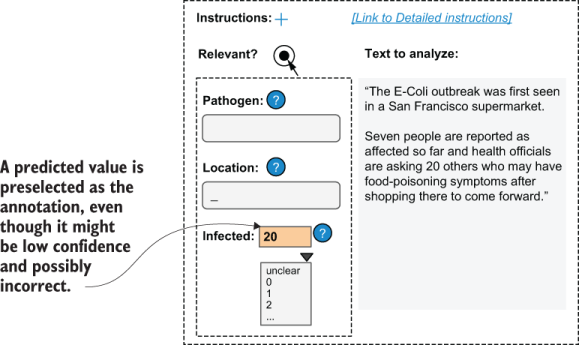
A predictive annotation interface encourages completeness of data. People are more likely to correct an error than to add a missing value, so prepopulating an incorrect answer can lead to more complete annotations than leaving values unannotated by default.
Summary
- The basic principles of human–computer interaction, such as affordance and minimizing scrolling, apply to annotation interfaces. Understanding these principles can help you improve the efficiency of annotation tasks.
- Good affordance means that elements should function as they appear to function, which for annotation typically means using the existing HTML form elements for their intended data types.
- Keyboards are the fastest annotation devices for most tasks, so annotation tools should use keyboard shortcuts and support key-based navigation as much as possible.
- Priming refers to how the context of the task can change the annotators’ interpretation of the item. The most common problem from priming in annotation occurs when the order of items changes the perception, especially for subjective tasks such as sentiment analysis.
- Know when to break the rules. High-volume batch labeling breaks the conventions of avoiding scrolling and balanced data. When you can’t display balanced data, however, scrolling can reduce the priming bias and speed up annotation.
- In addition to manual unassisted interfaces, three types of interfaces can use machine learning: assisted, predictive, and adjudication. Each type has strengths and weaknesses in efficiency of annotation, annotator agency, annotation quality, and each requires different effort to implement.
- Assisted interfaces present items to annotators without displaying machine learning predictions, using machine learning only to speed up annotator-initiated actions.
- Predictive interfaces present items that are pre-annotated by a machine learning model and allow the annotators to edit them.
- Adjudication interfaces present items to annotators that are pre-annotated by a machine learning model and allow the annotators to accept or reject the annotations.
- For tasks in which machine learning helps people in their daily roles, assisted annotation interfaces are often the most successful because they give the annotator the most agency.
- When integrating machine learning into existing applications, make the fewest changes possible in the current interfaces and workflows.

 Human-in-the-Loop Machine Learning ebook for free