8 Designing Solutions with Large Language Models
This chapter shows how to turn a solid understanding of large language models into practical, lower-risk solutions. Using a tech-support scenario as a running example, it explains that while chatbots are the obvious first choice, their tendency to make mistakes means the true decision hinge is the cost of errors. The authors advocate careful evaluation through trial or phantom deployments and an adversarial mindset that anticipates motivated misuse, so teams can quantify risks before granting an LLM direct access to customers.
To manage risk, the chapter outlines design patterns that reshape how people and models interact. Retrieval Augmented Generation can ground model responses in trusted documentation, but human-in-the-loop workflows must address automation bias, where reviewers over-trust AI suggestions. Practical mitigations include “escape to a human” paths and process changes that require human approval of outcomes. When autonomy is too risky, the chapter inverts the workflow: humans provide the initial answer and the LLM supervises, flagging disagreements or abnormal responses to prompt a double-check, which can shorten conversations, reduce escalations, and identify training needs—provided the system is tuned to avoid alert fatigue.
Beyond text generation, the chapter emphasizes leveraging embeddings to power classic machine learning tools—clustering, outlier detection, visualization, classification, and regression—and combining these with speech-to-text and text-to-speech to improve accessibility and triage. For example, callers can be grouped by similar issues for faster routing, and vetted, reusable solutions can be offered proactively while users wait. The authors caution that explainable AI is not a cure-all for trust; instead, prioritize transparency about models and limits, align incentives with users, and build continuous feedback and auditing to catch negative dynamics. The result is a solution that reduces workload and errors, limits exposure to harmful outputs, and delivers mutual benefit to organizations and customers.
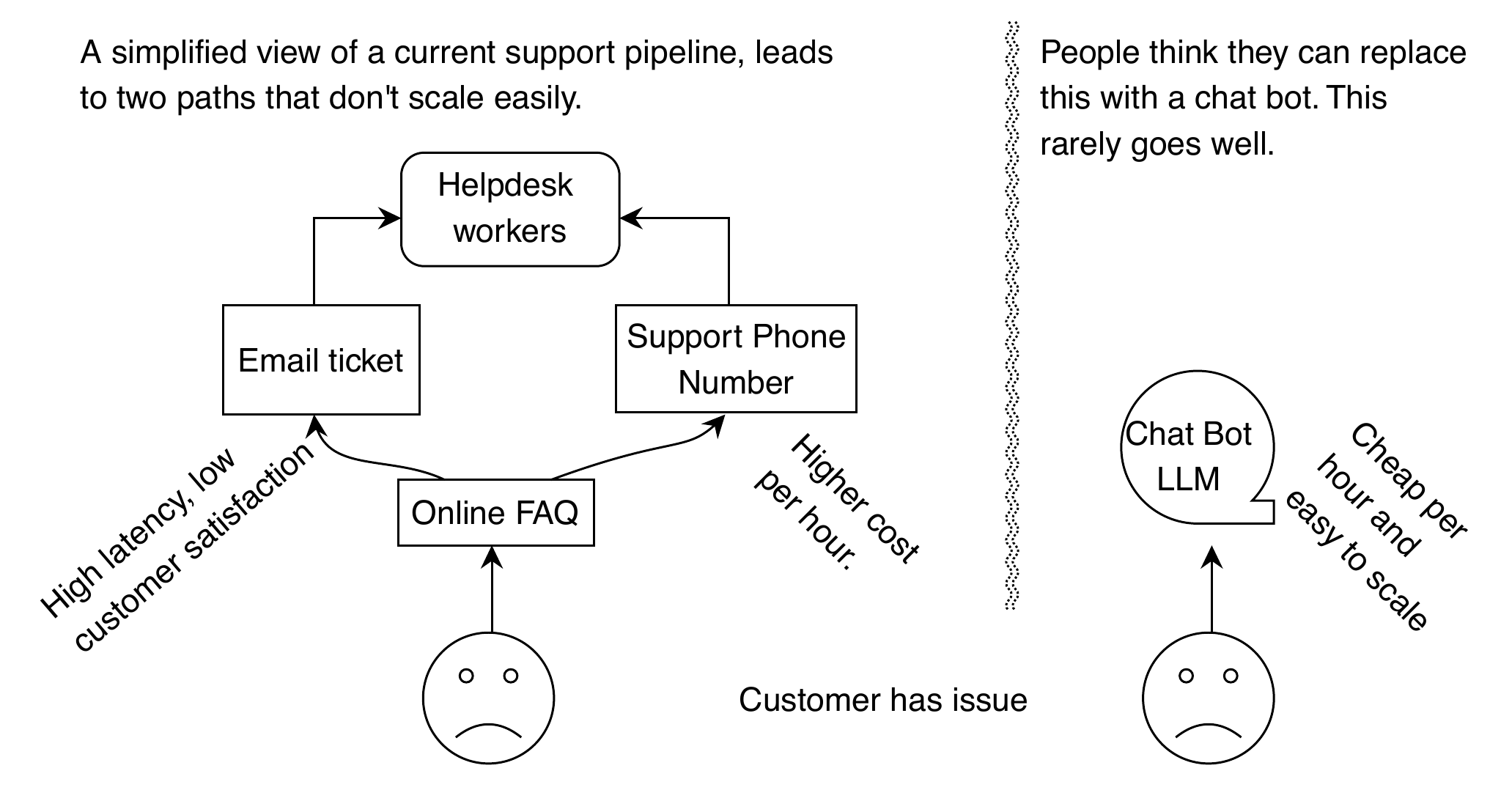
When looking at the process diagram, it would seem like replacing FAQs, email tickets, and support numbers could be simplified and streamlined with an LLM-based chatbot. However, the folly of this view is that the process is incomplete. The potential errors and remediation processes required to ensure an LLM will perform accurately are hidden and create more complexity.
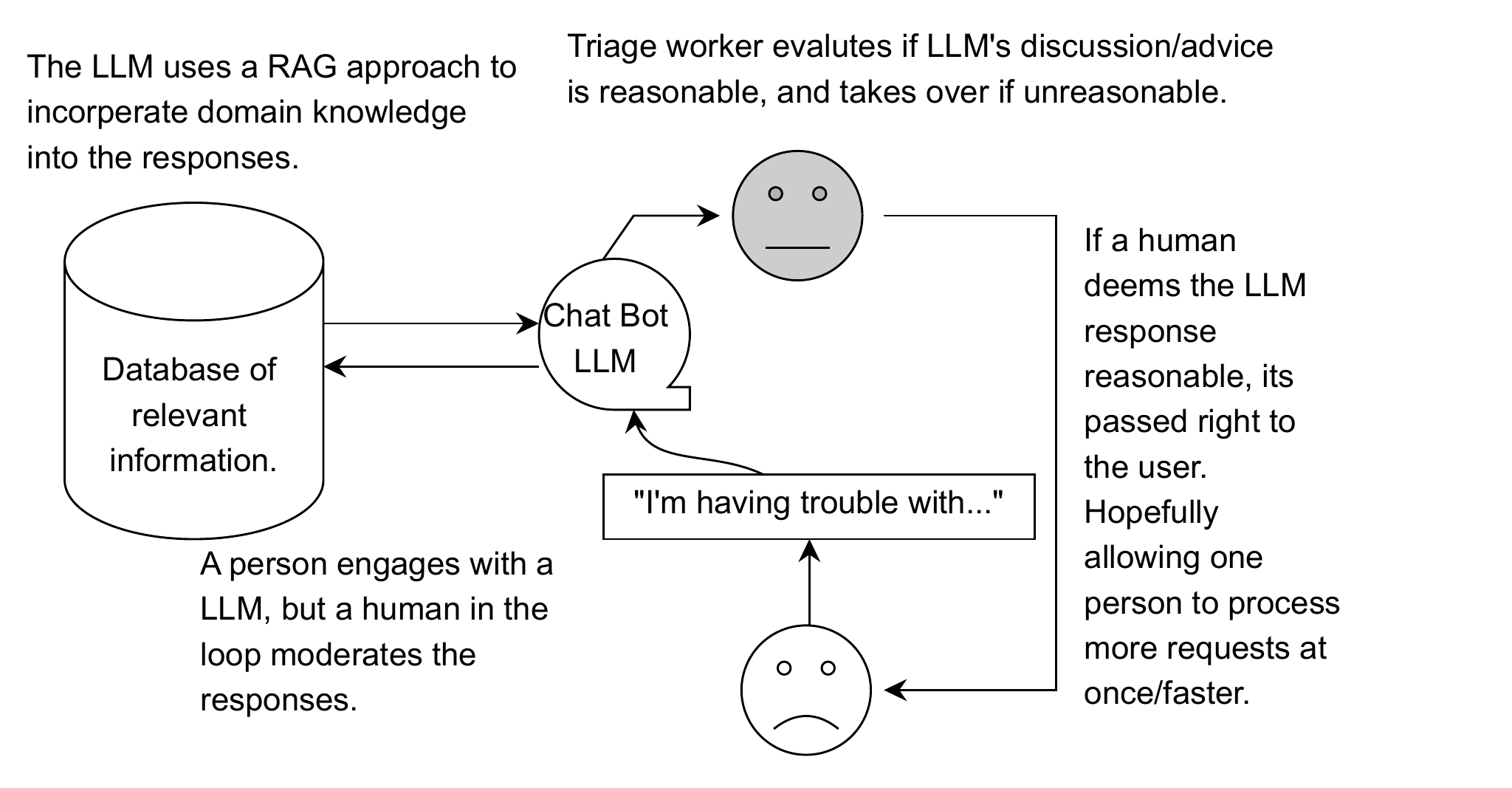
A naive approach toward implementing a “human in the loop” system that uses an LLM paired with a database of relevant information to produce output that is ultimately reviewed by and possibly corrected by a human worker.
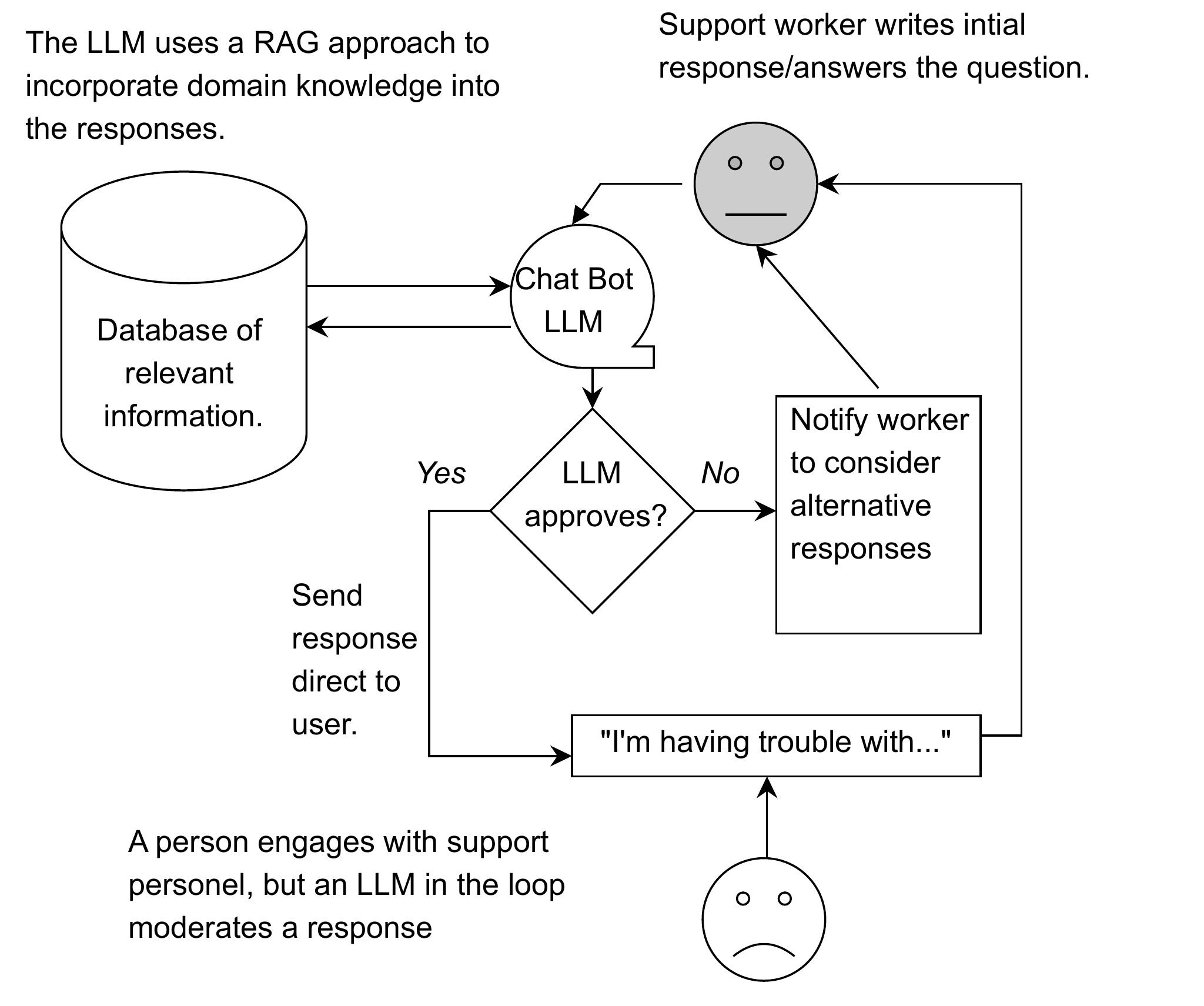
Notice that the direction of the arrows in this diagram have changed from 8.2. Everything goes to a human first, and we leverage LLMs to catch mistakes before they happen.
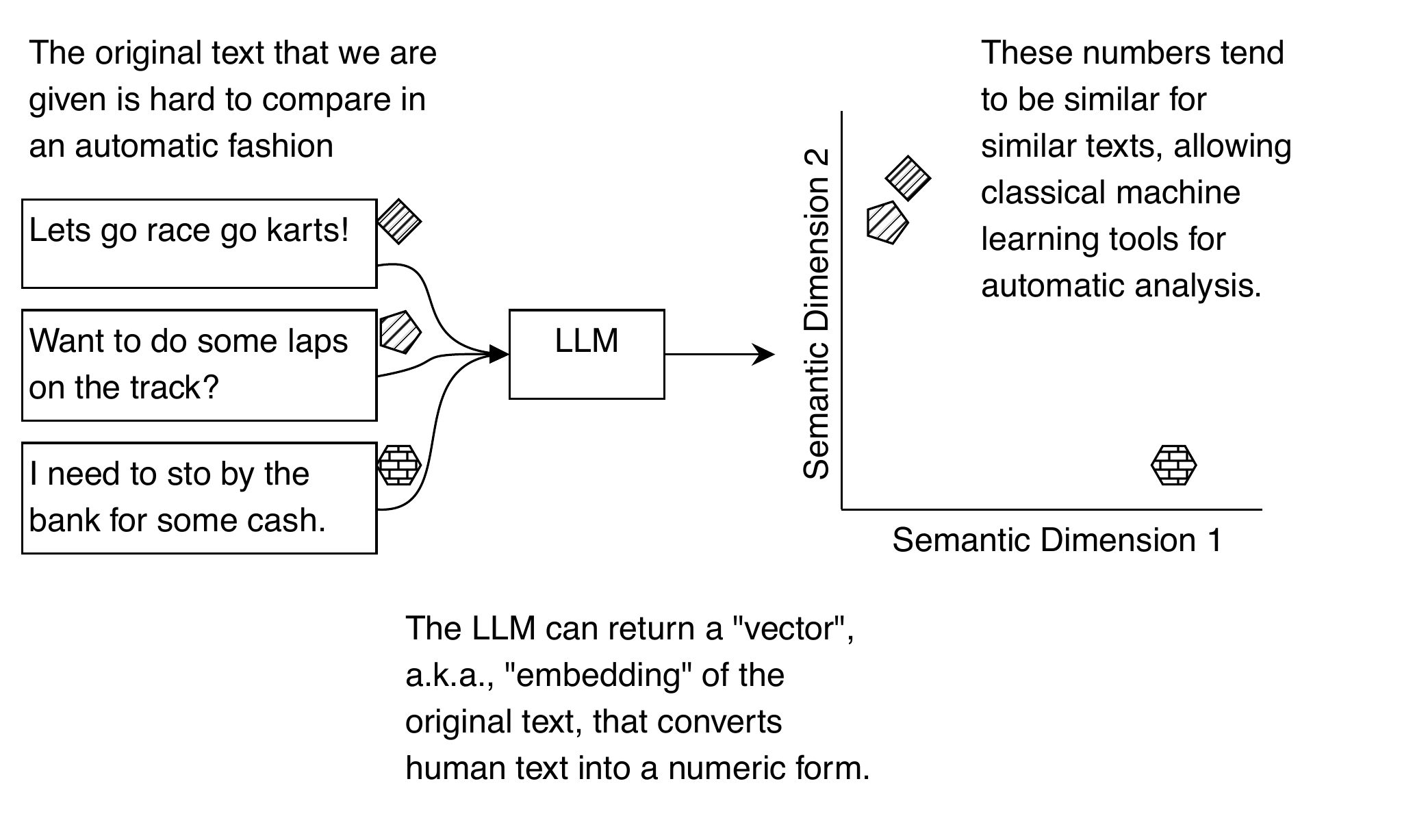
LLMs produce numeric vectors known as embeddings as an intrinsic part of their functioning. The utility of these embeddings is dependent on the fact that these numbers only change a little bit when given similar text. The two example tests here will have similar embeddings, and thus, their plots look similar, even though they don’t share any of the same words. This is a powerful feature that was present in older machine learning techniques.
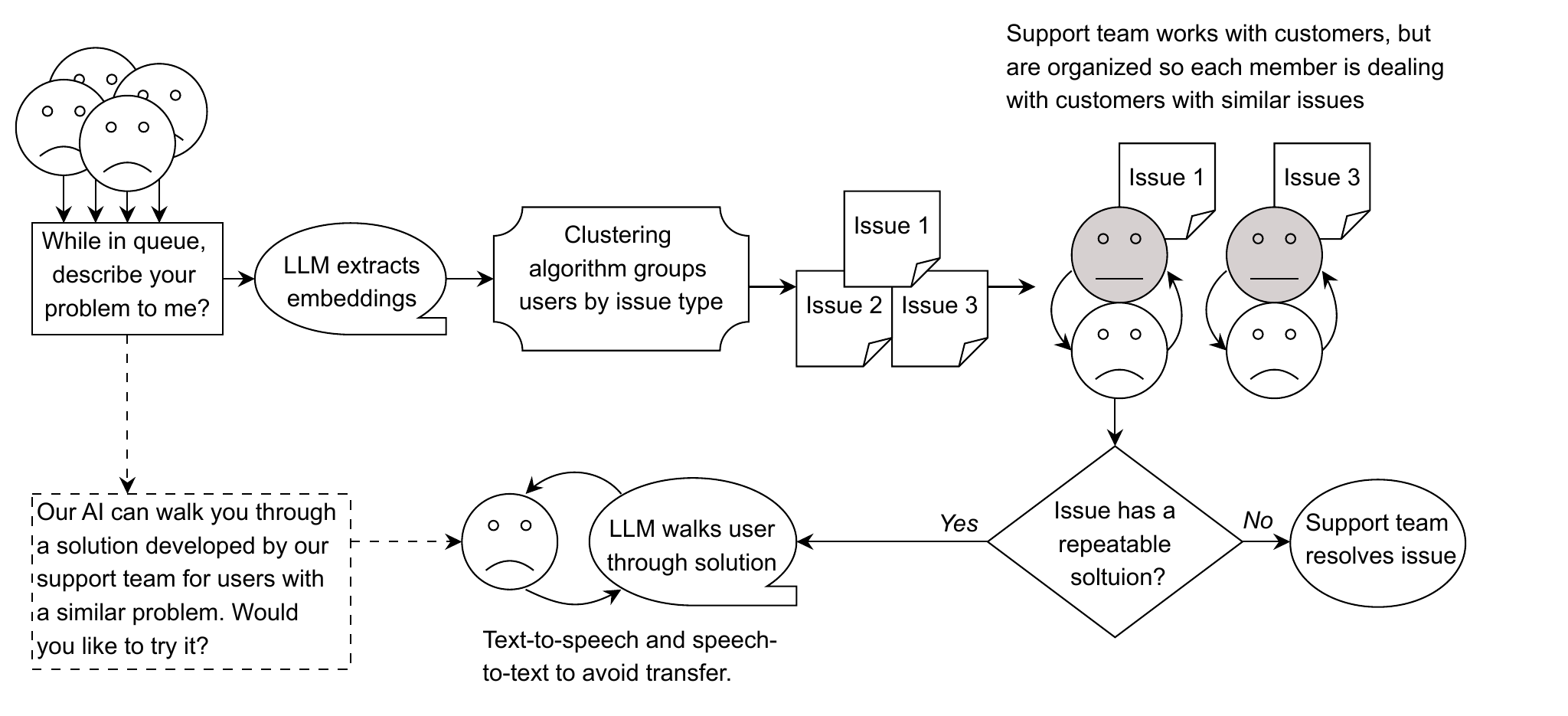
This diagram describes our “better solution” to customer support requests, where customers describe their problem while waiting to talk to someone. The LLM uses an embedding representation of the problem to compare similar problems with known solutions. While the user waits, an automated system can provide information that may help them solve their problem without support personnel intervention. If that fails, there’s always the possibility to “bail out” and talk to a real person. The model used to generate the embeddings does not necessarily have to be the same as the LLM that walks the user through the solution.
Summary
- LLMs will have errors, and you first need to determine the risk and potential cost of errors to design an appropriate solution. If the risk and cost of errors are low, you can potentially use a normal chatbot-style LLM.
- It is possible to control the risk of using an LLM by changing how users interact with the system or shifting automation to a different part of the business process.
- Including a “human-in-the-loop” to supervise an LLM creates automation bias risk, even when using techniques such as RAG to reduce the risk of errors.
- LLMs can convert text into embeddings, numeric representations where similar sentences receive similar values. This allows you to leverage additional machine learning approaches, including classic techniques like clustering and outlier detection.
- While LLMs can explain their decisions, these are often ineffective because people become dependent on these explanations. Instead, focus on producing explanations to satisfy a specific need or use-case rather than generic “needing to explain”.
- Design your system’s incentives to align with your user’s incentives. This is both a good way to avoid mistakes from an LLM optimizing for what you asked instead of what you intended and a good way to communicate and present your LLM to users.
FAQ
Should we “just make a chatbot” for tech support?
Not necessarily. LLM chatbots are great at interactive text generation, but they can increase the risk and cost of errors, especially in high-stakes customer scenarios. If the potential harm from a wrong answer is low and you have guardrails, a simple chatbot might be fine. Otherwise, weigh accuracy needs, liability, and customer experience. Run a small pilot first to see real outcomes before replacing existing support processes.How do we assess and manage the cost of LLM errors?
Start by quantifying business impact (e.g., customer retention, support costs, brand risk, legal exposure). Identify where wrong answers could be costly or harmful. Then mitigate with guardrails: constrain model scope, use retrieval-augmented grounding, add policy checks, and limit autonomous actions. Always include escalation paths to humans and monitor outcomes with KPIs during trial deployments.What is a trial or “phantom” deployment and why use it?
A phantom deployment runs your AI in parallel with the current process, without letting it control final outcomes at first. Compare the AI’s outputs to human decisions, measure discrepancies, error rates, and model drift over time, and surface edge cases. This de-risks rollout, reveals where accuracy degrades, and informs tuning, documentation, and escalation rules before going live.What does an adversarial mindset look like for LLM applications?
Design as if a motivated attacker understands your system. Ask how they could exploit prompts, force policy violations, or extract discounts/refunds. Add mitigations: strict instructions and constraints, authentication and rate limits, randomized routing to humans, credit holds or deposits for risky actions, logging and audits, and clear user disclosures of limits. Test red-team style before launch.What is automation bias and why does it matter in “human-in-the-loop” systems?
Automation bias is the tendency for people to over-trust and accept automated suggestions, especially when the system is usually right. In support workflows, this can lead technicians to rubber-stamp incorrect model answers. If the model is too often wrong, it slows staff; if it’s usually right, vigilance drops. Either way, plan for this bias and design to counter it.Which design patterns reduce automation-bias risk?
- Add an “escape to a human” path (max turns/time, user-triggered escalation, or auto-escalation on repeated failures).- Shift to “human final approval” instead of ongoing vigilance across every turn.
- Random audits and clear disclosure that all AI outputs may be reviewed.
- Authentication, limits, and unpredictable routing to reduce gaming.
- Consider incentives that encourage honest use rather than exploitation.

 How Large Language Models Work ebook for free
