12 Unity DOTS
The chapter explains how data-oriented design sets the stage for Unity DOTS by organizing gameplay information into flat arrays that are cache-friendly and easy to process efficiently. It then builds on that foundation by showing how Burst and the Jobs system can increase performance through two different forms of concurrency: SIMD, which performs the same operation on multiple values at once on a single core, and parallel processing, which spreads work across multiple CPU cores. The main idea is that the same array-based architecture that improved cache usage also makes it much easier to adopt DOTS tools, though doing so introduces additional code and tighter Unity-specific constraints.
Burst is presented as the first major optimization step, requiring the use of native memory types such as NativeArray and Burst-compatible math types like float2. The chapter walks through converting gameplay arrays, allocating and disposing of native memory manually, and rewriting enemy movement so it can be compiled with Burst. The result is the same gameplay logic, but executed more efficiently, with the chapter noting a substantial speedup in practice. It also emphasizes that Burst’s benefits come with tradeoffs, including extra complexity and reduced portability outside Unity.
The chapter then shows how Jobs can parallelize the same kind of array-based logic across worker threads, using IJobParallelFor and careful annotations such as [ReadOnly] and [NativeDisableParallelForRestriction]. It also discusses ECS as Unity’s formal DOD implementation, but argues that for this project, ECS would add unnecessary overhead because the game already benefits from direct array-based data handling. Finally, it demonstrates how TransformAccessArray can parallelize GameObject transform updates without fully converting the project to ECS, while still warning that scheduling and synchronization costs mean these tools should be used only when they address a real performance bottleneck.
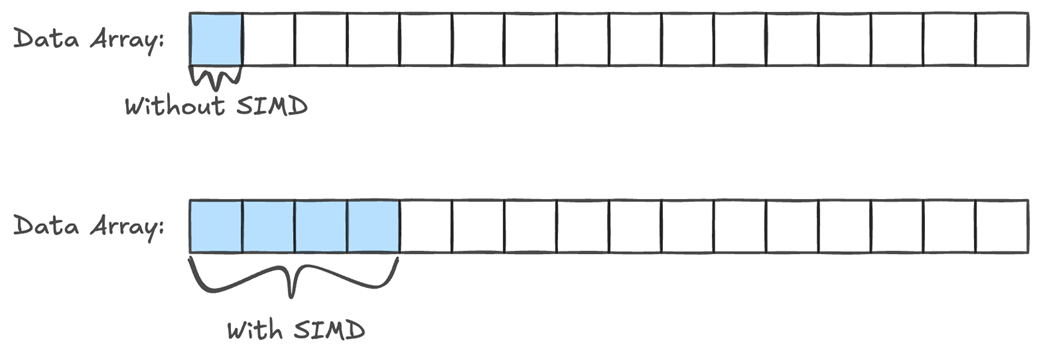
Without SIMD, when doing work on array data, we can only work on 1 element at a time. With SIMD, we can process multiple elements at once. If our CPU has 128-bit registers, we can work on 4 integer or floating-point values at the same time.
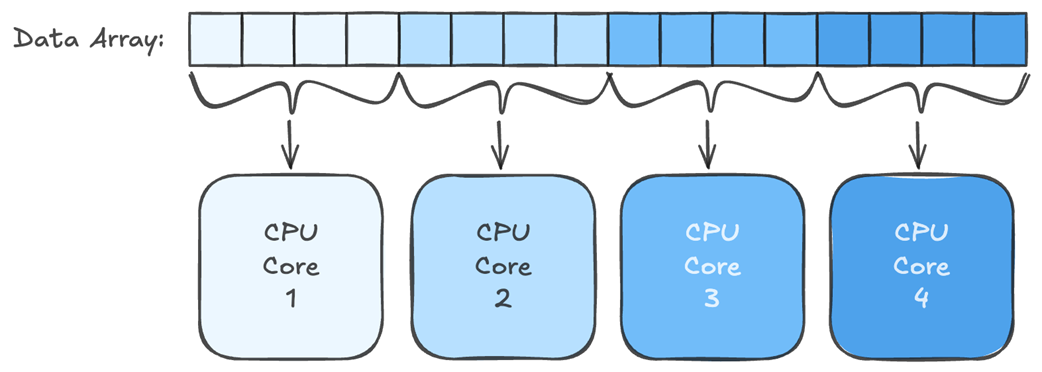
By combining Burst and Jobs, we can pass chunks of our array data to each CPU core and have them work on them in parallel.
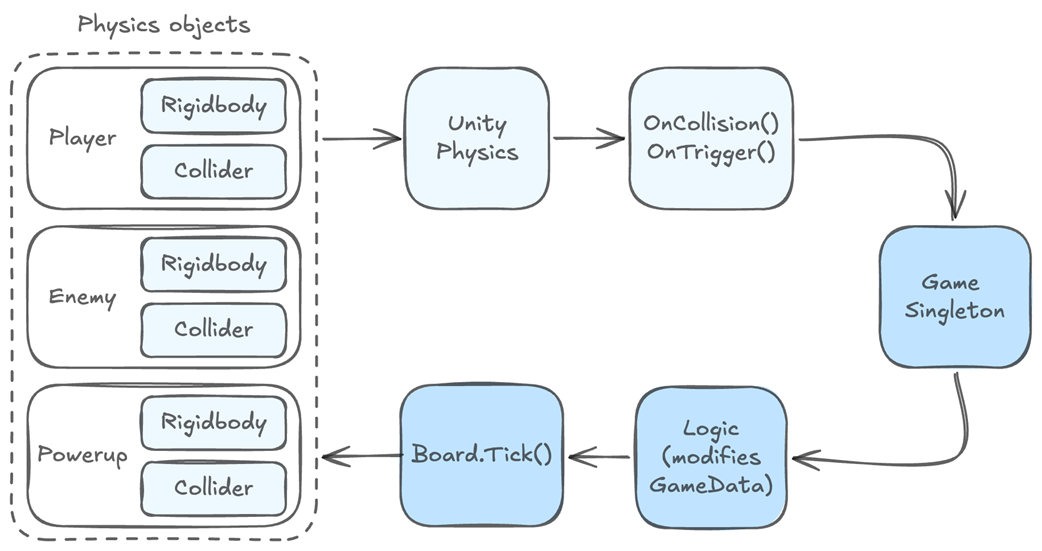
We can use Unity’s built-in physics with our DOD architecture. Our physics objects, be them GameObjects or entities, can directly call our Game singleton, which in turn can call static functions in Logic to modify our GameData accordingly. Then we can update the GameObjects/Entities in Board.Tick() based on the GameData changes.
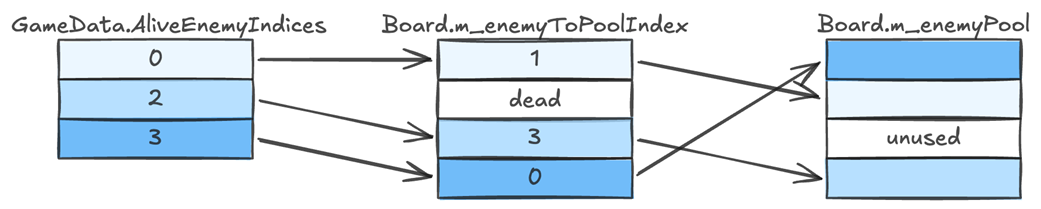
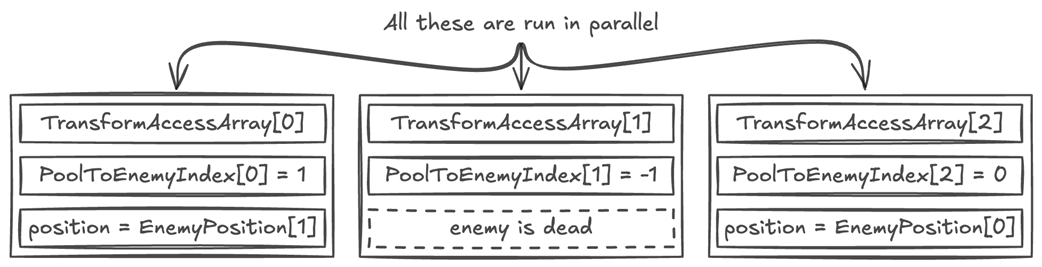
The m_enemyToPoolIndex array acts as a bridge between the alive enemies and the pool objects. If the first alive enemy index is 0, then the pool index is 1, and that’s the pool object we need to update. The second alive enemy index is 2, which points to pool index 3, so we update that next. The third alive enemy index is 3, which points to pool index 0. The enemy at index 1 is a dead enemy, so it is not referenced in the AliveEnemyIndices array. The pool object at index 2 is also unused, so nothing references it.
Every pool object has a corresponding entry in the TransformAccessArray. We need to run over all the elements in the array, so for each one we check if we have a valid pool index. The first one points to enemy index 1, so we use that enemy’s position to update the first transform in the access array. The second one points to -1, so we know it points to a dead enemy and we don’t have to update it. The third points to the enemy at index 0. Etc.

The Job runs over all the transforms in the TransformAccessArray, so we have to use PoolToEnemyIndex to determine which enemy they belong to, and if they are alive, and we should update the position.
Summary
- The Burst compiler allows us to use SIMD instructions to improve performance by processing multiple data elements in a single instruction.
- The Burst compiler requires us to use NativeArray and DOTS-compatible types (e.g., float2)
- The Jobs system enables multi-core parallelism by splitting array-based work across multiple threads.
- The Jobs system introduces scheduling overhead that can negatively affect performance when working with small amounts of data.
- ECS stands for Entity Component System, a design pattern often used with data-oriented design.
- Entity is the index into the array data.
- Component is the arrays of data.
- System is the logic that operates on the data.
- ECS increases code complexity and is not always necessary for performance gains.
- TransformAccessArray allows parallel updates of GameObject transforms without using ECS.
- TransformAccessArray requires iterating over all elements of the array, which may introduce extra branching if some GameObjects are unused.
- TransformAccessArray should only be used if updating GameObject transforms is the bottleneck.

 High Performance Unity Game Development ebook for free
