10 DOD and Dictionaries
The chapter explains why dictionaries, although extremely convenient and often fast in theory, are a poor fit for data-oriented gameplay code in Unity. Dictionary lookups require hashing, bucket access, key comparisons, and sometimes collision-chain traversal, which makes their memory access patterns unpredictable and much slower than array indexing in practice. The text emphasizes that big-O notation does not capture real performance well enough for game development, because even an O(1) lookup can be slower than a small O(n) search when cache behavior and memory latency are involved.
To avoid that runtime cost, the chapter shows how to shift work to tooltime by assigning stable IDs to enemy types and storing balance data in arrays instead of dictionaries. Enemy ScriptableObjects are parsed into compact balance data, and gameplay code uses an enemy type index to fetch velocity, radius, prefab names, and spawn weights directly from arrays. Runtime game state also stores each enemy’s type so movement, collision, spawning, and game-over checks can all use direct indexed access rather than key-based lookup.
The chapter then extends the same data-oriented thinking to dynamic object pooling and save compatibility. Because enemy types are spawned by weight and can vary over time, the board keeps a pool that grows only up to a fixed maximum, reuses unused objects by type, and destroys everything only when the session ends. Finally, to handle future changes to enemy definitions, the chapter introduces unique identifiers and a small, carefully limited dictionary used only at load time to map saved identifiers back to current IDs. This preserves old saves without putting dictionary overhead into the gameplay loop.
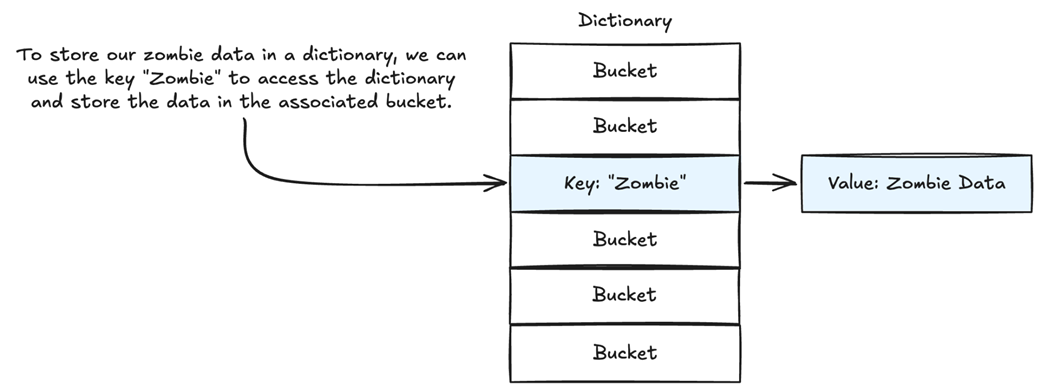
If our key is “Zombie”, it is hashed to an integer value, and the data (the value) is linked from the dictionary at that location.
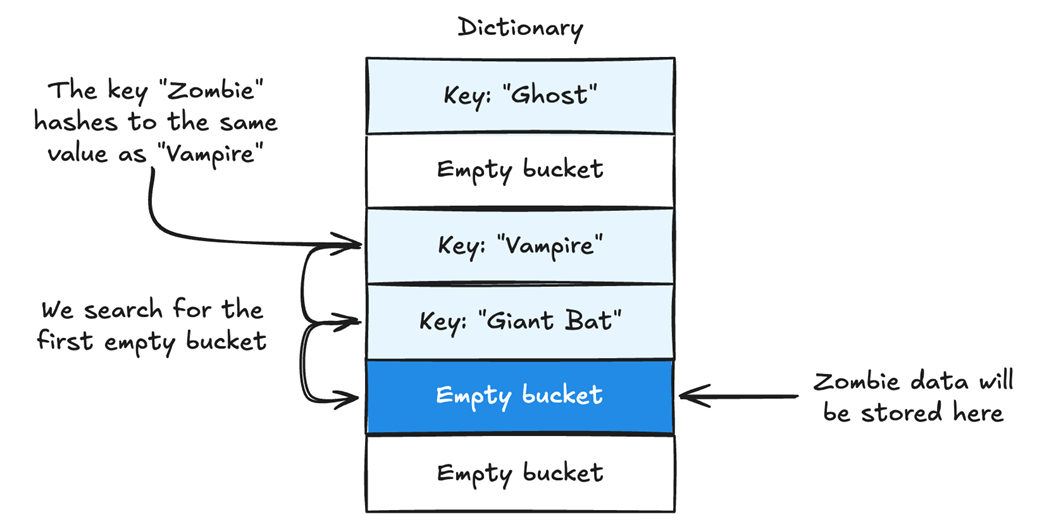
In this implementation, hash collisions are handled by finding the next available free slot for the data.
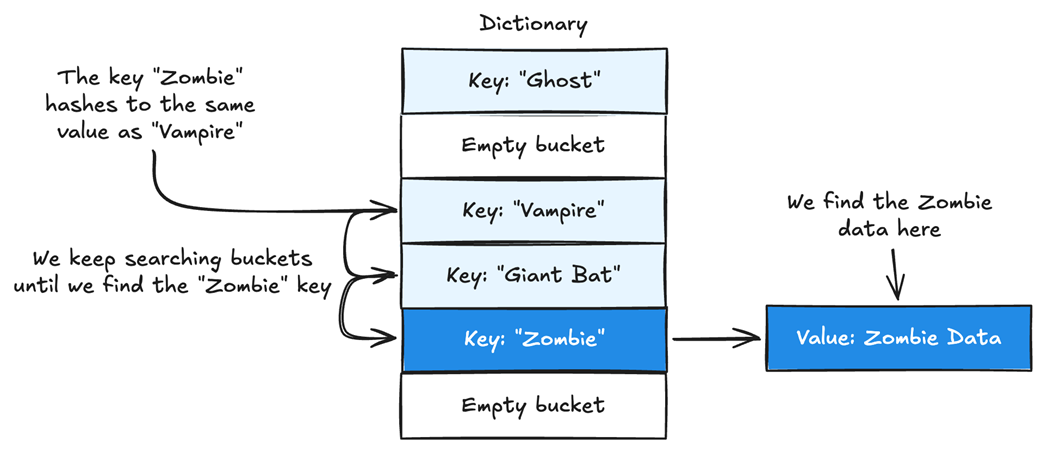
To find the value for a specific key, we need to linearly search the dictionary starting at the hashed location.
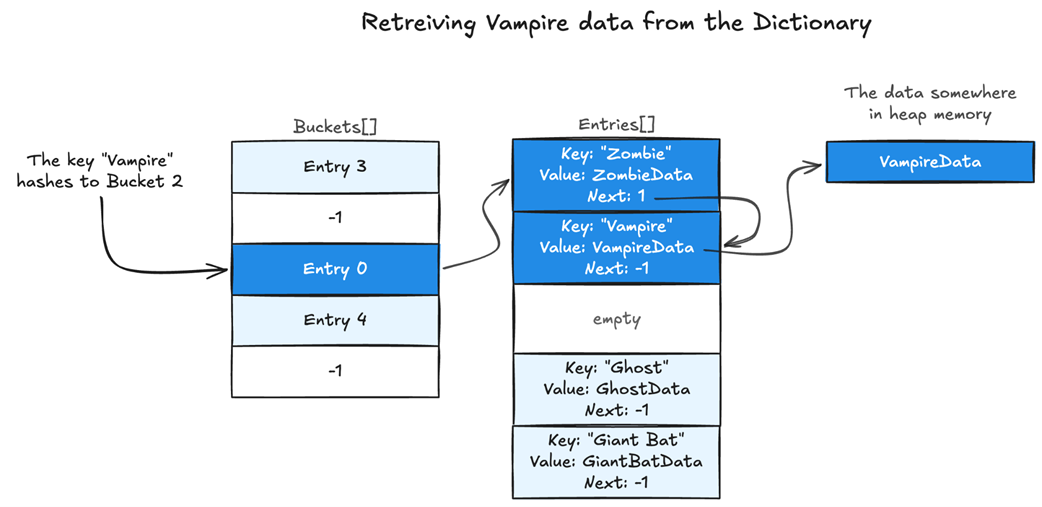
When a key hashes to a bucket that already contains an entry, the new entry is added to the entries array and linked to the previous first entry in that bucket. The bucket is then updated to point to the new entry. In this case, Zombie hashed to the same value as Vampire and was placed after it. The bucket points to Zombie, which then points to Vampire, even though Vampire was there first.
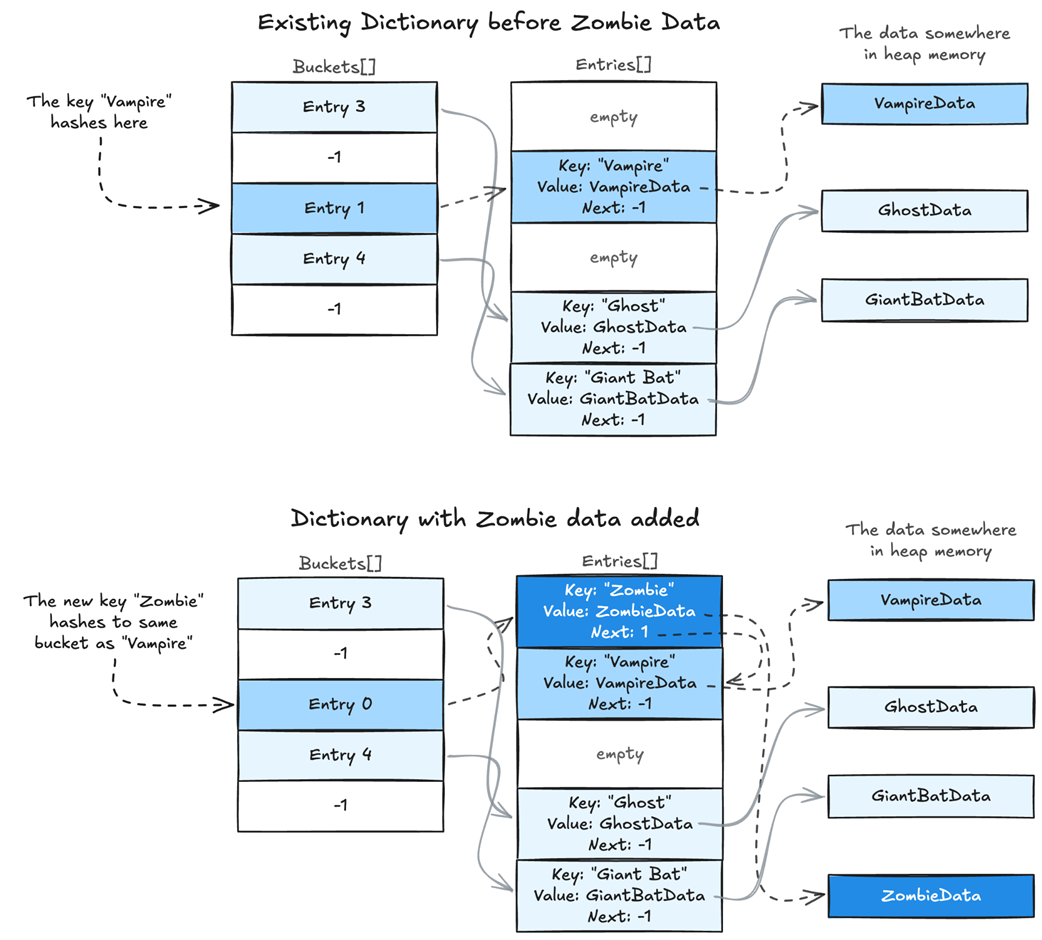
To retrieve a value from a C# Dictionary, the key is hashed to find the bucket. The bucket points to the first entry in the chain. If that entry’s key does not match, the dictionary follows the next index until it finds the matching key or reaches the end of the chain. In this case, "Vampire" hashes to bucket 2. Bucket 2 points to entry 0, where the dictionary compares the stored hash and key. Entry 0 belongs to "Zombie", not "Vampire", so the dictionary proceeds to the next link, entry 1. Entry 1 matches the key "Vampire", so the dictionary returns its value. Since VampireData is an object, the value stored in the entry is a reference, which points to the actual VampireData object in heap memory.
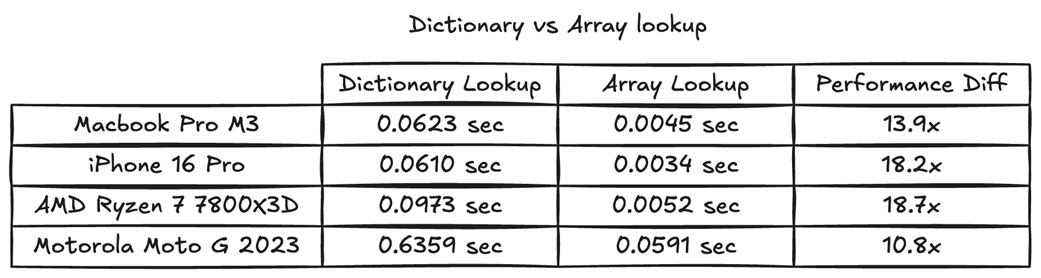
When testing random access to both a dictionary and an array, array lookup was more than 10 times faster.
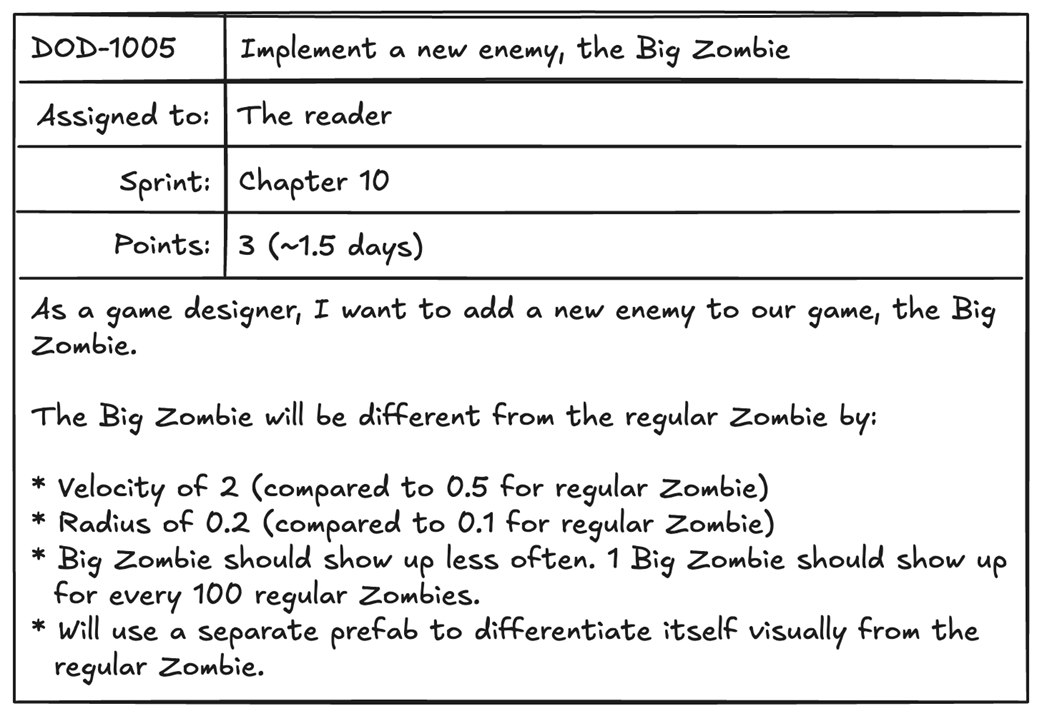
The task asks us to add a rarer, bigger, faster zombie.
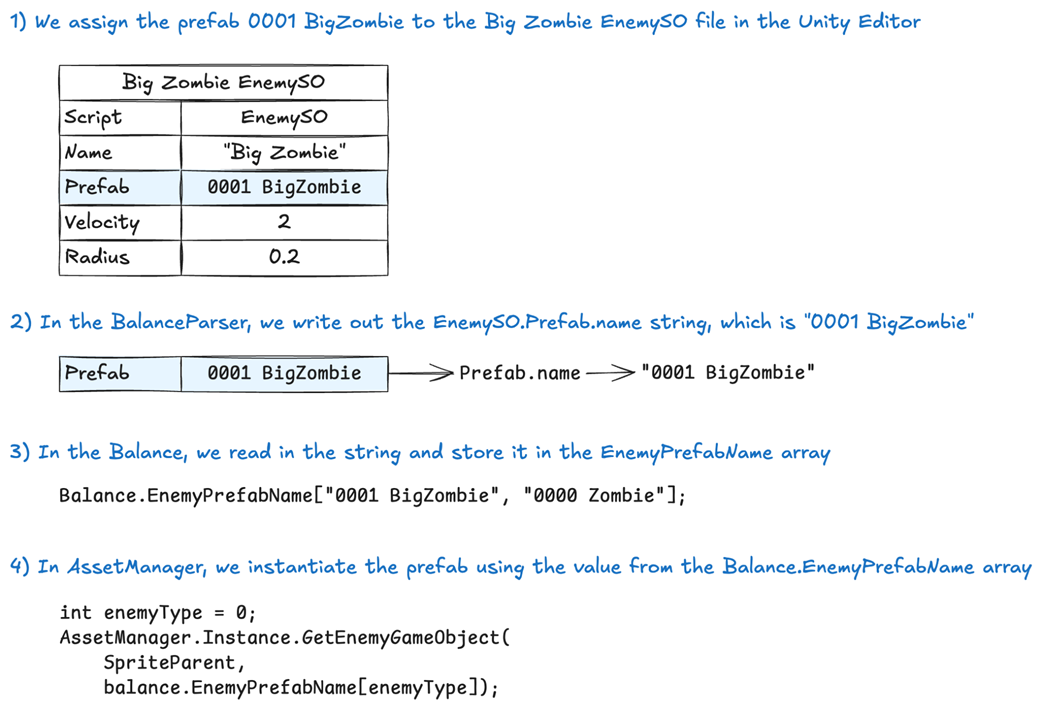
The name of the prefab is assigned in the ScriptableObject, parsed into the balance, and then we use that name to load the correct prefab in-game.
The two ScriptableObjects that hold the Zombie and Big Zombie enemies. They are placed in the Assets/Data/Enemies folder, which is where we’ll parse them.
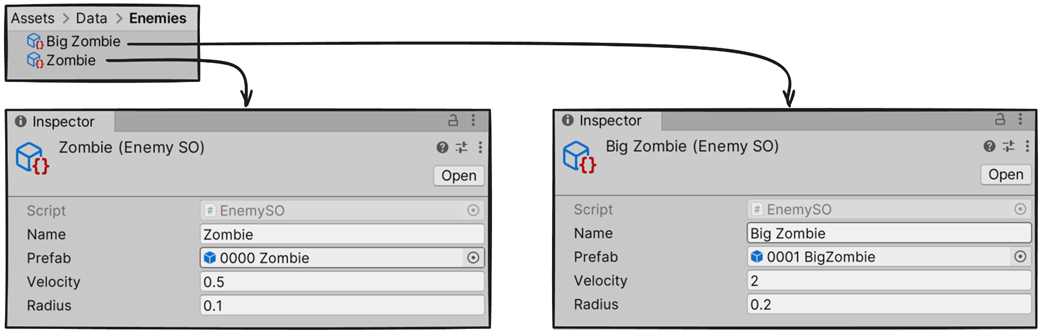
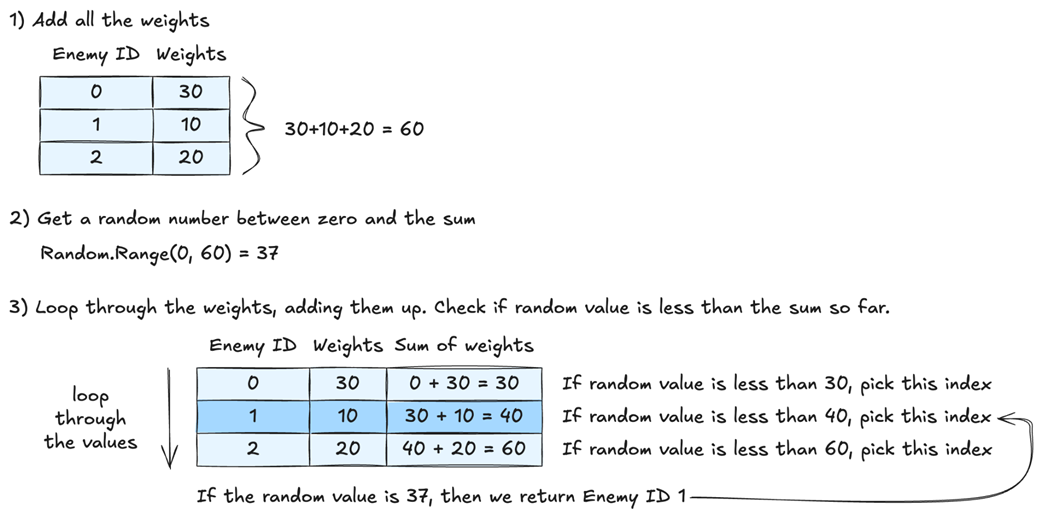
To determine how often enemies should spawn, we set both the weights and the EnemySO files that they belong to in the balance. When parsing the balance, we associated the EnemySO.ID value with each weight. Now, when we want to spawn an enemy, we sum up the total weight, randomly pick a weight, and then use the ID for that weight to decide which enemy to spawn. The more weight we give an enemy, the more likely it is to spawn.
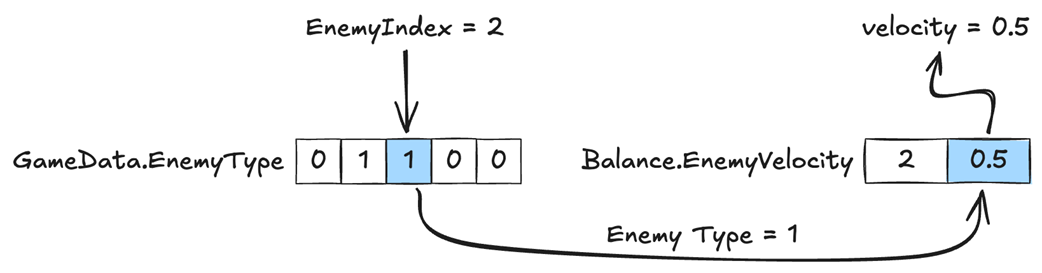
We use the enemy type from the game data to access the velocity data for the right enemy in the balance.
From chapter 3, the ideal memory allocation for pools is to allocate all the data we need at the start of the level. This ensures we don’t trigger the garbage collector or fragment memory by allocating and deallocating data during gameplay. Unfortunately, this is only possible if we know all the enemies we need beforehand.
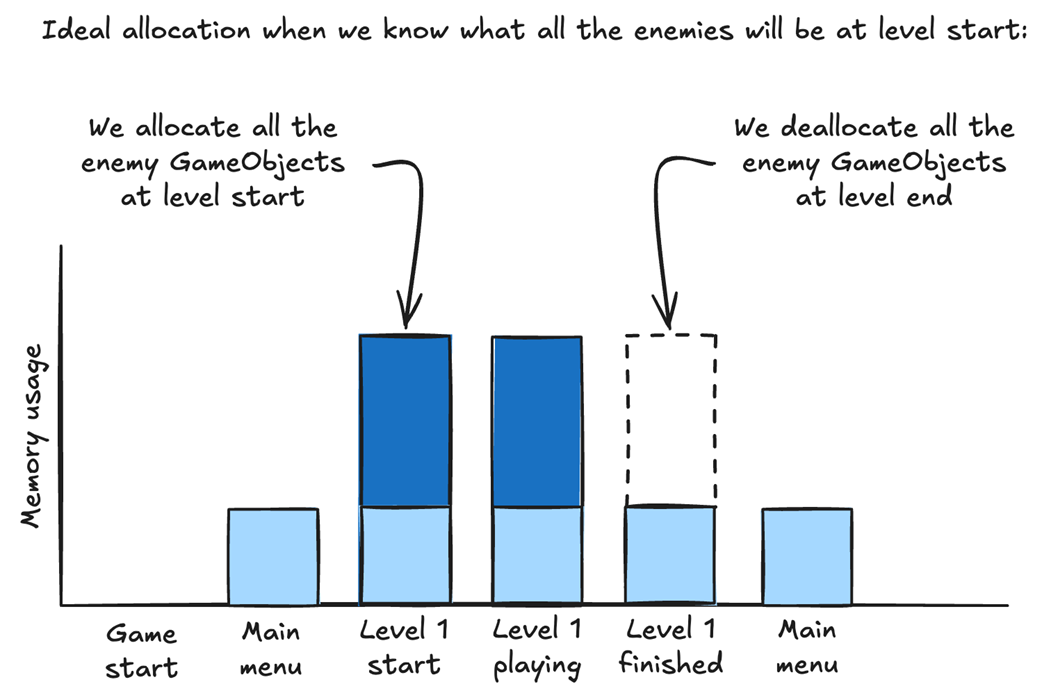
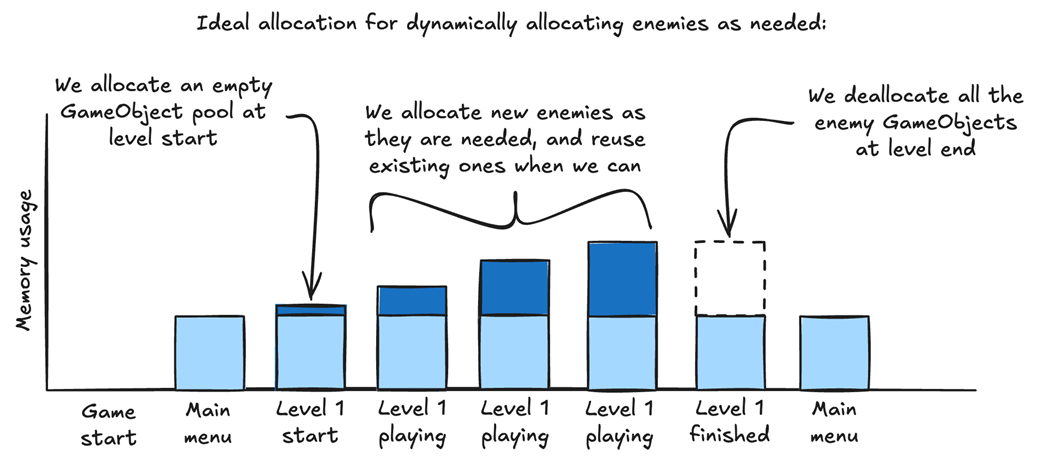
If we don’t know what enemies will be needed during gameplay, we should allocate them as needed, but only deallocate them when the level is over. This ensures we don’t trigger the garbage collector during gameplay.
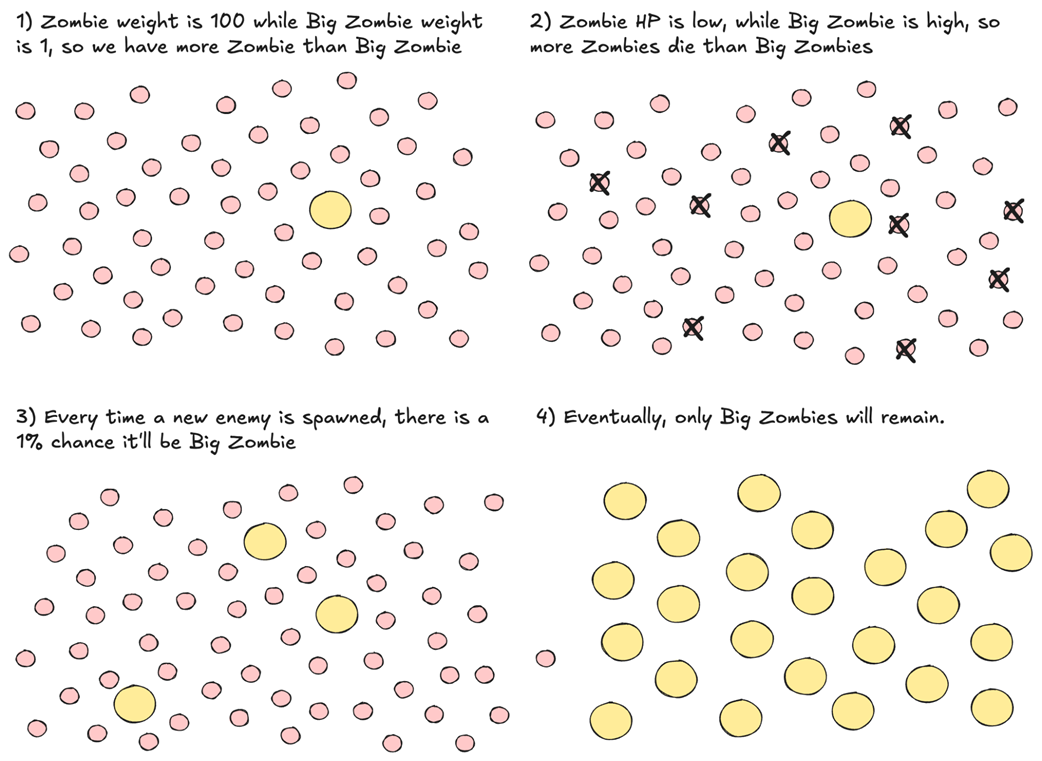
Weight only determines how likely it is for an enemy to spawn. If enemies with less weight have higher HP, they will slowly replace the high-weight enemies with low HP.
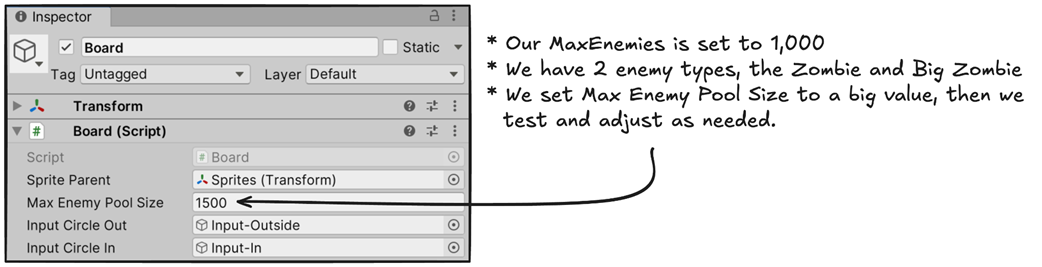
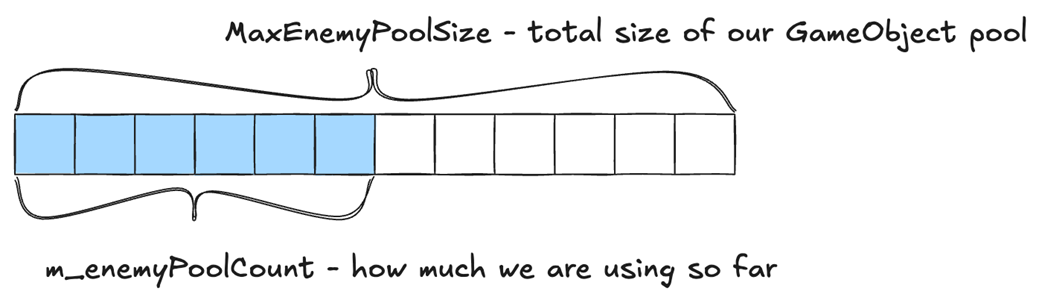
We set Max Enemy Pool Size to a number large enough to hold every variation of GameObjects we can expect in a session. In our case, we have 1000 enemies, but they will be a mix of Zombie and Big Zombie. We can set it to 1,500 and test whether the pool is big enough.
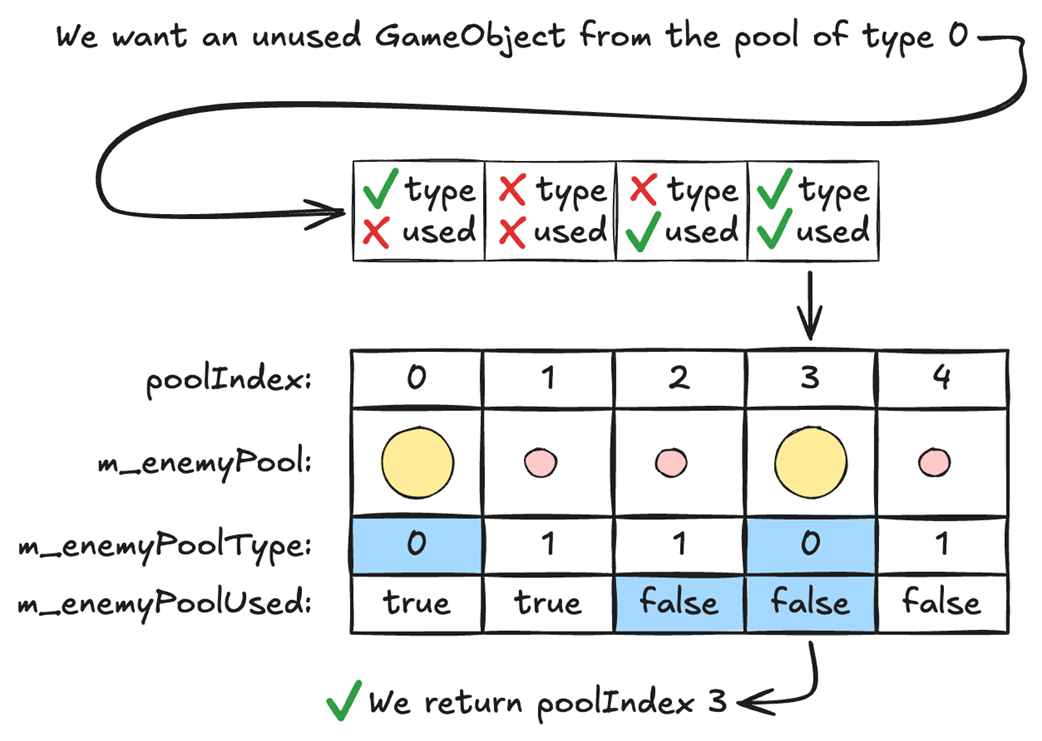
When we want a GameObject from the pool, we need to specify what type it is. If we want a Big Zombie, we specify type 0. If we want a Zombie, we specify 1. Here, we want a Big Zombie, which is type 0, so we go through the pool and look for an unused entry of type 0.
Since we are reusing GameObjects, the m_enemyToPoolIndex array lets us know which GameObject belongs to which enemy.
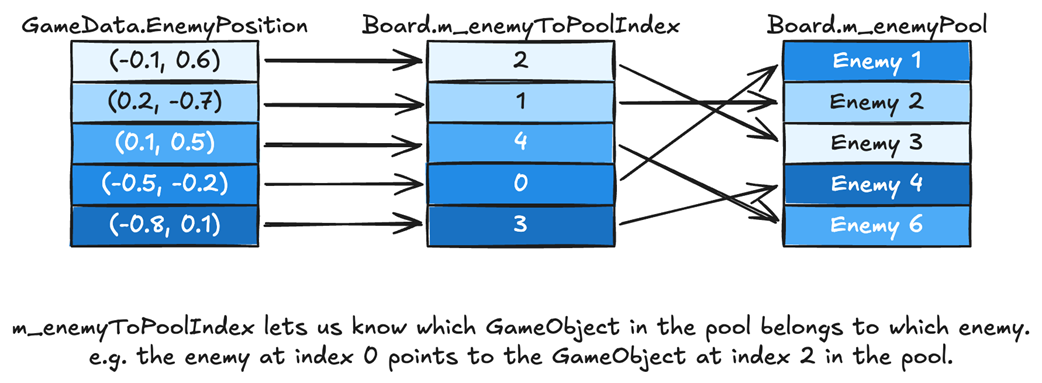
GameObjects are added to the pool linearly, so we need to keep track of how many have been added so we know where to add the next one.
Because we assign indices by loading our files in alphanumeric order, and we called the files by the name of the enemy, adding a new Vampire enemy assigns it the index previously reserved for Zombie.

We can control the sorting of the files by adding an integer number to the beginning of each file name. This allows us to add a new vampire enemy after the zombie enemy.

By saving the unique identifier in the game data, we can update indices as needed. When the vampire is added at index 1, and the zombie is moved to index 2, we can update the data accordingly.
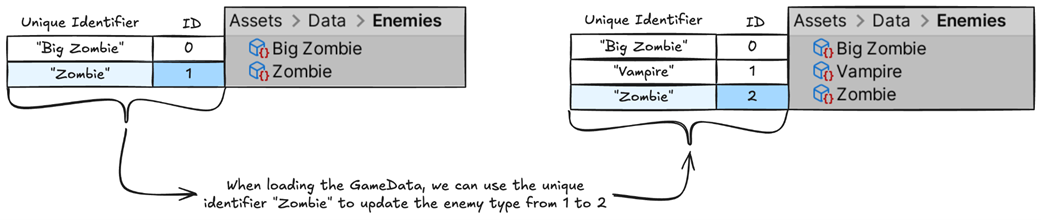
We can save the data from balance.EnemyIDToName with our GamedData, then, when loading a game, we can use it to check if an ID has changed in the new balance. If it has, we update it.
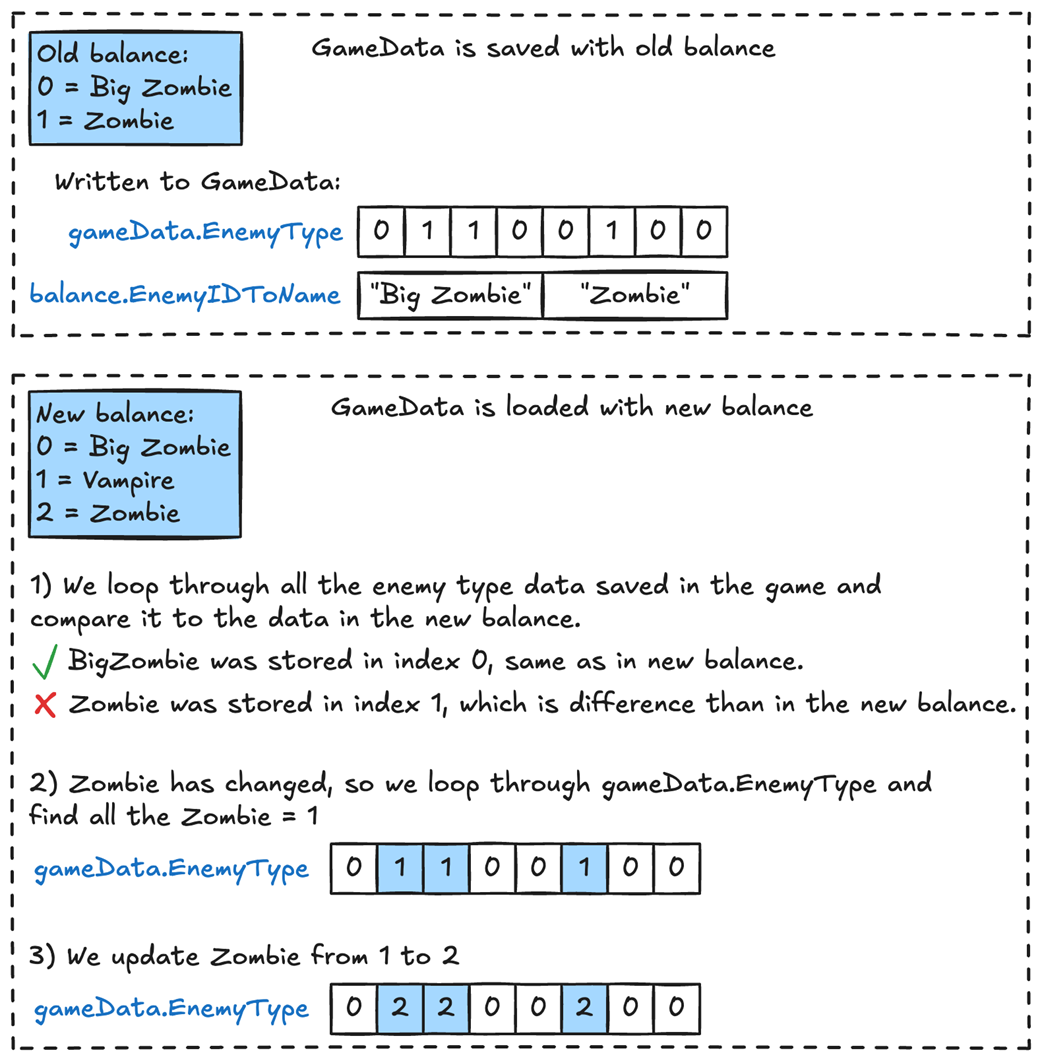
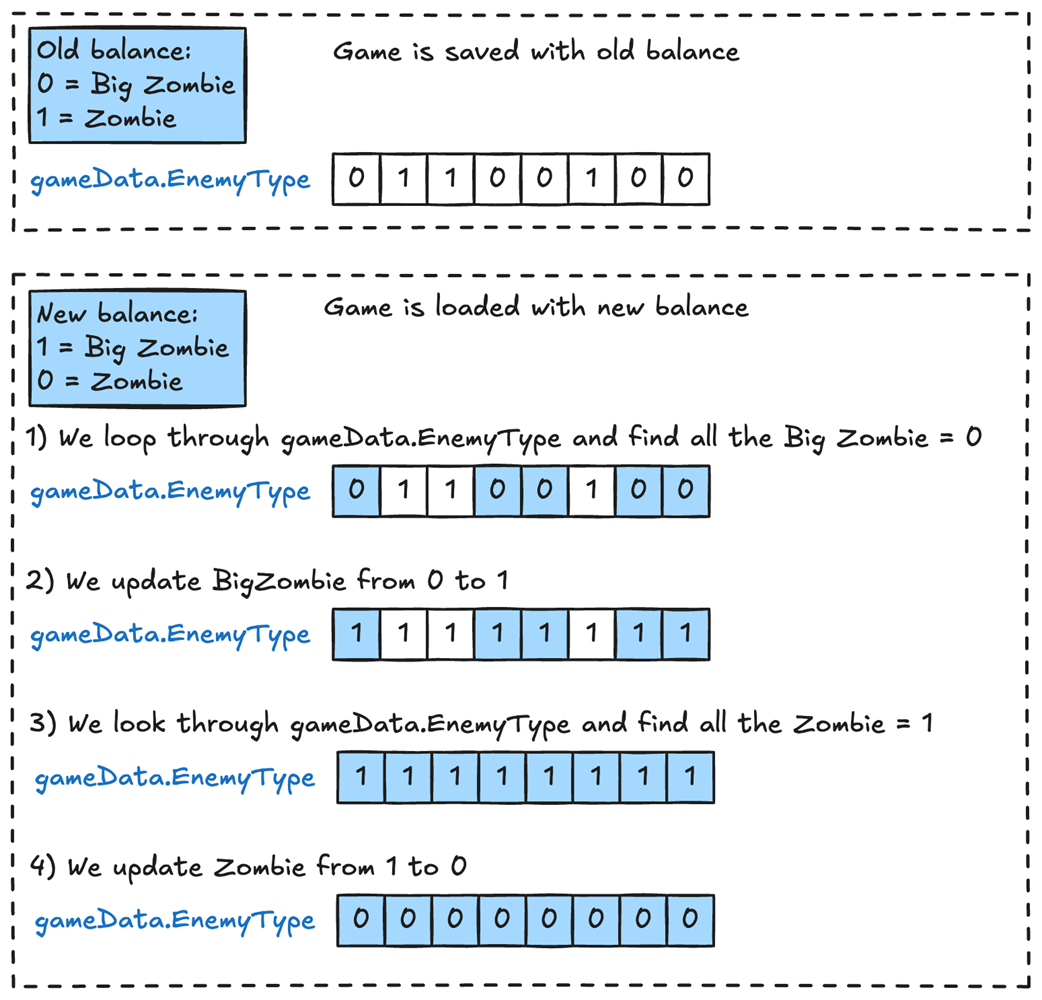
We need to be aware of the edge case where two enemies swipe types. In this case, when handling backward compatibility, we end up overwriting one type of enemy.
Summary
- The C# dictionary implementation requires multiple memory accesses for every lookup.
- Dictionary lookups are about ten times slower than array lookups.
- With data-oriented design, we can structure our data at tool time to avoid using dictionaries at runtime.
- We can assign indices to data at tool time in order to use arrays at runtime. For example, assign IDs to enemies so we can use them as indices into the enemy data stored in the balance.
- When implementing dynamic pools, set a maximum size and preallocate to that size to avoid runtime resizing.
- When implementing dynamic pools, we only want to add data during runtime. If we remove data during runtime, we’ll cause memory fragmentation and trigger the garbage collector.
- To handle backward compatibility, we can assign a unique identifier to objects, for example, our enemies. Then we can write out this data when saving the game, so we know what object each index belongs to.
- To maintain backward compatibility, we can use a dictionary to map saved indices to objects.
- We allocate this dictionary once and use it when loading saved games, keeping dictionary lookups out of the gameplay loop.

 High Performance Unity Game Development ebook for free
