7 Knitting Variables into Arrays and Dictionaries
This chapter builds on your understanding of variables by “knitting” them into collections: arrays and dictionaries. You learn why collections matter—organizing many related values, keeping data in order or pairing items meaningfully, and making programs easier to maintain and loop through. Everyday analogies set the stage: an attendance list (ordered names) models an array, while a glossary (word to definition) models a dictionary. With these mental models in place, the chapter explains how collections help you avoid dozens of standalone variables and enable clear, efficient data handling in Swift.
Arrays are introduced as ordered lists of values of the same type, with Swift’s type inference to keep code concise and explicit type annotations for empty arrays. A key idea is zero-based indexing: positions start at 0, and you access items with arr[index]. You practice reading and changing data (assign by index, append new items, remove at a position) and see how “for in” loops let you process every element without manual indexing. The chapter then expands to two-dimensional arrays (grids) accessed with [row][column], and puts arrays to work in a complete “10 Number Sorter” app that gathers ten numbers, uses a selection sort to arrange them in ascending order, and displays the results—cementing array manipulation, loops, and algorithmic thinking.
Dictionaries arrive as key–value stores where keys can be strings or other types, not just integers. You learn their syntax, how to look up values by key, add or overwrite entries by assignment, remove entries by setting a key to nil, and iterate with for (key, value) to filter or transform data. These skills power the “Friend List” app, which builds a simple contact store in a dictionary and renders it on demand. The chapter closes with the “Alphabet Unscrambler” game, reinforcing arrays through shuffling, finding indices, reversing a prefix of items, and updating the UI after each move. By the end, you can store, retrieve, update, and loop through arrays and dictionaries—and use them to build interactive, real iOS apps.
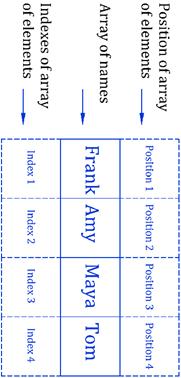
Array of names

Array of names, positions and indexes
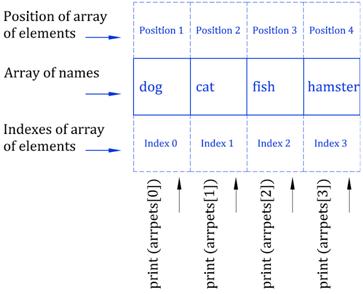
Array of pets, positions, indexes, and the print commands
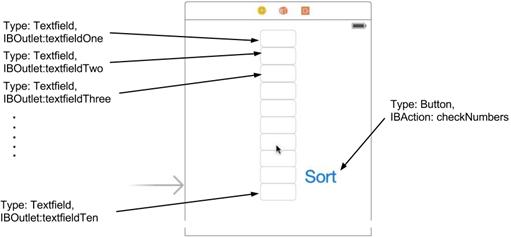
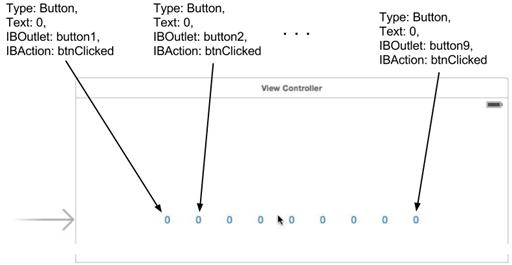
The 10 Number Sorter UI!
The Friend List UI
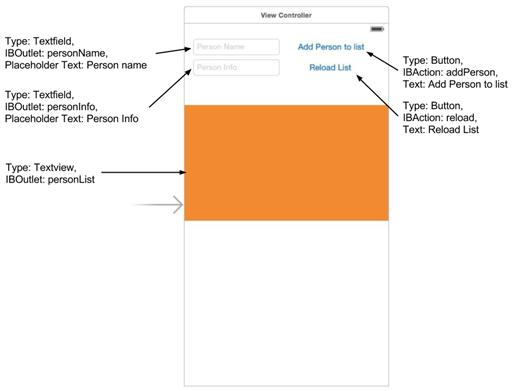
Running the Friend List app
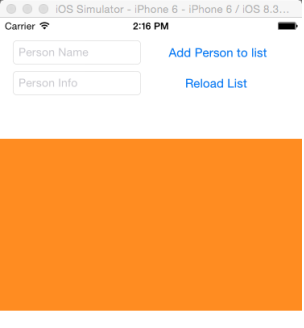
Using the Friend List app
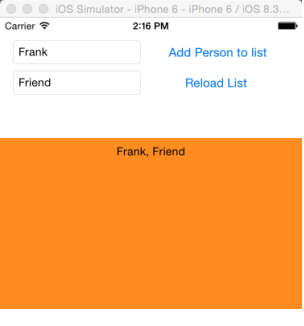
The final app
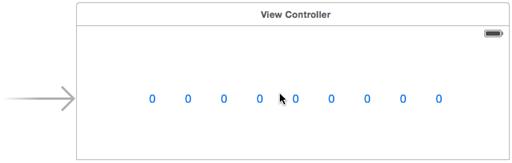
The Alphabet Unscrambler game UI
FAQ
What is an array in Swift and when should I use one?
An array is an ordered list of values that are all the same type (for example, all Strings or all Ints). Use an array when order matters and you want to access items by position (index). Example:var friends: [String] = ["Tim", "Bob", "Frank"]How do I create arrays (including empty ones)?
You can let Swift infer the type when you give values:var pets = ["dog", "cat", "fish"]. For an empty array, you must specify the element type: var names: [String] = [] or var scores = [Int]().What is a dictionary and how is it different from an array?
A dictionary stores key–value pairs. Instead of numeric indexes, you look up values by keys (like a word → definition). Keys must be unique. Dictionaries are not ordered. Example:var people: [String: String] = ["Frank": "Friend", "Tom": "Family"].How do I create dictionaries (including empty ones)?
With values:var meanings: [String: String] = ["water": "a drink", "paper": "to write on"]. Empty: var bag: [String: Int] = [:] or var map = [String: Int]().Why do arrays start counting at 0?
Swift arrays are zero-indexed. The first item is at index 0, then 1, 2, and so on. Sopets[0] is the first item. Keep this in mind to avoid “index out of range” errors.How do I get, add, change, and remove items in an array?
- Get by index:let first = pets[0]- Change by index:
pets[2] = "hamster"- Add to the end:
pets.append("parrot")- Remove by index:
pets.remove(at: 1)Tip: Check bounds before indexing:
if pets.indices.contains(2) { ... }.How do I add, update, and remove entries in a dictionary?
- Add or update:people["Craig"] = "Family" (overwrites if the key exists)- Remove:
people["Frank"] = nil- Read:
print(people["Tom"]) (returns an optional)How do I loop through arrays and dictionaries?
- Array:for name in friends { print(name) }- Dictionary:
for (key, value) in people { print("\(key): \(value)") }- Filter while looping:
for (k, v) in people where v == "Friend" { print(k) }What is a two-dimensional (2D) array and how do I access values?
A 2D array is an array of arrays, like rows and columns:var teams: [[String]] = [["Ann","Bob","Tim"], ["Todd","Jimmy","Tom"]]. Access with two indexes: teams[1][2] is "Tom".How can I sort numbers like in the “10 Number Sorter” app?
You can learn by coding Selection Sort with nested loops to swap smaller values forward. In real apps, prefer the built-in:let sorted = numbers.sorted() (ascending) or numbers.sorted(by: >) (descending).
 Hello Swift! ebook for free
