6 Let Computers Do Repetitive Work
This chapter introduces the idea of repetition (iteration) in programming and shows how loops let you run the same block of code efficiently instead of typing it over and over. Using real-life examples like running laps, taking tests, or pumping a bike tire, it explains that repetition is controlled either by a known count or by a condition that stays true. You learn the three loop types you’ll use in Swift—for-in, while, and repeat-while—and why choosing the right one makes your code cleaner, clearer, and safer.
First up is the for-in loop, the most common way to repeat code a specific number of times. You iterate over a range (such as 1...10), and a loop control variable automatically steps through each value in that range. The chapter shows how to use that variable inside the loop to produce changing output each iteration, and clarifies naming, syntax, and how ranges determine how many times the loop runs. Playground exercises reinforce the concepts with small tasks that count, label iterations, and combine loops with simple math and if statements.
Next, you learn the while and repeat-while loops for condition-driven repetition. A while loop checks its condition before each pass and requires you to update that condition (for example by incrementing or decrementing) to avoid infinite loops; a repeat-while loop runs the body once before checking the condition, guaranteeing at least one execution. You then build two small apps to put these ideas into practice: How Many Times? counts up with a for-in loop and counts down with a while loop based on user input; Hang Your Word Upside-Down! reverses a string by swapping characters from the ends toward the center with a while loop (and notes Swift’s simpler built-in reversal). Along the way, pop quizzes and mini-challenges strengthen your grasp of ranges, conditions, and safe loop design.
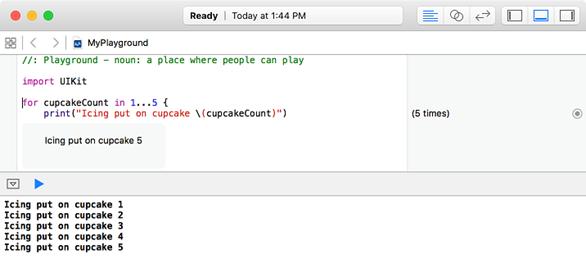
Icing on Cupcake code example, as seen in the Playground.
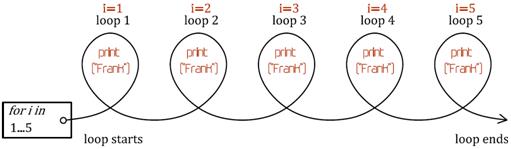
How the for-in loop works
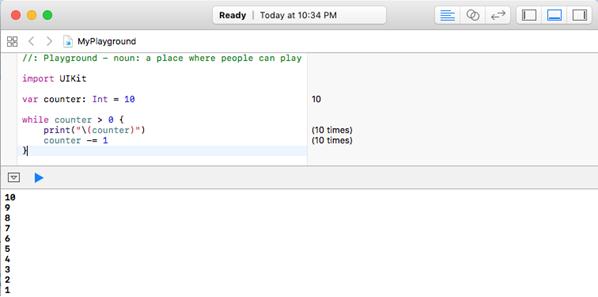
Output for the “while” loop playground exercise
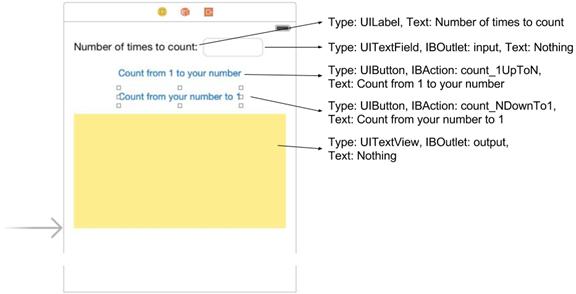
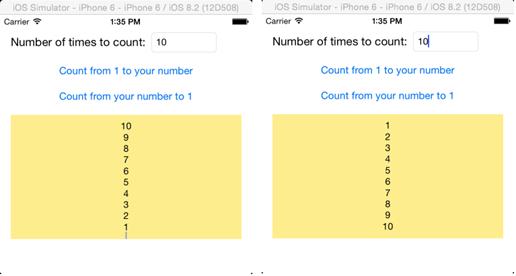
The “How Many Times?” UI
The “How Many Times?” App Test
The final “Hang your Word Upside-Down” app!
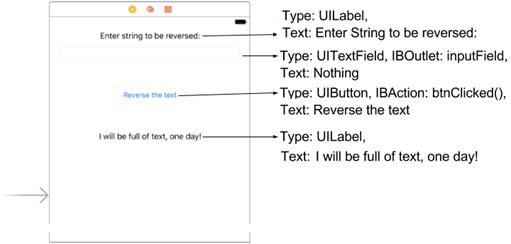
Diagram for String Reversing Logic
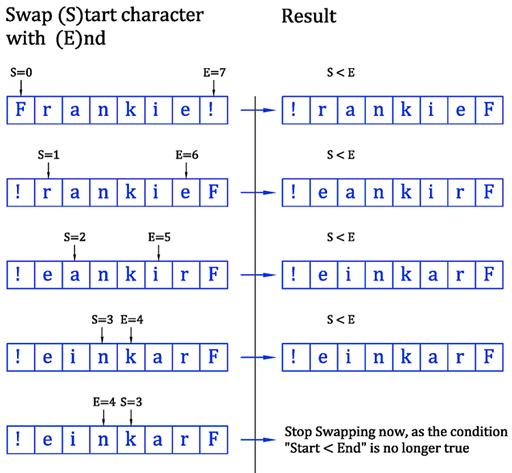
The “Hang your word Upside-Down” UI
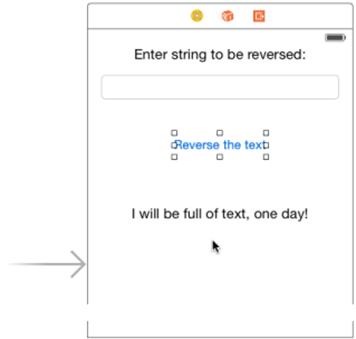
The final “Hang your word Upside-Down” App
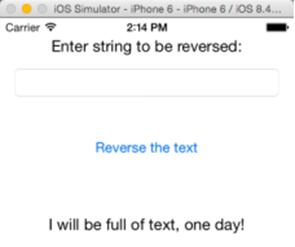
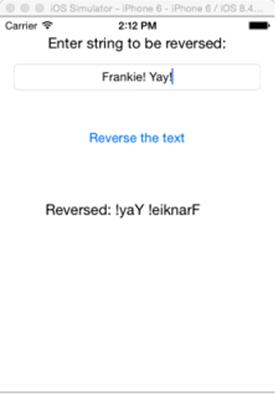
Testing the final “Hang your word Upside-Down” App
FAQ
What are repetitions (iterations) and why are they useful in programming?
Iterations let a program run the same block of code multiple times. They reduce copy‑paste code, make programs shorter and clearer, and help handle tasks like counting, processing lists, or repeating actions until a condition is met.Which loop types does Swift use in this chapter, and when should I use each?
- for-in: When you know exactly how many times to run, usually over a range (for i in 1...10).- while: When you want to repeat until a condition becomes false (you don’t know the exact count upfront).
- repeat while: Like while, but it runs the body at least once before checking the condition.
How does a for-in loop over a range work?
The loop variable takes each value in the range, inclusive of both ends. Example:for counter in 1...5 {
print("Count: \(counter)")
}This prints Count: 1 through Count: 5. The loop variable changes automatically each iteration.How many times does this run: for i in 25...30 ?
Six times. The closed range ... includes both ends, so values are 25, 26, 27, 28, 29, 30.Why doesn’t this compile: for i in 2..5 { ... }?
Because 2..5 isn’t a valid range operator. Use:- Closed range:
2...5 (values 2,3,4,5)- Half‑open range:
2..<5 (values 2,3,4)When should I pick while instead of for-in?
Use while when you’re looping “until something happens,” not a fixed count—for example, a countdown that stops at zero:var counter = 10
while counter > 0 {
print(counter)
counter -= 1
}
print("Launched!")What’s the difference between while and repeat while?
while checks the condition first and may run zero times. repeat while runs the body once, then checks the condition.Example with
var i = 0:- while i != 0 { print("Hi") } // prints nothing
- repeat { print("Hi") } while i != 0 // prints once
How do I prevent infinite loops, and how do I stop one during testing?
Always update the variables that affect the loop condition (increment/decrement or state changes) so the condition eventually becomes false. If you create an infinite loop in Xcode, use Command+Option+Esc to Force Quit Xcode.What does the modulus (%) operator do, and how do I check if a number is divisible by 4?
Modulus gives the remainder after division. A number n is divisible by 4 if n % 4 == 0. Example:for n in 1...25 {
let note = (n % 4 == 0) ? "divisible by 4" : "not divisible by 4"
print("\(n): \(note)")
}How does the “How Many Times?” app count up and down from a user’s number?
- Read the user’s input as an Int.- Count up:
for i in 1...n { append i to the Text View }- Count down: var k = n; while k != 0 { append k; k -= 1 }Tip: Prefer safe conversion (e.g., if let n = Int(input.text ?? "")) to avoid crashes on invalid input.
 Hello Swift! ebook for free
