Overview

5 Computers make decisions, too!

This chapter introduces how programs make decisions using conditions—questions that evaluate to true or false—and shows how those decisions control what code runs next. You learn the core building blocks of conditional logic in Swift: if, else if, and else, how braces define a block of code that executes when a condition is met, and how comparison operators (==, !=, <, >, <=, >=) let you compare values beyond simple equality. Woven through are everyday analogies (like carrying an umbrella if it’s raining), reminders to test and iterate, and a healthy mindset toward glitches: bugs are opportunities to learn, and patches are how you fix them.

To make these ideas concrete, you build “Which Number is Bigger?”, an app that reads two numbers from text fields and uses if statements to compare them, updating a label with the result. Along the way you connect UI elements to code with IBOutlets and IBActions, convert text input to integers for numeric comparisons, and systematically improve behavior: first handle “greater than,” then patch the “equal” case with else, and finally add else if for the “less than” case so all possibilities are covered. You also practice evaluating conditions, explore operator nuances, and see why careful input handling matters—non-numeric entries crash naïve code—reinforcing the value of testing and incremental fixes.

When many branches make if/else chains messy, you switch to the switch statement for cleaner, faster-to-read code. You use it to map numbers 1–4 to words and apply the same idea in “The Mystery of the Entered Number,” returning a friendly default when input is outside the expected range. Two appsercises extend your skills: “Gold, Silver, Bronze” orders three inputs using nested ifs, and “Times Tables Bee” generates random multiplication questions, checks answers with if, and tracks score, while introducing simple random number generation. By the end, you’ve practiced choosing the right conditional tool, organizing logic clearly, and building small, testable features that turn rules into working apps.

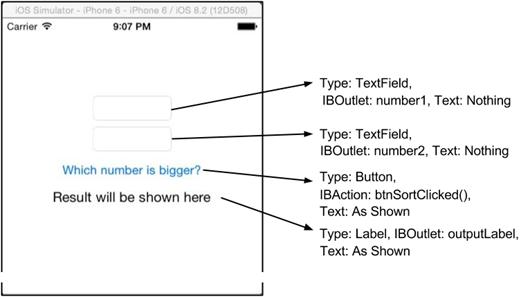
Overview of UI for the Which Number is Bigger app
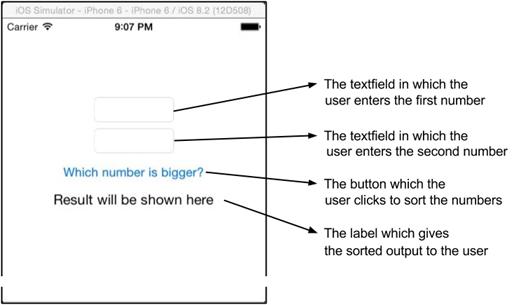
The Which Number is Bigger app UI elements
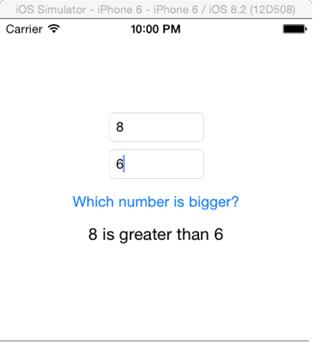
Your completed app and output if you use the numbers 8 and 6 as inputs.
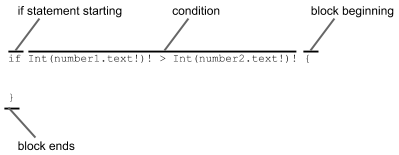
The if statement is checking to see if the first number (number1) is greater than the second number (number2).
“Which number is bigger?” App, Trial 1
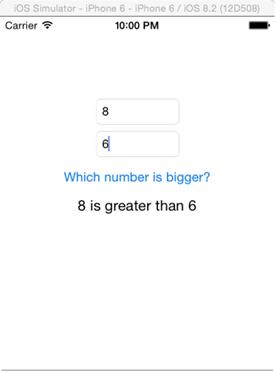
The Mystery of the Entered Number! App
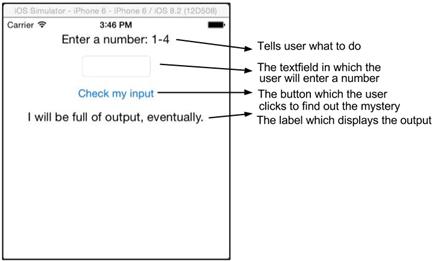
“The mystery of the entered number” UI
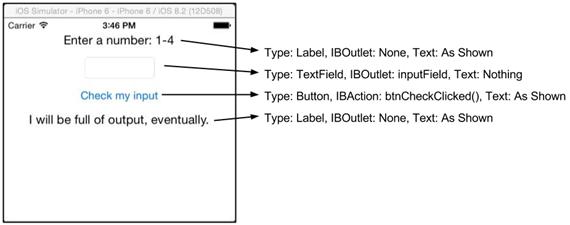
  “The mystery of the entered number!” App
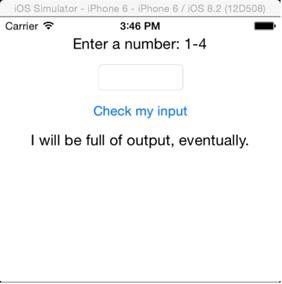
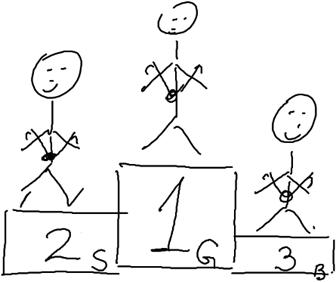
A “visual representation” of the idea of the app we are about to create
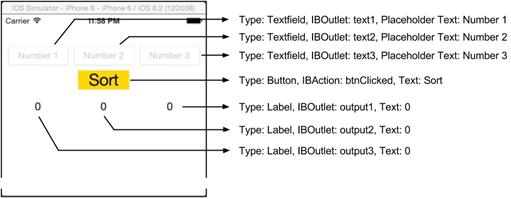
“Gold, Silver, Bronze” UI
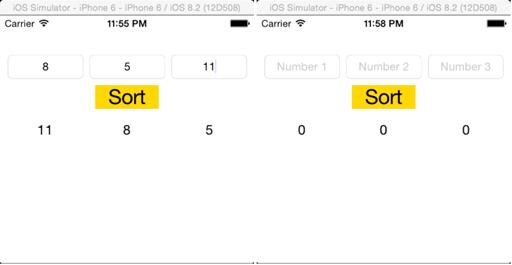
The app, “Gold, Silver, Bronze”
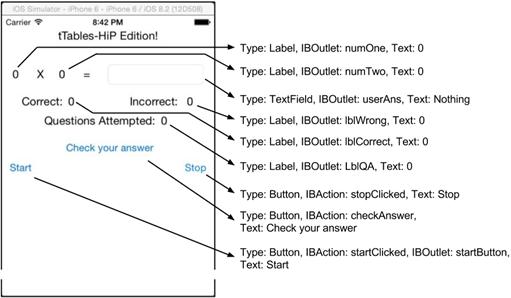
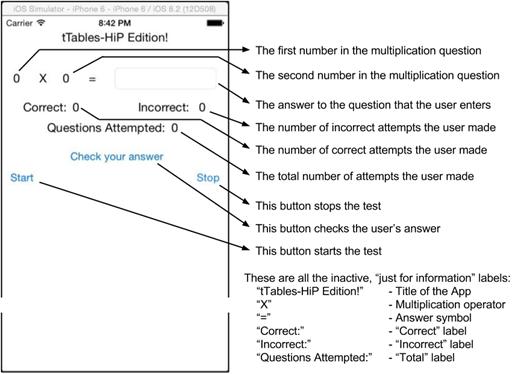
“tTables” UI
The “Times Tables Bee” App
FAQ

What is a condition in programming?A condition is a question your code asks that can only be answered true or false. If it’s true, the code can run a certain set of instructions; if it’s false, it can do something else or nothing.
How does a basic if statement work in Swift?Swift checks a Boolean condition. If it’s true, it runs the code inside the braces. You can add else if for another condition, and else for “everything else.” Example: if condition { ... } else if otherCondition { ... } else { ... }.
What’s the difference between else and else if?else if adds another condition to check if the first one was false. else has no condition; it runs only when all previous if/else if conditions were false.
Which comparison operators can I use in conditions?- == equal to - != not equal to - > greater than - < less than - >= greater than or equal to - <= less than or equal to Remember: = assigns a value; == compares values.
What is a “block of code” and what do braces {} do?A block is a group of statements enclosed in { }. In if/else or switch, the braces mark exactly which statements should run when a condition is met.
What is a switch statement and when should I use it?switch checks one value against many possible cases and runs the matching case’s code. It’s cleaner and easier to read than writing a long chain of else if conditions. Include a default case for “anything else.”
In “Which Number is Bigger?”, why convert text to Int and how can I avoid crashes?Text fields hold strings, but comparisons like > need numbers. Converting with Int(...) turns text into an Int. Force-unwrapping (the ! operator) will crash on invalid input. Safer pattern: guard let a = Int(number1.text ?? ""), let b = Int(number2.text ?? "") else { outputLabel.text = "Please enter valid whole numbers."; return }.
Why did the first version not show a message when numbers were equal?The if only checked “greater than.” When numbers were equal, that condition was false and there was no else branch yet—so nothing happened. Adding else and then an else if for “less than” handled the equal and smaller cases.
What are IBOutlets and IBActions, and how do I connect them?- IBOutlet: a reference from your code to a UI element (like a text field or label) so you can read or change it. - IBAction: a function your UI (like a button) calls when the user interacts. To connect: open Main.storyboard, Control-drag between the view controller and the UI element to the matching outlet/action name.
How do I generate random numbers for the Times Tables app?The chapter uses Int(arc4random() % 12) + 1 to get 1–12. In modern Swift, prefer Int.random(in: 1...12). Either way, you display the two random numbers, read the user’s answer, compare with ==, and update the score.

pro $24.99 per month

  • access to all Manning books, MEAPs, liveVideos, liveProjects, and audiobooks!
  • choose one free eBook per month to keep
  • exclusive 50% discount on all purchases
  • renews monthly, pause or cancel renewal anytime

lite $19.99 per month

  • access to all Manning books, including MEAPs!

team

5, 10 or 20 seats+ for your team - learn more


choose your plan

team

monthly
annual
$49.99
$499.99
only $41.67 per month
  • five seats for your team
  • access to all Manning books, MEAPs, liveVideos, liveProjects, and audiobooks!
  • choose another free product every time you renew
  • choose twelve free products per year
  • exclusive 50% discount on all purchases
  • renews monthly, pause or cancel renewal anytime
  • renews annually, pause or cancel renewal anytime
  • Hello Swift! ebook for free
choose your plan

team

monthly
annual
$49.99
$499.99
only $41.67 per month
  • five seats for your team
  • access to all Manning books, MEAPs, liveVideos, liveProjects, and audiobooks!
  • choose another free product every time you renew
  • choose twelve free products per year
  • exclusive 50% discount on all purchases
  • renews monthly, pause or cancel renewal anytime
  • renews annually, pause or cancel renewal anytime
  • Hello Swift! ebook for free
choose your plan

team

monthly
annual
$49.99
$499.99
only $41.67 per month
  • five seats for your team
  • access to all Manning books, MEAPs, liveVideos, liveProjects, and audiobooks!
  • choose another free product every time you renew
  • choose twelve free products per year
  • exclusive 50% discount on all purchases
  • renews monthly, pause or cancel renewal anytime
  • renews annually, pause or cancel renewal anytime
  • Hello Swift! ebook for free
