3 Your First Real Swift Code Using Variables!
This chapter moves from simple Playground printouts to “real” Swift by introducing variables—named places in memory that let apps remember and update information. You see why apps track changing values like scores or levels, why descriptive names beat single letters, and how variables can hold different kinds of data. A quick tour of core types—integers, decimals, booleans, and strings—highlights that numbers support math while text does not, so “four” and 4 are very different to Swift.
You practice declaring variables with var, sometimes stating the type explicitly and other times letting Swift infer it, all while following naming rules. The chapter covers optionals for “not yet known” values, printing and “spying” on data, and embedding values in text using string interpolation. It shows updating variables after creation, concatenating strings versus adding numbers, and converting between String, Int, and Decimal so user-entered text can be used in calculations, along with what happens when a conversion doesn’t make sense.
Math in Swift starts with the basic operators (+, −, ×, ÷) and the important gotcha that integer division drops the fractional part, so you’ll use decimals when you need precise results. You then step up to square root, exponentiation, and modulus for remainders, applying operations both inside print statements and when assigning to variables. Through small Playground exercises, you format output, combine and transform data, and build the habits needed to progress from Playgrounds to full apps.
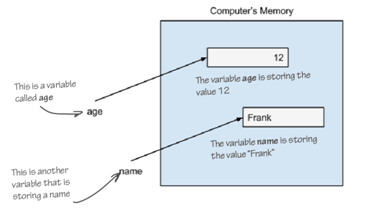
This shows two variables stored in the computer’s memory. One is a variable named age, with the value 12 stored in the computer’s memory, and the other variable is called name, with the value “Frank” saved in the computer’s memory.
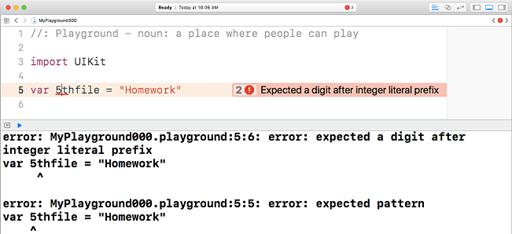
This is how the Playground will let tell you that you broke a variable naming rule.
This is what your playground will look like after you type in the code in listing 3.1.
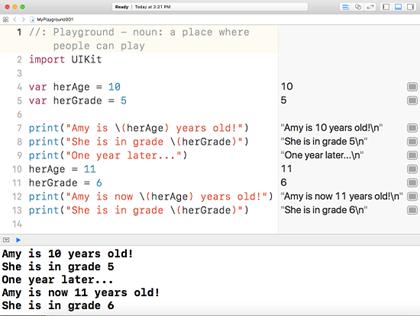
Notice when you don’t use the \ and () to format your text output, Swift doesn’t print the values of your variables.
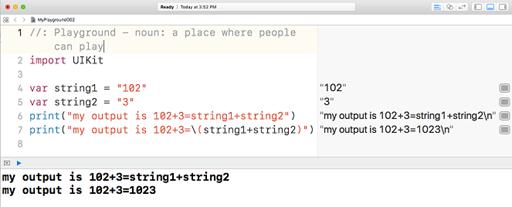
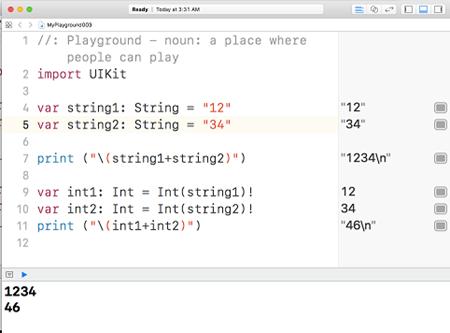
Converting strings and integers in the playground.

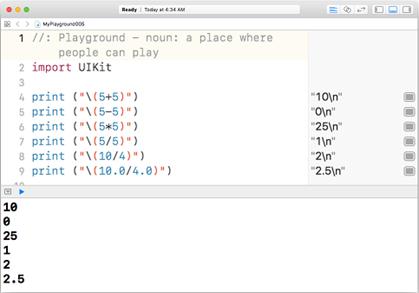
Using an operator with numbers in the Playground.
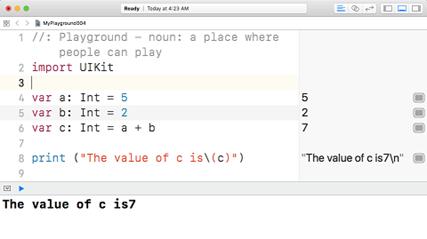
Doing math in the Playground.
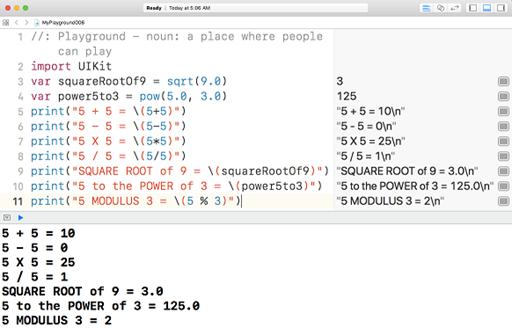
Advanced math in the playground
Check your App-Knowledge
- What arevariables?
- What’s it called when you put two strings together?
- Why is a variablecalled a variable?
- What does data conversion mean?
- Why might you need to convert data?
- Write code to declare variables that hold these pieces of data:
“That pizza was so good!”
17
2.23
“15.49” - What will the output be from the following commands? (HINT: Some of them won’t work, can you figure out what’s causing the errors?)
- Assume there are two variables var1 and var2 of type String with values “13” and “25” respectively. Write the code to print the following using only the two variables and print(). The sum should be calculated.
13+25=38 - Assume there are two variables var3 and var4 of type String with values “15” and “4” respectively. Write the code to print the following using only the two variables and print(). The remainder should be calculated.
If you divide 15 by 4, you get a remainder of 3.
FAQ
What is a variable in Swift and why do apps need them?
A variable is a named place in memory that can hold a value that may change over time. Apps use variables to remember information like scores, ages, levels, names, and more, so they can read or update it later as the app runs.How do I declare a variable and give it a value?
Use var with an optional type annotation. Examples: var someonesAge: Int = 23 and var myAge = 11. In the second case Swift infers the type from the value.How do I declare a variable when I don’t have a value yet?
Use an Optional type. Example: var someonesAge: Int! lets you create it without an initial value and assign later (e.g., someonesAge = 12). Don’t read it before you assign a real value.What are the most common data types I’ll use?
- Int for whole numbers (…, -2, -1, 0, 1, 2, …)- Decimal for decimal numbers (e.g., 3.14, 7.5)
- Bool for true/false
- String for text (e.g., "Anne")
You can do math with numbers, not with text.

 Hello Swift! ebook for free
