14 Continuing your Journey with Swift
Having wrapped up the fundamentals of iOS development with Swift, this chapter shifts your focus to how to keep growing. It frames the next stage of your journey around two themes: picking effective learning resources and deciding what to study next so you can build momentum with confidence.
The chapter highlights several communities and platforms that accelerate learning. The author’s forum offers book-related Q&A, updates as Swift and Xcode evolve, and practical tips. For quick, high-quality help on specific problems, Stack Overflow stands out thanks to its huge community, reputation system, and established etiquette—just remember the age requirement and to follow the site’s norms. You’re also encouraged to learn by example on GitHub, where open-source projects reveal real-world code style, logic, structure, and collaboration, all powered by git version control; reading, experimenting with, and contributing to projects helps you develop your own approaches while benefiting from community feedback.
Classic resources complete the toolkit: YouTube and books. Videos let you watch real coding in action—cursor moves, navigation, and keystrokes—which can make tough concepts click, while books provide structured, in-depth guidance and curated examples. The chapter suggests exploring video tutorials (including the author’s channel) and further reading on iOS development and git/GitHub to deepen both your coding and collaboration skills. Together, these resources guide what to learn next and how to keep improving through practice, community engagement, and steady exploration.
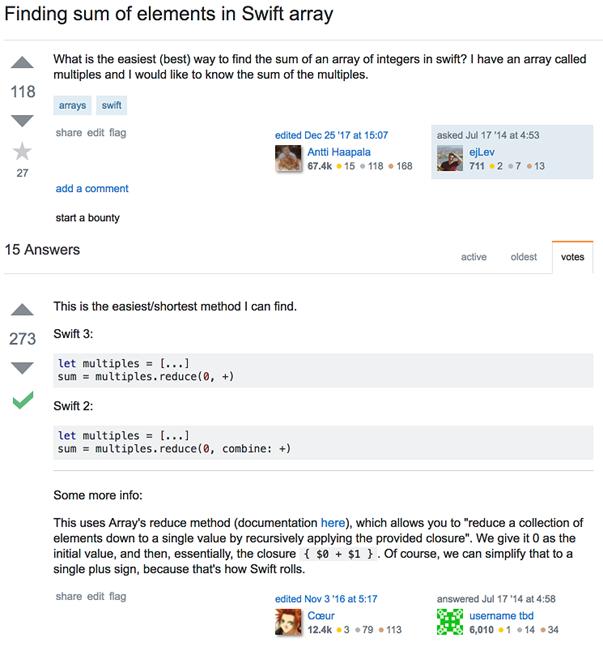
A simple example of a question and its answer on Stack Overflow
What’s next?
As a final, closing topic, I’d like to tell you what I believe you should be pursuing next using the resources I mentioned before, in this chapter:
- Debugging – learn how to debug your code when there’s an exception or your app doesn’t work the way you intended, using breakpoints, inspection, dry runs, and more. This will help in methodically solving the problem, and creating better code, quickly.
- Protocols – learn how to implement protocols in your applications. This will help you create apps with more complex objects, such as Table Views and Picker Views.
- Structures – learn how to implement structures in your apps to make apps that use and work better with complex data of specific types.
- UITableView – learn how to implement lists in your apps, to help you list an unknown amount of data dynamically.
- UIPickerView – learn how to implement scroll-pickers in your apps to help your users pick data from a few options.
- Auto Layout – learn how to use Auto Layout to automatically make your apps work on all different devices automatically, in order to eliminate the process of manually creating separate screens for each device.
- Using the resources I mentioned above, I’d recommend learning those 6 topics in order, to make your journey to become an advanced iOS developer!
Always keep learning, improving, and sharing! I wish you good luck!
FAQ
I just finished the fundamentals. What should I do next?
- Pick a small, achievable app idea and build it end to end.
- Keep a learning log of questions and solutions.
- Join communities (author’s forum, Stack Overflow, GitHub).
- Alternate practice with reading/watching tutorials.
- Iterate: refactor, add features, and share your work.
What resources should I use to continue learning Swift and iOS?
- Author’s forum for book-related Q&A, updates, and tips.
- Stack Overflow for quick, high‑quality answers to specific problems.
- GitHub to learn from real projects and collaborate.
- YouTube and books for guided, example-driven learning.
How can the author’s forum help me, and where do I find it?
The forum hosts book-related questions, updates as Swift/Xcode evolve, and practical tips. Check existing threads first, search before posting, and ask clear, focused questions. Link: https://forums.manning.com/forums/hello-swiftWhat is Stack Overflow and why is it useful for iOS learners?
It’s a massive Q&A site for programmers with strong community review and a reputation system. You’ll find answers to most iOS/Swift issues and learn accepted best practices. Search with tags like [swift], [ios], and [xcode].How do I ask a good question on Stack Overflow?
- Include a minimal reproducible example and exact error messages.
- State what you tried, expected vs. actual results, and your Xcode/Swift versions.
- Use clear titles and relevant tags.
- Search for duplicates first; upvote/accept helpful answers.
Is there an age requirement to join Stack Overflow?
Yes. You must be 13 or older to sign up. If you’re younger, ask a parent or guardian to create and manage the account on your behalf.How does GitHub help me learn Swift?
- Study real codebases to see structure, style, and problem‑solving approaches.
- Use git for version control to track changes and experiments.
- Open issues, submit pull requests, and receive feedback from the community.
- Discover patterns and libraries used in production apps.
How do I get started with Git and GitHub?
- Create a GitHub account and install Git.
- Learn basics: init/clone, branch, commit, merge, push/pull.
- Practice by versioning your learning projects.
- Recommended resource: Learn Git in a Month of Lunches — https://www.manning.com/books/learn-git-in-a-month-of-lunches
How can YouTube and books support my learning?
They provide example-driven explanations; videos let you see the exact steps and workflow. Try the “Tanmay Teaches” channel: https://www.youtube.com/c/tanmaybakshiteaches. Suggested reading: “iOS Development with Swift” by Craig Grummitt (Manning).What should I learn next in Swift and iOS?
- UI: Auto Layout, navigation, animations; deepen UIKit or explore SwiftUI.
- Data: UserDefaults, file storage, Core Data, Codable/JSON.
- Networking: URLSession, APIs, error handling, async/await.
- Architecture: MVC/MVVM, dependency management with Swift Package Manager.
- Quality: unit/UI tests, debugging, Instruments, performance basics.
- Distribution: app signing, TestFlight, App Store guidelines.

 Hello Swift! ebook for free
