This chapter introduces how and why iOS apps read from and write to files so data can persist across app launches and even device restarts. It clarifies what files and file formats are and why different formats require appropriate software. You also learn the difference between file content management (working with the information inside files) and file management (copying, moving, renaming). On iOS, saving app data typically happens in the app’s own sandboxed Documents directory, which each app accesses privately.
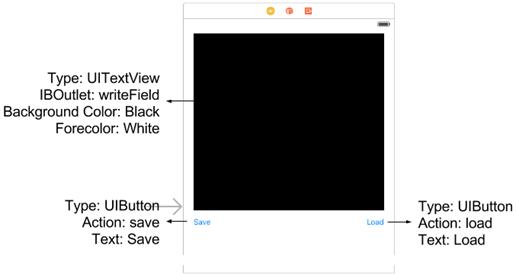
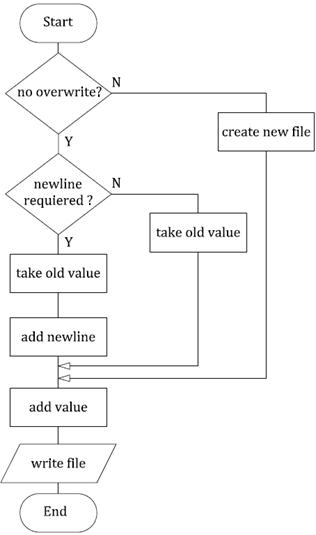
To practice these ideas, you build a simple File Content Manager app that stores whatever text the user types. The app uses two helper functions: one to write text to a .txt file in the Documents directory—either creating, overwriting, or appending (optionally on a new line)—and one to read the file back and return its contents as a string. Tapping Save writes the text to a file and tapping Load retrieves it, proving persistence by surviving app termination and device reboots.
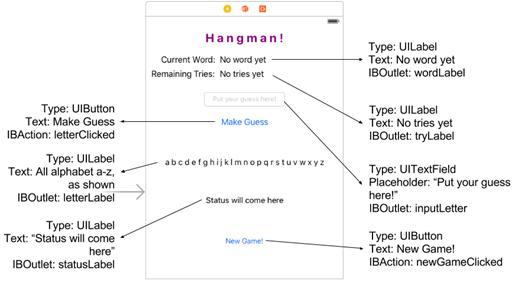
Next, you apply file handling in a Hangman game. The app downloads a word list, picks a random word, tracks guesses and remaining tries, and updates on-screen labels as play proceeds. It also persists the player’s last score and high score in local text files, reading them at startup to show status and writing updates when a game ends. Along the way you reinforce the separation between fetching remote data and storing local state, and you preview the idea of moving the file code into a reusable library in the following chapter.
The UI for the simple FCM app
The “write” function as a flowchart
The UI for the Hangman app
The running Hangman application!
APPTIVITY: Store your name and birth date
Create an app that takes the user’s name, and the user’s date of birth, in two separate text fields, and stores them in separate files.
Later, whenever the user would like to, he should be able to read the values back from the files, and see what he stored. So, once the “load” button is clicked, the app should display the contents of the two files in two labels.
FAQ
What do we mean by “files” in an app?Files are places to store information so it can be used later—after the app closes or the device restarts. Examples include text notes, game scores, documents, music, and more.Why do apps need to read from and write to files?Variables disappear when an app is closed or a device reboots. Saving to files lets your app persist data like scores, preferences, or progress, and load it back on the next launch.What’s the difference between File Management and File Content Management?File Management is about handling the files themselves (copy, move, rename, delete). File Content Management is about creating, reading, updating, and storing the data inside files.Where can an iOS app save files, and what is the Documents directory?Each iOS app has its own sandbox—a private area the app alone can access. Within it, the Documents directory is the common place to store user data your app reads and writes.What are file formats, and which one do we use here?A file format tells software how to interpret the data (for example .mp3, .pdf, .xcodeproj). In this chapter, we use plain text files with the .txt extension.How do we get the path to a file we want to read or write?Find the app’s Documents directory path and append your filename (for example “Documents/infoSave.txt”). This full path tells the system exactly where the file lives.How does the write function decide between appending and overwriting?You pass flags to control behavior. Overwrite true replaces the file’s contents; overwrite false keeps existing data and adds your new text, optionally starting on a new line if newline is true.What does the read function return if the file doesn’t exist?It returns an empty string. Your app can use that to detect “no saved data yet” and handle the UI accordingly.How can an app download a file from the internet to use in the app?You can load text from a URL and then parse it (for example, a word list for a game). In production apps, prefer asynchronous networking (like URLSession) so the UI stays responsive.How can we persist and show a player’s last and highest scores?Save scores to simple text files (for example “lastscore.txt” and “highscore.txt”) when a game ends. On launch or at the right moment, read those files and display the values in your labels.
pro $24.99 per month
access to all Manning books, MEAPs, liveVideos, liveProjects, and audiobooks!


 Hello Swift! ebook for free
