2 Related tables and more SQL
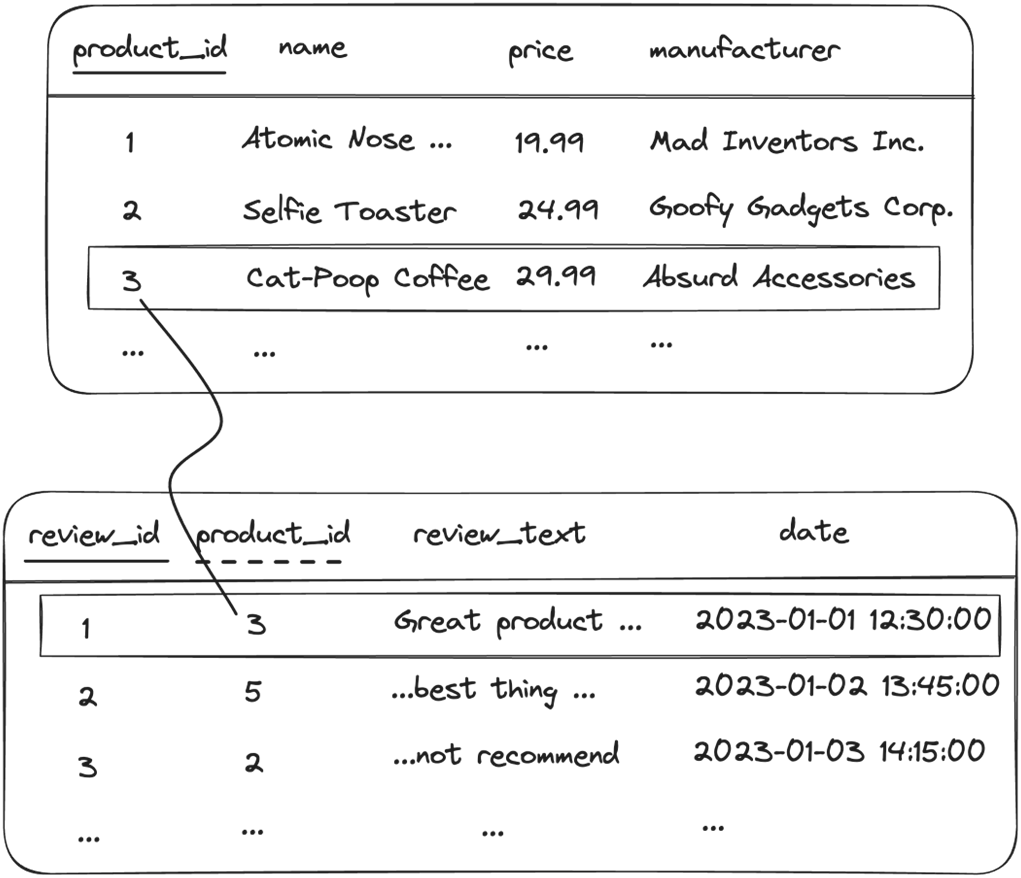
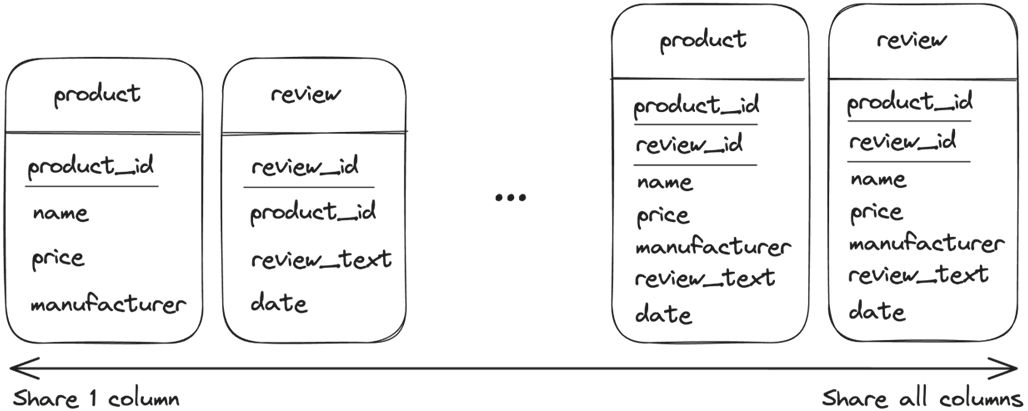
This chapter extends the basics from working with a single table to designing and querying related tables. It explains how relationships are formed through shared columns, with a primary key in the parent table and a foreign key in the child table, and why those keys should be the only shared columns. Duplicating additional attributes across related tables introduces redundancy and can cause update anomalies, so the clean design principle is to keep non-key attributes in only one table.
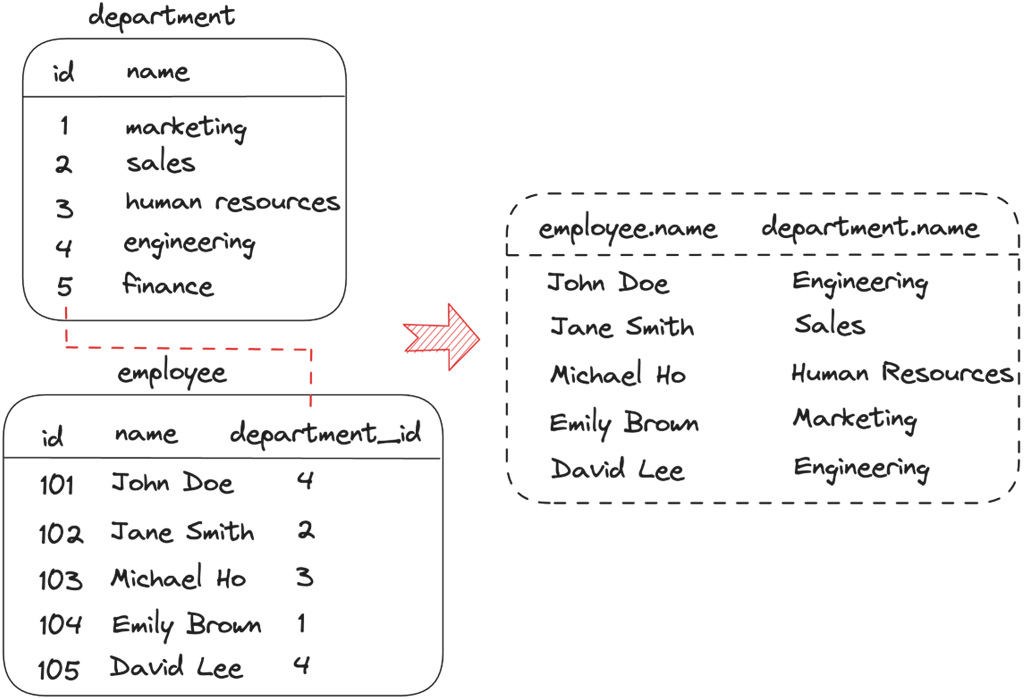
On the querying side, the chapter introduces joining data across tables with an explicit JOIN … ON pattern and clarifies dot notation (table.column) for disambiguating columns, plus the use of column aliases when names collide. It compares common join types—INNER, LEFT, RIGHT, and FULL OUTER—and highlights how outer joins can introduce NULLs that must be handled carefully. While joins can be written with a WHERE clause over multiple tables, the text recommends explicit JOINs for readability, maintainability, and better optimization than implicit cross joins.
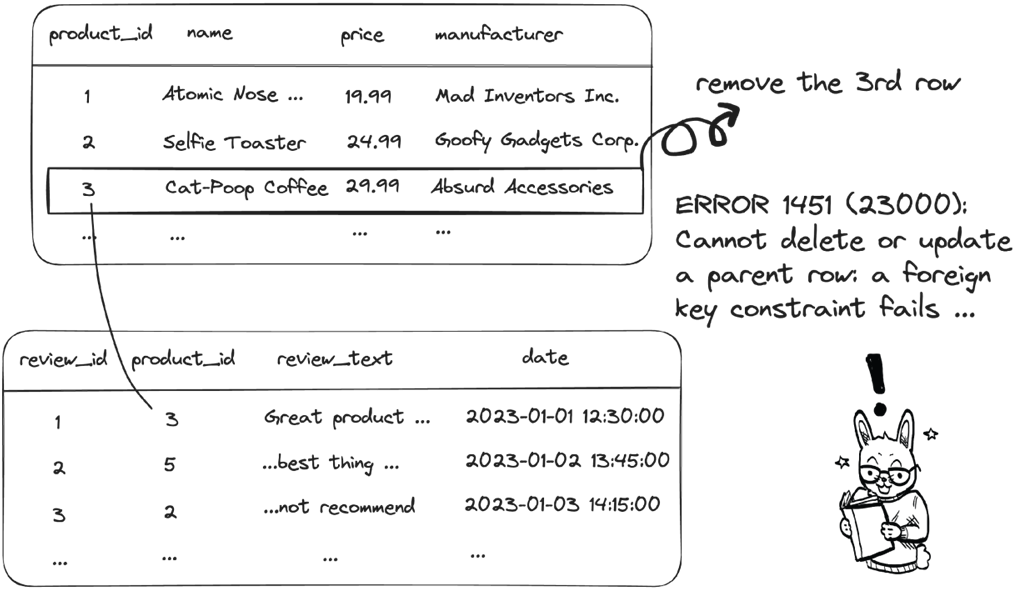
For managing schemas and data, the chapter shows how to create parent/child tables and add foreign key constraints that enforce referential integrity: child rows must reference existing parent keys, and unsafe updates or deletes to parent rows are blocked to prevent orphaned data. Naming constraints makes future changes easier, and when removing structures, the child table should be dropped before the parent. The chapter closes with guidance on continuing to learn SQL efficiently—build on a solid conceptual foundation from quality resources and use modern generative AI tools for just-in-time explanations, examples, and practice.











Summary
- Related tables are tables in a database that are connected to each other by a common column.
- In general, it is a bad idea to have related tables share more columns beyond the primary/foreign key(s).
- To query two related tables, the general syntax is as follows:
- The most common join types include INNER JOIN, LEFT JOIN, RIGHT JOIN, and OUTTER JOIN. The INNER JOIN is the same as JOIN, returning only the rows that have matching values in two tables. The other three types may return non-matching values from one or two tables.
- In general, the JOIN clause is preferred to the WHERE clause when querying related tables.
- Given a pair of two related tables, the table that uses the shared column(s) as the primary key(s) is typically known as the parent table. The table that holds the foreign key(s) is typically known as the child table.
- The parent table can be created in the same way as creating a table that is not related to other tables.
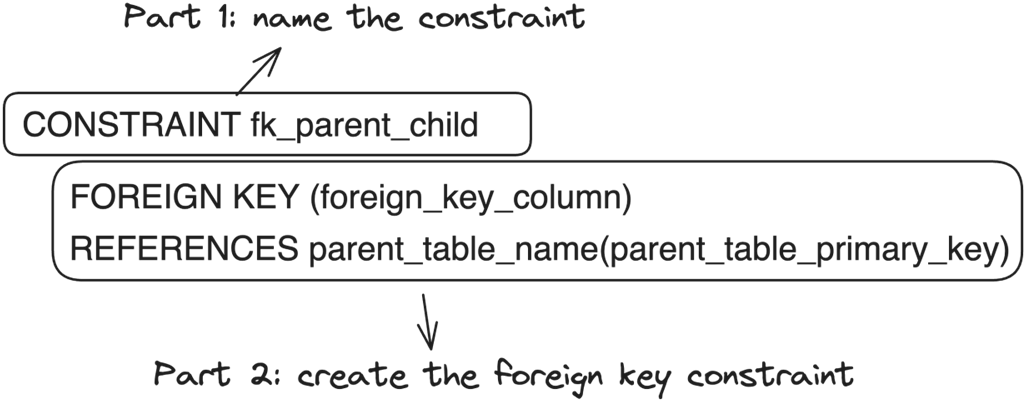
- The general syntax of creating a child table is as follows:
- The foreign key constraint enforces referential integrity in related tables. The referential integrity applies to both table and data management in related tables.
- In general, it is a good idea to name the foreign key constraint when creating related tables.
- Taking advantage of generative AI tools, like ChatGPT, can make your learning of SQL more efficient.
FAQ
What are “related tables” in a relational database?
Related tables are two or more tables connected by shared columns. Typically, a parent table exposes a primary key, and a child table stores that key as a foreign key. Matching values link rows across the tables (e.g., product.product_id = review.product_id).Why shouldn’t related tables share columns beyond the key(s)?
Sharing non-key columns creates redundancy and risks inconsistencies. If the same attribute lives in multiple tables, updates can diverge and produce update anomalies. Keep shared columns limited to the primary/foreign key pair(s).How do I join data from related tables?
Use an explicit join with an ON clause to match keys:SELECT t1.col, t2.col
FROM table1 AS t1
JOIN table2 AS t2
ON t1.key = t2.key;
What does JOIN … ON do compared to using WHERE for joins?
JOIN … ON explicitly defines how tables relate, improving readability, maintainability, and optimizer behavior. The older style FROM t1, t2 WHERE t1.key = t2.key can produce the same inner-join result, but it starts as a cross join conceptually and is less clear.What are the common JOIN types and how do NULLs appear?
- INNER JOIN: only matching rows from both tables. - LEFT JOIN: all left rows plus matches; unmatched right columns are NULL. - RIGHT JOIN: all right rows plus matches; unmatched left columns are NULL. - FULL OUTER JOIN: all rows from both sides; unmatched columns are NULL. Handle NULLs carefully in calculations and comparisons.How do I disambiguate columns with the same name when joining?
Use dot notation and optional aliases:SELECT e.name AS employee_name,
d.name AS department_name
FROM employees AS e
JOIN departments AS d
ON e.department_id = d.id;
How do I create parent/child tables with a foreign key?
Create the parent with its primary key, then the child with a foreign key referencing it:CREATE TABLE parent (..., parent_id INT PRIMARY KEY);
CREATE TABLE child (
...,
parent_id INT NOT NULL,
CONSTRAINT fk_parent_child
FOREIGN KEY (parent_id) REFERENCES parent(parent_id)
);

 Grokking Relational Database Design ebook for free
