1 Why parallel programming?
The chapter begins by explaining why parallel programming became necessary. For many years, software appeared to get faster automatically as hardware improved, thanks to shrinking transistors and rising clock speeds. That era ended when heat and power limits stopped single processors from becoming much faster. Instead of relying on one faster core, chip designers turned to multiple cores and, especially, GPUs with thousands of simpler processing units.
The chapter then shows that parallelism is valuable only when work can be divided into independent pieces. Some problems, like doubling every element in an array or processing millions of pixels, are ideal because each task can run separately. Other problems, like summing values or computing Fibonacci numbers, contain dependencies that force parts of the computation to happen in order. This leads to the central lesson that the amount of sequential work sets a hard limit on speedup, even with many processors.
Finally, the chapter explains why GPUs and CUDA matter. GPUs were originally designed for graphics, but the same structure that makes them good at rendering images also makes them excellent for matrix math, image processing, and AI workloads. CUDA opened GPU programming to general-purpose code and taught programmers to think in terms of patterns such as map, reduce, scan, histogram, and stencil. The broader message is to match the tool to the task: CPUs are best for complex, branch-heavy logic, while GPUs excel at doing the same simple operation across huge amounts of data.
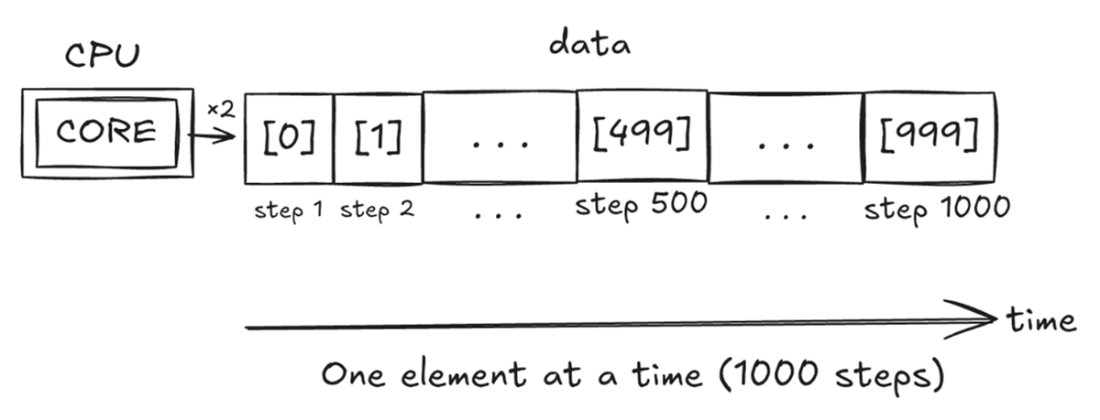
Sequential processing: one core, one element at a time. A single CPU core works through a 1,000-element array step by step, doubling each value before moving on to the next. With only one core doing the work, the total number of steps equals the size of the data: 1,000 elements means 1,000 steps, and the time grows right along with it.
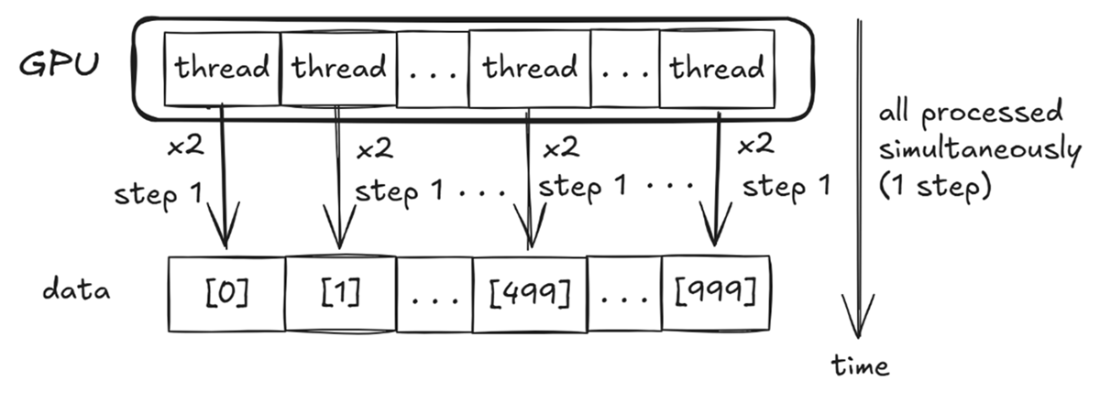
Parallel processing: every element at once. A GPU assigns one thread per element, doubling all 1,000 values in parallel; the hardware schedules these thousands of threads onto its many CUDA cores.
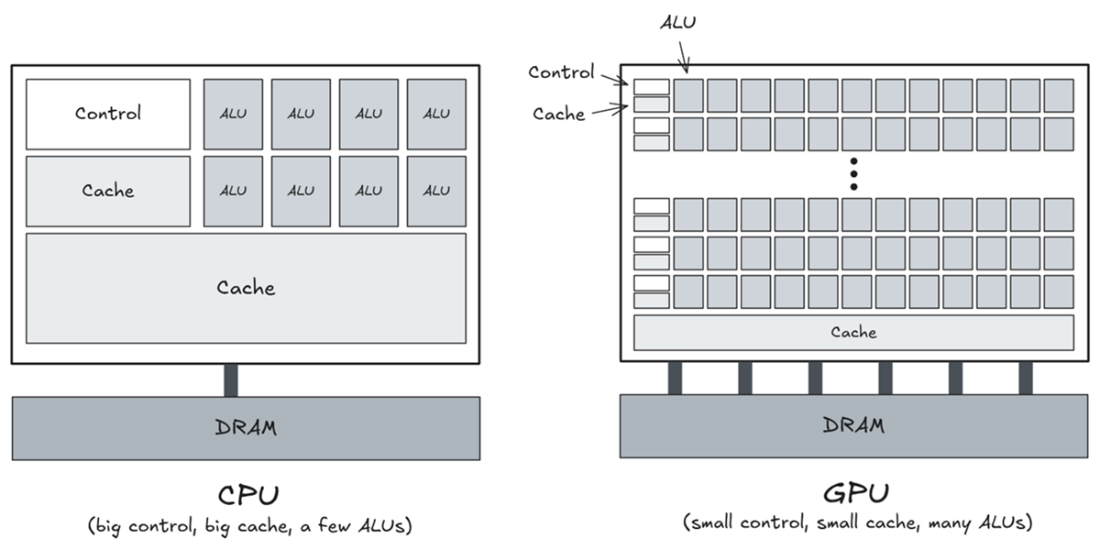
Where the transistors go. A CPU devotes most of its silicon to control logic and cache, leaving room for only a few ALUs; a GPU spends the same silicon on row after row of small ALUs with minimal control and cache, and connects to its DRAM through many more memory channels. The two designs are answers to opposite questions: finish one task fast? Or finish many tasks at once?
Summary
- Around 2003–2005, heat killed the free lunch: single-core speed gains hit a physical ceiling.
- Instead of one fast processor, use many working simultaneously. A modern laptop has 6–16 cores, high-end desktops well past 24; a GPU has thousands.
- Parallel computing did not start with GPUs: MPI spreads work across separate machines, OpenMP across the cores of one CPU, and SIMD across values inside a single core. GPUs are the newest branch of that family, and they specialize in data parallelism: the same operation applied to many pieces of data at once.
- Thousands of simple processing units make GPUs perfect for massively parallel tasks like image processing, matrix math, and AI training.
- Learning CUDA teaches you parallel thinking that carries over to just about any parallel framework, including PyTorch and TensorFlow.
- Dependencies, not core count, decide how much of a problem can run at once. Before parallelizing anything, ask whether any task needs another task’s result before it can start.
- Amdahl’s Law: the sequential parts of your code limit the overall speedup, no matter how many cores you throw at it. But Gustafson’s Law offers a brighter view: scale the problem size with the cores, and parallelism keeps paying off.
- swforces.com, a free online lab, lets you write and run real CUDA code, no GPU hardware required.
- Part 2 builds up the recurring parallel patterns (Map, Reduce, Scan, Histogram, and Stencil), and Part 3 turns to the performance techniques that make them run fast on real hardware.

 Grokking Parallel Programming ebook for free
