Overview

3 Scaling up: from one block to many

To scale CUDA programs beyond a single block, the chapter shows how to move from “one thread per element” in a small launch to a grid of many blocks that can cover much larger arrays. The key motivation is hardware: a block can hold at most 1,024 threads, so large problems cannot be launched as one giant block. By spreading work across multiple blocks, the GPU can run many threads in parallel while still respecting the limit, and the same kernel can scale from tiny arrays to very large ones.

The central idea is CUDA’s three-part hierarchy: a grid contains blocks, and each block contains threads. Because thread numbers restart in every block, using only threadIdx.x causes all blocks to target the same elements. The fix is to compute a unique global index with int idx = blockIdx.x * blockDim.x + threadIdx.x;. The chapter explains why this works, how blocks are scheduled independently, and why threads in different blocks must not rely on any execution order. It also notes that blocks cannot safely synchronize with one another during a normal kernel launch, which is why some operations, like reductions, need multi-step approaches.

To launch a correct 1D kernel, the chapter gives a practical recipe: choose a block size, compute the number of blocks with ceiling division, calculate each thread’s global index inside the kernel, and guard the final access with if (idx < n). A block size of 256 is recommended as a good default because it is a multiple of the GPU warp size, helping avoid wasted threads. The chapter finishes with a complete multi-block example that doubles array elements, along with common mistakes to avoid: forgetting the block offset, rounding the block count down, or swapping the launch arguments. Together, these patterns form the standard template for most 1D CUDA array-processing kernels.

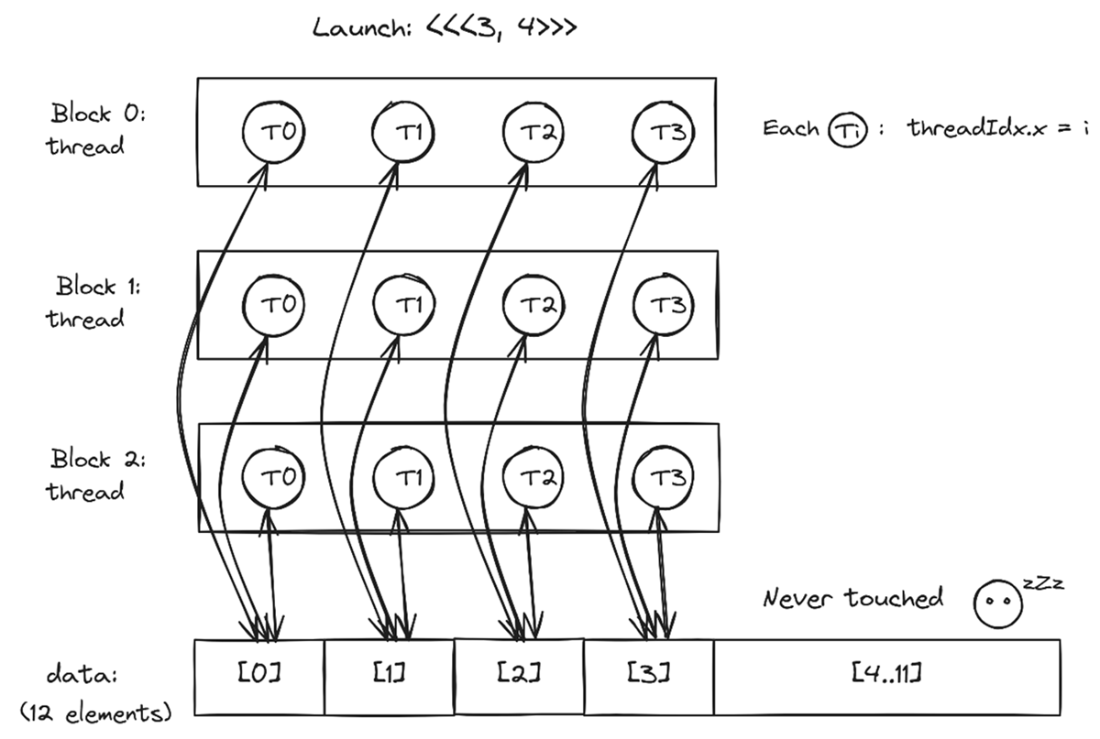
Launching <<<3, 4>>>: 12 threads, but only 4 elements touched. With 3 blocks of 4 threads each, every thread uses only threadIdx.x, so all three blocks target the same 4 elements (data[0..3]), leaving data[4..11] untouched. To reach the full array, each thread needs to factor in its block index too.
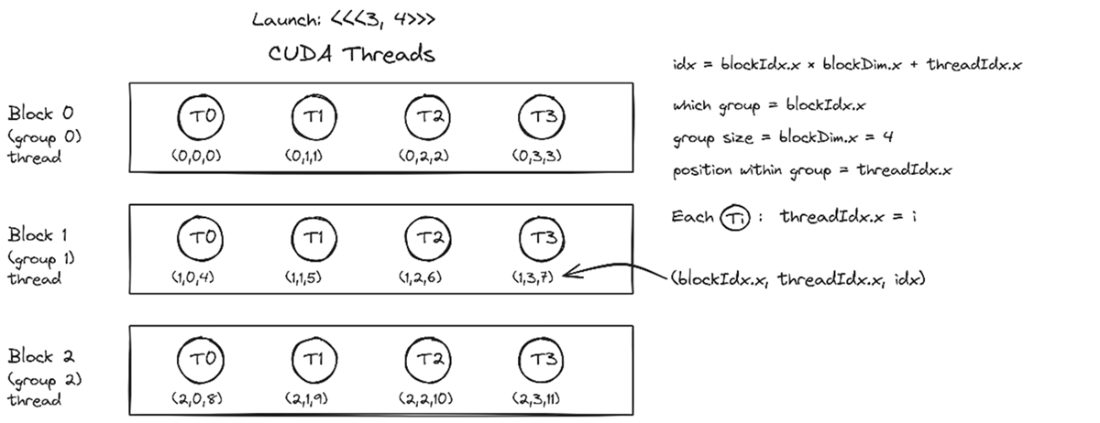
Global indexing: no two threads share the same index. By combining blockIdx.x, blockDim.x, and threadIdx.x, each thread gets a unique global index: Block 0 owns 0–3, Block 1 owns 4–7, and Block 2 owns 8–11.
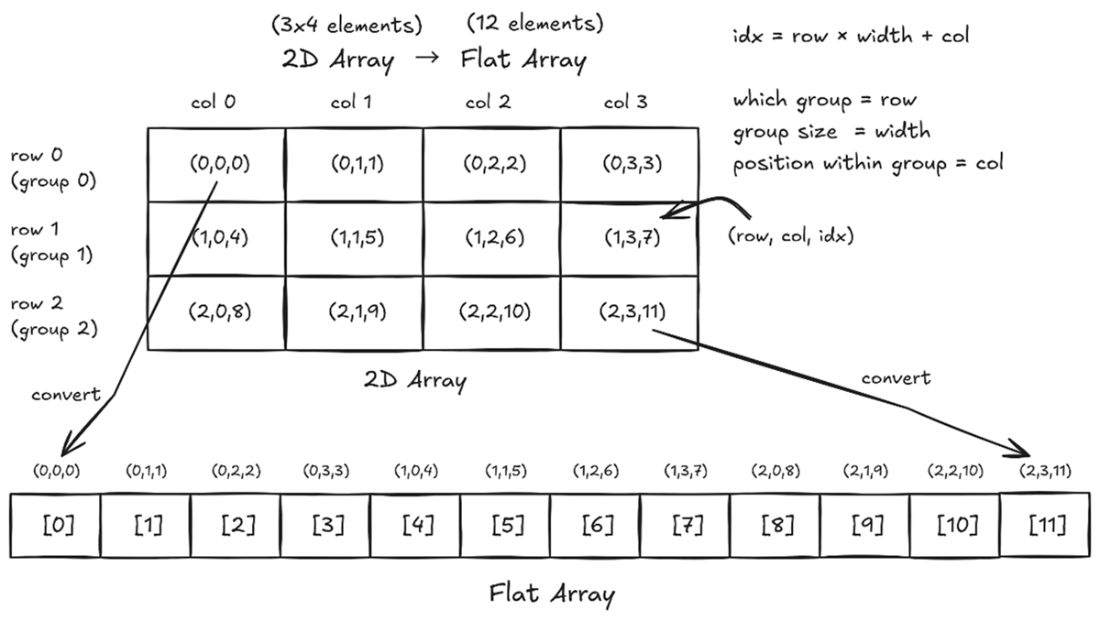
Row-major flattening: laying out a 2D array in a 1D flat array one row after another, the way C and CUDA store 2D arrays. Each element's flat index is computed as row × width + col: with width = 4, row 1, col 3 becomes index 7 (1 × 4 + 3), and row 2, col 0 becomes index 8 (2 × 4 + 0).
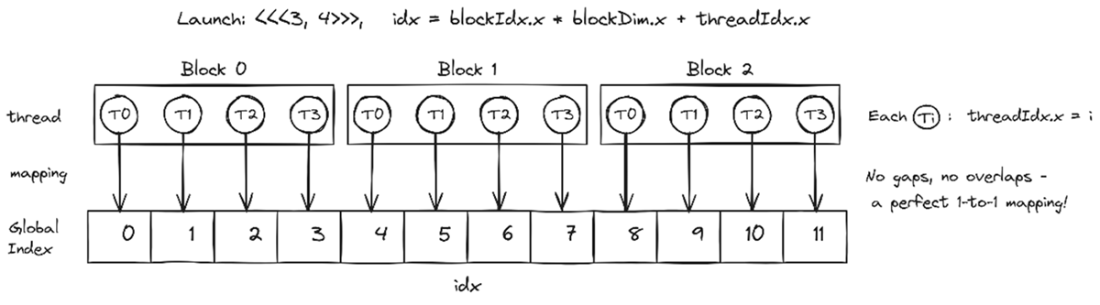
A perfect 1-to-1 mapping: one thread per element, no gaps, no overlaps. With <<<3, 4>>> and idx = blockIdx.x × blockDim.x + threadIdx.x, each of the 12 threads lands on exactly one element: Block 0 covers 0–3, Block 1 covers 4–7, and Block 2 covers 8–11.
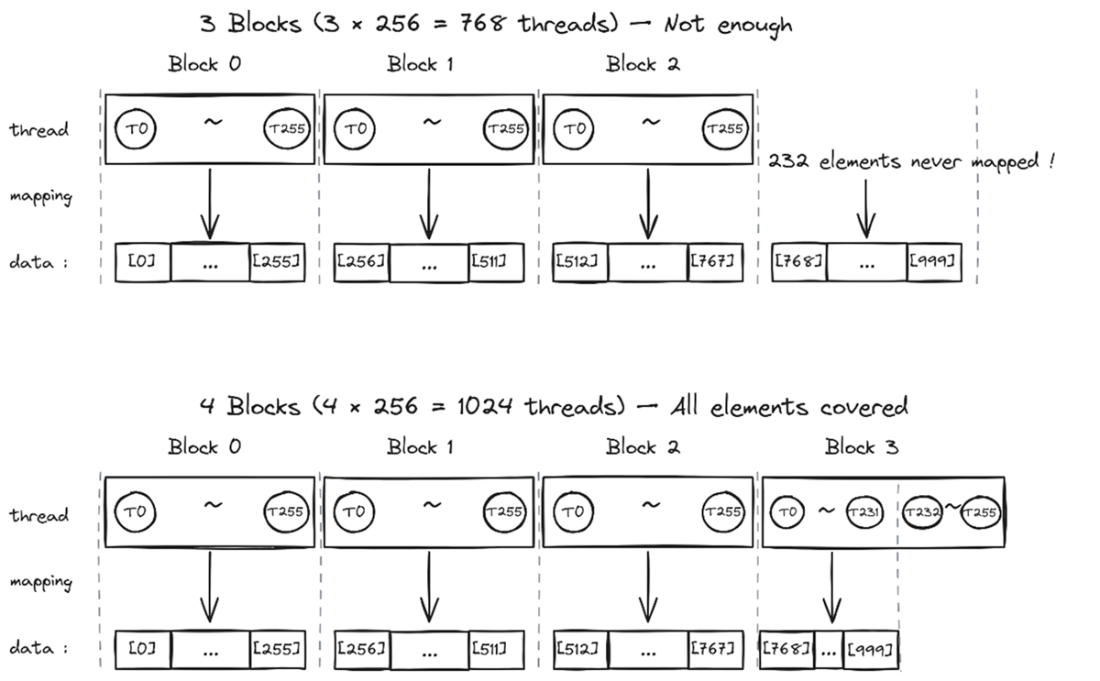
Too few blocks leaves gaps; one more block covers everything. With 3 blocks of 256 threads (768 total), the last 232 elements are never touched; simply adding a fourth block covers all 1,000 elements, though the 24 extra threads (indices 1,000–1,023) must be guarded with a bounds check.
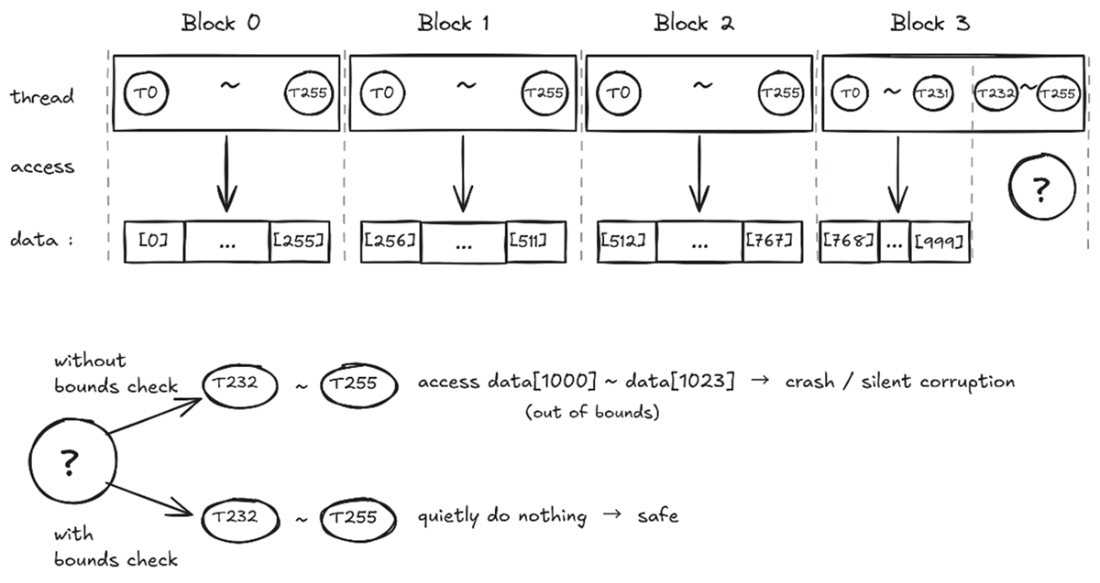
Bounds check: the one-line fix for out-of-bounds access. Without it, threads T232–T255 in Block 3 blindly access data[1000]–data[1023], memory that doesn't belong to your array, causing crashes or silent corruption. With it, those same threads simply skip the work and do nothing: safe, but still consuming GPU resources.
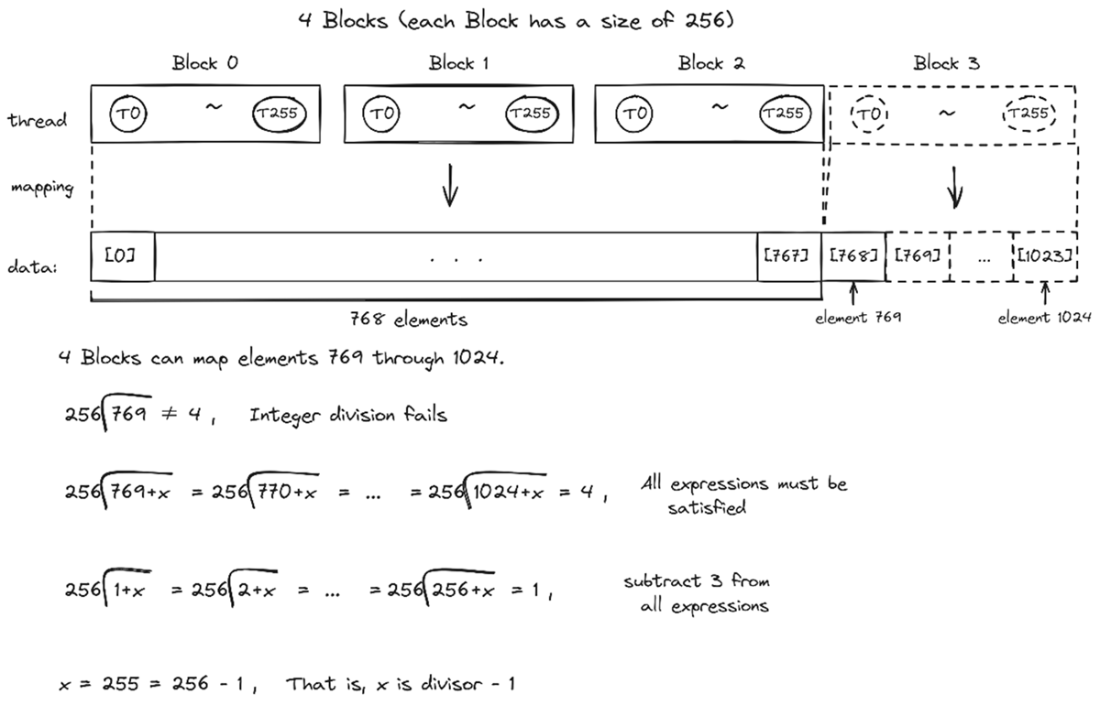
Ceiling division: why (divisor − 1) is the right amount to add. With 1,000 elements and 256 threads per block, plain integer division gives 3 blocks, which is not enough. Adding (256 − 1 = 255) to the numerator guarantees that any leftover elements tip the result up to 4 blocks, while exact multiples stay put.
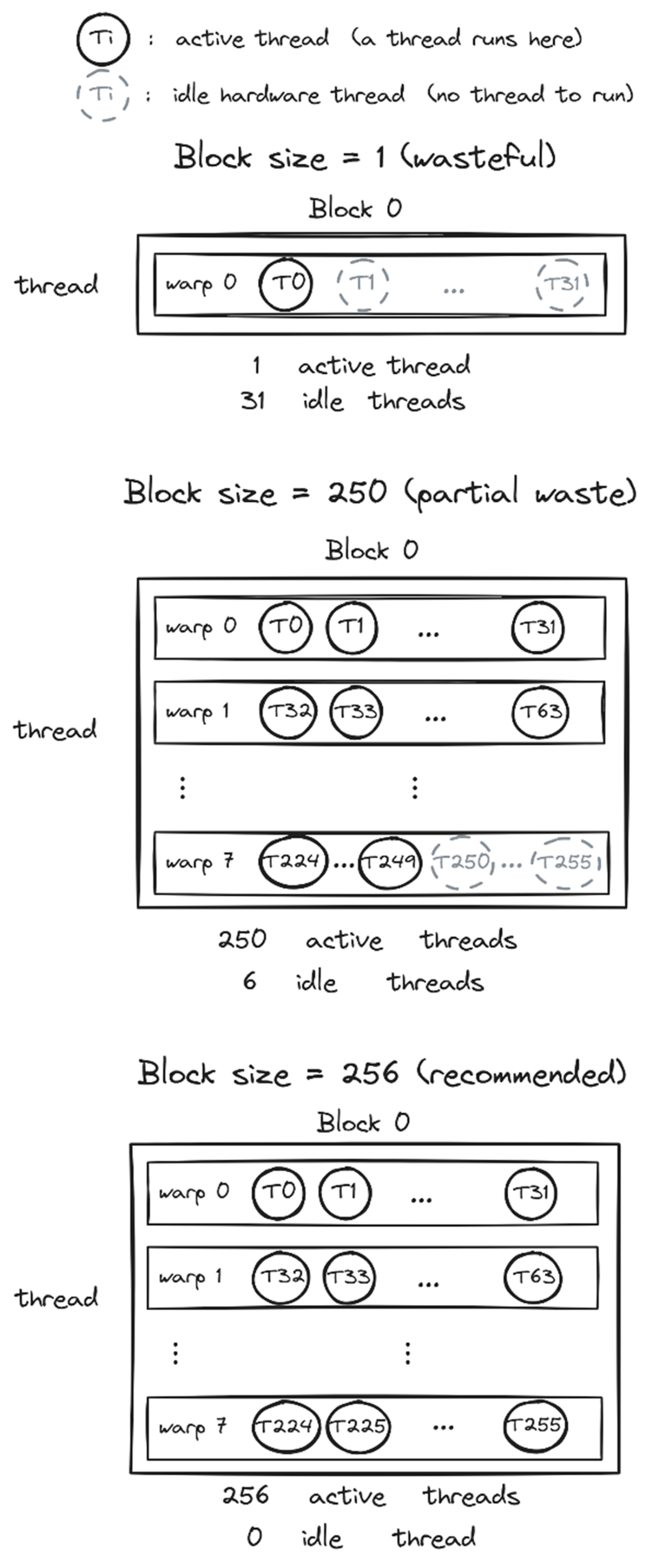
Block size matters: warp utilization from wasteful to optimal. A block size of 1 still occupies a full warp, leaving 31 of its 32 hardware threads idle, about 97% waste. A block size of 250 is better but still wastes 6 threads in the last warp. A block size of 256 (a multiple of 32) fills every warp completely, leaving no thread in a warp idle.
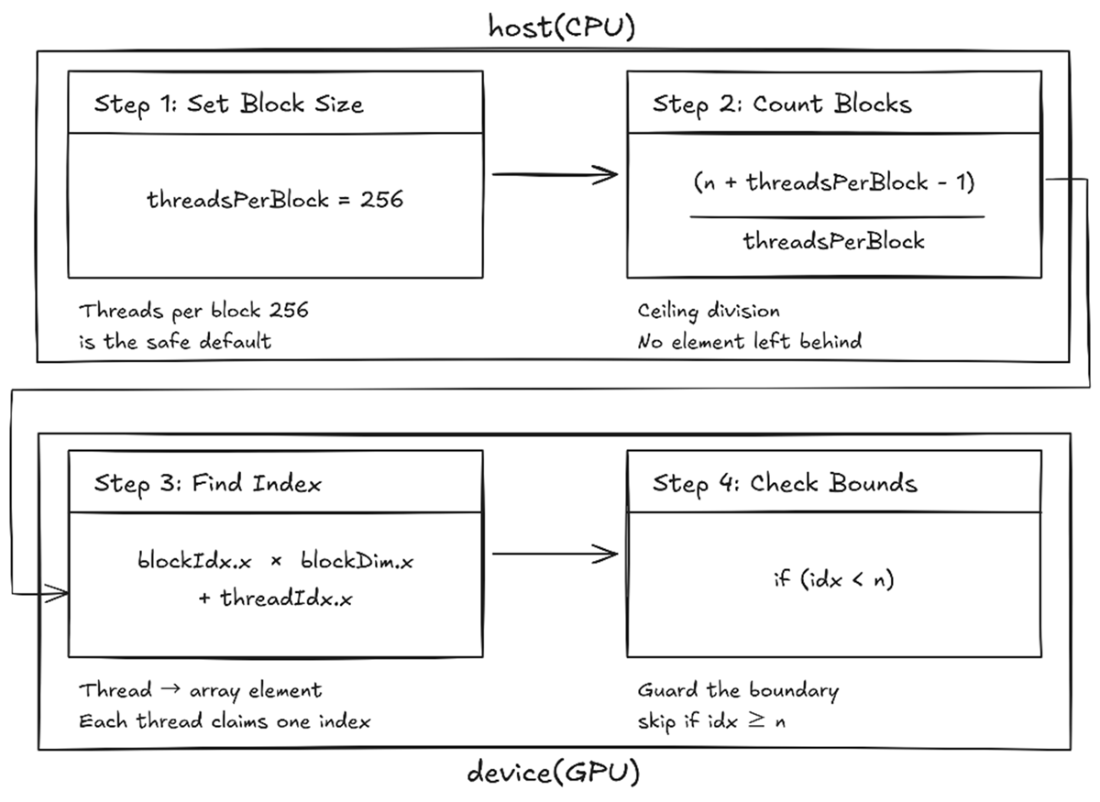
The thread-to-element recipe: four steps nearly every CUDA kernel follows. Set your block size to 256, use ceiling division to count blocks, compute each thread's global index, then guard the boundary with if (idx < n). Get these four steps right and every element is covered with no out-of-bounds access. Steps 1 and 2 run on the host (CPU); steps 3 and 4 run inside the kernel on the device (GPU).
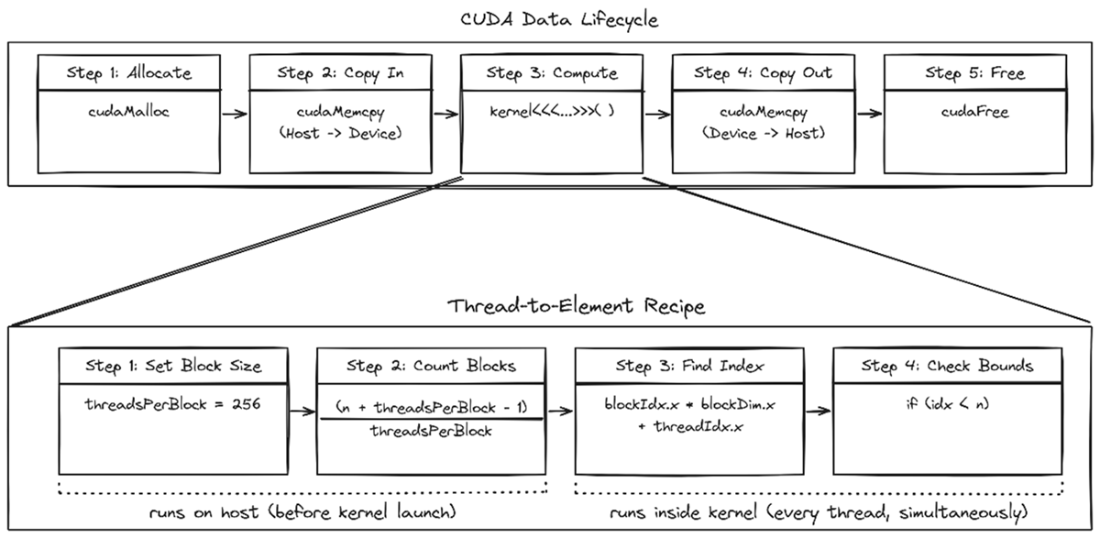
The thread-to-element recipe is a zoom-in on the lifecycle’s Step 3 (Compute). The CUDA Data Lifecycle shows the big picture: allocate, copy in, compute, copy out, free. The thread-to-element recipe zooms into the Compute step, splitting it into two host-side steps (set block size, count blocks) and two kernel-side steps (find index, check bounds) that run simultaneously across every thread.

Summary

  • Grids are composed of blocks, and blocks are composed of threads. CUDA organizes execution like a school with classrooms and students. A single block holds at most 1,024 threads.
  • Going past the 1,024-thread limit makes the launch fail: no threads run, so the data comes back unchanged. Call cudaGetLastError() right after a launch to see the error.
  • The global index formula int idx = blockIdx.x * blockDim.x + threadIdx.x gives each thread its unique position.
  • The ceiling division formula (n + threadsPerBlock - 1) / threadsPerBlock rounds up so no elements are missed.
  • Include a bounds check, if (idx < n), to prevent out-of-bounds memory access.
  • Start with 256 threads per block, a multiple of 32 that works for most kernels.
  • Each block is handed to a single SM and runs there from start to finish, and any extra blocks wait their turn. That is what lets the same kernel scale from a laptop GPU to a data-center GPU without a code change.
  • Blocks may run in any order and have no simple way to synchronize with each other while a kernel is running. Don’t assume Block 0 finishes before Block 1.
  • Kernel launches return immediately. Call cudaDeviceSynchronize() after the launch to make the kernel’s completion point explicit, and use it sparingly once you tune for performance.

FAQ

Why can’t a single CUDA block handle very large arrays?A single block is limited to at most 1,024 threads on modern GPUs. If your array needs more threads than that, a launch like <<<1, 10000>>> is invalid and the kernel won’t run. To scale up, you split the work across multiple blocks.
What is the difference between a grid, a block, and a thread?A grid is the entire collection of blocks launched by one kernel call, a block is a group of threads that can work together, and a thread is the smallest unit that does the actual work. In short: grid = whole launch, block = classroom, thread = student.
Why is threadIdx.x not enough to index a 1D array when using multiple blocks?threadIdx.x resets to 0 inside every block, so different blocks would reuse the same indices. That causes multiple blocks to write the same array elements while leaving others untouched. You need to include the block offset too.
What is the global index formula for a thread in a 1D CUDA kernel?The global index is int idx = blockIdx.x * blockDim.x + threadIdx.x;. This gives each thread in the whole grid a unique number so it can map to a unique array element.
How do you calculate how many blocks to launch for an array of size n?Use ceiling division: int numBlocks = (n + threadsPerBlock - 1) / threadsPerBlock;. This rounds up so any leftover elements still get covered by one extra block.
Why do we usually choose 256 threads per block?256 is a good default because it is a multiple of the warp size (32), so warps are fully utilized. Smaller or non-multiple sizes can waste hardware threads; 256 usually gives a good balance of simplicity and efficiency.
Why do you need a bounds check like if (idx < n) in the kernel?Because ceiling division often creates extra threads in the last block. Those extra threads would otherwise access memory past the end of the array. The bounds check makes them safely skip the work.
What happens if you launch too few blocks?Some array elements will never be processed. For example, with 1,000 elements and 256 threads per block, 3 blocks cover only 768 elements, leaving 232 untouched. The fix is to round the block count up.
What happens if you swap the grid size and block size in the kernel launch?If you write <<<256, (n+255)/256>>> instead of <<<(n+255)/256, 256>>>, you may accidentally put too many threads in a block and exceed the 1,024-thread limit. The launch can fail with an invalid configuration error.
What is the basic four-step recipe for turning a 1D array problem into a correct multi-block CUDA kernel?1) Choose a block size, usually 256. 2) Compute the number of blocks with ceiling division. 3) Compute each thread’s global index with blockIdx.x * blockDim.x + threadIdx.x. 4) Guard the work with if (idx < n). This pattern covers the whole array safely.

pro $24.99 per month

  • access to all Manning books, MEAPs, liveVideos, liveProjects, and audiobooks!
  • choose one free eBook per month to keep
  • exclusive 50% discount on all purchases
  • renews monthly, pause or cancel renewal anytime

lite $19.99 per month

  • access to all Manning books, including MEAPs!

team

5, 10 or 20 seats+ for your team - learn more


Close
choose your plan

team

monthly
annual
$49.99
$499.99
only $41.67 per month
  • five seats for your team
  • access to all Manning books, MEAPs, liveVideos, liveProjects, and audiobooks!
  • choose another free product every time you renew
  • choose twelve free products per year
  • exclusive 50% discount on all purchases
  • renews monthly, pause or cancel renewal anytime
  • renews annually, pause or cancel renewal anytime
  • Grokking GPU Programming Grokking GPU Programming ebook for free

Close
choose your plan

team

monthly
annual
$49.99
$499.99
only $41.67 per month
  • five seats for your team
  • access to all Manning books, MEAPs, liveVideos, liveProjects, and audiobooks!
  • choose another free product every time you renew
  • choose twelve free products per year
  • exclusive 50% discount on all purchases
  • renews monthly, pause or cancel renewal anytime
  • renews annually, pause or cancel renewal anytime
  • Grokking GPU Programming Grokking GPU Programming ebook for free