2 Your first parallel program
The chapter introduces CUDA through a simple grading-room analogy: a CPU hands work to a GPU, where many threads run the same kernel code in parallel. It starts with a minimal “Hello, Parallel World!” program that uses __global__ to define a kernel, <<<1, 8>>> to launch eight threads, and cudaDeviceSynchronize() to make the host wait for the device to finish. Along the way, it explains the basic CUDA vocabulary, the role of the host and device, and why kernel launches are asynchronous even though the host code keeps running.
The chapter then shows how individual threads distinguish their own work using threadIdx.x, which gives each thread a unique index within a block. That index is used to filter output so that only one thread prints, and then to map threads onto array elements in a small parallel kernel that squares numbers. This introduces the core SPMD style of GPU programming: one program body, many threads, each operating on a different piece of data, with bounds checks such as if (idx < n) preventing out-of-range accesses.
Finally, the chapter builds a complete CUDA solution by moving data between host and device memory. It walks through the standard five-step workflow: allocate GPU memory, copy input from host to device, launch the kernel, copy results back, and free device memory. The text emphasizes common beginner mistakes—forgetting to synchronize, using the wrong copy direction, or missing bounds checks—and frames debugging around this lifecycle. It also briefly connects the software view to hardware reality, explaining that GPUs run threads in warps on SMs, while still keeping the chapter focused on single-block, embarrassingly parallel problems.
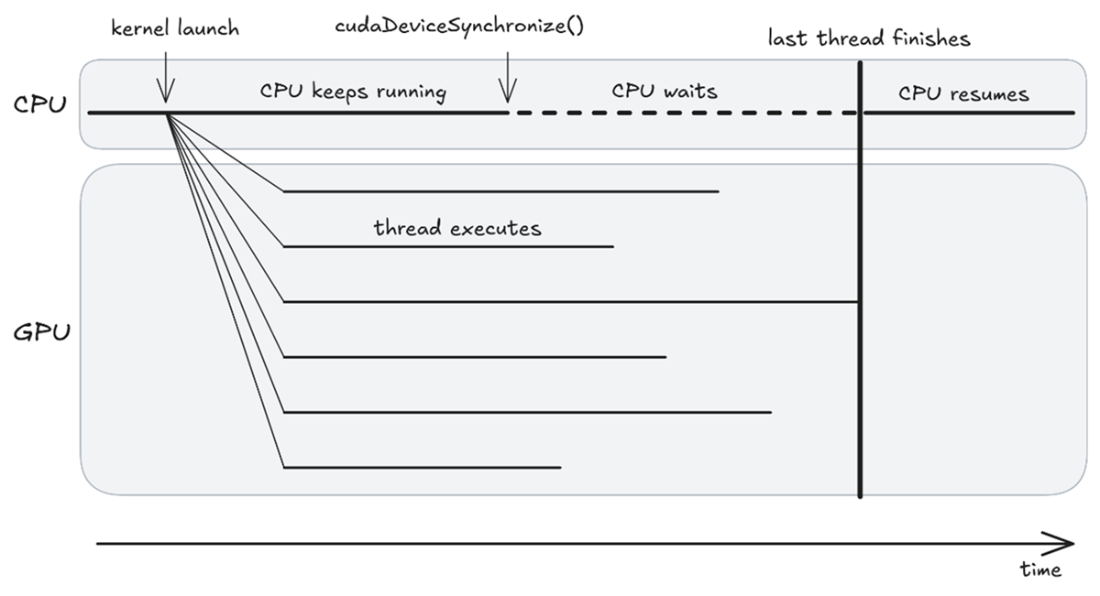
Launch, then wait. The CPU fires the kernel and keeps going while the threads fan out and run in parallel. Threads finish at different times; cudaDeviceSynchronize() makes the CPU wait until the last thread finishes.
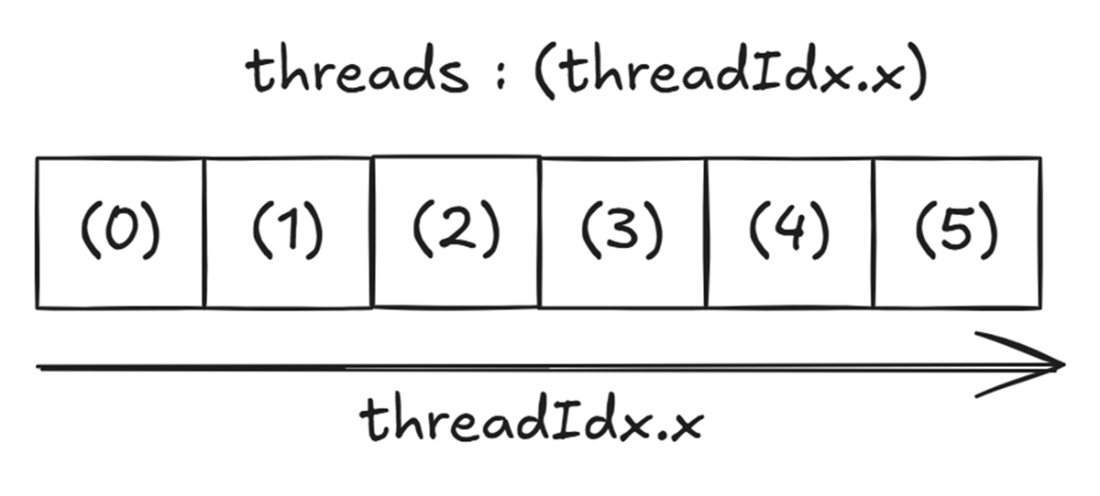
1D thread layout: one index per thread. In a 1D block, each thread gets a unique threadIdx.x starting from 0; that's all it needs to know which element to work on. (These numbers are unique within a block; with multiple blocks, each block counts from 0 again.) The six threads shown here are what a one-dimensional launch like kernel<<<1, 6>>>() creates: the launch is what brings the threads into being, and each one then reads its own threadIdx.x.
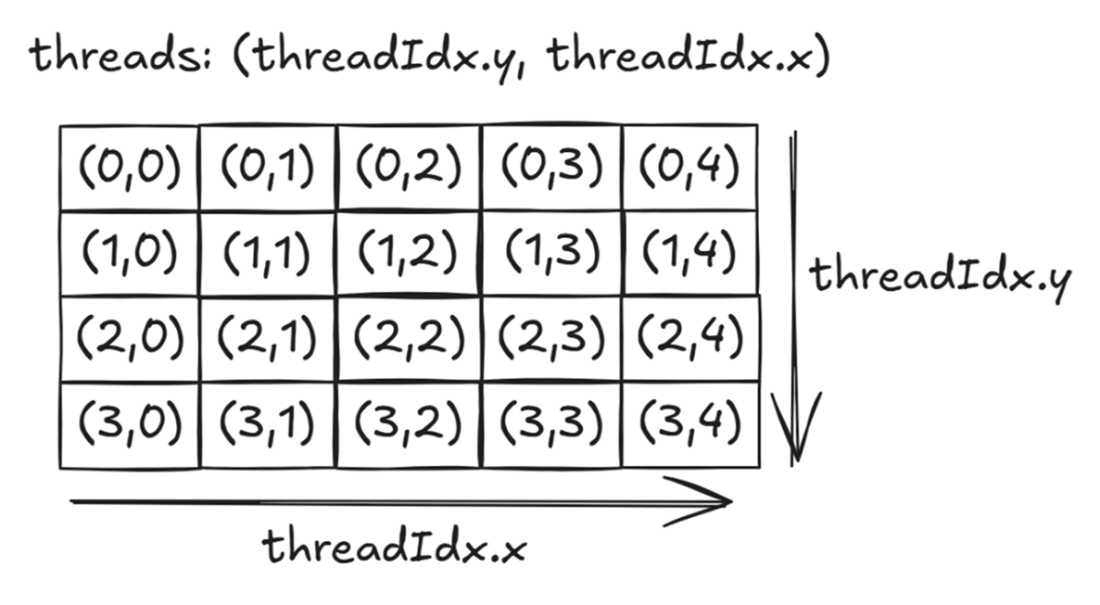
2D thread layout: two coordinates, one thread. In a 2D block, each thread is identified by a (threadIdx.y, threadIdx.x) pair (row, column), making it a natural fit for working with grids, images, or matrices. A block like this comes from a 2D launch, where you pass the block shape as a dim3 instead of the single number a 1D launch uses: here dim3 block(5, 4); kernel<<<1, block>>>(); for 5 columns (x) and 4 rows (y).
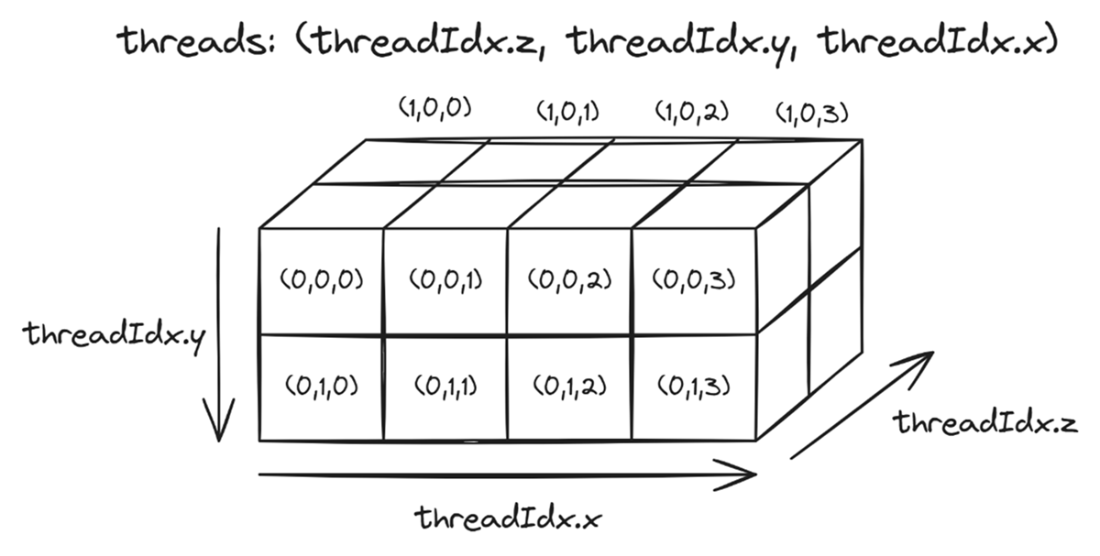
3D thread layout: three coordinates, one thread. In a 3D block, each thread is identified by a (threadIdx.z, threadIdx.y, threadIdx.x) triple (depth, row, column), making it a natural fit for working with volumetric data like 3D simulations or video frames. The same idea extends the launch: you pass a 3D dim3, for example dim3 block(4, 2, 2); kernel<<<1, block>>>(); for 4 columns (x), 2 rows (y), and 2 layers (z).
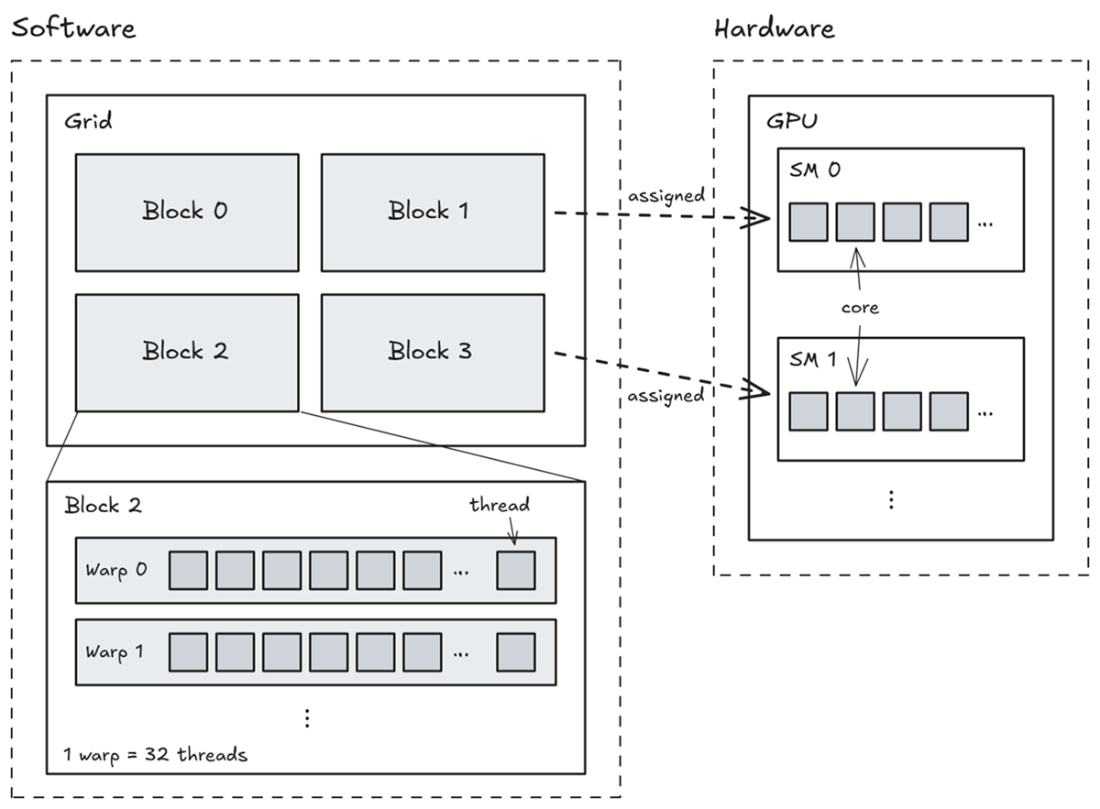
The containment hierarchy and where it runs. A kernel launch creates a grid; the grid contains blocks; each block’s threads are packed into warps of 32; and each block is assigned to an SM, whose cores execute those warps. Software on the left, hardware on the right.
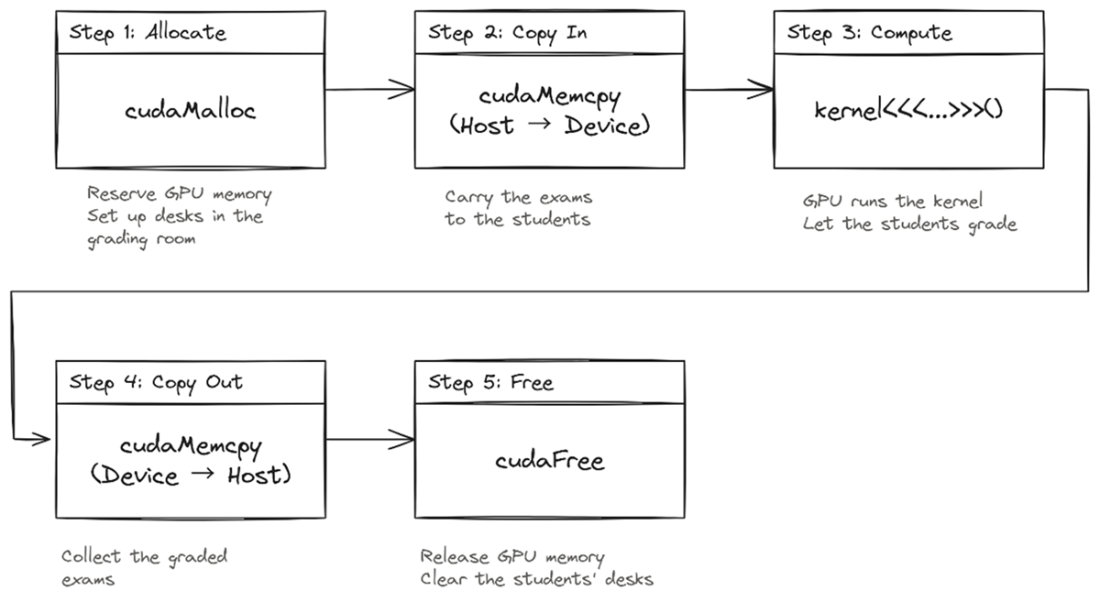
The CUDA data lifecycle, five steps from CPU to GPU and back: allocate GPU memory, copy data in, run the kernel, copy results out, and free the memory.
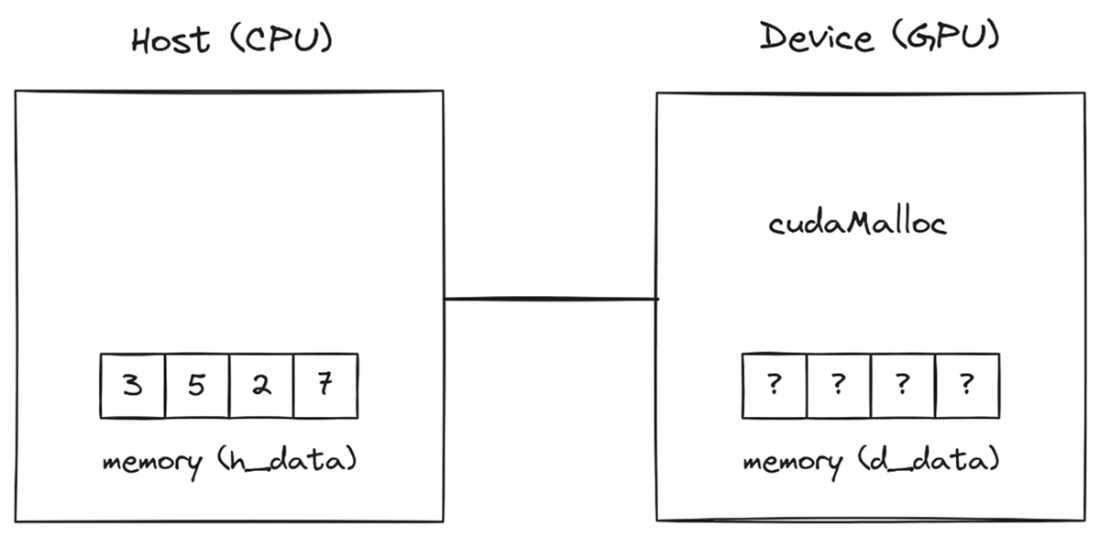
Step 1 — Allocate: reserving space on the GPU. cudaMalloc carves out a block of device memory the same size as the host array, but doesn't copy anything yet. The GPU slots contain uninitialized data (the ? marks) until the copy step. Each region is labeled with the pointer that refers to it: h_data for the host array and d_data for the device array, a reminder that they point into two separate memories.
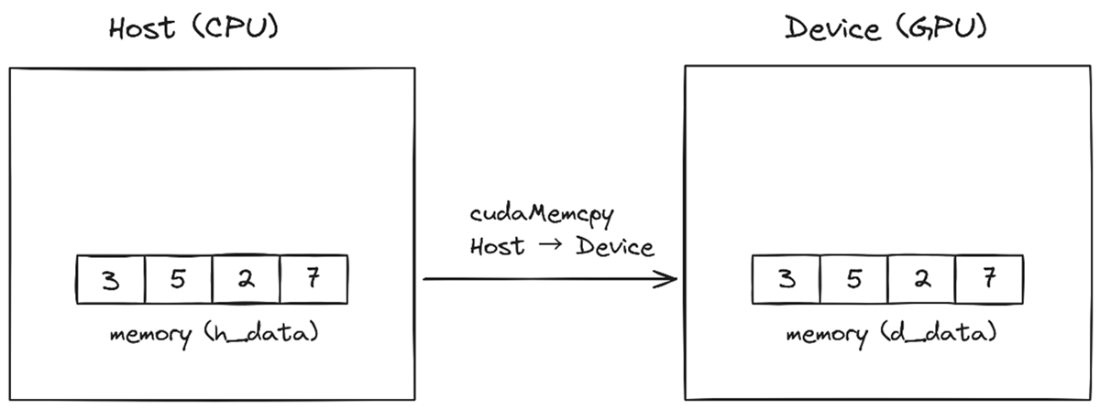
Step 2 — Copy In: moving data from host to device. cudaMemcpy transfers the array from CPU memory to the GPU: both sides now hold the same values, but from this point on, the GPU works with its own copy.
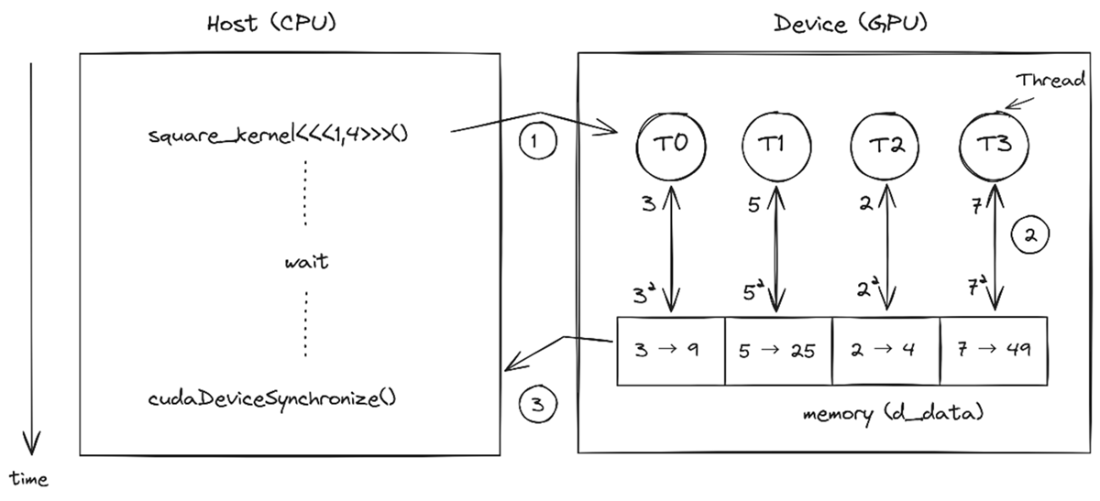
Step 3 — Compute: the GPU takes over. The CPU launches the kernel and steps back to wait; all four threads fire at once, each one reading its value from device memory, squaring it, and writing the result back (the up and down arrows), all in parallel. When the last thread finishes, cudaDeviceSynchronize() returns and the CPU carries on.
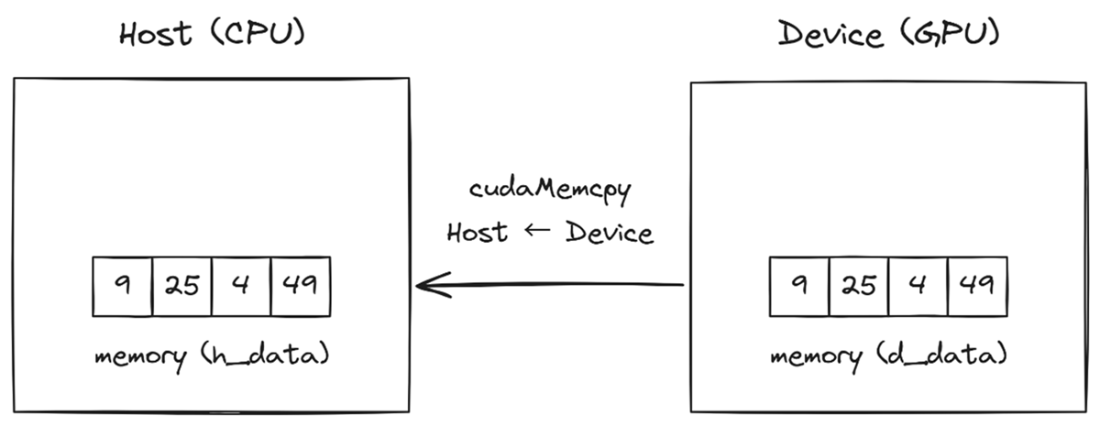
Step 4 — Copy Out: bringing the results back to the host. cudaMemcpy transfers the computed results from device to host: the squared values (9, 25, 4, 49) are now back on the CPU, ready to be used.
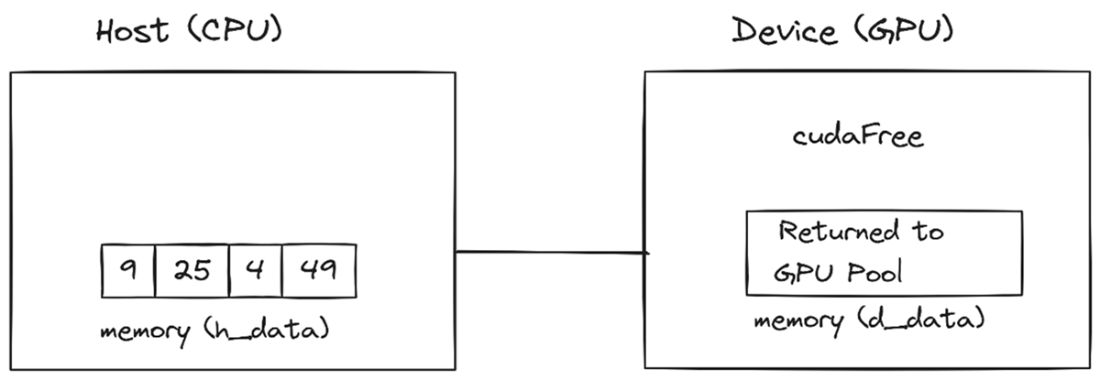
Step 5 — Free: clearing the desks out of the room. cudaFree returns the device memory to the GPU pool now that the results are safely on the host.
Summary
- __global__ marks a function as a kernel that runs on many GPU threads in parallel.
- <<<1, n>>> launches a kernel with n threads in one block. Each thread executes the same code independently.
- A kernel launch is asynchronous: the CPU moves on immediately, so call cudaDeviceSynchronize() before you rely on the GPU’s results.
- threadIdx.x gives each thread a unique index from 0 to n−1, its “desk number” for finding its own work.
- The hardware runs threads in warps of 32 on its SMs, and the CUDA cores inside an SM do the math. You launch threads; the hardware does the packing.
- The 5-step pattern: allocate GPU memory, send data in, launch kernel (and synchronize), retrieve results, free memory. Remember the analogy: Set Up Desks, Carry Exams, Grade, Collect, Clear. Almost every CUDA program that processes data follows it.
- Bounds check: if (idx < n) prevents threads from accessing memory they don’t own. Make it a habit.
- Data parallelism: the same operation applied to different data elements in parallel. Every kernel in this chapter is one instance of it, and the patterns in Part 2 are built on it.
FAQ
What is the basic structure of a parallel CUDA program in this chapter?
A simple CUDA program here has a host-sidemain() function on the CPU and a kernel function on the GPU. The host launches the kernel, waits for it to finish with cudaDeviceSynchronize(), and can also move data between host and device memory.What does __global__ mean in CUDA?
__global__ marks a function as a kernel. That means the function is called from the CPU but runs on the GPU across many threads in parallel.Why do CUDA kernels use the <<<...>>> launch syntax?
The triple-angle-bracket syntax is CUDA’s special way to launch a kernel. The two numbers inside it tell CUDA how many blocks and how many threads per block to create for the work.Why can’t you call a kernel like a normal function?
A kernel is not an ordinary CPU function call. It must be launched with <<<...>>>; a plain call likehelloKernel(); is rejected by the CUDA compiler.What does threadIdx.x do?
threadIdx.x gives each thread its index within a block. In this chapter’s 1D examples, each thread uses that number to know which piece of work or which array element belongs to it.Why do CUDA kernels need cudaDeviceSynchronize()?
Kernel launches are asynchronous, so the CPU keeps going immediately after launching the GPU work. cudaDeviceSynchronize() makes the CPU wait until the GPU has finished, which prevents missing or partial output.What is the difference between host memory and device memory?
Host memory is the CPU’s memory, usually allocated withmalloc. Device memory lives on the GPU and must be allocated with cudaMalloc. A kernel can only directly access device memory.
 Grokking GPU Programming ebook for free
