2 Diving Into Go
This chapter takes a hands-on approach by guiding the reader through building a real utility that counts words, using it as a way to introduce the Go development experience. It begins with setting up the basic tools and project structure, including the Go toolchain, an editor, Git, and a module-based project root. Along the way, it emphasizes that Go is not just a language but a practical ecosystem centered on the go command, standard conventions, and workflow tools that help manage formatting, dependencies, testing, and documentation.
The first version of the program starts simply, using a hard-coded string and a basic loop to count spaces as a proxy for words. This leads into a tour of core language concepts such as package declarations, imports, blocks and scope, variable declaration, short variable syntax, comments, and the three-part for loop. The chapter also highlights Go’s formatting culture with gofmt, explains how exported identifiers work through capitalization, and shows how the standard library can replace manual logic with cleaner solutions. In particular, strings.Fields simplifies word splitting and makes the program shorter and more reliable.
From there, the chapter expands the program to read text from files instead of from a hard-coded string. It introduces os.ReadFile, multiple return values, basic error handling with log and os.Exit, and command-line arguments through os.Args, while warning about out-of-range panics and the need to check slice lengths. To improve memory efficiency, it then replaces whole-file reads with buffered scanning via bufio.Scanner, showing how documentation and examples help uncover better patterns and how function types can customize scanner behavior. Finally, the program is extended to process multiple files using range loops, demonstrating how Go’s standard library, interfaces, and concise control flow combine to support practical, scalable command-line tools.
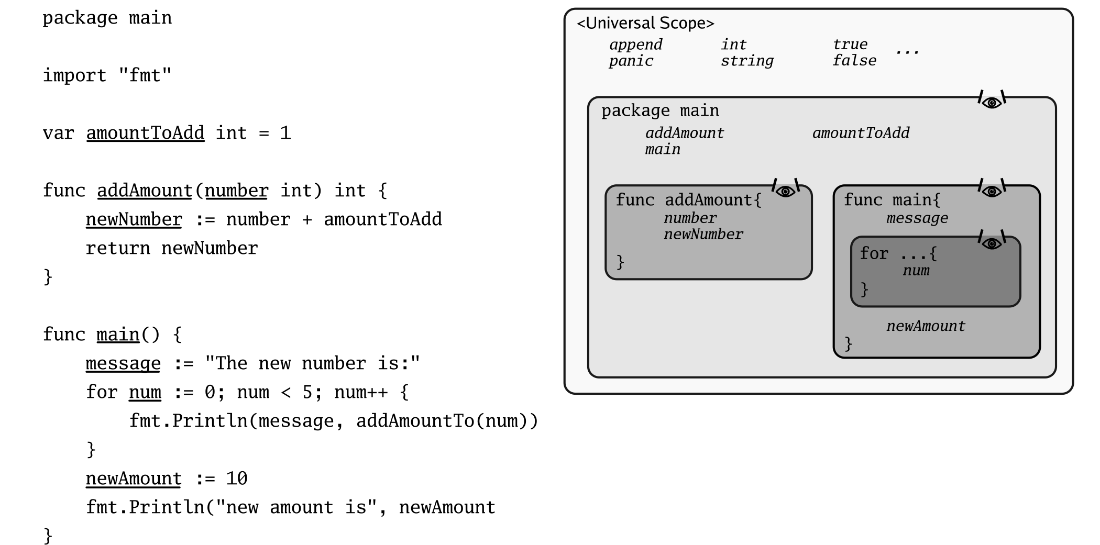
Scopes And Visibility
Anatomy Of A for Statement

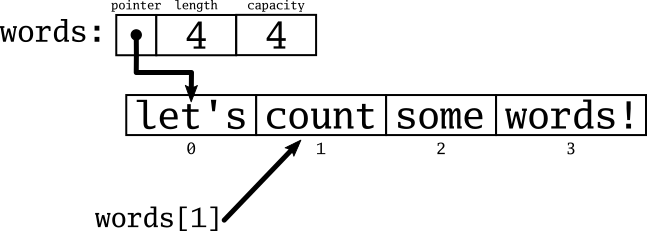
The Slice Of Words
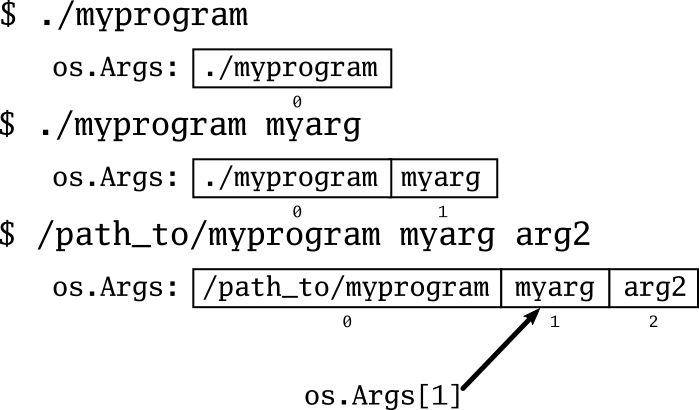
os.Args Illustrated
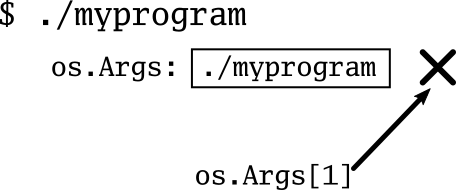
Looking Where You Shouldn’t
Summary
- Go is a compiled, statically-typed language with a simple syntax and rich feature-set.
- Go has great documentation support, and once you know how to look things up, you can find information on types and methods as well as examples to help you get started.
- Go has an extensive standard library that can provide a variety of useful features and help you simplify your code.
FAQ
What is the main goal of the chapter’s example program?
The chapter builds a small word-counting program, similar to the Unixwc utility, to introduce Go language basics and core tools in a hands-on way.What tools do I need before following along with the chapter?
You should have Go installed, plus access to a terminal. A code editor or IDE is recommended, and Git is useful for fetching dependencies and working with common Go workflows.Why does the chapter create a project root and initialize a Go module?
The project root keeps the code organized, andgo mod init creates a go.mod file so Go knows the module name and can manage dependencies consistently.What does the main package mean in Go?
main is special because it tells Go you are building an executable program. A file in the main package should contain a main() function, which is the program’s entry point.How does the first version of the program count words?
The first version counts spaces in a hard-coded string using afor loop, then adds 1 to get the number of words. This works for simple input, but it breaks with extra spaces.Why is strings.Fields better than counting spaces?
strings.Fields splits text into words while ignoring extra whitespace, so it produces a more accurate word count than simply counting spaces.What is gofmt and why is it important?
gofmt is Go’s standard formatting tool. It automatically formats code in a consistent style, which reduces argument about formatting and makes Go code easier to read.How does Go handle errors when reading a file?
Functions likeos.ReadFile return a value and an error. You should check whether the error is nil; if not, log the error and usually stop the program with os.Exit(1).Why does the chapter switch from os.ReadFile to bufio.Scanner?
os.ReadFile loads the entire file into memory, while bufio.Scanner reads data in smaller chunks. That makes the program more efficient and able to handle large files.How can the program count words in multiple files?
It usesos.Args to read command-line arguments, checks that at least one filename was provided, then loops over os.Args[1:] with range to process each file one by one.
 Go in Action, Second Edition ebook for free
