4 Command-line interfaces
This chapter shows how to design practical, user-friendly command-line programs in Go by building a small performance-testing tool called HIT and a reusable client package it depends on. It clarifies the difference between arguments (positional inputs like a URL) and flags (optional configuration like -n and -c), and advocates separating the CLI (cmd/hit) from importable logic (package hit) for reuse, testing, and maintainability. After a quick first version that prints a logo and usage, it demonstrates structuring a project, building and running binaries, and adding sensible defaults so the tool remains convenient even when users omit common options.
The chapter first implements a custom flag parser with the os package to demystify how parsing works: it maps flag names to higher-order parsing functions (closures) that hold pointers to target variables, splits arguments into name/value pairs, and updates a config struct while wrapping errors for clarity. It then replaces this manual approach with the standard flag package, using a FlagSet configured to continue on error, registering flags via StringVar and IntVar, and relying on Parse to populate variables and auto-generate helpful usage text. The discussion covers flexible flag syntax (with or without “=”, single or double dashes), testing considerations around the default FlagSet, and general coding habits like left-aligned flow and scoped error variables.
Going further, it explains how to enforce richer rules than basic type checks by implementing custom flag.Value parsers. A positiveIntValue ensures n, c, and rps are greater than zero and is registered via FlagSet.Var; defaults come from the linked variable’s current value, and strconv.ParseInt accommodates formats like underscores. Next, the URL becomes a required positional argument retrieved with FlagSet.Arg(0), and the chapter shows how to customize usage output with FlagSet.Usage to clearly describe “usage: hit [options] url.” Finally, it adds post-parse validation for cross-field rules and required inputs (e.g., n must be ≥ c and URL must be valid), printing consistent errors to the FlagSet’s output and reprinting usage, rounding out a robust pattern for CLI ergonomics, correctness, and maintainability.
Separating the CLI tool from the hit package for reusability. For instance, we could add a REST API and reuse the same hit package.

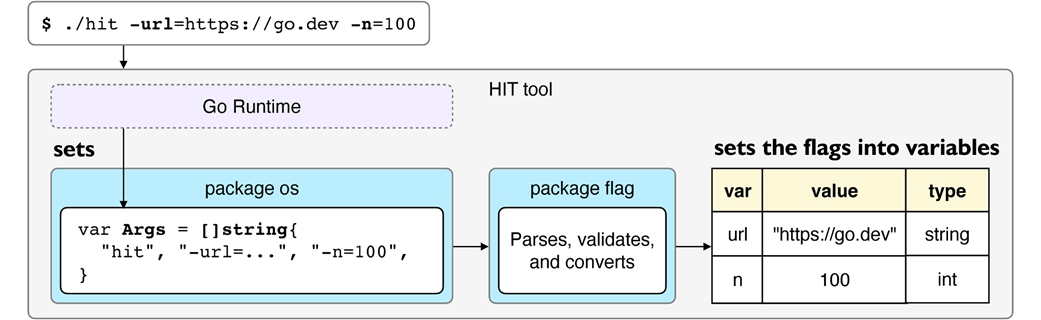
The flag package parses and saves the command-line arguments set in os.Args by the Go runtime into type-safe regular Go variables that we provide.
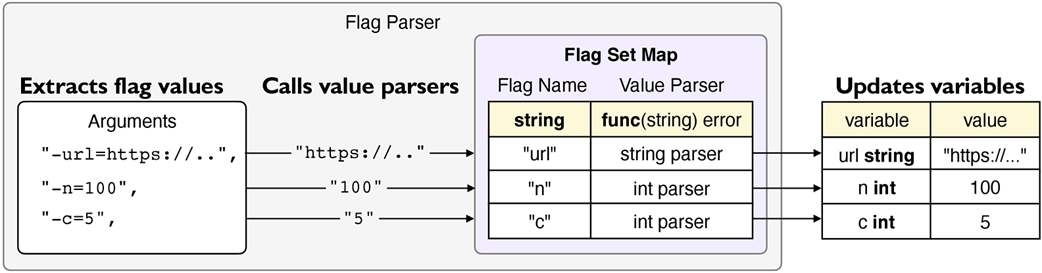
Mapping the flags to value parser functions. Value parsers parse the flag values they receive from the flag parser and set the flag values into variables.
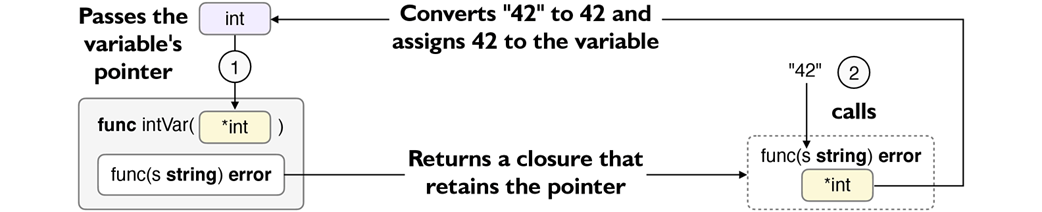
Calling intVar returns a closure that retains the variable's pointer. Calling the closure updates the original variable's value through the pointer.
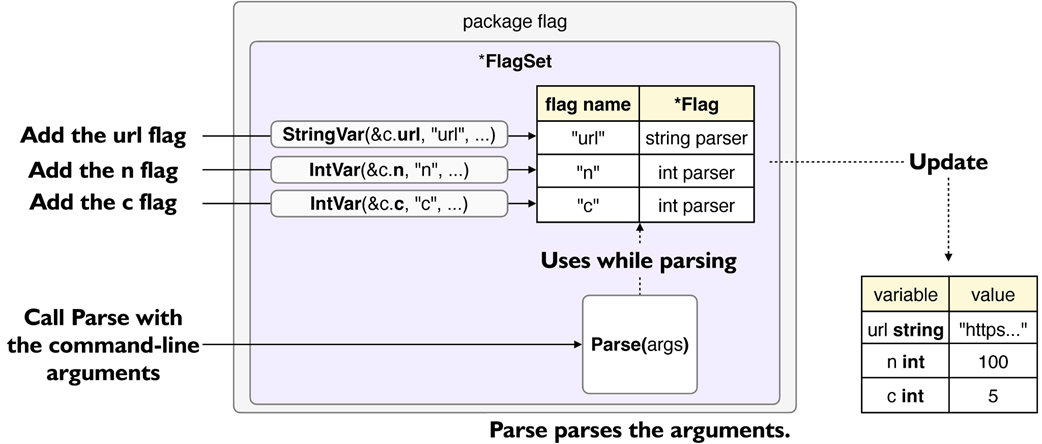
FlagSet maps flag names to Flags. Its Parse method parses the flags from command-line arguments, and the value parsers update the variables.
A Flag has a Value field with the type of the Value interface. Value parsers, such as stringValue or intValue, implement the Value interface.
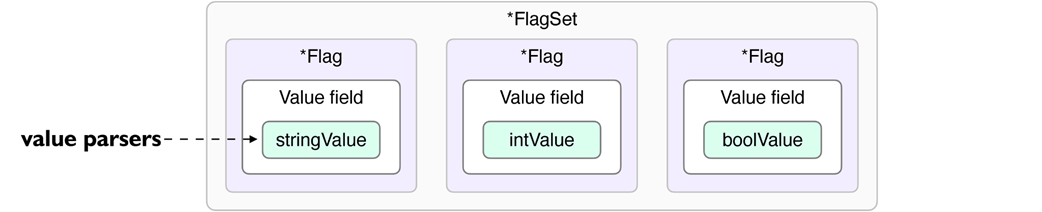
The intValue is a Value implementation that can handle int variables. The variable c is an integer variable linked to an intValue parser.

Summary
- Arguments are typically the necessary parameters for the program, while flags are often optional settings that modify how the program behaves.
- Separating the user interface logic from the business logic provides reusability.
- The cmd directory is a convention to store the code for executable programs.
- Backticks define a raw string literal. The compiler doesn't interpret escape characters in raw string literals, making it easy to create multi-line strings.
- Package-level identifiers (e.g., variables) are accessible throughout the package that declares them. Exporting makes them accessible from other packages.
- We can change the output binary name using the -o flag while using the go tool.
- Command-line arguments are string values. The flag package parses each argument into the specified type-safe variable that we can use in our programs.
- os.Args is a string slice variable that holds command-line arguments.
- Keeping function signatures uniform allows us to store them in maps, slices, etc.
- A closure returned by a function can access that function's surroundings.
- Higher-order functions are those that return or take other functions as input. They help us provide adaptor functions that bridge different signatures (e.g., parseFunc).
- Using the if err := ...; err != nil syntax scopes the err to the if statement.
- Naming the fields to match the flag names makes it easier to see their relationship.
- fmt.Errorf with "%w" wraps an error in a new error, creating an error chain.
- errors.Is detects and returns true if an error exists in the given error chain.
- Idiomatic code is left-aligned, which makes exit conditions clear. Avoid deeply right-aligning the code with conditionals, which makes the code harder to grasp.
- os.Exit exits the program with a status code. Non-zero code means a failure.
- The flag package can parse flags, generate usage messages, and more.
- flag.FlagSet ties flags to variables with a *flag.Flag for each.
- The flag package has a package-level default FlagSet called CommandLine.
- flag.Flag contains flag information and updates a variable via a value parser.
- FlagSet methods such as StringVar and IntVar add flags to a FlagSet.
- Surrounding a text with backticks in a Flag's usage message prints the surrounded text in the final usage message next to the flag's name.
- FlagSet.Parse parses flags and updates variables. Defined flags and positional arguments are available only after parsing ends.
- A flag.Flag has a value parser part to handle different variable types.
- flag.Value has two methods: String and Set.
- FlagSet.Var defines a Flag on a FlagSet with a value parser type.
- FlagSet.Arg returns positional arguments provided after flags (if any).
- FlagSet.Usage is a function that allows customizing the FlagSet's usage.
- FlagSet.Name returns the FlagSet's name.
- FlagSet.Output returns the FlagSet's output (standard error by default). Passing FlagSet.Output to Fprintf allows us to print where the FlagSet prints.
- FlagSet.PrintDefaults prints the usage messages for the flags.
- FlagSet lacks support for mandatory or interdependent flags.

 Go by Example ebook for free
