3 Test coverage and optimization
This chapter introduces a practical toolkit for strengthening Go code beyond basic correctness: measuring what tests actually exercise, optimizing hot paths with data-driven techniques, and reducing feedback time by running tests in parallel. It starts by showing how to use coverage reporting to see which statements are executed, then explains why full coverage alone doesn’t guarantee correctness and how targeted tests reveal real bugs. From there it moves into performance work—writing reliable benchmarks, profiling to find the true bottlenecks, and comparing results—before closing with techniques for parallel testing and race detection to keep suites fast and safe.
The coverage portion uses coverage profiles to visualize what’s tested and highlights that 100% coverage can still miss defects. Careful, behavior-focused tests expose issues such as accepting an empty scheme, panicking on a nil receiver, or assembling empty URLs incorrectly; each is fixed with small, idiomatic changes that also improve robustness (for example, making zero values useful). The takeaway is that coverage is a map, not a guarantee: it guides where to look, but only well-chosen cases validate correctness.
The optimization section builds trustworthy measurements with benchmarks (including sub-benchmarks), then uses profiling to pinpoint costs like repeated string allocations. Rewriting string assembly with a pre-sized strings.Builder cuts allocations and time substantially, and tools like benchstat make improvements clear and comparable. The chapter also explains compiler effects (inlining, dead-code elimination), the classic b.N pitfalls and the “sink” pattern, and how the newer Loop method yields safer, simpler benchmarks. Finally, it shows how to run tests and subtests in parallel, tune parallelism, and use the race detector to surface shared-state bugs early—speeding feedback while preserving reliability.
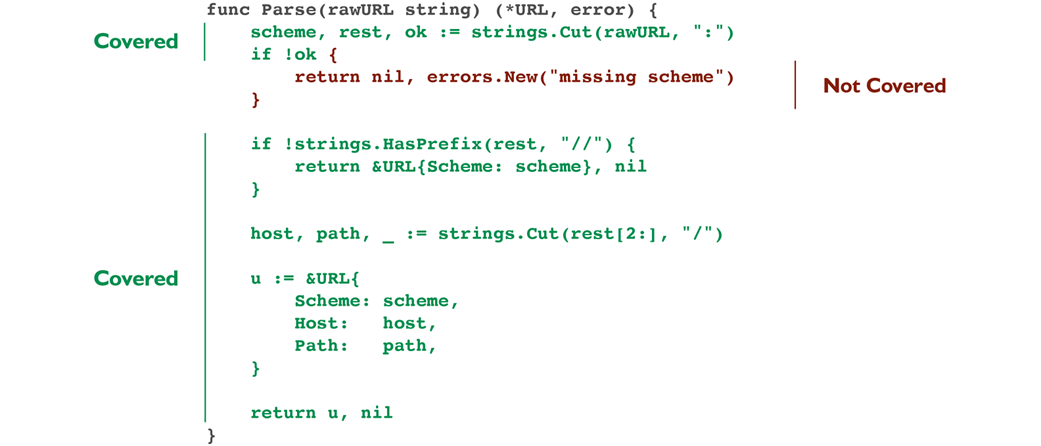
Tests cover every line except the part that returns the missing scheme error. Remember that this output is normally colored.
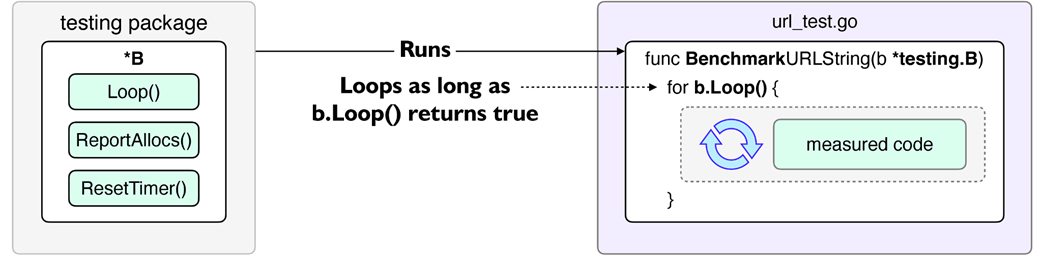
Benchmarking the code in a loop to measure performance.
Summary
- Test coverage helps find untested code, but does not guarantee correctness.
- The coverprofile flag generates a test coverage profile.
- The go cover tool can display the test coverage using a coverage profile. Its -html flag saves the test coverage to a file and then shows the results in a browser.
- The cover flag measures the test coverage while running tests.
- Benchmarks measure a code's performance by repeatedly running it.
- A benchmark has a Benchmark prefix and takes a *testing.B input.
- The testing.B.Loop method returns true during the benchmark run.
- The bench flag specifies the benchmark name to run. Using "." runs all.
- The benchmem flag outputs memory allocation results.
- The "op" means "operation" and denotes a single iteration.
- The "allocs/op" shows the number of memory allocations made on average.
- Tests are run before benchmarks. Pass -run=' ' skips running tests.
- The testing.B.Run method runs a sub-benchmark.
- Profiling helps us understand where our code is spending time and memory.
- The memprofile flag outputs the memory profile of a benchmark run.
- The count flag runs tests or benchmarks for the specified number.
- String concentration may allocate memory since strings are immutable.
- The strings.Builder type combines strings and bytes without allocation.
- Calling len is efficient as it returns the length from the string's internal field.
- The benchstat tool allows us to compare benchmark results.
- The testing.B.N field is automatically set by rerunning the benchmark function.
- A function under a benchmark should not use B.N to change its behavior.
- Benchmarking trivial functions can be inaccurate due to compiler optimizations.
- Inlining moves the body of a function to the caller.
- Deadcode elimination may remove unused instructions.
- Using a package-level variable may prevent compiler optimizations in benchmarks.
- B.Loop is immune to most compiler optimizations. It's more efficient than the classical B.N approach and doesn't require rerunning benchmark functions.
- Avoid using both N and Loop in the same benchmark for accurate results.
- Running tests in parallel helps reduce the time it takes to run tests.
- The t.Parallel method marks a test to run in parallel to other tests.
- The parallel flag controls the number of test functions run in parallel. Setting it to a number larger than the CPU cores can backfire and increase the test run time.
- The race detector helps catch data race issues.
- The -race flag turns on the race detector.
FAQ
How do I measure test coverage in Go and inspect what's covered?
Use go test with the cover flags, then view the report: - Save a profile: go test ./url -coverprofile=cover.out - Open HTML view: go tool cover -html=cover.out (green = covered, red = not covered, gray = non-statements) - See per-function summary in the terminal: go tool cover -func=cover.outDoes 100% test coverage guarantee bug‑free code?
No. Coverage only tells you which statements executed during tests, not whether behavior is correct. You still need thoughtful cases for edge conditions. In the chapter, even with 100% coverage the “empty scheme” case (://host) initially slipped through until a targeted test exposed it.How can I make methods robust against nil receivers and follow Go's "zero value is useful" guideline?
Guard the method early. For example, for a method on*URL that formats a string, return "" when the receiver is nil. This avoids panics from dereferencing nil and makes the type safer to use as a zero value.What's the modern way to write benchmarks and how do I run them?
Use Go 1.24'sb.Loop() to control the benchmark loop; it avoids common compiler-optimization pitfalls.
- Example: for b.Loop() { _ = u.String() }
- Run all benchmarks: go test ./url -bench=.
- Add allocation metrics: -benchmem
- Extend duration: -benchtime=2s
- Skip tests while benching: -bench=. -run=' '
Metrics: ns/op (time per op), B/op (bytes allocated per op), allocs/op (allocations per op).How do I keep benchmarks fair and avoid timing setup/teardown work?
Do expensive setup outside the benchmark loop so only the code under test is measured. For example, allocate large buffers or connect to services beforeb.Loop(). Otherwise you’ll inflate ns/op, B/op, and allocs/op with setup costs.How can I benchmark different input sizes cleanly?
Use sub-benchmarks withb.Run(name, func(b *testing.B){ ... }). Generate inputs (for example, small/medium/large strings) and run u.String() inside each sub-benchmark's b.Loop(). The output will list results per size, helping you see scaling behavior.How do I find where memory allocations come from in a benchmark?
Create a memory profile and inspect it with pprof: - Run: go test ./url -bench=BenchmarkURLStringLong -benchmem -memprofile=mem.out - Inspect a symbol: go tool pprof -list String mem.out This reveals lines responsible for allocations (for example, string concatenations), guiding targeted optimizations.What's an effective optimization for repeated string building?
Usestrings.Builder, optionally pre-growing capacity with Grow to the final size to minimize allocations:
- Compute needed length (using len on components and separators)
- var b strings.Builder; b.Grow(total)
- Write with WriteString/WriteByte
This reduces allocs/op and B/op and improves ns/op compared to repeated + concatenation.How do I compare two sets of benchmark results reliably?
Record multiple runs for each version and use benchstat: - Save many samples: go test -bench=... -benchmem -count=20 > old.benchmark (and similarly for new) - Compare: benchstat old.benchmark new.benchmark For more stable comparisons, alternate runs between versions (compile each to a test binary with -c and interleave executions) to reduce environmental drift.How do I run tests in parallel and catch data races?
Parallel tests: - Mark tests/subtests witht.Parallel() to run concurrently
- Control overall parallelism: -parallel N
Data races:
- Run with the race detector: -race (optionally raise -count to increase detection odds)
- Avoid shared mutable state, reset package-level variables between tests, and use synchronization (for example, atomics/mutexes) for concurrent access.
 Go by Example ebook for free
