Appendix A. Modules and packages
This appendix walks through building a tiny program that prints the book’s title to illustrate how Go organizes code with modules and packages. The example uses a small directory layout with a main package as the executable entry point and a separate importable package that provides a Title function. Along the way, it introduces idiomatic naming, what it means to export or hide identifiers, and how packages interact through imports.
In Go, a package corresponds to a directory, and all files in that directory declare the same package. Packages named main produce executables via a main function, while other packages are imported for reuse. Exporting is controlled by capitalization: Title is public, while subtitle remains internal to its package. Idiomatic naming favors concise, lowercase package names without underscores and avoids noisy or stuttering names (for example, prefer Title over GetTitle, and avoid repeating the package name in identifiers). Imports bring packages into scope using their path, with the last segment serving as the package name; standard library packages don’t need a full module path. Although package organization is conceptually flat, directories can nest for clarity.
Every project should be initialized as a module, which is a named collection of packages with versioning and dependencies recorded in go.mod. Module paths are typically URLs for uniqueness and to enable fetching with the tooling; you can also pin the Go toolchain version via an environment variable for reproducible builds. To run the example quickly, use go run (which compiles and discards the binary), or use go build -o to produce a reusable executable. The resulting binary is easy to deploy, and Go can cross-compile for multiple operating systems and architectures.
Figure A.1 The main package imports the book package to use its functionality. The main package's main function calls the book package's Title function.
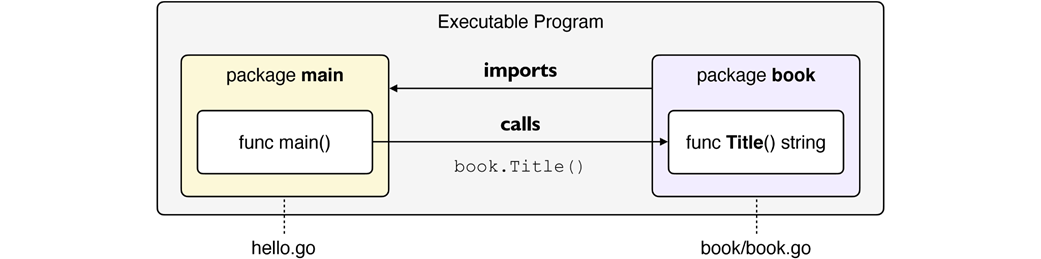
Figure A.2 We see two distinct modules with their own packages, each with a unique URL name. For example, the one on the right has bmp and font packages.

A.6 Exercises
- Create a new directory and initialize a new Go module.
- Create an importable package and import it from the main package. Your package should have exported and unexported functions that you can call from main.
- Compile and run your program using go build and go run.
FAQ
What is a package in Go?
A package is a set of Go source files in the same directory that all declare the same package name. Files in the same package are compiled together.What is special about the package named "main"?
Only packages namedmain can be built into executables. The Go toolchain uses the main function in the main package as the program’s entry point. Packages not named main are importable libraries and cannot be executed directly.How do I initialize a Go module and why is the module path often a URL?
Rungo mod init <module-path> at your project root, for example: go mod init github.com/yourname/yourproject. Using a URL-like path ensures global uniqueness and makes it easy for others to download your module with go get <module-path>.What does the go.mod file contain, and how is the Go version chosen?
go.mod records the module path, the minimum required Go version (e.g., go 1.24.2), and dependencies. The Go version is set automatically based on the go tool you use. You can pin the toolchain version per command with GOTOOLCHAIN=1.24.2 go <command>.How do I import packages from my module and the standard library?
Import your own packages using their full module path (e.g.,"github.com/yourname/yourproject/hello/book"). Standard library packages (e.g., "fmt") don’t require a module path. The last segment of the import path is the package name used in code.Are Go packages hierarchical?
No. Go packages are flat, not hierarchical. You can nest directories for organization (e.g.,net/http), but you still import them by their full path (e.g., import "net/http"), and each directory defines exactly one package.How does exporting work in Go?
Identifiers that start with an uppercase letter are exported (public) and accessible to other packages; those starting with a lowercase letter are unexported (private). Code within the same package can access both exported and unexported identifiers.What are idiomatic naming conventions for exported functions?
Prefer concise names without unnecessary prefixes. For example, useTitle() instead of GetTitle(), and avoid stuttering such as book.BookTitle(). Callers will use book.Title(), which is clear and concise.How should I name packages, files, and directories?
Package names are short, lowercase nouns without underscores (e.g.,book). It’s common to name the directory and primary source file to match the package (e.g., book/book.go) to maintain clarity and follow the principle of least surprise.What’s the difference between go run and go build?
go run compiles and runs your program, discarding the binary afterward—great for quick prototyping (e.g., go run .). go build produces a reusable executable; use -o to name it (e.g., go build -o hello), then run ./hello.
 Go by Example ebook for free
