This lesson expands your Express.js toolkit by focusing on routing and the request–response flow. It shows how to set up endpoints that send meaningful data (including values sourced from separate modules) before views are introduced, how to capture URL-based information, and how these building blocks fit into an MVC-style architecture. The emphasis is on keeping application code organized while incrementally adding capabilities to handle real user input.
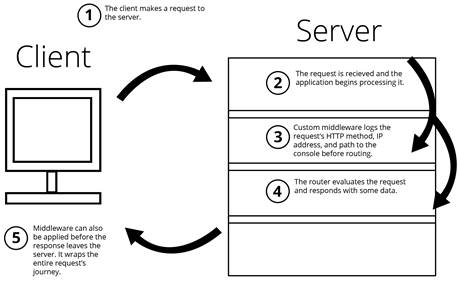
You learn how routes are defined with the app object and HTTP methods (for example, get and post), and how route parameters (like /items/:vegetable) let you read values embedded in the path—useful for REST-friendly URLs. The chapter also introduces custom middleware with app.use, explaining how to insert logic (such as request-path logging) into the pipeline and why calling next is essential to avoid stalling requests. Middleware can apply globally or to specific path prefixes, letting you shape how requests are processed before they reach matching routes.
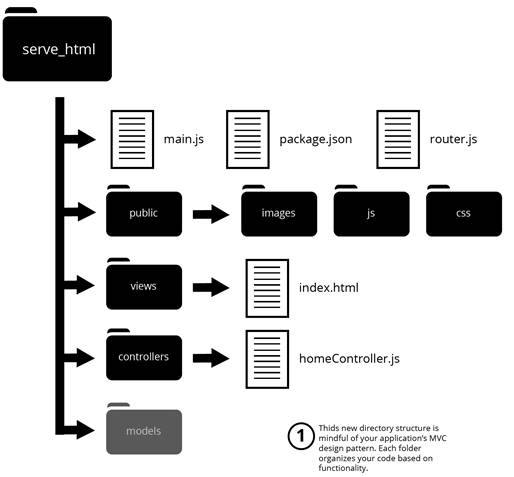
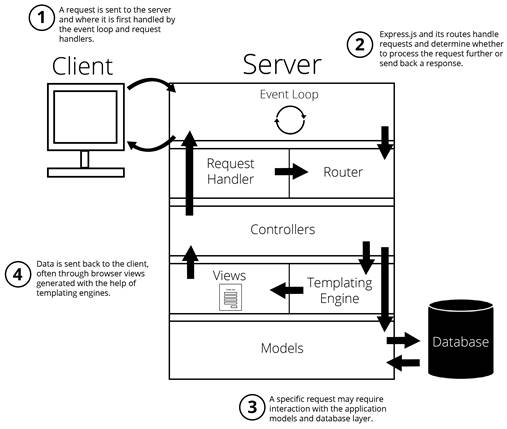
For handling user data, the lesson contrasts two primary sources: the request body (commonly from POSTed forms) and query strings in the URL. Because incoming body data arrives as a stream, you configure body-parser to populate req.body for URL-encoded and JSON payloads, while req.query exposes query string values without extra packages. To keep codebase growth manageable, you then reorganize route callbacks into controller modules (for example, homeController) and have routes reference those functions directly, aligning Express.js apps with MVC by separating concerns between routing, controllers, models, and eventually views.
The role of middleware function
Express.js MVC file structure
Express.js can follow the MVC structure with routes feeding controllers.
FAQ
How do I define a route in Express.js?Use the app object with an HTTP method, path, and callback: app.get('/path', (req, res) => { ... }); For example, app.post('/contact', (req, res) => { res.send('OK'); });What are route parameters and how do I access them?Route parameters are named segments in the path, prefixed with a colon. Example: app.get('/items/:vegetable', (req, res) => { res.send(req.params.vegetable); }); Access the value via req.params..When should I use route parameters vs. query strings?Use route parameters for identifying resources (e.g., /users/:id) and query strings for optional, filter, or tracking data (e.g., /search?q=term&page=2). Access params via req.params and query strings via req.query.What does app.use do, and how do I write middleware?app.use registers middleware that runs before matching routes. Example: app.use((req, res, next) => { console.log(`request made to: ${req.url}`); next(); }); You can scope it: app.use('/items', middleware).Why do I need to call next() in middleware?Middleware runs sequentially. Calling next() signals Express to continue to the next middleware or route. Omitting it leaves the request hanging.How can I parse data sent in a POST request body?Install body-parser (npm install body-parser --save), then configure: const bodyParser = require('body-parser'); app.use(bodyParser.urlencoded({ extended: false })); app.use(bodyParser.json()); Read values from req.body.How do I read query string values from the URL?Use req.query. For a URL like /?cart=3&pagesVisited=4, req.query is { cart: '3', pagesVisited: '4' }.How can I respond with data stored in a separate module?Put the data in its own module and require it where needed. Example: const info = require('./data/info'); app.get('/', (req, res) => res.send(info.message)); This keeps values changeable without editing your main app file.What is MVC in the context of Express.js, and what do controllers do?MVC separates concerns into Models (data), Views (rendered output), and Controllers (logic). In Express, route callbacks act as controllers, processing requests, invoking models, and deciding which view or data to send.How do I move route logic into a controller module?Create a controllers folder; add homeController.js; export functions (e.g., exports.sendReqParam = (req, res) => { ... }); Require it in main.js: const homeController = require('./controllers/homeController'); Reference in routes: app.get('/items/:vegetable', homeController.sendReqParam). You can move middleware similarly (e.g., homeController.logRequestPaths).
pro $24.99 per month
access to all Manning books, MEAPs, liveVideos, liveProjects, and audiobooks!

 Get Programming with Node.js ebook for free
