8 Setting up an app with Express.js
This chapter introduces the value of using a web framework in Node.js to speed up development and provide a clear structure for applications. Express.js is presented as the practical, widely adopted choice thanks to its maturity, community support, and built-in capabilities like static asset serving and error handling. While alternatives such as Koa, Hapi, Sails, and Total are acknowledged, the emphasis is on Express as the best starting point for learning and rapid progress.
The chapter walks through setting up an Express project from scratch: create a new directory, run npm init to generate package.json, and install express so it’s recorded as a dependency. It highlights why initializing the project first matters and what the dependency entry signifies. You then build a minimal server by requiring the express module, creating an app instance, defining a GET handler for the root path that sends a greeting, and listening on port 3000. To streamline development, it recommends using nodemon to auto-restart the server on file changes, installed either globally or as a development dependency, and explains basic start/stop workflows.
Next, the chapter explains how to navigate a web framework through middleware—functions that sit between raw HTTP traffic and application logic to inspect, parse, and route requests. Although the same request and response objects are in play as with the core http module, Express adds convenient accessors and helpers, making it easy to work with req.params, req.body, req.url, and req.query within route handlers. By the end, you see how Express reduces boilerplate, clarifies app structure, and equips you with practical tools that set the stage for deeper topics like routing in the following lesson.
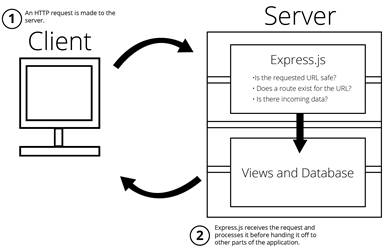
Express.js stands between the HTTP requests and your application code.
FAQ
What is a web framework in Node.js, and why use Express.js?
It’s a module that gives structure and common tooling (routing, error handling, static files) so you don’t rebuild basics from scratch. Express.js is widely used, open-source, and well supported, which speeds development and reduces boilerplate.How do I initialize a new Express.js project?
Create a project folder (for example,first_express_project), open it in your terminal, run npm init (accept defaults or set an entry point like main.js), then create your main.js file.How do I install Express.js, and why use the --save flag?
From your project directory, run npm install express --save. Using --save records Express.js under dependencies in package.json, so others (or deployment) know to install it. To match the lesson’s version, you can pin it: npm install express@4.16.2 --save.What happens if I forget to use --save when installing Express?
The app will still run locally because the module is in node_modules, but your package.json won’t list Express as a dependency. If you deploy or share the code without node_modules, installs won’t know to fetch Express.How do I build and run a minimal Express.js app?
Inmain.js: require express, create app = express(), add a route like app.get('/', (req, res) => res.send('Hello, Universe!')), and start the server with app.listen(3000, ...). Run it with node main and visit http://localhost:3000.What’s the difference between the express and app constants?
express is the framework module (and exposes utilities for configuration and other tools). app is your instantiated application, used for routes, middleware, and most app-level operations.How can I auto-restart the server when files change?
Usenodemon. Install globally with npm i -g nodemon (admin privileges may be required) or as a dev dependency with npm i -D nodemon. Start your app by running nodemon in the project directory; stop with Ctrl-C (or Command-D).What is middleware in Express.js?
Middleware are functions that sit between HTTP requests and your app logic to listen, parse, filter, and handle data (for example, security checks or body parsing). Think of it like a post office inspecting and routing packages before delivery.Which request properties are commonly used in Express routes?
-req.params: IDs/tokens extracted from the URL path segments-
req.body: data sent in the request body (often from POSTed forms)-
req.url: the visited URL-
req.query: key/value pairs from the query string (for example, ?name=jon)
 Get Programming with Node.js ebook for free
