6 Writing better routes and serving external files
This chapter moves from simple URL matching to serving real web pages and organizing routing logic. Instead of returning strings of HTML, you load entire files with Node’s fs module, placing page markup in a views directory while keeping server logic in main.js. You begin with a basic route map, then add a helper to translate request URLs into view file paths, handling success and “not found” responses and reinforcing the need for robust error handling when reading from the filesystem.
Beyond HTML, you also serve client-side assets. A public directory holds images, stylesheets, and JavaScript in dedicated subfolders, and routes are refined to detect requested file types by extension. Appropriate Content-Type headers are set for each response, and a reusable customReadFile function centralizes the file-reading workflow. The server now responds dynamically to multiple file types and returns a clear 404 error when files are missing, reducing duplication and improving clarity.
To keep growing projects manageable, routing is extracted into a router module. A routes object stores callbacks by HTTP method and URL, and the module exposes handle, get, and post functions through exports. main.js registers routes with router.get or router.post and delegates all requests to router.handle, optionally reusing helpers to serve static content. This separation makes the codebase cleaner, easier to extend, and closer to patterns used by web frameworks, laying groundwork for more advanced structure later.
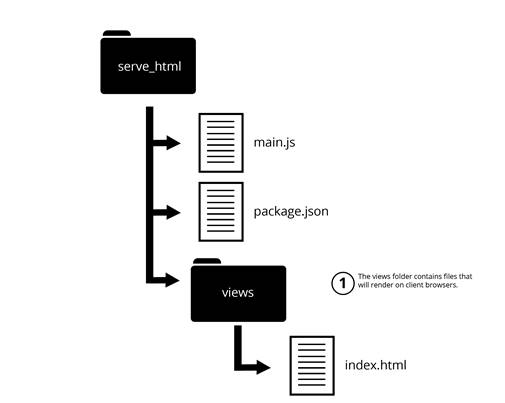
Application structure with views
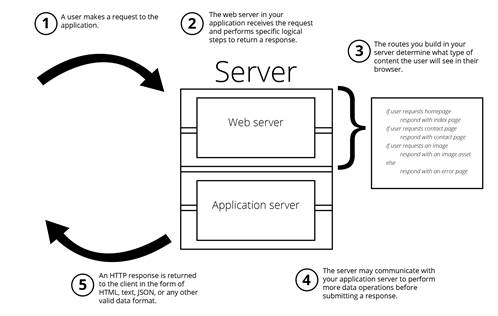
Server routing logic to render views
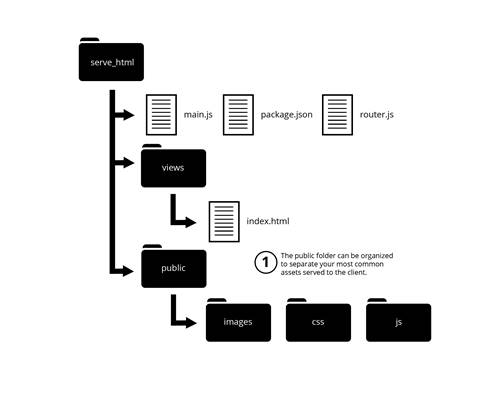
Arranging your assets so they’re easier to separate and serve
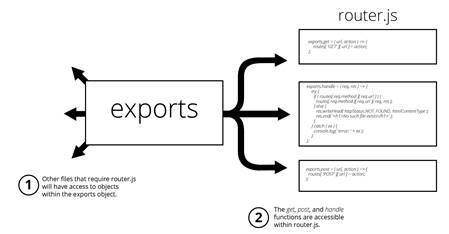
The exports object gives other files access to specific functionality.
FAQ
How can I serve a full HTML page using only Node.js core modules?Use the fs module inside an http server. Read the desired HTML file from your views folder with fs.readFile and send its contents as the response body, setting Content-Type to text/html.Why organize HTML files in a views folder?It keeps all HTML in one place and follows a common convention used by web frameworks, making your project easier to navigate and extend later.How do I map incoming URLs to specific view files dynamically?Create a helper that converts a request URL into a file path (for example, /index to views/index.html), then read that file with fs.readFile. If reading fails, return a 404 response.What should I do when a requested file doesn’t exist?Handle the fs.readFile error and respond with a 404 status and a clear “Not Found” message. Don’t let the application crash—log the error and end the response gracefully.How do I serve static assets like CSS, JS, and images?Place assets in a public folder (e.g., public/css, public/js, public/images). Inspect req.url for the file extension, set the appropriate Content-Type (text/css, text/javascript, image/png, etc.), and read the file from the matching directory.What’s the benefit of creating a custom file-reading helper?A helper (e.g., customReadFile) centralizes fs.readFile calls, reduces repetition, handles missing files consistently, and keeps routing logic cleaner.What should be my default response when a route isn’t found?Return an HTTP 404 status code with a message indicating that the requested page or resource can’t be found.Why move routing logic into a separate router module?Separating routes into router.js improves organization, reduces main.js complexity, and avoids large if-else chains. It also makes it easier to add, change, or remove routes without affecting others.How do router.get and router.post work with the routes object?The router module stores callbacks in a routes object keyed by method and URL (e.g., routes['GET']['/index.html']). Calling router.get or router.post registers a new route by adding the callback to that object.How are requests dispatched when using the router module?The router.handle function looks up a callback using the request’s method and URL. If found, it executes the callback with req and res; otherwise, it responds with a 404. A try-catch around dispatching prevents crashes and logs routing errors.
pro $24.99 per month
access to all Manning books, MEAPs, liveVideos, liveProjects, and audiobooks!

 Get Programming with Node.js ebook for free
